Gaming towers are heavy, large, and expensive, so the right mount needs more than basic support. The best under-desk PC mounts keep your setup clear while protecting airflow, stability, and easy access to ports.
Below, we focus on mounts that can handle real-world tower sizes and weights, with options for no-drill installs, clamp-on designs, and heavy-duty brackets for demanding rigs.
Best 10 Under Desk PC Mounts for Gaming Towers Picks for 2026
Heavy-Duty Pick
77 lb Adjustable Under-Desk Tower Mount

- 77 lb load capacity for heavy towers
- Adjustable height, width, and clearance
- Steel frame with ventilation slots and pads
Best For: Large gaming PCs and heavier towers
No-Drill Choice
Clamp-On Standing Desk CPU Holder

- No-drill clamp mount for compatible desk legs
- 50 lb capacity with stable dual clamping
- Best for standard mid-tower rectangular PCs
Best For: Standing desk users with standard mid-tower PCs
White Heavy-Duty Option

- 77 lb support for large towers
- Adjustable fit with steel dual supports
- White finish with ventilation slots
Best For: Gamers who want a white mount for a heavy tower
Side-Mount Flex Pick

- Up to 66 lb capacity with C-clamps
- Fits larger custom cases up to 11.9" wide
- Open frame design with desk-side or wall mount use
Best For: Large gaming cases and standing desks
Heavy-Duty Under-Desk Pick
Heavy Duty Under Desk PC Mount, 66 lb Capacity

- Supports up to 66 lbs
- Adjustable 17.3" to 25.1" height
- Open-frame design improves airflow
Best For: Gamers with heavier towers who want a stable adjustable mount
Swivel Space-Saver
Mount-It! CPU Under Desk Mount Bracket
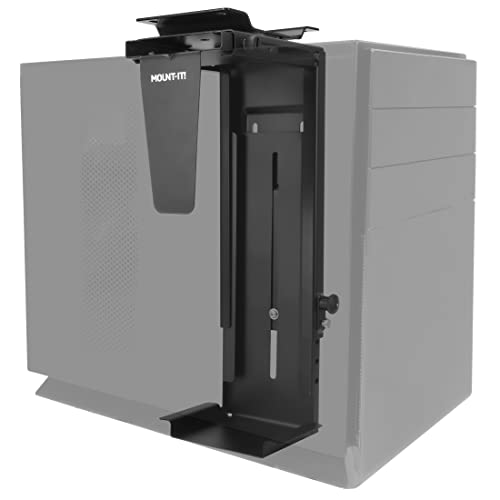
- 360-degree swivel for easy access
- Fits 11.8" to 21" tall towers
- Can mount under desk or on wall
Best For: Users who want easy port access and flexible mounting
Clamp-On Desk Leg Pick
JOY worker Under Desk PC Mount for Standing Desk

- No-drill clamp-on install
- Supports up to 44 lbs
- Fits 5.9" to 9.8" wide cases
Best For: Standing desks and users who want a clamp-on tower mount
Heavy-Duty Space Saver
PUTORSEN Under Desk PC Mount for Full/Mid-Tower Cases

- Supports up to 77 lbs
- Vertical or horizontal mounting
- Open-frame design boosts airflow
Best For: Heavy gaming rigs that need a high-capacity adjustable mount
Heavy-Duty Pick – 77 lb Adjustable Under-Desk Tower Mount
If you need under desk pc mounts for gaming towers with serious capacity, this heavy-duty steel holder is built for oversized and heavy rigs. It focuses on stability, ventilation, and adjustability, making it a strong fit for setups where keeping a full-size tower safely off the floor matters.
Best For: Large gaming PCs and heavier towers that need maximum support under a desk.
Pros:
- Supports up to 77 lb, which is unusually high for an under-desk PC mount.
- Adjustable height, width, and under-table space help it fit many tower sizes.
- Steel construction, two support pillars, and protective mats add stability and case protection.
- Ventilation slots help promote airflow around performance-focused PCs.
Cons:
- Requires drilling for installation, so it is not a no-drill option.
- May be more mount than needed for smaller standard towers.
For heavy gaming rigs, this model stands out because it combines high load capacity with broad adjustability and a secure under-desk fit. If your priority is support for a larger tower rather than quick clamp-on convenience, it is one of the strongest options here.
No-Drill Choice – Clamp-On Standing Desk CPU Holder
This no-drill option is designed for under desk pc mounts for gaming towers when you want a cleaner setup without permanent installation. It clamps to compatible standing desk legs, keeps the tower off the floor, and uses an open-frame design to improve airflow and reduce accidental bumps.
Best For: Standing desk users with standard mid-tower PCs who want a no-drill mount.
Pros:
- No-drill clamp installation makes setup faster and simpler.
- Open-frame design helps with airflow and cooling.
- Top-and-bottom clamping is built for stable support during desk height changes.
- Supports up to 50 lb with adjustable sizing for standard rectangular towers.
Cons:
- Only fits specific standing desk leg sizes.
- Not recommended for oversized full-tower or extra-wide gaming cases.
- Will not work with rounded, irregular, or non-standard desk legs.
This is a practical pick if your desk matches the required leg dimensions and your PC is within the stated size range. It is less suited to larger gaming towers, but for compatible setups it offers a straightforward, space-saving solution.
White Heavy-Duty Option – 77 lb Adjustable Tower Holder
For anyone comparing under desk pc mounts for gaming towers and wanting a lighter visual finish, this white version offers the same core structure as the black model. It is built around a high 77 lb load rating, adjustable fit, and protective steel construction for larger cases.
Best For: Gamers who want a white under-desk mount for a heavy or large tower.
Pros:
- Supports up to 77 lb for substantial gaming or workstation towers.
- Adjustable height and width improve compatibility with different PC sizes.
- Steel build with dual support pillars adds security and stability.
- Ventilation slots and protective mats support cooling and case protection.
Cons:
- Requires drilling for installation.
- White finish may not match darker desk or PC setups.
If you like the higher-capacity design but want a white finish to match your setup, this is the straightforward alternative. It keeps the same emphasis on strength, airflow, and safe under-desk placement as the black version.
Side-Mount Flex Pick – Clamp-On Gaming Case Stand
This clamp-on design is a flexible choice among under desk pc mounts for gaming towers because it can mount beside a desk or even to a wall. It is built for larger custom cases, gives you open-frame cooling, and helps free up desk space while keeping the PC visible and accessible.
Best For: Large gaming cases and standing desks where side mounting is preferred.
Pros:
- Supports PCs up to 66 lb with heavy-duty C-clamps.
- Adjustable width fits larger custom cases from 7.1″ to 11.9″ wide.
- Open frame design improves visibility and airflow.
- Can be used as a desk-side clamp-on mount or wall-mounted option.
Cons:
- Drywall-only wall mounting is limited to 22 lb.
- More suited to side mounting than a traditional under-desk setup.
This mount is a good fit if you want flexibility in where the PC lives and need room for a larger case. Its main advantage is the mix of sturdy clamping, wide adjustability, and an open design that suits gaming systems well.
Heavy-Duty Under-Desk Pick – Heavy Duty Under Desk PC Mount, 66 lb Capacity
If you want under desk pc mounts for gaming towers that can handle a larger case, this heavy-duty option is built for stable support and cleaner floor space. The reinforced steel frame, wood base, and open-frame design make it a practical pick for keeping a gaming rig accessible while improving airflow.
Best For: Gamers or workstation users with heavier towers who want a sturdy, adjustable under-desk mount.
Pros:
- Supports up to 66 lbs with a reinforced steel frame and stable wood base
- Adjustable height from 17.3″ to 25.1″ to fit a range of tower sizes
- Open-frame design helps improve ventilation around the PC
- Includes mounting hardware and step-by-step instructions for easier setup
Cons:
- Maximum case width is limited to 9.6″
- Heavier build may be less convenient than lighter clamp-style mounts
Overall, this is a strong choice if your priority is load capacity and a secure under-desk hold. It stands out for keeping a gaming tower stable while still allowing good access and airflow.
Swivel Space-Saver – Mount-It! CPU Under Desk Mount Bracket
For buyers comparing under desk pc mounts for gaming towers, this Mount-It! bracket is a flexible space-saving option with 360-degree swivel access. It fits smaller-to-mid-size towers and makes cable access easier when you want to reach the back of the PC without pulling it out.
Best For: Users who want a swivel mount for easier port access and wall-or-under-desk installation.
Pros:
- 360-degree swivel makes cable and port access easier
- Adjustable frame fits towers from 11.8″ to 21″ tall and 3.5″ to 8″ wide
- Can be mounted under a desk or on a wall
- Includes sticky EVA pads for added scratch protection
Cons:
- 22 lb weight limit is lower than heavy-duty alternatives
- Width range may be too narrow for wider gaming cases
This model makes sense when access and placement flexibility matter more than maximum load capacity. It is a practical fit for lighter towers or users who want a mount that can also work as a wall holder.
Locking Heavy-Duty Choice – VIVO Heavy Duty Adjustable Under-Desk PC Mount
If you need under desk pc mounts for gaming towers that prioritize security and a strong hold, this VIVO model is built for that job. It supports larger cases, offers multiple height settings, and uses an open-frame layout to help keep a gaming PC ventilated.
Best For: Gamers and home-office users who want a secure, adjustable mount with extra padding and a strong weight rating.
Pros:
- Supports up to 66 lbs with a solid high-grade steel frame
- Five height settings from 16″ to 24″ and adjustable width from 5″ to 10″
- Open-frame design supports airflow and cooling
- Thick inner padding helps protect against scuffs and scratches
Cons:
- Requires a desktop at least 0.75″ thick
- Needs 8.5″ of clearance from frame to edge for mounting
Compared with lighter brackets, this one leans toward a more secure, full-duty installation. It is a good match if your desk setup can meet the clearance requirements and you want a mount that feels firmly locked in place.
Clamp-On Desk Leg Pick – JOY worker Under Desk PC Mount for Standing Desk
If you want under desk pc mounts for gaming towers that avoid drilling and keep cable strain low on a standing desk, this JOY worker clamp-on option is built around that use case. It attaches to the desk leg instead of the desktop, helping keep your tower elevated, protected from floor dust and bumps, and easier to manage when the desk moves up or down.
Best For: Standing-desk users who want a no-drill clamp-on mount for a heavier gaming tower.
Pros:
- No-drill clamp-on design mounts to the desk leg for quick setup.
- Thickened steel construction supports up to 44 lbs.
- Adjustable width fits most cases from 5.9″ to 9.8″ wide.
- Upgraded silicone gasket is designed to keep the mount from slipping.
Cons:
- Works best with inverted desk legs, not round legs.
- Width range is narrower than some full-tower mounts.
Overall, this is a practical space-saver if your tower fits the size range and you want a stable clamp-on solution for a standing desk. It focuses on straightforward installation and better clearance off the floor rather than maximum adjustability.
Large Full-Tower Holder – VIVO Black Large Under Desk and Wall PC Mount
For under desk pc mounts for gaming towers with more room to spare, this VIVO model is aimed at larger cases that need solid support and easy access. It can mount under a desk or on a wall, and its wide adjustment range makes it a strong fit if you need to keep a full tower off the floor while preserving clearance for ports and cables.
Best For: Full-tower PCs that need a wide-adjustment mount with swivel access.
Pros:
- Adjustable width from 8.3″ to 13″ and height from 14.6″ to 25.2″.
- 135° swivel helps with backside port and cable access.
- Thick padding dots help protect the case from scratches.
- Steel construction supports up to 44 lbs.
Cons:
- Requires a desk or surface at least 1″ thick for under-surface mounting.
- Desktop overhang must be greater than or equal to the PC width.
This is a flexible pick if your gaming tower is larger and you want an organized mounting setup with room for adjustment. The swivel and broad sizing range make it especially useful when cable access matters as much as storage.
Heavy-Duty Space Saver – PUTORSEN Under Desk PC Mount for Full/Mid-Tower Cases
If you are comparing under desk pc mounts for gaming towers and want something with extra load capacity, this PUTORSEN rack is built for heavier setups. It supports mid-tower and mini-tower cases, offers vertical or horizontal mounting, and uses an open-frame design to improve airflow and cable management in tight gaming or office spaces.
Best For: Mid-tower and mini-tower gaming setups that need a high-capacity, flexible mount.
Pros:
- Heavy-duty steel hardware supports up to 77 lbs.
- Two mounting modes: vertical or horizontal.
- Open-frame design improves airflow and cable management.
- Works with ATX, Micro-ATX, and Mini-ITX cases in standard sizes.
Cons:
- Designed for mid-tower and mini-tower cases, not the largest full towers.
- Horizontal mode needs more room than vertical mounting.
For users who want a sturdier mount with more placement flexibility, this is the most robust option in the group. It stands out for its 77 lb rating and dual-orientation setup, making it a smart fit for performance-oriented rigs in compact spaces.
How We Picked These Under Desk PC Mounts for Gaming Towers
We prioritized load capacity, size adjustability, mounting method, and overall stability. For gaming towers, a mount should support the case safely without flexing, slipping, or blocking critical airflow. We also looked for options that fit a range of desk and leg styles, since Under Desk PC Mounts for Gaming Towers need to work with different setups.
Quick Comparison: What Matters Most
The main tradeoff is between convenience and rigidity. Clamp-on and no-drill mounts are easier to install and remove, while heavier fixed or bracket-style mounts often offer the most secure hold for larger cases. If your PC is a full-tower or unusually wide, case dimensions matter just as much as weight rating.
Key Buying Factors for Under Desk PC Mounts for Gaming Towers
Weight Capacity
Choose a mount with a comfortable safety margin above your system weight. A powerful gaming tower can be much heavier than it looks once glass panels, cooling hardware, and storage are added.
Case Dimensions
Check width, height, and depth against the mount’s adjustable range. A high weight limit does not help if the bracket is too narrow or cannot support the tower’s footprint.
Mounting Style
Clamp-on models are ideal if you want minimal desk modifications. Drill-free options are useful for renters or shared workspaces. Wall or counter-style brackets can be a better fit when desk leg geometry does not cooperate.
Access and Clearance
Look for swivel, height adjustment, and open-side designs if you need easier cable management or frequent hardware access. Good clearance also helps maintain airflow around the case.
Who Should Buy Which Under Desk PC Mounts for Gaming Towers?
If you want the most straightforward install, choose a no-drill or clamp-on model. If your tower is especially heavy, go with the highest-rated heavy-duty mount you can fit. If you frequently upgrade parts or move your setup, a model with swivel or tool-friendly adjustment will save time.
For most buyers, the best choice is the mount that matches your case dimensions first, then your desk style, and finally your preferred installation method. That order helps you avoid fit issues and ensures your gaming tower stays secure long term.