An under-desk PC mount keeps your tower off the floor, frees up legroom, and can make a standing desk setup feel cleaner and more stable. The best options balance strong support, easy installation, and enough adjustability to fit your case and desk legs.
In this roundup, we focus on under desk pc mounts for standing desks that are built for real-world use: heavy PCs, no-drill installs, and compact or oversized desk frames. The right mount depends on your tower weight, leg shape, and how often you change desk height.
Best 10 Under Desk PC Mounts for Standing Desks Picks for 2026
Ultra-Heavy Duty Pick
Heavy Duty Under Desk PC Holder

- Up to 77 lb load capacity
- Highly adjustable height and width
- Steel frame with pads and ventilation
Best For: Heavier towers that need maximum support
No-Drill Desk-Leg Mount

- No-drill clamp installation
- Supports up to 50 lb PCs
- Fits specific standing desk leg sizes
Best For: Compatible standing desks that need a quick install
Compact No-Drill Clamp Pick
Under Desk PC Mount 40 lb Capacity

- No-drill clamp-on installation
- Fits specific desk leg sizes only
- Non-slip pads and open-frame design
Best For: Users with matching legs and a lighter standard tower
Desk-Leg Mount Pick
Clamp-on PC Holder for Standing Desks

- Tool-free side clamp install
- Fits cases 3.5" to 7.8" wide
- Supports towers up to 22 lbs
Best For: Height-adjustable desk owners who want a no-drill, leg-mounted PC holder
Heavy-Duty Storage Pick
High-Capacity Under Desk Tower Mount

- Reinforced steel frame holds up to 66 lbs
- Fits towers 16.1" to 25.6" tall
- Built for standing desks and gaming PCs
Best For: Users with larger, heavier towers who need maximum support
Fixed-Leg Fit Pick
Clamp-on CPU Holder for Specific Desk Legs
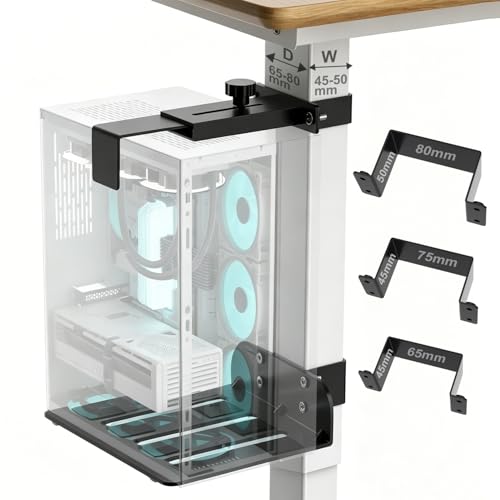
- No-drill U-bracket attachment
- Fits 3 exact rectangular leg sizes
- Supports up to 40 lbs
Best For: Users with compatible desk legs who want a secure clamp-on mount
Heavy-Duty Clamp-On Option
Mount-It! Under Desk PC Mount for Standing Desk

- 66 lb capacity for larger towers
- Clamp-on install with no drilling
- Adjusts for height, width, and airflow
Best For: Mid- and full-size tower owners who want maximum support
Leg-Mount Space Saver
JOY worker Under Desk PC Mount

- Clamps to the desk leg with no drilling
- Supports up to 44 lbs with steel construction
- Wide adjustability for most PC cases
Best For: Standing desks with inverted legs and standard tower widths
Precision-Fit Leg Clamp
Under Desk PC Mount & CPU Holder
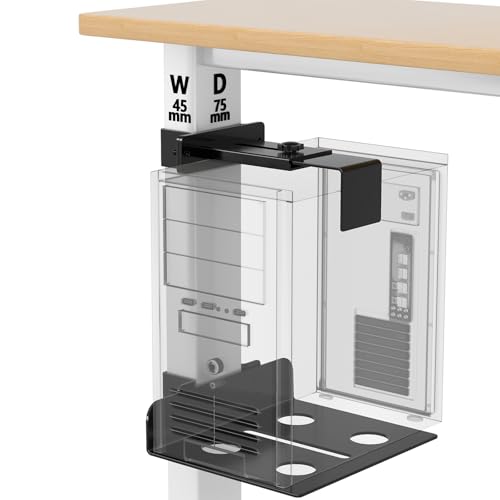
- Made for 75x45mm square/rectangular legs
- No-drill clamp installation
- 40 lb adjustable steel design
Best For: Shoppers with exact-match desk legs who want a tight, stable fit
Ultra-Heavy Duty Pick – Heavy Duty Under Desk PC Holder
If you need one of the most robust under desk pc mounts for standing desks, this heavy-duty steel holder is built for large, heavier towers. It supports up to 77 lb, uses two support pillars for added stability, and includes protective pads plus ventilation slots to help keep a high-performance PC secure and cool.
Best For: Users with heavier desktop towers who want maximum load capacity and a highly adjustable under-desk mount.
Pros:
- Supports up to 77 lb for very heavy PC cases.
- Highly adjustable in height, width, and desk clearance.
- Steel construction with support pillars and protective mats.
- Ventilation slots help promote airflow around the case.
Cons:
- Requires drilling, so it is not a no-drill option.
- May be more mount than you need for smaller towers.
This is a strong fit when stability and load capacity matter most. It is especially appealing for users who want a secure under-desk setup and need flexibility to accommodate different tower sizes.
No-Drill Desk-Leg Mount – TOPSKY Under Desk PC Mount
This no-drill option is tailored for under desk pc mounts for standing desks, but it only works with specific electric desk leg sizes. If your frame matches the listed dimensions, the clamp-on design keeps the tower elevated off the floor, while the open frame helps airflow and the 50 lb rating covers standard and mid-tower PCs.
Best For: Standing desk owners with compatible desk legs who want a simple no-drill installation.
Pros:
- No-drill clamp installation makes setup straightforward.
- Open-frame design supports airflow and cooling.
- Supports up to 50 lb for standard and mid-tower PCs.
- Designed specifically for compatible standing desk legs.
Cons:
- Only fits 65x45mm, 75x45mm, or 80x50mm legs.
- Not suitable for rounded, oversized, or irregular desk legs.
- Not recommended for oversized full-tower gaming cases.
The big advantage here is convenience, but fit is everything. Measure carefully before buying, because this mount is a niche solution rather than a universal one.
Versatile Adjustable Choice – VIVO Heavy Duty Adjustable Under-Desk PC Mount
For buyers comparing under desk pc mounts for standing desks, this VIVO model stands out for its broad adjustability and solid 66 lb capacity. It mounts under the desk to save floor space, offers multiple height and width settings, and uses an open-frame steel design with padding for protection and ventilation.
Best For: Users who want a flexible, heavy-duty under-desk mount that fits many PC sizes.
Pros:
- Supports up to 66 lb with a sturdy steel frame.
- Adjustable height and width for broad compatibility.
- Open-frame design promotes airflow.
- Thick inner padding helps prevent scuffs and scratches.
Cons:
- Requires a desktop at least 0.75″ thick.
- Needs 8.5″ clearance from frame to edge for mounting.
This is a practical middle-ground pick if you want strong support without stepping up to the very heaviest-duty options. Its adjustment range makes it easier to match different tower dimensions.
Compact No-Drill Clamp Pick – Under Desk PC Mount 40 lb Capacity
This clamp-on option is a practical choice for standing desks if your leg dimensions match one of the fixed sizes. As one of the more compact under desk pc mounts for standing desks, it installs without drilling, holds up to 40 lb, and uses an open-frame layout plus non-slip pads to help keep the tower stable and protected.
Best For: Standing desk users with matching desk legs who want a smaller no-drill mount for a standard PC tower.
Pros:
- No-drill U-clamp installation is quick and simple.
- Supports up to 40 lb with top-and-bottom clamping.
- Wide adjustment range fits many standard PC cases.
- Non-slip pads help reduce sliding and scratches.
Cons:
- Only works with 65x45mm, 75x45mm, or 80x50mm legs.
- Not a universal mount, so measurement is essential.
- 40 lb capacity may be limiting for heavier towers.
If your desk legs line up with the listed sizes, this is an easy way to keep a tower off the floor. It is best viewed as a targeted solution for lighter builds and precise fitment.
Desk-Leg Mount Pick – Clamp-on PC Holder for Standing Desks
If you want one of the simplest under desk pc mounts for standing desks, this clamp-on design is built for fast, tool-free installation on a desk leg. It keeps your tower off the floor, uses a side-clamp layout with no drilling, and is a strong fit if you want easy access without modifying your desk.
Best For: Users with height-adjustable desks who want a compact, no-drill PC mount that clamps to the desk leg.
Pros:
- Tool-free side clamp installation with no drilling required
- Adjustable frame fits PC cases from 3.5″ to 7.8″ wide and 11.5″ to 20.5″ tall
- Heavy-duty dual clamp supports towers up to 22 lbs
- Designed to stay secure during standing desk height changes
Cons:
- Lower weight capacity than heavier-duty under-desk mounts
- Fit is limited by the desk leg clamp design
- Best suited to specific tower sizes within the adjustment range
This is a practical choice if your priority is quick installation and a clean, off-the-floor setup. The standing-desk-friendly clamp design makes it easy to keep a PC mounted while still matching the movement of an electric desk.
Heavy-Duty Storage Pick – High-Capacity Under Desk Tower Mount
For larger systems, this is one of the more robust under desk pc mounts for standing desks thanks to its reinforced steel frame and 66 lb capacity. It is designed to free up floor space while keeping a gaming PC or workstation stable, with adjustable sizing that covers a wide range of tower dimensions.
Best For: People with heavier desktop towers who want a sturdy no-drill under-desk mount for a standing desk or home office.
Pros:
- Reinforced steel frame supports up to 66 lbs
- Fits PC cases from 16.1″ to 25.6″ tall and 7.1″ to 11.8″ wide
- Designed for standing desks, gaming desks, and home offices
- Non-slip pads help protect the case and improve grip
Cons:
- May be more mount than needed for smaller or lighter PCs
- Larger size can take up more space under the desk
- Installation is still best matched to users comfortable with adjustable hardware
If you need a mount for a big tower, this model stands out for its load rating and broad adjustability. It is a sensible pick when stability and space-saving storage matter more than a minimal frame.
Fixed-Leg Fit Pick – Clamp-on CPU Holder for Specific Desk Legs
This clamp-on option is aimed at buyers who need under desk pc mounts for standing desks with a very specific desk-leg fit. It uses a no-drill U-bracket design to secure the PC to compatible rectangular legs, keeping the tower elevated and helping protect it from bumps, dust, and moisture.
Best For: Shoppers whose standing desk legs match one of the listed rectangular sizes and who want a no-drill, low-profile PC mount.
Pros:
- No-drill U-clamp design attaches directly to compatible desk legs
- Fits three fixed rectangular leg sizes for a precise setup
- Adjustable holder accommodates PC cases from 5.7″ to 9.84″ wide
- High-strength steel frame supports up to 40 lbs
Cons:
- Only works with the specified desk leg dimensions
- Recommend use with inverted legs, which may not match every desk
- Lower capacity than the strongest heavy-duty mounts
This is a good fit if you know your desk leg size matches the listed measurements and want a secure clamp-on solution. The open-frame design also helps with airflow, which is useful if your tower runs warm.
Heavy-Duty Clamp-On Option – Mount-It! Under Desk PC Mount for Standing Desk
If you want one of the most robust under desk pc mounts for standing desks, this clamp-on holder is built for larger towers and frequent desk movement. It keeps the PC lifted off the floor while helping reduce cable strain, loose connections, and accidental unplugging during height changes.
Best For: Users with mid- or full-size towers who want a no-drill, heavy-duty mount for a standing desk.
Pros:
- Rated to hold up to 66 lbs, making it the strongest option in this group.
- Adjusts in height and width to fit many mid- and full-size towers.
- Clamp-on design installs without drilling and fits desk tops 0.59″-2.4″ thick.
- Anti-slip padding and a rigid steel frame help keep the tower stable.
Cons:
- Requires enough desk edge thickness for the clamp range.
- May be more mount than needed for smaller or lighter PCs.
This is a practical pick if stability and load capacity matter most. It is especially well suited to desks that move often and to setups where a cleaner floor space and better airflow are priorities.
Leg-Mount Space Saver – JOY worker Under Desk PC Mount
This JOY worker model is a straightforward choice among under desk pc mounts for standing desks when you want the tower attached to the desk leg instead of the underside. The clamp-on design helps prevent cable strain as the desk rises and also keeps the PC away from dust, moisture, and bumps.
Best For: Standing desk users with inverted legs who want a simple, no-drill leg-mounted CPU holder.
Pros:
- No drilling required; clamps directly to the desk leg.
- Upgraded silicone gaskets are designed to help prevent slipping.
- Fits most PC cases in the 5.9″-9.8″ width range.
- Thickened steel build supports up to 44 lbs.
Cons:
- Not compatible with round legs.
- Best suited to standing desks with inverted leg designs.
If your desk frame matches the mounting style, this is a convenient way to raise the CPU off the floor and keep the cable path cleaner during desk adjustments. The adjustable fit and easy installation make it a practical everyday mount.
Precision-Fit Leg Clamp – Under Desk PC Mount & CPU Holder
For standing desks with specific leg dimensions, this under desk pc mount for standing desks stands out for its exact fit. It is engineered for 75x45mm square or rectangular legs, using a no-drill clamp-on design that helps keep the tower secure while the desk moves.
Best For: Buyers who can match the exact 75x45mm desk leg size and want a secure clamp-on CPU holder.
Pros:
- Purpose-built for 75x45mm square or rectangular desk legs.
- No-drill clamp-on installation avoids tabletop damage.
- Adjustable width and height help fit most towers snugly.
- 40 lb steel frame keeps the CPU elevated, stable, and off the floor.
Cons:
- Requires precise leg measurements before buying.
- Limited to 75x45mm leg compatibility.
This is the most specialized option here, and that can be a strength if your desk matches the spec. The exact-fit design is meant to reduce wobble, while the open frame supports airflow and cleaner cable management.
How We Picked the Best Under Desk PC Mounts for Standing Desks
We prioritized mounts that suit standing desk setups, with an emphasis on secure attachment, usable adjustability, and enough clearance for daily sit-stand movement. We also looked for clear weight ratings, compatibility with common desk leg sizes, and installation styles that match different buyer needs, including no-drill and clamp-on designs.
Quick Comparison
If you want the simplest setup, choose a no-drill clamp-on model that matches your desk leg dimensions. If your tower is heavy or oversized, look for reinforced steel construction and a higher load rating. For tighter spaces, favor mounts with width and height adjustment so the PC sits snugly without blocking cables or airflow.
Key Buying Factors for Under Desk PC Mounts for Standing Desks
Weight Capacity
Always choose a mount rated above your actual PC weight. A margin of safety matters, especially with larger towers, gaming builds, and systems with heavy power supplies or multiple GPUs.
Desk Leg and Case Compatibility
Many Under Desk PC Mounts for Standing Desks are made for square metal legs or specific size ranges. Measure both the desk leg and the tower before buying to avoid fit issues.
No-Drill Vs. Fixed Installation
No-drill clamp-on mounts are ideal for renters and anyone who does not want to modify a desk. Fixed mounts can feel more permanent, but they are less flexible if you change desks later.
Adjustability and Access
Look for adjustable width, height, and locking features so the tower stays secure while still allowing cable access, airflow, and easy maintenance.
Build Quality
Steel frames, secure locking hardware, and protective contact points help reduce wobble and protect both your PC case and desk finish.
Who Should Buy Which Under Desk PC Mounts for Standing Desks?
Choose a heavy-duty mount if you have a large gaming or workstation PC. Choose a no-drill clamp-on model if you want a fast, reversible setup. Choose a highly adjustable design if your desk legs are unusual or you expect to upgrade your tower later. For most users, the best pick is the mount that fits your desk dimensions first, then offers the highest safe load rating within budget.