In 2025, staying connected at home is more essential than ever, especially for PC users who demand reliability and speed. You’ll find that the right whole home mesh network can greatly enhance your online experience, whether it’s for gaming, streaming, or remote work. But with so many options available, how do you choose the best one? Let’s explore the top contenders that promise to keep your connection seamless and robust throughout your space.
TP-Link Deco BE63 Tri-Band WiFi 7 Whole Home Mesh System (3-Pack)

If you’re a PC user looking for a robust and future-proof solution, the TP-Link Deco BE63 Tri-Band WiFi 7 Whole Home Mesh System is designed just for you. With speeds reaching up to 10 Gbps and coverage of 7,600 sq. ft., it supports over 200 devices effortlessly. Enjoy seamless 4K/8K streaming and gaming, thanks to its AI-driven roaming and dual backhaul support. Plus, you’ll appreciate the easy setup through the TP-Link Deco app. Security features like TP-Link HomeShield guarantee your network remains protected. Shifting to this system will enhance your connectivity and performance in today’s digital landscape.
Best For: Users seeking a high-performance, future-proof mesh WiFi system that supports extensive coverage and multiple devices for seamless streaming and gaming.
Pros:
- Exceptional speeds of up to 10 Gbps and extensive coverage of 7,600 sq. ft.
- AI-driven seamless roaming ensures optimal connectivity across multiple devices.
- Comprehensive security features with TP-Link HomeShield for enhanced network protection.
Cons:
- Initial setup may pose challenges for some users, requiring troubleshooting through the app.
- Heavier weight (4.98 pounds) compared to some competing models, which may affect placement flexibility.
- Higher price point compared to older Wi-Fi standards or entry-level mesh systems.
DBIT AC1200 Whole Home Mesh WiFi System (D-MAC3, 3-Pack)
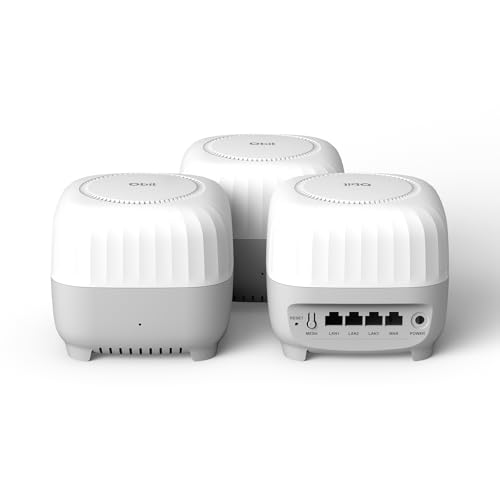
The DBIT AC1200 Whole Home Mesh WiFi System (D-MAC3, 3-Pack) is an excellent choice for PC users seeking reliable and expansive internet coverage. With a reach of up to 6,000 sq ft and dual-band speeds of 1200Mbps, it supports over 90 devices, making it perfect for smart homes and gaming setups. The system eliminates dead zones using smart roaming technology, ensuring stable connections. You’ll appreciate the easy setup via the mobile app, along with robust security features like WPA3 encryption and parental controls. However, some users have noted it functions more like a WiFi extender than a true mesh system.
Best For: The DBIT AC1200 Whole Home Mesh WiFi System is best for users seeking extensive WiFi coverage and reliable performance in smart homes and gaming setups.
Pros:
- Easy setup via intuitive mobile app and web GUI.
- Seamless coverage with smart roaming technology eliminates dead zones.
- Supports over 90 devices, making it ideal for multiple users and smart devices.
Cons:
- Some users report it functions more like a WiFi extender than a true mesh system.
- Critiques mention limitations compared to newer WiFi 6 options for future compatibility.
- A few users experienced setup difficulties.
TP-Link Deco X55 AX3000 WiFi 6 Mesh System (3-Pack)

For large households or environments with multiple users, the TP-Link Deco X55 AX3000 WiFi 6 Mesh System (3-Pack) stands out as an excellent choice. Covering up to 6500 sq. ft., it eliminates dead zones and buffering, supporting up to 150 connected devices. With speeds of 2402 Mbps and 574 Mbps, you’ll enjoy seamless streaming and gaming. Each unit features 3 Gigabit Ethernet ports, allowing for wired connections and enhanced speed. The user-friendly Deco app makes setup a breeze, while advanced security measures keep your network safe. Experience reliable connectivity with this high-performance mesh system designed for your home.
Best For: Large households or environments with multiple users seeking seamless connectivity and high-speed internet.
Pros:
- Covers up to 6500 sq. ft., effectively eliminating dead zones.
- Supports up to 150 connected devices, ideal for busy households.
- User-friendly Deco app provides easy setup and remote network management.
Cons:
- Higher upfront cost compared to traditional routers.
- May require additional configuration for optimal performance in complex setups.
- Limited advanced features for tech-savvy users looking for extensive customization.
TP-Link Deco BE63 Tri-Band WiFi 7 Whole Home Mesh System (3-Pack)
Designed to meet the demands of tech-savvy users, the TP-Link Deco BE63 Tri-Band WiFi 7 Whole Home Mesh System (3-Pack) offers blazing-fast speeds and extensive coverage for seamless online experiences. With Wi-Fi 7 technology, you’ll enjoy combined speeds up to 10 Gbps and coverage up to 7,600 sq. ft. This system supports over 200 devices, making it perfect for gaming and 4K streaming. The TP-Link Deco app simplifies setup and management, while built-in security features keep your network safe. Experience smooth connectivity throughout your home, eliminating dead zones and ensuring reliable performance for all your devices.
Best For: Tech-savvy users who require high-speed internet, extensive coverage, and seamless connectivity for multiple devices in large homes.
Pros:
- Blazing-fast speeds with combined capabilities up to 10 Gbps, ideal for gaming and 4K streaming.
- Extensive coverage of up to 7,600 sq. ft., supporting over 200 devices without dead zones.
- Comprehensive security features including TP-Link HomeShield for network protection and parental controls.
Cons:
- Initial setup challenges reported by some users, which may require troubleshooting through the app.
- Weight of the system (4.98 pounds) may be cumbersome for mounting in certain locations.
- Higher price point compared to some other mesh systems on the market.
TP-Link Deco M5 Mesh WiFi System (3-Pack)

Covering up to 5,500 square feet, the TP-Link Deco M5 Mesh WiFi System (3-Pack) is perfect for PC users seeking reliable connectivity throughout their homes. With support for over 100 devices, this system replaces traditional routers and eliminates dead zones, ensuring seamless internet access. Its adaptive routing technology selects the fastest path for your devices, enhancing performance even in challenging environments. The easy setup via the TP-Link Deco app simplifies connectivity, while features like advanced antivirus protection and robust parental controls offer peace of mind. Users rave about its reliability, especially for streaming and gaming, making it a fantastic choice.
Best For: Those seeking a reliable and comprehensive home Wi-Fi solution that supports multiple devices and offers extensive coverage.
Pros:
- Seamless mesh network that eliminates dead zones and provides consistent connectivity throughout large areas.
- User-friendly setup via the TP-Link Deco app simplifies installation and device management.
- Robust security features including antivirus protection and parental controls for enhanced safety.
Cons:
- Limited advanced features compared to some traditional routers may not satisfy tech-savvy users.
- Requires a modem, which may be an additional cost for some users who do not already own one.
- Performance can vary in extremely challenging environments, despite the mesh technology.
TP-Link Deco S4 Whole Home Mesh WiFi System (2-Pack)

The TP-Link Deco S4 Whole Home Mesh WiFi System (2-Pack) stands out for its impressive coverage of up to 3,800 square feet, making it an excellent choice for PC users in larger homes. With AC1900 speeds and support for up to 75 devices, you’ll enjoy fast and reliable connections. The seamless roaming feature guarantees your devices switch between units effortlessly, eliminating dead zones. Plus, the easy setup via the Deco app simplifies management. With parental controls and wired Ethernet backhaul, you can tailor your network to your family’s needs. Overall, it’s an efficient and cost-effective solution for robust home WiFi.
Best For: Average home consumers looking for an easy-to-manage and effective WiFi solution for larger spaces.
Pros:
- Strong coverage of up to 3,800 sq. ft., eliminating dead zones in your home.
- Supports up to 75 devices simultaneously with reliable AC1900 speeds.
- Easy setup and management via the Deco app, complete with parental controls.
Cons:
- Some users report limitations in the app’s functionality compared to higher-end routers.
- Occasional issues with firmware updates may require manual intervention.
- Best suited for average users rather than those with advanced networking needs.
NETGEAR Orbi 370 Series Dual-Band WiFi 7 Mesh Network System (RBE373)

If you’re looking for a mesh network that can handle demanding tasks like 4K streaming and online gaming, the NETGEAR Orbi 370 Series Dual-Band WiFi 7 Mesh Network System (RBE373) is an excellent choice. With speeds up to 5 Gbps and coverage of 6,000 sq.ft., it supports up to 70 devices, ensuring everyone stays connected. The dual-band technology and enhanced backhaul provide reliable performance, while the sleek design and 360° WiFi coverage enhance your home’s aesthetics. Automatic firmware updates and robust security features make management a breeze, letting you focus on enjoying seamless connectivity throughout your space.
Best For: Those seeking a high-performance mesh network system that can support multiple devices and demanding applications like 4K streaming and gaming in large homes.
Pros:
- Delivers speeds up to 5 Gbps, significantly faster than previous WiFi standards.
- Covers up to 6,000 sq.ft., making it ideal for large homes with multiple floors.
- Automatic firmware updates and advanced security features enhance user experience and peace of mind.
Cons:
- Some users may encounter installation challenges, particularly with app setup and password configurations.
- A few reports of dropped signals and buffering in very large homes, leading to dissatisfaction.
- Higher price point compared to other mesh systems, which may deter budget-conscious buyers.
TP-Link Deco WiFi 6 Mesh System (Deco X20)

Designed for homes with heavy internet usage, the TP-Link Deco WiFi 6 Mesh System (Deco X20) delivers robust performance and seamless coverage. With a range of up to 5800 sq. ft., it eliminates dead zones and buffering. Supporting up to 150 devices, its Wi-Fi 6 AX1800 technology enhances speed and capacity. You’ll appreciate the easy setup via the Deco app, which offers features like parental controls and guest access management. Users report excellent performance, even with multiple connected devices, making it perfect for gaming and streaming. It’s a smart choice for those seeking reliable, high-speed internet throughout their home.
Best For: Those seeking reliable, high-speed internet coverage throughout large homes with multiple connected devices.
Pros:
- Excellent coverage of up to 5800 sq. ft., effectively eliminating dead zones.
- Supports connection of up to 150 devices, making it ideal for households with numerous smart devices.
- Easy setup and management through the Deco app, including features like parental controls.
Cons:
- Performance may vary based on home layout and building materials, potentially affecting coverage.
- Limited advanced features compared to some higher-end models in the market.
- Requires a compatible ISP for optimal performance, which may not be available in all areas.
TP-Link Deco XE70 Pro Tri-Band WiFi 6E Mesh System (3-Pack)

For PC users seeking seamless connectivity and high-speed performance, the TP-Link Deco XE70 Pro Tri-Band WiFi 6E Mesh System (3-Pack) stands out with its advanced Wi-Fi 6E technology. With speeds up to 4.9 Gbps across six streams, it’s perfect for 4K streaming and online gaming. The system covers up to 2,900 sq. ft., supports up to 200 devices, and features a 2.5 Gbps WAN/LAN port for wired connections. Enhanced security through HomeShield guarantees your network stays safe, while AI-roaming technology keeps your devices connected without interruption. Enjoy reliable performance in every corner of your home.
Best For: Users looking for a high-speed, reliable Wi-Fi solution that can handle multiple devices and demanding applications like 4K streaming and online gaming.
Pros:
- Advanced Wi-Fi 6E technology provides faster speeds and reduced congestion with a dedicated 6 GHz band.
- Extensive coverage of up to 2,900 sq. ft., making it suitable for various home layouts.
- Enhanced security features through HomeShield, including parental controls and IoT protection.
Cons:
- Higher price point compared to standard Wi-Fi systems may not fit all budgets.
- Setup may require technical knowledge for optimal configuration and performance.
- 3-Pack may be overkill for smaller homes, potentially leading to unnecessary expense.
Netgear Nighthawk Whole Home Mesh WiFi 6 System, 3-Pack , BLK (Renewed)

The Netgear Nighthawk Whole Home Mesh WiFi 6 System is an excellent choice for PC users seeking robust performance and expansive coverage. With speeds up to 1.8 Gbps, it supports HD streaming, gaming, and video calls for up to 25 devices across medium to large homes (up to 4500 sq. ft.). Its dual-band system features Wi-Fi 6 technology, enhancing efficiency and bandwidth sharing. Users appreciate easy installation and reliable performance, though some have faced DHCP issues after several months. Overall, this renewed system delivers impressive value, but consider alternatives if ongoing customer support is a priority for you.
Best For: Those seeking a reliable and high-performance Wi-Fi solution for medium to large homes with multiple devices.
Pros:
- Easy installation and setup process, even for users with limited technical knowledge.
- Strong signal coverage and reliable performance, ideal for streaming, gaming, and video calls.
- Wi-Fi 6 technology enhances speed and capacity, supporting up to 25 devices simultaneously.
Cons:
- Reports of DHCP and IP address assignment issues after several months of use.
- Limited customer support available after three months unless paid for additional service.
- Some users experienced challenges during setup, requiring careful adherence to instructions.
Factors to Consider When Choosing Whole Home Mesh Networks for PC
When choosing a whole home mesh network for your PC, you need to take into account several key factors. Speed and performance are essential for a seamless experience, while coverage area guarantees you stay connected throughout your home. Don’t forget to check device compatibility, security features, and how easy it is to set up the system.
Speed and Performance
Choosing a whole home mesh network that meets your speed and performance needs is essential, especially if you’re a PC user engaged in high-bandwidth activities like gaming or streaming. Look for systems utilizing Wi-Fi 7 technology, which can deliver combined speeds exceeding 10 Gbps, ensuring smooth 4K and 8K streaming. Dual-band and tri-band options allow multiple devices to connect simultaneously, reducing congestion for peak performance. Advanced features like Multi-Link Operation and 4K-QAM enhance speed and reliability, improving data transmission. Additionally, seamless roaming technology helps your devices connect to the strongest signal automatically, minimizing lag and maintaining consistent performance throughout your home. This way, you can enjoy uninterrupted connectivity, no matter where you are.
Coverage Area
Achieving high speed and performance is only part of the equation; coverage area is just as important for a whole home mesh network. When choosing a system, check its coverage range, which can vary from 3,800 sq. ft. to over 7,600 sq. ft. Keep in mind that your home’s layout and materials, like brick or concrete walls, can impact signal strength. A well-configured mesh network with strategically placed nodes will help eliminate dead zones. Additionally, opt for systems with dual-band or tri-band connectivity to enhance performance in larger spaces. Finally, verify the network can support a substantial number of devices—over 70 to 200—while maintaining strong coverage throughout your home.
Device Compatibility
As you explore options for a whole home mesh network, device compatibility should be a top priority. Make sure the mesh system supports a variety of devices, including your PC, smartphones, smart TVs, and gaming consoles, ensuring seamless connectivity throughout your home. Look for models that can handle numerous simultaneous connections—some support over 200 devices—perfect for busy households. Verify compatibility with your internet service provider and existing equipment, as many systems work well with major ISPs. Consider Dual-Band or Tri-Band technology for optimized bandwidth allocation. Finally, assess the network’s performance for specific use cases like gaming or streaming, as these may require higher speeds and lower latency for the best experience on your PC.
Security Features
When it comes to securing your whole home mesh network, advanced security features are crucial to protect your PC and other devices from potential threats. Look for mesh systems that offer WPA3 encryption, which greatly enhances protection against unauthorized access. It’s wise to take into account systems that include thorough security services, such as real-time IoT security and parental controls, to manage device access effectively. Also, make sure your mesh network supports VPN client and server capabilities for secure remote access without extra software. Evaluate systems with automatic firmware updates to keep security protocols current against newly discovered vulnerabilities. Finally, check for guest network capabilities to isolate visitor access from your main network, helping to maintain security for all connected devices.
Setup Process
To guarantee a smooth experience with your whole home mesh network setup, consider how user-friendly the installation process is. Most mesh systems utilize a dedicated mobile app that guides you through configuration with visual prompts, making it easy to set up your network. Look for plug-and-play designs, where you simply connect the primary unit to your modem and power it on to start. Many systems also offer intuitive management features, allowing you to adjust Wi-Fi settings, set parental controls, and create guest networks directly from the app. If possible, choose a system supporting wired Ethernet backhaul for enhanced performance. Remember to check for firmware updates after installation, which are typically managed through the app for peak performance and security.