The best wireless drawing display tablets give artists a more natural way to sketch, paint, annotate, and edit while reducing the limits of a fixed desk setup. This roundup compares 10 models across screen size, pen performance, portability, controls, and device compatibility.
From compact 11.6-inch pen displays to standalone Android drawing tablets, these options suit beginners, students, professionals, and creators who want a more flexible digital art workflow.
Best 10 Wireless Drawing Display Tablets Picks for 2026
Professional Color Control
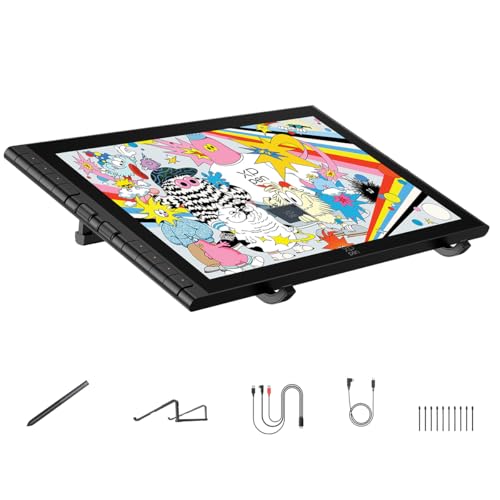
- 16K stylus with low activation force
- 15.4-inch laminated display with wide color coverage
- Dual wheels, eight keys, stand, and broad compatibility
Best For: Professional illustration, animation, and 3D work
Compact Dial-Controlled Creator

- 13.3-inch laminated Canvas Glass 2.0 display
- 16K pressure sensitivity and three pen buttons
- Dual dials, five keys, stand, and calibration report
Best For: Portable creative work with tactile shortcut controls
Entry-Level Learning Pick

- Compact 11.6-inch Full HD display
- Battery-free pen with digital eraser
- Six keys, touch bar, and broad software support
Best For: Students, teachers, beginners, and compact workspaces
Wide-Gamut Workhorse

- 15.6-inch laminated anti-glare display
- 120% sRGB and 92% AdobeRGB gamut volume
- Six keys, touch bar, tilt support, and adjustable stand
Best For: Desktop illustration, design, and painting
Best All-in-One Pick

- Standalone Android 14 design
- Battery-free Pro Pen 3 with 8,192 pressure levels
- Lightweight matte display for portable sketching
Best For: Artists and students who want computer-free drawing on the go
Best for Color Accuracy
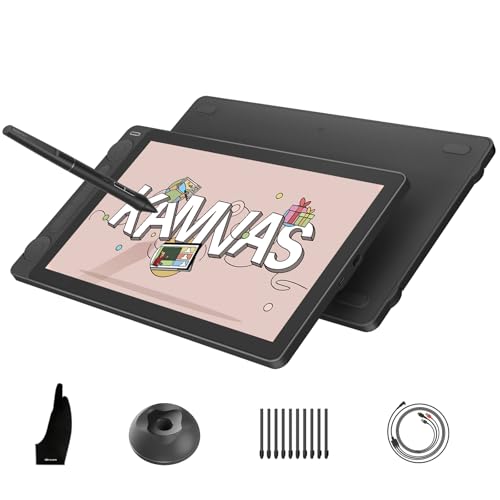
- 99% sRGB/Rec.709 and 90% Adobe RGB coverage
- 16,384-pressure-level PenTech 4.0 stylus
- Dual dials and five customizable press keys
Best For: Computer-connected artists and designers focused on color fidelity
Best Value Setup

- 11.6-inch full-laminated anti-glare display
- Battery-free pen with tilt support
- Two pens and generous replacement-nib bundle
Best For: Students and hobbyists seeking an accessible computer-connected pen display
Premium 16K Control

- 16K battery-free stylus with built-in eraser
- Fully laminated FHD display with wide color coverage
- Dial, shortcut keys, stand, and dual modes included
Best For: Detailed digital art and color-conscious creative work
Portable Precision Pick

- Lightweight 1.58-pound, 11.9-inch portable design
- 16K X4 pen with tilt support and magnetic storage
- AG glass, dual dials, eight keys, and stand included
Best For: Portable illustration, student work, and mobile creative setups
Budget Workflow Favorite

- 11.6-inch laminated Full HD anti-glare display
- Battery-free 8,192-pressure stylus with 60° tilt
- Red dial, eight keys, and broad OS compatibility
Best For: Beginners, teaching, annotation, and everyday digital drawing
Professional Color Control – XPPen Artist 16 3rd
The XPPen Artist 16 3rd is a strong choice among wireless drawing display tablets for artists who prioritize a large, accurate canvas and precise pen response. Its 15.4-inch fully laminated display, 16K stylus, dual scroll wheels, and broad operating-system compatibility suit detailed illustration, animation, and 3D work. Note that the supplied information describes a USB-C or 3-in-1 wired connection rather than built-in wireless operation.
Best For: Professional illustrators, animators, and 3D creators who want a spacious, color-accurate display.
Pros:
- 16,384 pressure levels, 2g initial activation force, and 0.3mm retraction support precise, responsive strokes.
- Fully laminated AG+AF etched glass reduces glare, fingerprints, and parallax while adding paper-like friction.
- Broad color coverage includes 99% sRGB, 98% Adobe RGB, and 97% Display P3, with OSD profile controls.
- Eight shortcut keys, two scroll wheels, a foldable stand, and support for Mac, Windows, Android, ChromeOS, and Linux improve flexibility.
Cons:
- It is a pen display that requires connection to a compatible device rather than functioning as an independent computer.
- The larger 15.4-inch format may be less convenient for highly portable setups.
This is the most feature-rich option in the group for color-sensitive creative work. Its advanced stylus and controls are particularly appealing if accuracy and workflow speed matter more than a minimal setup.
Compact Dial-Controlled Creator – HUION Kamvas 13 Gen 3
The HUION Kamvas 13 (Gen 3) is a compact option for shoppers comparing wireless drawing display tablets, especially when desk space and shortcut control are important. Its 13.3-inch laminated display, dual dial interface, and included adjustable stand create a focused drawing setup. It must be connected to a computer or compatible Android device to work.
Best For: Creators who want a portable-size pen display with physical dials and reliable color calibration.
Pros:
- PenTech 4.0 provides 16,384 pressure levels, 2g initial activation force, and three customizable pen buttons.
- Canvas Glass 2.0 and full lamination aim to reduce glare and improve pen-to-cursor accuracy.
- Factory calibration, 99% sRGB coverage, and an average Delta E below 1.5 support consistent color work.
- Five programmable keys, dual dial controls, an included ST300 stand, and Windows, Mac, Android, and Linux compatibility add versatility.
Cons:
- It is not standalone and requires a compatible computer, laptop, or Android device.
- Android compatibility requires USB 3.1 Gen 1 and DisplayPort 1.2 support.
- A full-featured USB-C cable is sold separately according to the supplied connectivity details.
The Kamvas 13 Gen 3 balances portability with useful hardware controls. It is a practical fit for artists who prefer dials and a smaller screen without giving up high pressure sensitivity or color consistency.
Entry-Level Learning Pick – XP-PEN Artist12
The XP-PEN Artist12 is a straightforward entry point for buyers exploring wireless drawing display tablets on a budget-conscious or compact desk. Its 11.6-inch Full HD screen, battery-free pen, six shortcut keys, and touch bar support drawing, photo editing, online teaching, and remote work. The display must connect to a computer through HDMI and USB.
Best For: Students, teachers, beginners, and digital artists who need a compact screen tablet for a computer-based setup.
Pros:
- 11.6-inch 1920×1080 display offers 100% sRGB coverage and vivid image presentation.
- Battery-free stylus includes a digital eraser, while the pen holder supplies replacement nibs.
- Six customizable shortcut keys and a programmable touch bar can speed up common actions.
- Supports Windows, macOS, Linux, and popular creative and video-conferencing software.
Cons:
- Its 8,192 pressure levels are lower than those of the newer models in this roundup.
- It requires available HDMI and USB-A ports, or an appropriate converter.
- The smaller 11.6-inch screen provides less working area for detailed projects.
The Artist12 keeps the core pen-display experience accessible and uncomplicated. It makes the most sense for learning, teaching, and everyday digital drawing where compact size matters more than premium display technology.
Wide-Gamut Workhorse – HUION Kamvas Pro 16
The HUION Kamvas Pro 16 is a spacious pen display for artists who want strong color volume and an ergonomic workstation. As one of these wireless drawing display tablets, it is worth noting that the supplied product information specifies a wired 3-in-1 USB-C connection and requires a computer or laptop. The 15.6-inch laminated screen, touch bar, shortcut keys, and included stand support a comfortable creative workflow.
Best For: Illustrators, designers, and painters who want a large Full HD canvas with wide-gamut color.
Pros:
- 15.6-inch fully laminated anti-glare display provides a spacious drawing surface with slight texture.
- 120% sRGB and 92% AdobeRGB color gamut volume, plus a 1000:1 contrast ratio, support vivid visuals and clearer shadows.
- Six customizable keys and a touch bar provide quick access to shortcuts, zoom, and brush-size adjustments.
- Includes a 20-to-60-degree adjustable stand, battery-free pen with 60-degree tilt support, and pen holder accessories.
Cons:
- It is not standalone and must be connected to a computer or laptop.
- The supplied specifications list 8,192 pressure levels, below the newer 16K models here.
- The setup uses a 3-in-1 cable and power adapter rather than a wireless connection.
The Kamvas Pro 16 remains appealing when a wide-gamut display and generous workspace are priorities. Its included stand and tactile controls make it a capable desktop tool for sustained drawing and painting sessions.
Best All-in-One Pick – Wacom MovinkPad 11
For shoppers seeking wireless drawing display tablets that do not require a computer, the Wacom MovinkPad 11 is a highly portable all-in-one option. Its Android 14 system, 11.45-inch matte display, 8 GB of memory, and 128 GB of storage support drawing, writing, and animation on the go.
Best For: Students, teachers, and artists who want a standalone drawing tablet that travels like a sketchbook.
Pros:
- Works without a computer, with Android 14 and built-in storage.
- Includes a battery-free Pro Pen 3 with 8,192 pressure levels and three buttons.
- Matte etched glass provides a paper-like, anti-glare drawing surface.
- Weighs about 1.3 pounds and supports several popular digital pens.
Cons:
- Its 11.45-inch display is smaller than many desktop-oriented pen displays.
- The Android-based workflow may not replace a full desktop setup for every creator.
The MovinkPad 11 stands out because it combines the display, operating system, storage, and pen in one compact device. Choose it when portability and independence from a computer matter more than a larger workstation screen.
Best for Color Accuracy – HUION Kamvas 13 Gen 3
The HUION Kamvas 13 Gen 3 is a strong choice among wireless drawing display tablets for creators who prioritize color, pen precision, and customizable controls. It is a pen display rather than a standalone tablet, so it must be connected to a compatible computer or laptop.
Best For: Digital artists, designers, and editors who need a color-focused computer-connected display with extensive controls.
Pros:
- Full-laminated Canvas Glass 2.0 reduces glare, sparkle, and parallax.
- PenTech 4.0 provides 16,384 pressure levels, tilt alignment, and three side buttons.
- Displays 99% sRGB/Rec.709 and 90% Adobe RGB coverage with factory calibration.
- Two dials and five press keys provide convenient shortcut customization.
Cons:
- It is not standalone and requires a computer or compatible Android device.
- Connection and software compatibility vary by operating system and device.
With its calibrated color coverage, high-resolution pressure response, and dual dials, the Kamvas 13 Gen 3 is tailored to detail-oriented work. It is best suited to a desk or mobile workstation where a connected computer is already part of the workflow.
Best Value Setup – VEIKK VK1200 V2
The VEIKK VK1200 V2 offers a compact, computer-connected option for shoppers comparing wireless drawing display tablets. Its 11.6-inch full-laminated screen, anti-glare glass, programmable keys, and included accessories make it practical for drawing, design, education, and remote work.
Best For: Students, hobbyists, and digital artists who want a portable pen display with useful accessories and shortcut controls.
Pros:
- Full lamination and anti-glare glass help reduce parallax and glare.
- Battery-free pens provide 8,192 pressure levels and 60-degree tilt recognition.
- Six programmable shortcut keys support customized workflows.
- Includes two pens, replacement nibs, a stand, glove, and cables.
Cons:
- It must be connected to a computer to work.
- The 1920×1080 display has a 72% NTSC color gamut.
- Its one-year hardware warranty is shorter than some competitors’ coverage.
The VK1200 V2 is a sensible fit for creators who want a straightforward pen display with a useful accessory bundle. Its compact design and six shortcut keys favor portable, everyday work, while the required computer connection makes it less flexible than a standalone tablet.
Premium 16K Control – XP-PEN Artist 13.3 Pro V2
The XP-PEN Artist 13.3 Pro V2 is a strong choice among wireless drawing display tablets for artists who want a color-focused, fully laminated screen and extensive shortcut controls. Its 13.3-inch Full HD display, 16K stylus, dial, and dual connection options make it suitable for detailed creative work, though it must be connected to a compatible computer or mobile device.
Best For: Digital artists, animators, manga illustrators, and remote educators who want a larger portable pen display with advanced pen sensitivity.
Pros:
- 16,384 pressure levels, low activation force, tilt support, and a built-in pen eraser.
- Fully laminated 13.3-inch display with 99% sRGB, 89% Adobe RGB, and 95% P3 coverage.
- Red dial, eight customizable keys, metal backing, foldable stand, and pen accessories included.
- Supports single-cable USB-C connections as well as legacy HDMI setups.
Cons:
- It is not standalone and requires a compatible host device.
- Full-featured USB-C compatibility requires a device with USB 3.1 DisplayPort 1.2 support.
- A 3-in-1 cable for traditional HDMI connections is sold separately.
Choose this model when screen color, pen precision, and physical workflow controls matter more than having a completely cable-free setup. The pen-display and pen-tablet modes also add flexibility for longer sessions.
Portable Precision Pick – XPPen Artist 12 3rd
The XPPen Artist 12 3rd is a compact option for shoppers comparing wireless drawing display tablets for portable illustration and design work. It combines an 11.9-inch Full HD AG-glass screen with a 16K X4 pen, dual X-Dial wheels, and broad operating-system compatibility in a 1.58-pound design.
Best For: Students, traveling illustrators, manga artists, and freelancers who need a lightweight screen tablet with quick-access controls.
Pros:
- Lightweight 1.58-pound build with an 11.9-inch portable display.
- 16K-pressure X4 pen with 60-degree tilt, 2g initial pressure, and magnetic storage.
- AG etched glass reduces glare and fingerprints, while full lamination minimizes parallax.
- Dual X-Dial wheels, eight keys, factory color calibration, and a foldable stand included.
Cons:
- It is a connected drawing display rather than a standalone tablet.
- The 11.9-inch screen provides less working area than larger pen displays.
- Single-cable operation depends on compatible USB-C hardware; alternative cables are included for other setups.
This is the most travel-friendly choice in the group, especially for users who value portability, glare reduction, and fast brush-size or zoom adjustments. Its broad OS support also helps when moving between devices.
Budget Workflow Favorite – XPPen Artist12 Pro
The XPPen Artist12 Pro is a practical entry point for shoppers seeking wireless drawing display tablets for illustration, annotation, and remote teaching. Its 11.6-inch fully laminated Full HD screen, battery-free stylus, red dial, and eight shortcut keys provide a familiar pen-display workflow, but it requires a computer connection.
Best For: Beginners, digital artists, teachers, and remote educators who want an affordable screen-based tablet with physical controls.
Pros:
- Fully laminated anti-glare display delivers low-parallax drawing and reduced reflections.
- Battery-free stylus offers 8,192 pressure levels and 60-degree tilt support.
- Red dial and eight customizable shortcut keys streamline zooming, brush sizing, and editing.
- Supports Windows, macOS, ChromeOS, and Linux, along with common creative software.
Cons:
- It must connect to a desktop or laptop and cannot operate independently.
- Its 72% NTSC color gamut is more limited than the newer models listed here.
- The smaller 11.6-inch display and 8,192 pressure levels offer less specification headroom than the 16K alternatives.
The Artist12 Pro makes sense when you want a straightforward, connected pen display with useful hardware controls and broad compatibility. It is particularly well suited to teaching, annotation, and general digital drawing rather than demanding color-critical production.
How We Picked the Best Wireless Drawing Display Tablets
We focused on the features that most affect everyday drawing: display quality, pressure sensitivity, pen responsiveness, viewing comfort, shortcut controls, portability, and compatibility. The selection includes both connected pen displays and standalone mobile tablets, since “wireless” can mean either a cable-light setup or a device that runs independently.
We also considered practical differences between entry-level and professional models, including screen size, color coverage, etched or anti-glare surfaces, battery-free pens, adjustable controls, and support for Windows, macOS, Android, ChromeOS, or creative software.
Quick Comparison
- Best for larger canvases: 15.4- and 15.6-inch models offer more room for detailed illustration and editing.
- Best for portability: 11.6- to 13.3-inch displays are easier to carry and fit smaller workspaces.
- Best for mobile creation: The Wacom MovinkPad 11 is a standalone Android option rather than a conventional computer-dependent pen display.
- Best for shortcut control: Models with dials, scroll wheels, touch bars, or programmable buttons can speed up brush and canvas adjustments.
Key Buying Factors for Wireless Drawing Display Tablets
Connection and Power Requirements
Check whether the tablet works independently or must connect to a computer, phone, or Chromebook. Many pen displays still require a USB or video connection, even if the overall setup can be streamlined with compatible adapters or wireless accessories. Confirm the included cables, power needs, and operating-system support before buying.
Screen Size, Resolution, and Surface
A larger screen is useful for detailed work, but compact displays are easier to transport. Full HD is common on smaller models, while larger or higher-end tablets may provide more workspace and improved sharpness. Anti-glare etched glass can reduce reflections and create a more paper-like feel, though glossy screens may appear more vivid.
Pen Performance and Ergonomics
Pressure sensitivity matters for line weight and opacity control, but pen calibration, tilt support, initial activation force, and tracking stability are equally important. Battery-free styluses reduce charging interruptions. Look for a comfortable grip and replacement nibs that are easy to obtain.
Color and Workflow Controls
Artists working in illustration, photography, or design should check color coverage and calibration options. Dials, wheels, touch bars, and shortcut keys are valuable for zooming, scrolling, changing brush size, and undoing actions without reaching for the keyboard.
Who Should Buy Which Wireless Drawing Display Tablets?
Beginners and students should prioritize affordability, simple setup, reliable pen tracking, and compatibility with their existing computer. Traveling artists may prefer a smaller display or standalone Android tablet. Professional illustrators and designers will benefit from a larger canvas, stronger color performance, comfortable anti-glare glass, and customizable controls. Hybrid creators who sketch away from a desk should compare standalone functionality carefully with the portability of a connected pen display.