A thoughtful desk gift can make everyday work, study, gaming, or creative projects more comfortable and convenient. These picks suit different setups and routines, from simple workspace upgrades to computer accessories that need a compatibility check.
Desk Accessory Gift Ideas
1. XPPen Artist 13.3 Pro V2 Drawing Tablet
A Creative Screen for Digital Artists
XPPen Artist 13.3 Pro V2 Drawing Tablet

- 13.3-inch full-laminated screen with anti-glare film and Full HD resolution.
- Includes a battery-free stylus, red dial, eight customizable keys, and adjustable stand.
- Works with compatible Windows, macOS, Chrome OS, Android, and Linux systems; requires a computer or laptop.
Best For: An aspiring illustrator or designer who creates art digitally.
2. Acer Gadget 7-in-1 Wireless Charging Station
A Multi-Device Desk Charging Hub
Acer Gadget 7-in-1 Wireless Charging Station

- Charges compatible phones, earbuds, and Apple Watch wirelessly, with USB-A and USB-C ports for wired devices.
- Includes a Bluetooth-synced clock display showing day of the week and indoor temperature.
- Check device compatibility and note that the phone case should be under 2 mm thick for charging.
Best For: Someone who keeps several compatible devices close at hand.
3. EMEET NOVA 4K Webcam
A Sharper View for Video Calls

- USB webcam with 4K capability, PDAF autofocus, and two built-in microphones.
- Includes a physical privacy cover and an adjustable stand with a standard tripod mount.
- Resolution defaults to 1080p; switching to 4K requires compatible camera software or an app.
Best For: A remote worker or streamer who regularly uses video calls.
4. Nylavee Bluetooth & AUX Desktop Speakers
A Sound Bar for the Workday
Nylavee Bluetooth & AUX Desktop Speakers

- Desktop sound bar offers Bluetooth 5.0 and 3.5 mm AUX connections.
- USB-powered design uses a side knob for operation.
- Compatible with computers, gaming consoles, phones, and tablets.
Best For: Someone who listens to music, podcasts, or game audio at a desk.
5. American Lifetime Large Display Day Clock
A Clear Time and Date Companion
American Lifetime Large Display Day Clock

- Large display shows the time, full day of the week, month, and date.
- Offers up to five daily alarms and automatic brightness adjustment.
- Can sit on a tabletop or mount on a wall.
Best For: A recipient who prefers a clear, at-a-glance desk clock.
6. Univivi 36-Inch Under-Desk Cable Tray
A Neater Home Office Setup
Univivi 36-Inch Under-Desk Cable Tray

- 36-inch fabric tray organizes power adapters and cables beneath a desk.
- Installs with clamps or screws and includes built-in ties to secure items.
- Measure the desk first; the clamps need edge space and at least 5.3 inches of clearance where drawers or support rods are present.
Best For: A PC enthusiast looking to organize a cable-heavy workstation.
7. HUANUO Adjustable Single Monitor Arm
A More Flexible Monitor Position
HUANUO Adjustable Single Monitor Arm

- Fits compatible 13–32-inch monitors weighing 4.4–19.8 pounds with 75 × 75 or 100 × 100 mm VESA patterns.
- Offers tilt, swivel, and rotation adjustments, with clamp and grommet mounting options.
- Check monitor weight, VESA pattern, and desk construction before choosing a mounting method.
Best For: A desk user who wants to adjust their monitor position.
8. ComfiLife Memory Foam Under-Desk Footrest
A Cushioned Desk Comfort Upgrade
ComfiLife Memory Foam Under-Desk Footrest

- Memory foam footrest has adjustable height for under-desk use.
- Removable cover can be machine washed, and the base is described as non-slip.
- Can also be used as a knee support or chair rocker.
Best For: Someone who spends long stretches seated at a desk.
9. Pzloz Adjustable LED Desk Lamp
Flexible Light for Focused Tasks
Pzloz Adjustable LED Desk Lamp

- Offers 25 light combinations with five color temperatures and five brightness levels.
- Adjustable arms and lamp head can direct light toward work, reading, or crafting.
- Comes with a wireless remote and power cord.
Best For: A reader, student, or crafter who works at a desk after dark.
10. Yodoit 15.6-Inch Portable Monitor
Extra Screen Space on the Move
Yodoit 15.6-Inch Portable Monitor

- 15.6-inch Full HD IPS display with a matte finish and built-in speakers.
- Connects by USB-C or Mini HDMI, depending on the device and video output.
- Check laptop or device ports and video support before gifting; some connections require separate power through USB-A.
Best For: A laptop user who wants a second screen at home or while traveling.
11. Nulea M501 Wireless Trackball Mouse
A Cursor Tool for Compact Desks
Nulea M501 Wireless Trackball Mouse

- Thumb-operated trackball lets the user control the cursor without moving the mouse across the desk.
- Connects to up to three devices using Bluetooth or the included USB receiver.
- Rechargeable, right-handed design with adjustable DPI and six buttons.
Best For: A computer user who wants cursor control in a small workspace.
12. ProtoArc EM11 NL Vertical Wireless Mouse
A Vertical Mouse for Daily Work
ProtoArc EM11 NL Vertical Wireless Mouse

- Vertical shape is designed to keep the wrist and forearm in a more natural position.
- Connects to up to three devices using Bluetooth or a USB-A receiver; it does not include a USB-C receiver.
- Made for small to medium hands; the maker suggests allowing time to adjust to the shape.
Best For: A right-handed computer user with small to medium hands.
13. 48 × 17-Inch Brown PU Leather Desk Mat
A Full-Width Desk Surface
48 × 17-Inch Brown PU Leather Desk Mat

- 48 × 17-inch PU leather pad provides a surface for writing and mouse use.
- Waterproof surface can be wiped clean with a cloth.
- Suede-style backing is designed to resist slipping on a desk.
Best For: Someone who wants a broad, easy-care surface for a home office desk.
14. SWEETFULL 5-Inch USB Desk Fan
Personal Cooling for a Desk
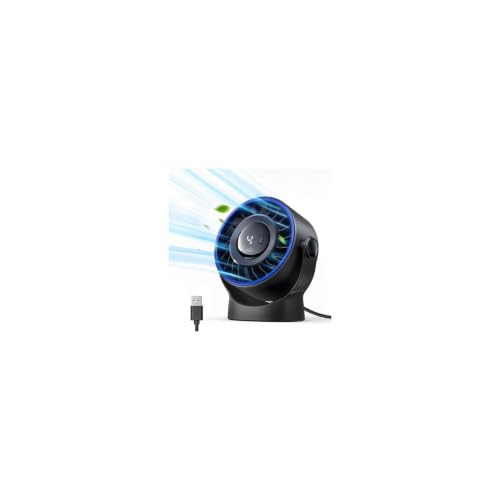
- Compact fan has four speeds and a head that adjusts through 360 degrees.
- Powered by USB from a computer, charger, or power bank; it has no built-in battery.
- Rear cover detaches for cleaning the blades and interior.
Best For: Someone who wants a small fan beside a home office desk.
15. Plugable Thunderbolt 4 Dock
16. AULA F75 Pro Wireless Mechanical Keyboard
A Customizable Keyboard for Work or Play
AULA F75 Pro Wireless Mechanical Keyboard

- Compact 75% layout has 81 keys, arrow keys, a control knob, and RGB backlighting.
- Connects via Bluetooth, 2.4 GHz wireless, or USB-C wired mode and can pair with up to five devices.
- Hot-swappable base accepts compatible 3-pin or 5-pin switches.
Best For: A typist or PC builder who enjoys customizing a keyboard.
17. VSD M18 Programmable Macro Keypad
Quick Controls for Repeated Tasks
VSD M18 Programmable Macro Keypad

- Has 18 programmable keys, including 15 LCD keys that can display images or animations.
- Can trigger single actions or multi-step macros for tasks such as media control or switching OBS scenes.
- Connects by USB-C and supports Windows 11 or newer and macOS 11 or newer; native Linux plug-and-play is not available.
Best For: A streamer, editor, or power user who repeats computer actions.
Choosing Desk Accessory Christmas Gifts
Start with the recipient’s routine. A desk accessory is most useful when it improves something they do every day: typing, joining calls, drawing, keeping devices charged, or organizing cables. For a creative person, the drawing display supports digital illustration and animation, while the portable monitor adds screen space for editing or presenting. A webcam suits frequent video meetings. Someone whose desk is already comfortable may appreciate a desk mat, lamp, or speakers that make the space more pleasant to use.
Think about the workspace before choosing an ergonomic gift. A monitor arm needs a compatible VESA pattern, appropriate monitor weight, and a desk edge that can accept its clamp or grommet mount. Cable trays also need underside and edge clearance. A footrest is less dependent on a particular computer setup, while vertical and trackball mice change how the user controls the pointer. These can be useful desk accessories, but hand size and willingness to adapt are relevant: the vertical mouse is intended for small to medium hands, and its maker notes a learning period.
Match the Gift to Your Budget
For a modest workspace refresh, consider a desk mat, small USB fan, speakers, or a clock. These focus on one clear purpose and can complement an existing setup. A lamp, footrest, mouse, or cable tray can be a more substantial everyday upgrade, especially when you know the recipient’s needs. Larger technology gifts, such as a drawing display, portable monitor, or Thunderbolt dock, suit recipients who can use their specific functions and have compatible equipment.
A useful way to set a budget is to consider whether the gift solves a recurring annoyance. If the person often moves cables to clear the desk, a tray may matter more than a feature-rich accessory. If they frequently switch between a laptop and peripherals, a dock may be valuable, provided their computer supports it. Choose based on the routine the gift will improve rather than on the longest feature list.
Check Compatibility and Personalization
Computer accessories often depend on details that are easy to miss. Before choosing the dock, check the computer’s port type, operating system, processor model, and external-display support. The dock’s display capabilities vary across Windows, Mac, Thunderbolt, and USB-C systems. For the portable monitor, confirm whether the recipient’s laptop or phone supports video over USB-C; otherwise, the Mini HDMI connection and separate power arrangement may be needed.
For charging stations, check the recipient’s phone, watch, and earbuds against the listed compatible families. A phone case thicker than 2 mm may affect wireless charging. For the monitor arm, confirm screen size, weight, VESA pattern, and desk mounting space. Measure the desk for the cable tray and mat. For input devices, consider hand size and preferred connection method: the trackball is right-handed, and the vertical mouse uses Bluetooth or a USB-A receiver. These quick checks make a practical gift feel thoughtfully chosen.
Personalization can also mean choosing for the way someone works. A macro keypad fits repeated software actions; a mechanical keyboard is suited to someone who likes switch customization and lighting; a lamp may suit reading, drawing, or craft work. Match the gift to the recipient’s habits, not to a generic idea of a perfect desk.
Timing and Last-Minute Decisions
For Christmas shopping, decide early when a gift needs measurements, device details, or a change in setup. A monitor arm, cable tray, large desk mat, dock, or drawing display benefits from checking fit and compatibility before ordering. If those details are hard to confirm, choose a desk accessory whose use is straightforward for the recipient, such as a lamp, clock, fan, speakers, or footrest.
For a last-minute decision, keep the recipient’s existing equipment in mind and avoid guessing about ports or dimensions. A digital gift note can explain why you chose an accessory and invite them to confirm a measurement or device detail before setup. That small personal touch keeps the Christmas gift practical while giving the recipient a say in how it fits their workspace.