Choosing the right switch can make a small business network faster, easier to manage, and more reliable. The best models balance simple setup with the control you need for VLANs, traffic prioritization, and expansion.
Below, we focus on managed network switches for small business that cover everything from basic office Ethernet to higher-speed multi-gig and PoE builds.
Best 10 Managed Network Switches for Small Business Picks for 2026
Easy Smart Starter Pick
NETGEAR GS308E 8-Port Managed Switch

- 8 gigabit ports with plug-and-play setup
- Web GUI management on Windows, Mac, or Linux
- Fanless metal design with VLAN and QoS support
Best For: Small offices needing simple managed control and silent operation
Rack-Friendly Branch Switch
NETGEAR GS724T 24-Port Smart Switch
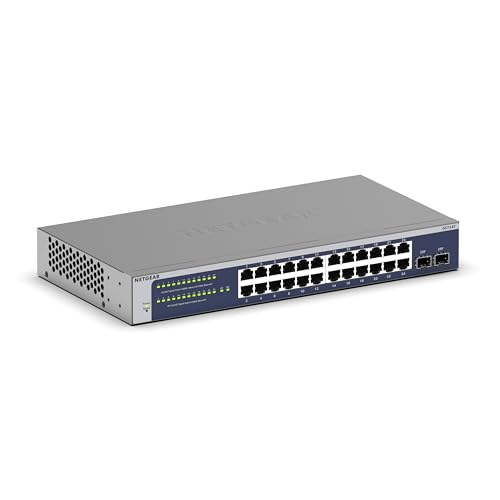
- 24 gigabit ports for larger office networks
- 2 SFP ports for fiber or uplink expansion
- Fanless metal design with smart management tools
Best For: Small offices that need many wired ports and flexible mounting
Compact Easy Smart Pick
TP-Link 8-Port Easy Smart Managed Switch

- 8 gigabit ports for small business expansion
- Web interface or free software management
- VLAN, QoS, IGMP snooping, and link aggregation support
Best For: Small offices needing a compact smart switch with essential management tools
Best Lifetime Value
HPE Instant On 1830 24-Port Smart-Managed Switch

- 24 gigabit ports plus 2 SFP uplinks
- Manage from app or web browser with no subscription
- Fan-less build with flexible mounting options
Best For: Small businesses wanting easy setup, more ports, and lifetime support
High-Capacity Smart Choice
TP-Link 24-Port Easy Smart Managed Switch

- 24 gigabit ports with plug-and-play setup
- VLAN, QoS, IGMP snooping, and LAG support
- Port mirroring, loop prevention, and cable diagnostics
Best For: Small offices that need more ports and basic traffic management
Compact Managed PoE+ Switch
NETGEAR 10-Port Smart Switch with SFP
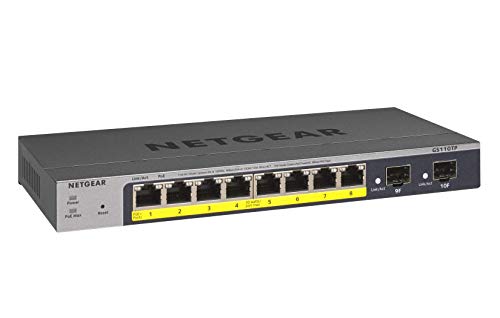
- 8 PoE+ Gigabit ports with 55W total budget
- 2 x 1G SFP uplinks for expansion
- Fanless metal design with smart management
Best For: Small offices needing a compact managed PoE+ switch
High-Capacity PoE Switch
TP-Link 24-Port Easy Smart Managed

- 24 PoE+ ports with 250W total budget
- 2 SFP slots and 2 extra Gigabit ports
- VLAN, QoS, IGMP, and LAG support
Best For: Growing small businesses needing lots of PoE ports
Value Managed Desktop Switch
STEAMEMO 16-Port Gigabit Switch

- 16 Gigabit ports for network expansion
- Web management with VLAN and QoS
- Fanless metal housing for quiet operation
Best For: Small offices needing a basic managed switch for wired devices
Easy Smart Starter Pick – NETGEAR GS308E 8-Port Managed Switch
If you want managed network switches for small business without a steep learning curve, the NETGEAR GS308E is a straightforward 8-port gigabit option. It gives you full-speed wired connections for everyday office devices while adding practical management tools like VLANs, QoS, IGMP snooping, and port mirroring.
Best For: Small offices, home offices, and teams that want simple managed control in a compact desktop or wall-mount switch.
Pros:
- 8 auto-negotiating gigabit ports for plug-and-play setup
- Easy Smart web GUI works on Windows, Mac, or Linux
- Includes VLAN, QoS, IGMP snooping, port mirroring, and cable test
- Fanless metal housing runs silently for 24/7 use
Cons:
- Only 8 ports, so it may be too small for growing networks
- No multi-gig or 10G uplink options
- Designed for indoor use in the U.S. and Canada
Overall, this is a practical entry point for small-business switching when you want managed features, stable operation, and quiet hardware without extra complexity.
Multi-Gig Compact Upgrade – TP-Link Omada ES206X-M2 Multi-Gig Switch
For managed network switches for small business that need more speed in a compact footprint, the Omada ES206X-M2 focuses on 2.5Gbps access and a 10G SFP+ uplink. It combines plug-and-play connectivity with web and app-based Omada management, plus traffic controls like VLAN and IGMP snooping.
Best For: Small offices, creative teams, and compact workspaces that want a quiet multi-gig switch with easy centralized management.
Pros:
- Five 2.5Gbps RJ45 ports plus one 10G SFP+ slot
- Centralized cloud management through the web or Omada app
- Supports automatic loop prevention, VLAN, and IGMP snooping
- Fanless metal design with desktop or wall mounting
Cons:
- Only five RJ45 ports, so expansion room is limited
- One SFP+ slot may not be enough for larger uplink needs
- Managed features are more useful if you use the Omada ecosystem
It is a strong fit when you need faster-than-gigabit performance in a small chassis and value simple remote management over a long list of advanced enterprise features.
Rack-Friendly Branch Switch – NETGEAR GS724T 24-Port Smart Switch
If your small business needs more wired connections, the NETGEAR GS724T is a 24-port smart managed switch built for office expansion. It adds 2 SFP ports for fiber or uplink flexibility, while the fanless metal design keeps operation silent for workspaces where noise matters.
Best For: Small offices, branch networks, and shared workspaces that need a larger rack-mount or desktop switch with smart management.
Pros:
- 24 auto-negotiating gigabit Ethernet ports for wider device coverage
- 2 x 1G SFP ports for fiber optic connections and expansion
- Smart managed interface with secure setup and SNMP management
- Fanless, energy-efficient design with desktop or rackmount flexibility
Cons:
- More switch than a very small office may need
- Insight cloud management is optional and limited to 1 year
- Made for U.S. and Canada use only
This is the most practical choice here when port count matters most and you want a managed switch that can scale a wired office network without adding fan noise.
Fastest Multi-Gig Option – TRENDnet TEG-3102WS 10-Port Multi-Gig Switch
For managed network switches for small business that need higher throughput, the TRENDnet TEG-3102WS offers eight 2.5GBASE-T ports and two 10G SFP+ slots. Its web smart interface makes setup and control easier, while VLAN, QoS, link aggregation, and access controls give you the tools to organize traffic across a busy network.
Best For: Small businesses that want a high-speed multi-gig switch with 10G uplink flexibility and broad traffic management features.
Pros:
- Eight 2.5Gbps RJ-45 ports for faster wired access
- Two 10G SFP+ slots for high-speed uplinks
- Web-based management with VLAN, QoS, and access control features
- Metal housing with lifetime protection and compliance-focused design
Cons:
- Only 10 total ports, which may limit larger device counts
- More advanced than basic plug-and-play switches
- Best value if your network can actually use multi-gig speeds
If your office needs more performance than standard gigabit switching, this model stands out for its multi-gig access ports and 10G uplinks in a compact web-managed package.
Compact Easy Smart Pick – TP-Link 8-Port Easy Smart Managed Switch
If you need managed network switches for small business without adding unnecessary complexity, the TP-Link TL-SG108E is a practical 8-port gigabit option. It gives you basic smart-management features through a web interface or free software, while still staying simple to install on a desktop or wall mount.
Best For: Small offices that want affordable smart switching, VLAN support, and easy setup in a compact metal chassis.
Pros:
- 8 gigabit Ethernet ports for small network expansion
- Easy Smart management via web interface or free software
- Supports VLANs, QoS, IGMP snooping, link aggregation, and loop prevention
- Metal build with shielded ports and desktop or wall-mount flexibility
Cons:
- Only 8 ports, so it may outgrow very quickly
- Designed for simpler smart management rather than full enterprise switching
- No SFP uplink ports listed
Overall, this is a solid fit when you want core management features and a sturdy, low-fuss switch for a small business network. The included monitoring tools and VLAN support make it more versatile than an unmanaged switch without pushing you into a heavier setup.
Best Lifetime Value – HPE Instant On 1830 24-Port Smart-Managed Switch
Aruba Instant On 1830 24-Port Gb Smart Switch - 24x 1G | 2X SFP | Fanless | US Cord (JL812A#ABA)
Check Price On AmazonThe HPE Networking Instant On 1830 is a strong choice if you want managed network switches for small business with straightforward deployment and room to grow. It combines 24 gigabit ports, 2 SFP uplinks, and smart-managed Layer 2 features with easy app or browser management.
Best For: Small businesses that want a 24-port smart-managed switch with flexible mounting and lifetime support.
Pros:
- 24 gigabit Ethernet ports plus 2 SFP uplink ports
- Smart-managed Layer 2 design with mobile app or web browser control
- No subscription or license required for management
- Fan-less design and flexible table, wall, or under-table mounting
Cons:
- More expensive and physically larger than compact 8-port models
- Management is smart-managed, not full enterprise-grade switching
- SFP uplinks may be more than some small setups need
This model stands out for teams that want a dependable, easy-to-manage switch with a broader port count and lifetime warranty support. It’s especially appealing if you prefer simple deployment but still want advanced local web configuration available.
High-Capacity Smart Choice – TP-Link 24-Port Easy Smart Managed Switch
For larger small-business networks, the TP-Link TL-SG1024DE offers a straightforward way to add 24 gigabit ports with smart-management features. It’s a practical fit when you want managed network switches for small business that balance plug-and-play use with traffic controls and monitoring tools.
Best For: Small businesses needing a 24-port smart switch for file transfers, VLAN segmentation, and basic traffic management.
Pros:
- 24 gigabit ports for expanding office connectivity
- Supports VLANs, QoS, IGMP snooping, and link aggregation
- Port mirroring, loop prevention, and cable diagnostics help with monitoring
- 9K jumbo frame support for large data transfers
Cons:
- Desktop/rackmount design may be bulkier than compact switches
- Management is easy-smart rather than full-featured enterprise control
- No SFP ports are listed
This switch makes sense when you need more ports than an 8-port model and want useful management features without a steep learning curve. Its mix of monitoring, segmentation, and QoS gives it solid everyday value for office networks.
Compact Managed PoE+ Switch – NETGEAR 10-Port Smart Switch with SFP
If you want managed network switches for small business use with PoE and a simple footprint, the NETGEAR GS110TP is built around a practical 10-port layout. It gives you 8 Gigabit PoE+ ports, 2 SFP uplinks, and smart managed controls, making it a strong fit for smaller offices that need cameras, access points, or other powered devices without moving to a large rack switch.
Best For: Small offices that need a compact managed PoE+ switch with fiber expansion.
Pros:
- 8 PoE+ Gigabit ports with a 55W total power budget
- 2 x 1G SFP ports for fiber connectivity and network expansion
- Smart managed interface with SNMP support and optional Insight cloud management
- Fanless metal design for silent desktop or wall mounting
Cons:
- 55W PoE budget is modest for heavier powered-device deployments
- Built for U.S. and Canada only
Overall, this switch makes sense when you need basic managed control, silent operation, and a few PoE endpoints in a small business network. The SFP ports add flexibility, while the compact build keeps installation easy.
High-Capacity PoE Switch – TP-Link 24-Port Easy Smart Managed
For managed network switches for small business environments that need lots of ports, the TP-Link TL-SG1428PE brings a much larger PoE setup. It offers 24 PoE+ Gigabit ports with a 250W budget, plus 2 SFP slots and easy web-based management, so it works well when you need to connect many powered devices and keep traffic organized with VLAN support.
Best For: Growing small businesses that need a high-port-count managed PoE+ switch.
Pros:
- 24 PoE+ ports with up to 30W per port and 250W total power budget
- 2 SFP slots plus 2 non-PoE Gigabit ports for flexible uplinks
- Web-based management with VLAN, QoS, IGMP, and LAG features
- Auto Recovery can reboot unresponsive PoE devices when configured
Cons:
- Larger and heavier than compact desktop switches
- Designed for more advanced needs than a very simple plug-and-play setup
This model is a better fit when port count and PoE capacity matter more than size. The management tools are straightforward, but the switch still gives you the networking features many small businesses need as they scale.
Value Managed Desktop Switch – STEAMEMO 16-Port Gigabit Switch
If you’re comparing managed network switches for small business workstations, printers, and basic network expansion, the STEAMEMO 16-port Gigabit Managed Switch offers a simple web-smart approach. It provides 16 Gigabit RJ45 ports, VLAN support, QoS, and a fanless metal housing, making it a practical choice for offices that want manageable segmentation without PoE.
Best For: Small offices that want an affordable managed switch for standard wired devices.
Pros:
- 16 Gigabit Ethernet ports for easy network expansion
- Web interface and free software for local or remote management
- VLAN support with up to 15 IEEE 802.1Q VLAN groups
- Fanless metal housing for quiet desktop or wall mounting
Cons:
- No PoE support for powered devices
- One-year manufacturer warranty is shorter than some rivals
This is a straightforward pick when your priority is adding more wired ports and basic management features at the edge of a small business network. It keeps the setup quiet and compact while still giving you VLAN control and QoS.
How We Picked These Managed Network Switches for Small Business
We prioritized models that make sense for real office use: stable hardware, practical managed features, and the right mix of port counts, speeds, and power options. That means looking at VLAN support, QoS, loop prevention, PoE availability, SFP uplinks, fanless designs, and metal enclosures for durability.
We also favored switches that are easy to deploy without enterprise-level complexity, since many small teams want management features without a steep learning curve.
Quick Comparison
For simple wired offices, 8-port smart-managed switches are usually enough. If you need more devices or room to grow, 24-port models are the better fit. Multi-gig switches help when you have fast workstations, NAS storage, or Wi-Fi 6/6E access points. PoE switches are best when you need to power phones, cameras, or access points from the switch itself.
Key Buying Factors for Managed Network Switches for Small Business
Port Count and Expansion
Choose a port count based on current devices plus future growth. Small offices often outgrow 8-port units quickly, while 24-port switches offer more flexibility for desks, printers, APs, and conference room gear.
Speed Requirements
Gigabit is still the baseline for most businesses, but multi-gig makes a noticeable difference for bandwidth-heavy work. If you move large files or use fast wireless access points, look for 2.5G or faster ports and consider SFP/SFP+ uplinks.
Managed Features
At minimum, look for VLANs, QoS, and loop protection. VLANs help segment guest, staff, and voice traffic; QoS can prioritize calls and video; loop prevention helps avoid outages caused by wiring mistakes.
PoE Needs
If you plan to run IP phones, security cameras, or wireless access points, PoE saves time and cabling. Check both the number of PoE ports and the total power budget so you do not run short.
Noise, Placement, and Build
Fanless switches are excellent for quiet offices, reception areas, and home offices. Metal housings and rackmount options are useful when you want better durability or a more permanent setup.
Who Should Buy Which Managed Network Switches for Small Business?
If you want a simple office switch for desks and printers, choose a compact gigabit smart-managed model. If your team depends on cameras, phones, or access points, a PoE switch is the smarter pick. If your business handles large files, backups, or fast wireless networks, a multi-gig model will give you more headroom.
For growing businesses, the best Managed Network Switches for Small Business are the ones that match today’s needs while leaving room for tomorrow’s devices, speed upgrades, and network segmentation.