An SFP port can give your network a flexible uplink, but the right switch depends on what connects to it. A home NAS, a rack of PoE cameras, and a growing office need very different port counts and speeds.
These seven picks span compact multigigabit switches, managed PoE options, and an SFP+-focused model. Check the slot type and uplink speed before choosing: an SFP slot and a 10Gb SFP+ slot are not interchangeable promises of performance.
Best 7 Network Switches with Sfp Ports Picks for 2026
Quiet Dual-Uplink Pick

- Four 2.5G RJ45 ports
- Two 10G SFP ports
- Fanless with one-key VLAN
Best For: Quiet 2.5G desktop setups needing two SFP connections
High-Port PoE Pick
TP-Link TL-SG3452P Managed Switch

- 48 Gigabit PoE+ ports
- 384W total PoE budget
- Four Gigabit SFP slots
Best For: Large managed PoE networks with Gigabit SFP uplinks
NAS Aggregation Pick

- Five 2.5Gb RJ45 ports
- One 10Gb SFP+ port
- Preset aggregation and VLAN modes
Best For: NAS-centered 2.5Gb networks needing one 10Gb link
SFP+ Density Pick

- Four up-to-10G SFP+ ports
- Fanless metal enclosure
- SwOS or RouterOS dual boot
Best For: Compact setups prioritizing multiple SFP+ links
Best for 2.5G Upgrades
GigaPlus 8-Port 2.5G Switch with Dual 10G SFP+

- Eight adaptive 2.5G RJ45 ports
- Two 10G SFP+ ports
- Fanless, unmanaged metal design
Best For: Simple 2.5G networks needing dual 10G SFP+ connections
Best for Managed PoE
TP-Link TL-SG2210P with 8 PoE+ Ports

- Eight Gigabit PoE+ ports; 61W total
- Two Gigabit SFP slots
- Omada and standalone management
Best For: Managed small networks with PoE+ devices
Best for Higher PoE Budgets
YuanLey 8-Port Gigabit PoE+ Switch
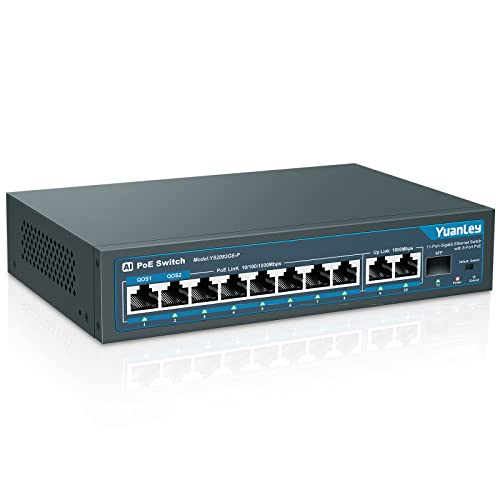
- Eight Gigabit PoE+ ports; 120W total
- Two RJ45 uplinks and one Gigabit SFP port
- Built-in power supply and PoE watchdog
Best For: Plug-and-play PoE+ setups needing a single SFP port
Quiet Dual-Uplink Pick – YuanLey 6-Port 2.5G Switch
Among network switches with sfp ports, this compact YuanLey model suits a small 2.5GbE setup that needs two faster uplinks. It pairs four adaptive 2.5G RJ45 ports with two 10G SFP ports in a fanless metal case.
Best For: A quiet desktop or wall-mounted switch for a 2.5G NAS, gaming PC, or Wi-Fi 6 access point.
Pros:
- Two 10G SFP ports support compatible 1G and 2.5G modules.
- One-key VLAN mode isolates communication between RJ45 ports.
- Fanless metal design supports desktop or wall placement.
Cons:
- SFP modules are not included.
- Only four RJ45 ports; it is an unmanaged switch.
Choose it if two SFP connections matter more than additional copper ports or managed-switch controls.
High-Port PoE Pick – TP-Link TL-SG3452P Managed Switch
For buyers comparing network switches with sfp ports across a larger installation, the TP-Link TL-SG3452P combines 48 Gigabit PoE+ RJ45 ports with four Gigabit SFP slots. Its 384W PoE budget and L2+ management make it a different fit from compact desktop switches.
Best For: Managed networks connecting many PoE devices while retaining four Gigabit SFP uplinks.
Pros:
- 48 PoE+ ports provide up to 30W per port within a 384W total budget.
- Supports VLANs, ACLs, DHCP snooping, and static routing.
- Offers standalone management or compatible Omada SDN management.
Cons:
- SFP slots and RJ45 ports are Gigabit, not multi-gigabit.
- Omada SDN integration requires compatible SDN firmware and controllers.
This is the capacity-focused choice when PoE port count and network controls take priority over faster individual uplinks.
NAS Aggregation Pick – UGREEN 6-Port 2.5Gb Switch
The UGREEN is one of the network switches with sfp ports worth considering for a small multi-gig network: it has five 2.5Gb RJ45 ports and one 10Gb SFP+ port. A physical mode selector adds link aggregation and VLAN isolation without a managed-switch interface.
Best For: A 2.5Gb home or small-office setup with a multiport NAS and one 10Gb backbone connection.
Pros:
- SFP+ port supports 1G, 2.5G, and 10G optical or RJ45 modules.
- Link Aggregation mode groups ports 4 and 5 for up to 5Gbps of aggregate bandwidth.
- VLAN mode isolates ports 1–4 while allowing access to ports 5–6.
Cons:
- SFP+ module is not included.
- Only one SFP+ port; the switch is unmanaged and non-PoE.
It offers useful preset modes for a NAS-centered setup, provided one SFP+ connection is enough.
SFP+ Density Pick – MikroTik CRS305-1G-4S+in
If your search for network switches with sfp ports is driven by the number of high-speed slots, the compact MikroTik CRS305 stands out with four SFP+ ports supporting up to 10 Gbit per port. Its single Gigabit RJ45 port is intended for management access.
Best For: A compact, quiet setup connecting several SFP+ devices and requiring switch-management options.
Pros:
- Four SFP+ ports in a fanless metal enclosure.
- Dual boot offers simplified SwOS or RouterOS with routing and other Layer 3 features.
- Two DC power jacks allow power redundancy; 802.3af/at PoE input is supported.
Cons:
- Only one RJ45 port, specified for management access.
- Choosing and configuring SwOS or RouterOS adds setup decisions.
Pick this model when SFP+ port density matters more than a bank of copper Ethernet connections.
Best for 2.5G Upgrades – GigaPlus 8-Port 2.5G Switch with Dual 10G SFP+
For buyers comparing network switches with SFP ports, this GigaPlus model pairs eight adaptive 2.5G Ethernet ports with two 10G SFP+ ports. It is an unmanaged, plug-and-play way to connect faster PCs, NAS devices, and compatible uplinks without configuring the switch.
Best For: A quiet desktop or wall-mounted 2.5G network that needs two 10G SFP+ connections.
Pros:
- Eight RJ45 ports support 10/100/1000/2500 Mbps devices.
- Two 10G SFP+ ports provide faster uplink options.
- Fanless metal enclosure supports desktop or wall mounting.
Cons:
- Unmanaged design offers no configuration controls.
- RJ45 ports top out at 2.5G, not 10G.
This is the straightforward pick when multigigabit copper connections matter more than management features. Check that your planned SFP+ equipment matches the 10G ports.
Best for Managed PoE – TP-Link TL-SG2210P with 8 PoE+ Ports
Among network switches with SFP ports, the TP-Link TL-SG2210P stands out for combining two Gigabit SFP slots with eight Gigabit PoE+ ports and management features. Its 61W total PoE budget suits installations that need powered devices and control over network traffic.
Best For: Small networks needing managed Gigabit connections, PoE+ devices, and Omada integration.
Pros:
- Eight PoE+ ports provide up to 30W per port within a 61W total budget.
- Supports Omada centralized management and standalone web, CLI, and SNMP management.
- Includes VLAN, security, QoS, and static-routing features.
Cons:
- SFP slots are Gigabit, not 10G.
- Desktop or wall mounting only; it is not rack-mountable.
Choose this switch when management and PoE+ are priorities rather than multigigabit speed. Plan device power needs against the 61W shared budget, not just the per-port maximum.
Best for Higher PoE Budgets – YuanLey 8-Port Gigabit PoE+ Switch
If you are shopping for network switches with SFP ports to connect several powered devices, this YuanLey switch offers eight Gigabit PoE+ ports, two Gigabit RJ45 uplinks, and one Gigabit SFP port. Its 120W total power budget and unmanaged setup make it a practical option for cameras or wireless access points.
Best For: Plug-and-play Gigabit PoE+ installations that need one SFP connection and a 120W power budget.
Pros:
- Eight PoE+ ports support up to 30W each, subject to the 120W total budget.
- Provides two Gigabit RJ45 uplinks plus one Gigabit SFP port.
- Includes a built-in power supply and an automatic restart feature for offline PoE devices.
Cons:
- Does not support 24V passive PoE.
- Unmanaged design does not offer the configuration controls of a managed switch.
This model favors PoE capacity and easy installation over advanced management. Verify your devices use compatible 802.3af/at PoE and budget their combined power draw before buying.
How We Picked the Best Network Switches with Sfp Ports
We compared the listed port layouts, uplink types, management features, and PoE budgets against common home, camera, and small-office needs. The lineup includes compact multigigabit options, higher-port-count PoE models, and a switch built primarily around SFP+ connections. Because specifications and hardware revisions can change, confirm the seller’s current listing and the manufacturer’s compatibility guidance before buying.
Quick Comparison: Which Layout Fits?
For a few 2.5GbE devices and a 10Gb uplink, the UGREEN six-port model or the listed four-port 2.5G switch keeps the desktop footprint small. The GiGaPlus ten-port model offers eight 2.5GbE copper ports and two listed 10G SFP+ ports for more wired devices. The MikroTik CRS305 is the SFP+-heavy choice, with four SFP+ ports and one Gigabit Ethernet port; it is not a substitute for a switch with many copper access ports.
For PoE deployments, the TP-Link TL-SG2210P pairs eight PoE+ ports with two SFP slots and a listed 61W budget. The TL-SG3452P scales to 48 PoE+ ports, four SFP slots, and a listed 384W budget. The YuanLey model is an unmanaged eight-port PoE+ alternative with one listed SFP port and a 120W budget.
Key Buying Factors for Network Switches with Sfp Ports
Match the Slot to the Link
Standard SFP slots are typically used for 1Gb links; SFP+ slots can support 10Gb links when the switch and module permit it. Do not assume a 10G module will make a 1G SFP slot run faster. Check supported speeds, optical transceivers or DAC cables, connector type, fiber type, and link distance at both ends. The first unnamed six-port listing says “10G SFP” rather than clearly identifying SFP+, so verify its exact slot specification.
Count Ports and PoE Watts Separately
Plan for the devices you own now, then leave room for growth. A 2.5GbE access port helps only if the connected device supports that speed; a fast uplink helps most when multiple devices share it. If powering access points, cameras, or phones, add up their maximum power requirements and compare the total with the switch’s PoE budget. Also confirm the per-port PoE standard and power limit.
Decide How Much Control You Need
Managed switches are worth considering for VLAN configuration, monitoring, and more deliberate traffic control. Unmanaged models are simpler when you just need additional connections. Read feature labels carefully: a listing that mentions VLAN does not necessarily provide the configurable VLAN tools of a managed switch. Check fan noise, mounting options, and power requirements for the intended location.
Who Should Buy Which Network Switches with Sfp Ports?
Choose a compact 2.5GbE/SFP+ model for a small multigigabit setup, or the ten-port GiGaPlus when you need more 2.5GbE connections. Consider the CRS305 when SFP+ links are the priority. Pick the TL-SG2210P for a modest managed PoE network, the TL-SG3452P for a larger managed PoE deployment, or the YuanLey if its simpler unmanaged setup, port count, and power budget meet your needs.