Building a home lab starts with reliable switching. The right rackmount network switch gives you enough ports, stable throughput, and a clean install in a standard rack or network cabinet.
Below, we focus on practical options for real-world home lab use, from quiet unmanaged models to smarter switches with VLANs and traffic controls.
Best 10 Rackmount Network Switches for Home Lab Picks for 2026
Quiet Rack-Friendly Pick
NETGEAR GS324 24-Port Unmanaged Switch

- 24 gigabit ports
- Fanless silent operation
- Rack, wall, or desktop mounting
Best For: Quiet home labs needing simple 24-port expansion
Managed PoE Rack Pick
Ubiquiti EdgeSwitch 16 150W Managed Switch

- 16 managed ports
- 150W PoE+ support
- Rack-mountable metal build
Best For: Managed home labs needing PoE+ in a rack
Simple Rackmount Classic
NETGEAR JGS524 24-Port Unmanaged Switch

- 24 gigabit ports
- Silent unmanaged operation
- Lifetime hardware warranty
Best For: Home labs wanting simple rackmount gigabit expansion
Smart Feature Pick
TP-Link TL-SG1024DE 24-Port Easy Smart Switch

- 24 gigabit ports
- VLAN, QoS, and IGMP features
- Desktop or rackmount metal build
Best For: Home labs that want smart features without full enterprise complexity
Flexible Quiet Pick
NETGEAR 16-Port Silent Rackmount Switch

- Fanless and silent operation
- 16 gigabit auto-negotiating ports
- Desktop, wall, or rack-mount options
Best For: Quiet home labs with flexible mounting needs
Budget Rack Pick
TP-Link 16-Port Fanless Rackmount Switch

- Fanless metal rackmount design
- 16 gigabit ports with plug-and-play setup
- Shielded ports and included rack kit
Best For: Small to mid-size home labs wanting quiet basics
Smart Managed Pick
D-Link DGS-1100-24V2 24-Port Smart Managed Switch
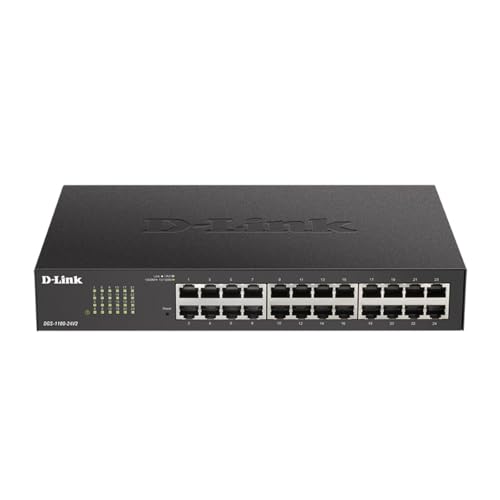
- 24 Gigabit ports with rackmount support
- Web UI for VLAN, QoS, IGMP snooping, and LAG
- Fanless metal design for quiet home racks
Best For: Home lab users who want managed controls and silent operation
Simple Rackmount Pick
UGREEN 24-Port Gigabit Unmanaged Rackmount Switch

- 24 gigabit ports with plug-and-play setup
- Rack ears included; wall, desktop, or rack use
- Fanless metal case with 4 operating modes
Best For: Users who want a quiet, no-setup switch for a home rack
Quiet Rackmount Pick
TP-Link TL-SG1024S 24-Port Fanless Rackmount Switch

- 24 gigabit ports in a 1U rackmount format
- Fanless metal design for quiet operation
- Plug-and-play with no configuration needed
Best For: Home lab users who want a reliable, silent basic switch
Quiet Rack-Friendly Pick – NETGEAR GS324 24-Port Unmanaged Switch
If you want rackmount network switches for home lab use without adding noise or complexity, the NETGEAR GS324 is a straightforward fit. It gives you 24 gigabit ports, a simple plug-and-play setup, and a metal chassis that can sit on a desk, mount on a wall, or slide into a rack.
Best For: Home labs that need a silent, unmanaged 24-port switch with flexible mounting.
Pros:
- 24 x 1.0Gbps Ethernet ports for high-speed connectivity
- Fanless design for silent operation
- Plug-and-play unmanaged setup with no software to install
- Desktop, wall-mount, or rack-mount placement options
Cons:
- No managed features like VLANs or QoS
- Made for use in U.S. & CA only
- Limited to standard gigabit switching needs
For a home lab that values quiet operation and easy deployment, the GS324 covers the basics well. It is best when you want dependable 24-port expansion and do not need advanced configuration tools.
Managed PoE Rack Pick – Ubiquiti EdgeSwitch 16 150W Managed Switch
Ubiquiti EdgeSwitch 16 - Switch - 16 Ports - Managed - Rack-Mountable - Black (ES-16-150W)
Check Price On AmazonAmong rackmount network switches for home lab setups, the Ubiquiti EdgeSwitch 16 stands out if you want managed switching and PoE+ in one unit. It is a 16-port rack-mountable switch with a 150W power budget, so it suits gear that needs both network connectivity and powered ports.
Best For: Home labs that need a managed rackmount switch with PoE+ support.
Pros:
- 16-port managed switch for more control than unmanaged models
- PoE+ switch with 150W power capacity
- Rack-mountable metal design
- SFP interface support
Cons:
- Fewer ports than 24-port alternatives
- Not a plug-and-play unmanaged model
- Best suited to users who need managed features
If your home lab includes powered network devices and you want a managed platform, this model is the most feature-oriented pick here. Its 16-port layout is smaller, but the PoE+ support makes it practical for compact, rack-based builds.
Simple Rackmount Classic – NETGEAR JGS524 24-Port Unmanaged Switch
NETGEAR 24-Port Gigabit Ethernet Unmanaged Switch (JGS524) - Desktop or Rackmount
Check Price On AmazonIf you are comparing rackmount network switches for home lab expansion, the NETGEAR JGS524 is a classic 24-port unmanaged option. It focuses on simple gigabit connectivity, silent operation, and rackmount readiness with the mounting hardware included.
Best For: Home labs that want a simple 24-port rackmount switch with lifetime warranty coverage.
Pros:
- 24 gigabit Ethernet ports for broad device connectivity
- Silent, energy-efficient unmanaged design
- Desktop or rackmount placement with hardware in the box
- Limited lifetime hardware warranty
Cons:
- No managed networking features
- Made for use in U.S. & CA only
- Bulkier than compact desktop switches
This is a strong fit when you want a no-fuss switch that can live in a rack without drawing attention. It is especially appealing for home labs that value longevity and straightforward gigabit expansion over advanced controls.
Smart Feature Pick – TP-Link TL-SG1024DE 24-Port Easy Smart Switch
For rackmount network switches for home lab use, the TP-Link TL-SG1024DE adds more control without jumping to a full enterprise setup. It combines 24 gigabit ports with easy smart management features like VLAN, QoS, IGMP Snooping, Port Mirroring, Loop Prevention, and Cable Diagnostics.
Best For: Home labs that want affordable smart-switch features in a 24-port rackmount format.
Pros:
- 24 gigabit ports with plug-and-play connectivity
- VLAN, QoS, IGMP Snooping, and LAG support
- Port Mirroring, Loop Prevention, and Cable Diagnostics
- Sturdy metal design with desktop or rackmount placement
Cons:
- Not a fully managed enterprise switch
- Requires more setup than an unmanaged model
- Best for users who will actually use the smart features
This switch makes sense if you want practical network tuning for a home lab without overpaying for advanced hardware. It is the most feature-dense option here for segmentation, monitoring, and traffic handling.
High-Capacity Core Pick – TP-Link 48-Port Gigabit Rack-Mount Switch
If you’re building out rackmount network switches for home lab use and need a simple way to connect a lot of gear, the TP-Link TL-SG1048 is a straightforward high-port-count option. It offers 48 gigabit RJ45 ports, a 19-inch rack-mount steel case, and plug-and-play setup, so it fits well in a home lab that values scale and low fuss over advanced configuration.
Best For: Home labs that need lots of wired ports in a rack-mount, no-configuration switch.
Pros:
- 48 gigabit RJ45 ports for connecting many devices
- Plug-and-play setup with no configuration required
- Steel 19-inch rack-mount design for durable installation
- Energy-saving features automatically adjust power use by link status and cable length
Cons:
- Unmanaged design means no advanced switching controls
- Large 48-port size may be more than smaller home labs need
For a home lab that needs density and reliability more than features, this TP-Link model makes a lot of sense. Its high switching capacity and rack-ready build make it a practical core access switch for many wired devices.
Flexible Quiet Pick – NETGEAR 16-Port Silent Rackmount Switch
NETGEAR 16-Port Gigabit Ethernet Unmanaged Network Switch (GS516) | Desktop, Wall, or Rack Mount
Check Price On AmazonFor rackmount network switches for home lab setups where silence and flexibility matter, the NETGEAR GS516 is an easy fit. It provides 16 gigabit ports, a compact metal design, and support for desktop, wall-mount, or rack-mount placement, so you can install it where it best fits your lab layout.
Best For: Home labs that need a quiet, flexible, unmanaged 16-port switch.
Pros:
- 16 auto-negotiating gigabit Ethernet ports
- Fanless design for silent operation
- Supports desktop, wall-mount, or rack-mount placement
- Energy Efficient Ethernet helps reduce power use
Cons:
- Unmanaged, so there are no advanced configuration features
- Made for use in U.S. and Canada only
This is a good choice if your home lab is in a shared space and you want simple, quiet switching. The flexible mounting options also make it easier to place in tighter setups without committing to a full rack position.
Budget Rack Pick – TP-Link 16-Port Fanless Rackmount Switch
If you want rackmount network switches for home lab use without extra complexity, the TP-Link TL-SG1016 is a practical 16-port option. It combines plug-and-play setup, a sturdy metal case, shielded ports, and fanless operation, making it a solid fit for a small or mid-size lab that needs dependable gigabit connectivity.
Best For: Home labs that want a simple, fanless 16-port rackmount switch.
Pros:
- 16 gigabit ports with non-blocking switching architecture
- Fanless design for quiet operation
- Metal case with shielded ports and rackmount kit included
- Plug-and-play installation with Auto MDI/MDIX support
Cons:
- Unmanaged switch with no advanced network controls
- Lower port count than large home lab core switches
This TP-Link model is a strong fit when you want reliable wired expansion and a quieter rack. It focuses on the basics well, which is often exactly what a home lab needs from an access switch.
Smart Managed Pick – D-Link DGS-1100-24V2 24-Port Smart Managed Switch
If you want rackmount network switches for home lab use with a little more control than basic plug-and-play models, the D-Link DGS-1100-24V2 is a practical middle ground. It gives you 24 gigabit ports plus a web-based management interface for VLANs, QoS, IGMP snooping, and link aggregation, while staying fanless and quiet for a home rack.
Best For: Home lab builders who want managed features without adding fan noise.
Pros:
- 24 Gigabit ports for expanding a wired home lab.
- Web UI with VLAN, QoS, IGMP snooping, and LAG support.
- Fanless metal design for silent operation.
- Includes rack kit and supports desktop or rackmount placement.
Cons:
- Managed setup is more involved than an unmanaged switch.
- Only 1 Gbps ports, so it is not suited for multi-gig networks.
Overall, this is a solid choice when you need rackmount flexibility and useful traffic controls without stepping into more complex enterprise hardware. The lifetime coverage and NDAA/TAA compliance add extra peace of mind for long-term use.
Simple Rackmount Pick – UGREEN 24-Port Gigabit Unmanaged Rackmount Switch
For rackmount network switches for home lab setups that need simple expansion, the UGREEN 24-port gigabit switch keeps things straightforward. It is unmanaged and plug-and-play, but still includes four working modes, rack ears, and a fanless metal build that fits well in a small rack, cabinet, or office bench.
Best For: Home lab owners who want an easy, silent 24-port switch with basic mode options.
Pros:
- 24 auto-negotiating gigabit ports for wired devices.
- Includes rackmount ears and supports wall or desktop mounting.
- Fanless metal enclosure with heatsinks and thermal pads.
- Four modes, including port isolation, link aggregation, and flow control.
Cons:
- Unmanaged design means no advanced web-based administration.
- Still limited to gigabit speeds.
This is a sensible fit if your priority is quick deployment rather than switch configuration. The 6KV surge protection and silent operation make it appealing for a home lab or utility rack where reliability matters more than features.
Quiet Rackmount Pick – TP-Link TL-SG1024S 24-Port Fanless Rackmount Switch
If you are comparing rackmount network switches for home lab use, the TP-Link TL-SG1024S is an easy fit for a basic wired network. It offers 24 gigabit RJ45 ports, a fanless metal housing, and plug-and-play operation, so you can add more devices without dealing with software setup or noisy cooling.
Best For: Home lab builders who want a quiet, durable 1U switch with no configuration.
Pros:
- 24 Gigabit RJ45 ports with auto negotiation and Auto MDI/MDIX.
- Fanless design for whisper-quiet operation.
- Metal case for durability, heat dissipation, and EMI protection.
- Fits standard 1U racks and includes a rackmount kit.
Cons:
- Unmanaged, so it lacks VLANs and other admin features.
- No multi-gig or PoE capabilities listed.
This model is best when you want a dependable, quiet switch that disappears into the rack and just works. Its long warranty and included support make it a safe choice for a straightforward home lab build.
How We Picked These Rackmount Network Switches for Home Lab
We prioritized switches that fit common home lab needs: rackmount-ready form factors, Gigabit speeds, quiet or fanless operation where possible, and enough ports to support servers, APs, storage, desktops, and streaming gear. We also considered whether a model is unmanaged or smart/managed, since that affects flexibility, setup time, and long-term usefulness.
Quick Comparison
For simple plug-and-play networks, unmanaged switches are usually the easiest choice and often the best value. If you plan to segment lab traffic, isolate virtual machines, or manage bandwidth-heavy devices, a smart or managed switch is the better fit. In this roundup of Rackmount Network Switches for Home Lab use, 16-port models suit smaller racks, while 24- and 48-port options are better for expanding builds or multi-device labs.
Key Buying Factors
Port Count and Expansion
Choose a port count based on today’s devices plus future growth. A 16-port switch can work well for compact labs, but 24 ports is the safer sweet spot for most home lab owners. If you run multiple servers, access points, cameras, and test devices, 48 ports may be worth the extra space.
Managed Vs. Unmanaged
Unmanaged switches are simple and reliable. Managed or smart managed models add VLANs, QoS, link aggregation, and monitoring tools, which are useful when separating lab traffic, protecting production gear, or optimizing network performance.
Noise and Cooling
Many home labs live in offices, closets, or shared spaces, so fanless or silent switches are especially attractive. If a switch uses active cooling, check whether the noise level is acceptable for your room.
Rack Fit and Build Quality
Look for standard 19-inch rackmount support, sturdy metal housings, and shielded ports if you want a cleaner, more durable install. These details matter in dense racks and makeshift lab environments alike.
Speed and Traffic Needs
Most buyers only need Gigabit today, but make sure the switch can handle your workload. If you move large files, run virtual machines, or use network storage, features like QoS and LAG can improve consistency even when port speeds stay at 1GbE.
Who Should Buy Which Rackmount Network Switches for Home Lab?
If you want a low-cost, low-maintenance setup, choose an unmanaged rackmount switch. If you need VLANs or traffic controls, go with a smart managed model. If noise is your top concern, prioritize fanless designs. For larger home labs, pick a 24- or 48-port switch so you do not outgrow the rack too quickly.
In short, the best Rackmount Network Switches for Home Lab use are the ones that match your current device count, your tolerance for setup complexity, and your noise requirements.