Choosing the right switch can make a home lab feel dramatically faster, especially when you are moving large files between a NAS, workstation, and virtualization host.
This roundup of 10G network switches for home lab setups focuses on practical port mixes, manageability, and real-world flexibility so you can buy once and scale with confidence.
Best 10 10g Network Switches for Home Lab Picks for 2026
Desk-Ready 10G RJ45 Switch
5-Port Multi-Gig Speed for Home Labs

- 5 x 10Gbps RJ45 ports with auto-negotiation
- Unmanaged plug-and-play setup
- Rackmount or desktop metal design
Best For: Home labs that want simple multi-gig RJ45 expansion.
Silent Managed Desktop Switch
MikroTik CRS304-4XG-IN 4-Port 10G

- Managed 4-port 10 Gigabit Ethernet switch
- Silent design with multiple mounting options
- Multiple powering options for reliability
Best For: Small home labs that need managed 10G control in a compact switch.
Managed SFP+ Core Switch

- 8 x 10Gbps SFP+ ports for high-bandwidth links
- L2+ managed features with VLAN and QoS
- Omada SDN support for centralized control
Best For: Fiber-based home labs needing managed SFP+ switching.
Hybrid Multi-Gig Desk Switch
NICGIGA 6-Port 2.5G/10G Hybrid

- 2 x 10Gb RJ45 ports plus 4 x 2.5Gb ports
- Fanless unmanaged design with Auto MDI/MDIX
- Desktop or wall-mount metal enclosure
Best For: Mixed home lab setups needing both 10G and 2.5G ports.
Quiet Plug-and-Play Pick
NETGEAR GS108MX 10G Ethernet Switch

- Eight Gigabit ports plus one multi-gig 10G uplink
- Fanless design for quiet home lab placement
- Desk, wall, or rack mounting included
Best For: Users who want a quiet, easy-to-use switch with simple installation
Budget Multi-Gig Upgrade
GigaPlus 10-Port 2.5G/10G Unmanaged Switch
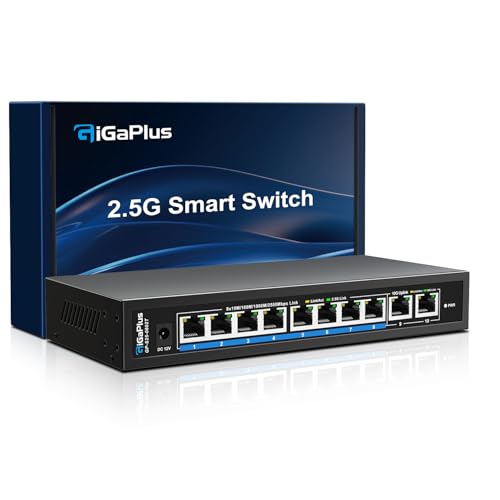
- Eight 2.5G ports and two 10G RJ45 ports
- 80Gbps capacity with plug-and-play setup
- Fanless metal case with desktop or wall mounting
Best For: Labs that need lots of 2.5G connectivity and a couple of 10G uplinks
Silent Plug-and-Play Option
VunLink 6-Port Multi-Gig Switch

- 4 x 2.5GbE plus 2 x 10GbE RJ45 ports
- Fanless unmanaged design
- 60Gbps switching with wire-speed forwarding
Best For: Quiet home labs that need simple multi-gig expansion
All-10G Desktop/Rack Pick

- 5 RJ45 ports with up to 10G auto-negotiation
- 100Gbps switching capacity
- Desktop or 19-inch rack mount support
Best For: Home labs that want every port to support 10GbE devices
Desk-Ready 10G RJ45 Switch – 5-Port Multi-Gig Speed for Home Labs
If you want a straightforward option among 10g network switches for home lab use, this YuanLey model focuses on simple, high-speed RJ45 connectivity. With five 10Gbps ports and auto-negotiation down to 100Mbps, it fits mixed-device setups where you want to connect NAS gear, servers, gaming PCs, or a WiFi 6 access point without extra configuration.
Best For: Home labs that need an unmanaged, plug-and-play 10G RJ45 switch with rackmount or desktop flexibility.
Pros:
- 5 x 10Gbps RJ45 ports with auto-adaptive 10G/5G/2.5G/1G/100Mbps support
- Unmanaged design means no setup or software is required
- 100Gbps switching capacity helps keep traffic moving smoothly
- Metal case, 4KV lightning protection, and rackmount/desktop placement
Cons:
- Unmanaged design offers no advanced VLAN or routing features
- Built-in fan is quiet, but it is not a fanless switch
This is a practical pick if your priority is getting multiple multi-gig RJ45 links online fast. It keeps the feature set focused on speed and ease of use, which makes it a strong fit for a small home lab or media-heavy network.
Silent Managed Desktop Switch – MikroTik CRS304-4XG-IN 4-Port 10G
The MikroTik CRS304-4XG-IN is a compact managed choice for home lab builders who need 10g network switches for home lab setups with more control than a basic unmanaged box. Its four RJ45 10 Gigabit ports, managed switch design, and silent operation make it a strong fit for a tidy desktop network where reliability and flexibility matter.
Best For: Home lab users who want a compact managed 10G Ethernet switch with quiet operation and flexible mounting.
Pros:
- 4-port 10 Gigabit Ethernet switch in a compact form factor
- Managed switch design adds more network control options
- Silent operation and multiple mounting options suit desktop setups
- Multiple powering options and a dual-core ARM CPU
Cons:
- Only four ports, so it is better for smaller setups
- Listed data transfer rate is 40 Gbps, not the highest in this group
If you want a more capable management layer in a small chassis, this MikroTik model stands out. It is especially appealing when you need a quiet switch that can sit on a desk without adding much clutter.
Managed SFP+ Core Switch – Omada SX3008F 8-Port 10G SFP+
For home lab users building around fiber or SFP+ gear, the Omada SX3008F is one of the more advanced 10g network switches for home lab networks. It offers eight 10Gbps SFP+ ports, L2+ managed features, and Omada SDN support, so it is geared toward organized networks that need VLANs, QoS, and centralized control.
Best For: Fiber-based home labs and users who want managed 10G switching with Omada SDN integration.
Pros:
- 8 x 10Gbps SFP+ ports with non-blocking switching capacity
- L2+ management features including VLAN, QoS, ACL, and port security
- Omada SDN support with hardware, software, or cloud-based control
- Five-year manufacturer warranty
Cons:
- SFP+ only, so it is not the best match for RJ45-only devices
- More complex than an unmanaged switch for simple plug-and-play use
This is the strongest choice in the group if your home lab is built around SFP+ transceivers or DACs and you want real network management features. It is less about simplicity and more about scaling a structured, well-managed network.
Hybrid Multi-Gig Desk Switch – NICGIGA 6-Port 2.5G/10G Hybrid
If you need a flexible entry point into 10g network switches for home lab expansion, this NICGIGA model blends two 10Gb RJ45 ports with four 2.5Gb ports. That makes it practical for mixed-device networks where a couple of high-speed endpoints need 10G, while other gear can still benefit from faster-than-gigabit links.
Best For: Mixed home lab and desktop setups that need a few 10G RJ45 ports plus extra 2.5G connectivity.
Pros:
- 2 x 10Gb RJ45 ports and 4 x 2.5Gb ports in one switch
- Unmanaged plug-and-play setup with Auto MDI/MDIX
- Fanless silent design with metal case and 6KV lightning protection
- Desktop or wall-mount placement for flexible installation
Cons:
- Only two ports are full 10G, so it is not ideal for all-10G builds
- Unmanaged design means no advanced configuration features
This switch makes sense when your network is a mix of 10G and 2.5G devices rather than a pure 10G deployment. It balances speed, quiet operation, and practical port mix in a compact form.
Quiet Plug-and-Play Pick – NETGEAR GS108MX 10G Ethernet Switch
If you want a straightforward option among 10g network switches for home lab use, the NETGEAR GS108MX focuses on simple setup and quiet operation. It combines eight Gigabit Ethernet ports with one multi-gig uplink port that supports 100M, 1G, 2.5G, 5G, and 10G, making it a practical fit for mixed-speed gear without any configuration.
Best For: Home labs that need a quiet, plug-and-play switch with one flexible multi-gig port and familiar RJ45 connectivity.
Pros:
- Plug-and-play setup with no software or configuration required
- Fanless design keeps noise low for desks, shelves, or quiet rooms
- Includes mounting options for desktop, wall, or rack placement
- Lifetime security protection and next-business-day replacement support
Cons:
- Only one multi-gig port is listed in the supplied details
- Not a managed switch, so advanced lab features are limited
- Most ports are standard Gigabit rather than 10G
This is a solid choice if your home lab values simplicity, low noise, and support coverage over advanced switching controls. It works best as an easy drop-in upgrade for a small mixed-speed network.
Budget Multi-Gig Upgrade – GigaPlus 10-Port 2.5G/10G Unmanaged Switch
For home lab builders looking at 10g network switches for home lab upgrades without jumping straight to a managed model, this GigaPlus switch is built around practical multi-gig connectivity. It offers eight 2.5G auto-sensing ports plus two 10G RJ45 uplinks, giving you a simple way to connect NAS, PCs, WiFi 6 APs, and other high-speed devices.
Best For: Budget-conscious labs and small networks that need multiple 2.5G ports plus a pair of 10G RJ45 uplinks.
Pros:
- Eight 100M/1G/2.5G ports plus two 10G RJ45 ports
- 80Gbps switching capacity for high-speed device connections
- Plug-and-play operation with auto MDI/MDIX and no configuration
- Fanless metal design with wall or desktop mounting support
Cons:
- Unmanaged design means no VLAN, LACP, or QoS controls
- RJ45-only port layout may not suit SFP+ fiber or DAC setups
- Only one-year warranty is listed in the supplied details
This model makes sense when you want more multi-gig ports than a basic 10G switch often provides, while still keeping setup easy. It is especially appealing if your lab uses 2.5G devices today but needs two 10G uplinks for growth.
Best Managed Lab Pick – SODOLA 12-Port 10G Managed Switch
If your home lab needs more control than a basic plug-and-play model, this SODOLA unit brings managed features to the 10g network switches for home lab category. It combines eight 10G SFP+ ports with four 10GBase-T RJ45 ports, plus web-based management for LACP, QoS, VLAN, and SNMP, which is useful when you want to organize traffic and link multiple systems efficiently.
Best For: Home labs that want managed 10G switching with both SFP+ and RJ45 flexibility.
Pros:
- Eight SFP+ ports and four 10GBase-T ports for mixed connectivity
- Web GUI supports LACP, QoS, VLAN, and SNMP
- Built-in fans help maintain stable performance under load
- 1U rack-mount design with included brackets
Cons:
- Built-in fans may be less desirable in ultra-quiet spaces
- Requires SFP+ transceivers or DACs for the fiber-side ports
- More complex than unmanaged switches for basic users
This is the strongest fit if you want to segment lab traffic, aggregate links, or mix fiber and copper in one chassis. The management features make it more flexible than simpler home lab switches, especially as your network grows.
Compact Multi-Gig Starter – TRENDnet 6-Port 10G Switch
If you want one of the more practical 10g network switches for home lab use, this TRENDnet model is a straightforward way to add faster links without overcomplicating setup. It combines two 10G RJ-45 ports with four 2.5G ports, making it a solid fit for mixed-speed devices and short home network runs.
Best For: A simple home lab switch for users who need a mix of 10G and 2.5G RJ-45 ports in a compact, wall-mountable design.
Pros:
- 2 x 10G RJ-45 ports plus 4 x 2.5G RJ-45 ports for flexible multi-gig expansion
- 60Gbps switching capacity for high-speed local traffic
- Wall-mountable design adds placement flexibility for a desk or rack-adjacent setup
- Lifetime manufacturer protection in the U.S. and Canada
Cons:
- Only two 10G ports, so it is not ideal if most devices need 10GbE
- To get the full 10G benefit, TRENDnet notes you need 10G service and a compatible 10G adapter
- Best suited to straightforward unmanaged use rather than advanced configuration
Overall, this is a compact and easy-to-place option if your home lab has a few 10G endpoints and several 2.5G devices. The port mix makes it especially useful for incremental upgrades rather than all-10G builds.
Silent Plug-and-Play Option – VunLink 6-Port Multi-Gig Switch
This VunLink model is a good fit if you want 10g network switches for home lab setups without fan noise or setup complexity. It offers four 2.5GbE ports and two 10GbE RJ45 ports, plus unmanaged plug-and-play operation for quick deployment with NAS, PCs, and wireless access points.
Best For: Quiet home labs and small networks that need easy multi-gig connectivity with no configuration.
Pros:
- 4 x 2.5GbE ports and 2 x 10GbE RJ45 ports cover mixed-speed devices
- Fanless design supports silent operation on a desk or wall
- 60Gbps switching capacity and wire-speed forwarding help reduce bottlenecks
- Fully unmanaged with auto-negotiation and auto MDI/MDIX for easy setup
Cons:
- Only two 10G ports, so it is not meant for all-10G device counts
- Unmanaged design means no advanced control features
- Best for basic expansion rather than complex segmented networks
For a home lab that values quiet operation and quick setup, this switch checks a lot of boxes. It is especially attractive if you are connecting a NAS, a gaming PC, and a few 2.5G devices in one simple network.
All-10G Desktop/Rack Pick – NICGIGA 5-Port 10G Switch
If your home lab is built around 10GbE endpoints, this NICGIGA option is one of the more focused 10g network switches for home lab buyers. All five RJ45 ports support up to 10G speeds, so it is a cleaner fit when you want every connected device to run at the same multi-gig level.
Best For: Home lab users who want an all-10G switch for NAS, PCs, routers, and other 10GbE gear.
Pros:
- 5 x RJ45 ports with 10G/5G/2.5G/1G/100M auto-negotiation
- 100Gbps switching capacity for higher-throughput local traffic
- Desktop or 19-inch rack mount support adds installation flexibility
- Metal case with lightning protection and LED status indicators
Cons:
- Has a fan, which may matter if you want the quietest possible lab
- No managed features are listed, so it is aimed at simple use
- Temperature range and fan behavior make it less minimal than fanless alternatives
This is the best match in the group if your priority is putting all five ports to work at 10GbE speeds. It suits a more concentrated home lab build where rack or desktop mounting and higher port performance matter more than silence.
How We Picked the Best 10g Network Switches for Home Labs
We prioritized port speed, port type, switching capacity, and whether a model makes sense for a quiet desk setup or a more structured rack build. For 10g Network Switches for Home Lab use, the best options balance performance with the right mix of RJ45 and SFP+ so you do not overpay for ports you will not use.
We also looked at unmanaged versus managed features, because many home labs only need plug-and-play simplicity, while others benefit from VLANs, link aggregation, and more advanced traffic control.
Quick Comparison
Unmanaged switches are the simplest choice for NAS-to-PC transfers, small office-style labs, and first-time 10G upgrades. Managed switches are better if you plan to segment traffic, build multiple test networks, or expand into a more advanced lab over time.
RJ45-based models are easiest if your gear already uses Ethernet cabling. SFP+ switches are often better for longer-term flexibility, quieter cooling options, and cleaner rack integration, especially when DACs or fiber are part of the setup.
Key Buying Factors for 10g Network Switches for Home Lab
Port Mix
Check how many 10G ports you truly need today, then leave room for expansion. A 2-port or 4-port model may be enough for a simple NAS and workstation pairing, while larger labs may want 8 or 12 ports.
RJ45 Vs. SFP+
RJ45 is convenient for existing copper cabling, but it can run warmer and draw more power. SFP+ is often a better fit for rack-mounted labs and mixed network builds, especially when using DAC cables.
Managed Features
If you need VLANs, QoS, static routing, or link aggregation, choose a managed model. If you just want faster file transfers and simple expansion, unmanaged is usually the smarter buy.
Noise, Cooling, and Form Factor
Fanless or low-noise designs are ideal for offices and desktops. Rack-mountable switches can suit larger labs, but active cooling may be noticeable in quiet rooms.
Compatibility
Make sure the switch supports your NIC speeds, cable types, and any multi-gig endpoints. Some 10g Network Switches for Home Lab environments also include 2.5G ports, which can bridge older gear and newer high-speed devices.
Who Should Buy Which 10g Network Switches for Home Lab?
If you want the simplest upgrade, choose an unmanaged RJ45 switch with just enough 10G ports for your NAS, PC, and router. If you are building a more serious lab, a managed SFP+ model offers more control and better scaling. For mixed environments, a multi-gig hybrid switch is often the best compromise.
In short, buy for your current devices first, then choose the switch that gives you the cleanest path to the next upgrade. That is the best way to get lasting value from 10G networking at home.