JSAUX DP to HDMI Adapter 2 Pack review: this is a simple, useful option if you need to connect a DisplayPort source to an HDMI display.
The main question is whether the one-way design and 4K@30Hz ceiling match your setup.
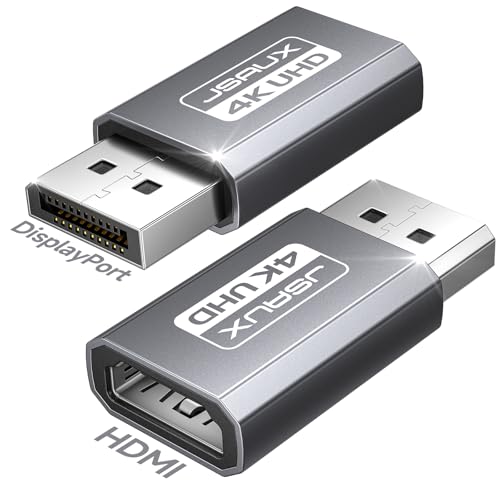
JSAUX DP to HDMI Adapter Review Summary
If you need a straightforward DisplayPort-to-HDMI adapter for a desktop PC or GPU, this JSAUX 2 pack makes sense because it solves a very specific problem without extra complexity.
It suits buyers who want plug-and-play output to an HDMI monitor, TV, or projector and who understand that this is a source-to-display adapter, not a universal converter.
What stands out most is the clarity of the product’s role.
The listing is explicit that it works only from DisplayPort source to HDMI display, which is exactly what many buyers need and exactly what others may overlook.
That makes the adapter a good fit for office setups, home big-screen use, and secondary displays, especially when you want a spare unit in the box.
At the same time, this is not the right product if your system starts on HDMI, USB-C, or Thunderbolt, or if you need a more flexible bidirectional converter.
The resolution support is practical rather than premium: good for everyday 4K output at 30Hz, with support also listed for 2K at 60Hz and 1080p at 120Hz.
Review Scorecard
| Category | Score | Why it scores this way |
|---|---|---|
| Compatibility clarity | 9/10 | The listing clearly states it is DP source to HDMI display only, which reduces guesswork. |
| Everyday usefulness | 8/10 | Good for office, home display, and presentation use where basic plug-and-play matters. |
| Resolution flexibility | 7/10 | 4K@30Hz is useful, but not ideal for users expecting higher-refresh 4K. |
| Setup simplicity | 9/10 | No conversion chain complexity is described; the product is positioned as plug and play. |
| Build practicality | 8/10 | Aluminum housing and gold-plated connector suggest a durable, everyday accessory. |
| Value for multi-device use | 8/10 | The 2 pack is helpful for keeping a spare at home, at work, or in a travel bag. |
| Buyer-risk control | 9/10 | Strong because the listing warns about unsupported ports and bidirectional confusion. |
Key Features and Specifications of JSAUX DP to HDMI Adapter
The core spec is simple: this adapter connects a full-size DisplayPort output on a PC or GPU to an HDMI display.
The listing positions it for TVs, monitors, and projectors, which covers the most common real-world uses for people who are repurposing a desktop or adding a second screen.
The maximum output listed is 4K at 30Hz.
That matters because it sets the expectation correctly: this is useful for everyday desktop work, video playback, and general large-screen output, but it is not marketed as a high-refresh gaming adapter at 4K.
The listing also supports 2K at 60Hz and 1080p at 120Hz, which gives buyers some flexibility at lower resolutions.
The product is explicitly one-way.
It is not bidirectional, it is not an HDMI to DisplayPort adapter, and it is not intended to convert HDMI source signals into DisplayPort.
That limitation is not a flaw if your setup already matches the direction, but it is the single biggest reason to read the listing carefully before buying.
The compatibility notes also narrow the use case.
It is designed for direct DP-to-HDMI connections from a computer or GPU, and the listing says it is not for USB-C or Thunderbolt ports.
It also warns against chaining it with active converters, USB-C to HDMI adapters, or hubs with embedded chips, since that can create instability.
The 2 pack is a practical part of the package.
One adapter can stay at the office and the other at home, or one can serve as a backup for travel and meetings.
The listing also calls out an aluminum housing and gold-plated connector, which points to a straightforward accessory built for repeated plugging rather than a premium active conversion device.
Useful listing facts:
- Brand: JSAUX
- Product type: DP to HDMI adapter
- Quantity: 2 pack
- Direction: DisplayPort source to HDMI display only
- Max listed output: 4K@30Hz
- Other listed modes: 2K@60Hz, 1080p@120Hz
- Intended use: monitors, TVs, projectors, office presentations, home displays
- Not intended for: HDMI-to-DP, USB-C, Thunderbolt, or complex converter chains
Pros and Cons of JSAUX DP to HDMI Adapter
Pros
- Clear one-way purpose, which reduces confusion for the right buyer.
- 2 pack format is useful for redundancy and multi-location setups.
- Plug-and-play positioning keeps the product easy to understand.
- 4K@30Hz support is enough for many office and home viewing scenarios.
- Lower-resolution support gives some flexibility for smoother output at 1080p.
- Aluminum housing and gold-plated connector should suit frequent use.
Cons
- Not bidirectional, so it will not help in the opposite direction.
- Not suitable for USB-C or Thunderbolt ports.
- 4K output is limited to 30Hz, which will disappoint buyers seeking higher refresh rates.
- The listing warns against converter chains, which limits setup flexibility.
- Buyers who want a single do-everything display adapter should look elsewhere.
Who Should Buy JSAUX DP to HDMI Adapter?
This is a good buy for anyone with a desktop PC or GPU that already exposes a full-size DisplayPort output and needs to feed an HDMI monitor, TV, or projector.
It is especially sensible for office users, home users who need a simple big-screen connection, and anyone who wants to keep a spare adapter around for meetings or travel.
It also fits buyers who value clarity over versatility.
If you know your source is DisplayPort and your display is HDMI, this adapter removes the guesswork and should do the job without much setup friction.
You should skip it if your source device is HDMI, USB-C, or Thunderbolt, or if you specifically need a reverse-direction adapter.
You should also skip it if your priority is high-refresh 4K output, because the listed ceiling is 4K@30Hz.
DisplayPort-to-HDMI Use Cases and Limits of JSAUX DP to HDMI Adapter
Desktop Monitor Expansion
For a desktop tower or GPU with DisplayPort outputs, this adapter is a direct way to reach an HDMI monitor.
That is the cleanest use case because the product is designed for exactly that signal path and the listing emphasizes compatibility with PCs and desktop GPUs.
TV and Projector Connections
If you need to send a presentation or general desktop output to an HDMI TV or projector, the adapter’s listed use scenarios line up well.
It is easiest to trust the product when you are connecting a standard DisplayPort source to a standard HDMI display without extra conversion layers.
Resolution and Refresh Tradeoff
The main tradeoff is resolution versus refresh behavior.
4K@30Hz is fine for many common tasks, but buyers should not expect a premium smoothness story at 4K.
The lower-resolution modes listed in the product details are more attractive if motion matters more than absolute resolution.
Setup Mistakes to Avoid
The biggest mistakes are simple ones: buying it for the wrong port type, assuming it works both ways, or trying to fit it into a converter chain the listing says is unsupported.
This is not a weakness if you read it as a narrowly defined tool; it only becomes a problem if you expect universal compatibility.
Alternatives to JSAUX DP to HDMI Adapter
If you need a similar adapter from a different brand, look at Cable Matters DP to HDMI adapter.
Cable Matters is a common alternative when buyers want a straightforward DisplayPort-to-HDMI solution from a known cable/accessory brand.
Another credible option is UGREEN DP to HDMI adapter.
That is worth comparing if you want a comparable plug-and-play accessory and prefer to shop by brand familiarity.
For buyers who want a broader range of display conversion accessories, Anker display adapter options can be a useful search.
That is especially relevant if you are comparing build style and accessory ecosystem rather than only the adapter direction.
Is JSAUX DP to HDMI Adapter Worth It?
Yes, if your setup already matches the direction it supports.
This JSAUX adapter is worth it for buyers who need a simple DisplayPort source to HDMI display connection, want a 2 pack, and do not need a reversible or USB-C-based converter.
It is less compelling for buyers who need high-refresh 4K, broader port flexibility, or a universal adapter that can handle multiple signal directions.
For the right user, though, it is a practical, low-friction accessory that does one job clearly and gives you a second unit for backup or another location.