Building out a Unraid array or cache pool often starts with one problem: not enough SATA ports. The right expansion card can add capacity without introducing stability headaches.
Below, we focus on practical, NAS-friendly options with the chipset and port count balance most Unraid users actually need.
Best 10 Sata Expansion Cards for Unraid Picks for 2026
Best for ZFS Builds
LSI 9300-8i IT Mode 8-Port HBA

- IT-mode LSI/Broadcom SAS3008 controller
- 8 SATA ports via 2× SFF-8643 breakout
- Works well with Unraid, TrueNAS, and ZFS
Best For: Users building a reliable multi-drive Unraid or NAS storage setup.
Best for Easy Setup

- Marvell 88SE9215 chipset for stable operation
- Includes cables, power splitter, low-profile bracket, and screws
- Fits x1/x4/x8/x16 slots with SATA III 6Gbps support
Best For: Unraid users who want a simple, ready-to-install 4-port SATA expansion card.
Best for 6-Bay Expansion
6-Port PCIe 3.0 SATA Expansion Card

- Adds 6 SATA 3.0 ports from a single PCIe 3.0 x4 slot.
- ASM1166 chip with aluminum heatsink for steady 24/7 use.
- Includes SATA cables and both bracket sizes for easier installs.
Best For: Unraid and NAS users who want simple six-drive expansion without hardware RAID.
Best for Easy Boot Drive Setup
4-Port SATA 6Gbps Controller Card

- 4 SATA III 6Gbps ports on a PCIe x1 card
- Includes 4 cables and both bracket sizes
- Non-RAID, bootable design suits simple storage builds
Best For: Users who need a straightforward, bootable SATA expansion card for extra drives in a PC or unraid-style build.
Best for Everyday Use
GLOTRENDS SA3026-C 6-Port SATA Card
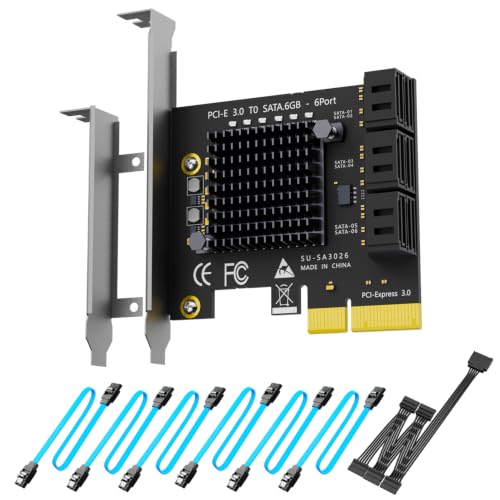
- 6 SATA ports for simple drive expansion
- Includes cables, splitter, and brackets
- Plug-and-play support for major OS and NAS setups
Best For: Users who want an easy-to-install SATA expansion card for Unraid-style storage builds.
Best for Maximum Drive Count

- 10 SATA ports for dense Unraid expansions
- Includes 10 SATA cables and full-height bracket
- Works in PCIe x1, x4, x8, and x16 slots
Best For: Unraid builders who want the most SATA ports from a single card.
Best for Port Count
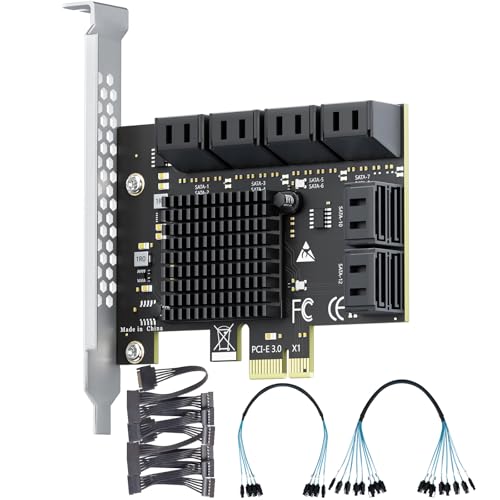
- Adds 12 SATA 3.0 ports from one PCIe 3.0 x1 slot
- Plug-and-play support for major OS and NAS systems
- Includes cables, bracket, and heatsink for server use
Best For: Unraid or NAS builders who want the most SATA ports from a single low-profile expansion card.
Best for Basic 4-Bay Expansion

- Adds four SATA 3.0 ports for extra drives
- Includes 4 cables and a low-profile bracket
- Simple non-RAID design for straightforward expansion
Best For: Budget-minded builders adding a few drives to an Unraid system.
Best for 24/7 NAS Stability
6-Port ASM1166 SATA Expansion Card
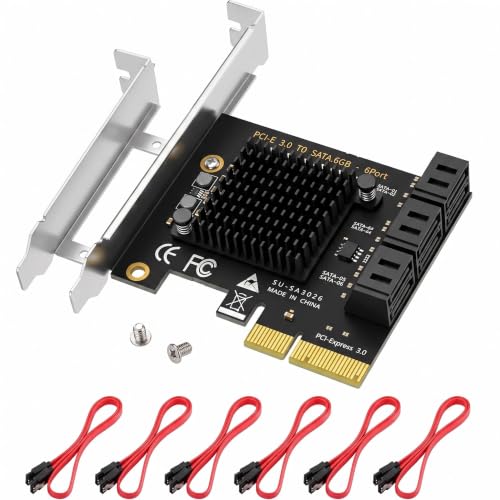
- ASM1166 chipset with PCIe 3.0 x4 interface
- Native Linux support for Unraid and TrueNAS
- Includes 6 SATA cables and both bracket sizes
Best For: Unraid and TrueNAS users building a reliable 6-drive NAS expansion.
Best for Low-Profile Builds
4-Port PCIe SATA 3.0 Expansion Card

- Adds 4 SATA 3.0 ports for simple drive expansion
- Includes 4 cables and a low-profile bracket
- Marvell 88SE9215 chipset works with many OS setups
Best For: Unraid or desktop users needing a compact, easy-to-install 4-port SATA add-in card.
Best for ZFS Builds – LSI 9300-8i IT Mode 8-Port HBA
If you want one of the more capable sata expansion cards for unraid, this LSI 9300-8i IT-mode HBA is built for straightforward storage expansion with modern 12Gbps SAS hardware. It supports up to 8 direct-attached drives, works with SATA disks out of the box, and can scale further through a SAS expander for larger NAS arrays.
Best For: Unraid, TrueNAS, ZFS, and home-lab users who want a reliable PCIe 3.0 x8 HBA for adding multiple SATA drives.
Pros:
- LSI/Broadcom SAS3008 controller in IT mode for HBA-style passthrough
- 8-port support with 2× SFF-8643 internal connectors and included SATA breakout cables
- Good fit for Unraid, TrueNAS, Proxmox, and other storage-focused builds
- Can expand further with a SAS expander for larger arrays
Cons:
- Included cables are for SATA drives only, not SAS drives
- Requires PCIe 3.0 x8 slot support for best compatibility
For builders comparing sata expansion cards for unraid, this card stands out because it favors proven HBA compatibility over flashy extras. It is especially useful when you need dependable multi-drive connectivity and room to grow.
Best for Easy Setup – 4-Port SATA III PCIe X1 Card
If you need a straightforward way to add drives, this 4-port Marvell-based adapter is a practical option for sata expansion cards for unraid. It supports common PCIe slots, includes the key cables and bracket, and is designed for simple installation with hot-swap support.
Best For: Unraid builders who want an easy, low-hassle 4-port SATA add-in card with included accessories.
Pros:
- Marvell 88SE9215 chipset for solid compatibility and stability
- Includes 4 SATA data cables, power splitter, low-profile bracket, and screws
- Works in x1/x4/x8/x16 slots and supports SATA III speeds up to 6Gbps
- Plug-and-play setup with hot-swap support
Cons:
- X1 bandwidth can bottleneck performance if many drives are active at once
- Not the strongest choice for heavy multi-drive workloads
- Speed depends heavily on the PCIe generation in your motherboard
For smaller Unraid expansions, this card covers the basics well and keeps installation simple. It is a sensible pick if you want sata expansion cards for unraid without having to buy extra accessories separately.
Best for 6-Bay Expansion – 6-Port PCIe 3.0 SATA Expansion Card
If you need one of the more straightforward sata expansion cards for unraid, this 6-port ASM1166 card is built for adding several drives at once without complicated setup. It uses a PCIe 3.0 x4 interface, supports plug-and-play operation on major operating systems, and includes cables and brackets for easier installation in a server or NAS build.
Best For: Unraid users who want a simple 6-drive SATA add-in card for storage expansion, monitoring rigs, or budget-friendly NAS builds.
Pros:
- Six SATA 3.0 ports let you expand storage with SSDs or HDDs on one card.
- ASM1166 controller and aluminum heatsink are suited to 24/7 operation.
- Driver-free support across Windows, Linux, macOS, and NAS systems.
- Includes 6 SATA cables, power lead, and both low-profile and full-height brackets.
Cons:
- Hardware RAID and boot-from-card support are not included.
- Bandwidth is shared across all attached drives, so it is not a top pick for maximum per-drive performance.
For builders comparing sata expansion cards for unraid, this is a practical option if your priority is easy 6-bay expansion rather than advanced RAID features or boot support.
Best for Easy Boot Drive Setup – 4-Port SATA 6Gbps Controller Card
If you want a simple way to add reliable storage to a NAS or PC build, this is one of the more practical sata expansion cards for unraid-style setups where you need extra drives without a full RAID feature set. The Marvell 9215 controller, four SATA 3.0 ports, and included cables make it easy to get up and running quickly.
Best For: Builders who want a straightforward, non-RAID SATA card for extra SSDs or HDDs, especially in compact cases or older systems that need a bootable add-in controller.
Pros:
- Four 6Gbps SATA III ports for expanding storage fast
- Non-RAID design is a good fit for simple drive management
- Includes 4 SATA cables plus full-height and low-profile brackets
- Fanless, low-noise operation for home servers and workstations
Cons:
- Only PCIe x1 bandwidth, so it is not ideal for heavy multi-drive throughput
- No hardware RAID features if you need advanced array management
- Compatibility can vary by motherboard, OS, and driver support
For budget-minded builders, this card covers the basics well: extra SATA ports, boot support, and an easy physical install. Among sata expansion cards for unraid, it makes more sense for light-to-moderate drive expansion than for high-performance array workloads.
Best for Everyday Use – GLOTRENDS SA3026-C 6-Port SATA Card
If you want a straightforward way to add more drives, this GLOTRENDS card is a practical pick among sata expansion cards for unraid. It gives you six SATA ports, includes the needed cables, and is designed to work across Windows, Linux, Mac OS, and NAS setups without a complicated install.
Best For: Builders who want a plug-and-play 6-port SATA expansion card for NAS or Unraid-style storage upgrades.
Pros:
- Six SATA ports make it easy to expand a multi-drive storage array.
- Includes SATA cables, power splitter, and both standard and low-profile brackets.
- Plug-and-play support keeps setup simple on Windows, Linux, Mac OS, and NAS systems.
- Built-in LEDs help you quickly check drive activity and status.
Cons:
- No hardware RAID support, so it relies on software-based storage management.
- PCIe 3.0 x2 upstream bandwidth may be limiting for heavier multi-drive workloads.
Overall, this is a solid value option for users who want an easy, included-accessories approach to sata expansion cards for unraid rather than a more advanced RAID-focused controller. It fits well for simple drive growth and general-purpose NAS builds.
Best for Maximum Drive Count – 10Gtek 10-Port PCIe SATA Card
If you need one of the highest-capacity sata expansion cards for unraid, this 10-port 10Gtek card is built for dense storage builds, backup boxes, and media servers. It adds a lot of SATA connections in a single low-cost PCIe slot, and the included cables make it easier to get a new array or cache pool online quickly.
Best For: Unraid users who want to maximize internal drive count with a simple, cable-included expansion card.
Pros:
- Ten SATA ports for large Unraid storage expansions
- Includes 10 SATA cables and a full-height bracket
- Broad slot compatibility across PCIe x1/x4/x8/x16
- JMicron chipset aims for stable non-RAID storage use
Cons:
- No RAID support, so it is strictly for non-RAID setups
- PCIe x1 bandwidth can become a bottleneck with many active drives
- No low-profile bracket included
For Unraid builds that care more about drive count than peak throughput, this is a practical pick. Among sata expansion cards for unraid, it stands out for bundling ten ports and all the cables you need, but it is best suited to workloads where not every drive is hammered at once.
Best for Port Count – 12-Port PCIe 3.0 x1 SATA Card
If you need to add a lot of drives without giving up a large PCIe slot, this is one of the more practical sata expansion cards for unraid. It exposes 12 SATA 3.0 ports from a PCIe 3.0 x1 connection, making it a simple way to scale a media server or storage box with minimal slot usage.
Best For: Unraid builds that need maximum drive count from a single low-bandwidth PCIe slot, especially budget-conscious storage expansions.
Pros:
- 12 SATA ports from just one PCIe 3.0 x1 slot
- Driver-free support for Windows, Linux, macOS, and NAS systems
- Includes cables and a 4U bracket for easier installation
- Built-in heatsink helps with 24/7 server use
Cons:
- Shared bandwidth limits peak performance across all 12 ports
- No hardware RAID or boot support
- Best suited for storage drives, not high-performance workloads
For Unraid users who care more about drive count and easy compatibility than raw throughput, this card is a strong expansion pick. It is especially appealing when you want a straightforward way to add a large number of SATA drives with sata expansion cards for unraid.
Best for Basic 4-Bay Expansion – SATA PCIe 3.0 4-Port Card
If you need a straightforward way to add more drives to a NAS or tower, this is a practical option to consider among sata expansion cards for unraid. It gives you four SATA 3.0 ports, includes cables and a low-profile bracket, and keeps the setup simple with a non-RAID design.
Best For: Budget-minded builders who want a simple 4-port SATA add-in card for extra Unraid storage.
Pros:
- Four SATA 3.0 ports for adding up to four drives
- Includes 4 SATA cables and a low-profile bracket
- Non-RAID design suits simple storage expansion
- Compatible with common Windows, Linux, macOS, and NAS setups
Cons:
- Asmedia-based cards can be motherboard-dependent in compatibility
- Not ideal if you need advanced RAID or higher-end HBA features
- Best for modest expansion rather than large multi-drive arrays
This card is a good fit if you want an affordable, no-frills way to grow storage without complicating your Unraid build. For users comparing sata expansion cards for unraid, it stands out more for simplicity and included accessories than for premium controller features.
Best for 24/7 NAS Stability – 6-Port ASM1166 SATA Expansion Card
If you want one of the more practical sata expansion cards for unraid, this 6-port ASM1166 card is built around straightforward storage expansion rather than flashy extras. It offers native Linux compatibility, 6Gbps per port, and a PCIe 3.0 x4 interface that gives it enough bandwidth for multi-drive arrays without the usual x1-card bottleneck.
Best For: Unraid and TrueNAS users who want a driver-light, 6-drive SATA expansion card for a media server, home lab, or always-on NAS.
Pros:
- ASM1166 chipset with PCIe 3.0 x4 bandwidth is a strong fit for multi-drive arrays
- Native Linux support makes it easy to use with Unraid and TrueNAS
- Includes 6 SATA cables plus both bracket sizes for a more complete install
- Heatsinked design is aimed at better 24/7 thermal stability
Cons:
- Does not support booting an operating system
- Performance depends on available PCIe lanes and motherboard layout
- Bulk cable bundle may be unnecessary if you already have SATA leads
For buyers comparing sata expansion cards for unraid, this model stands out for its balance of compatibility, included accessories, and enough bandwidth for a small-to-mid-size storage pool. It is a sensible pick if your priority is reliable drive expansion more than premium server features.
Best for Low-Profile Builds – 4-Port PCIe SATA 3.0 Expansion Card
If you’re comparing sata expansion cards for unraid, this 4-port PCIe SATA adapter is a straightforward way to add drive bays without moving up to a more expensive HBA. The Marvell 88SE9215 chipset, included SATA cables, and low-profile bracket make it a practical fit for compact storage builds and basic desktop NAS setups.
Best For: Unraid users who want a simple, low-profile 4-port SATA expansion card for adding a few drives on a budget.
Pros:
- 4 SATA 3.0 ports with up to 6Gbps support
- Low-profile bracket plus 4 included SATA cables
- Marvell 88SE9215 chipset for broad OS compatibility
- Fits PCIe x1, x4, x8, and x16 slots
Cons:
- Does not support hardware RAID
- Only 4 ports, so it may outgrow larger arrays quickly
- Best suited to light-to-moderate storage expansion, not heavy enterprise use
For small Unraid arrays, this card covers the essentials well: simple expansion, decent compatibility, and an easy install. If you need a compact option among sata expansion cards for unraid, it’s a sensible pick so long as you don’t need hardware RAID or a large number of ports.
How We Picked These Sata Expansion Cards for Unraid
For Unraid, the best SATA expansion cards are not just the ones with the most ports. We prioritized controller chipset quality, PCIe lane requirements, non-RAID operation, Linux compatibility, and whether the card is a sensible fit for HDDs, SSDs, or both. We also looked at included accessories such as low-profile brackets and SATA cables, since those can affect value and installation ease.
Quick Comparison
If you need the simplest setup, a 4-port card is often enough for a small server or cache build. Mid-range 6-port models are usually the sweet spot for mixed storage expansion. If you are scaling a larger array, higher-port cards or an HBA-style solution can reduce the number of cards and slots you need, but they may require more PCIe bandwidth and better airflow.
Key Buying Factors for Sata Expansion Cards for Unraid
Chipset and Driver Stability
Chipsets with a strong track record in Linux-based systems are usually the safest choice. For Unraid, stable operation matters more than peak specs on the box. Avoid cards that rely on RAID-only behavior if you want each drive to appear individually.
PCIe Lane Width and Bandwidth
A card with too little host bandwidth can bottleneck multiple drives, especially if several SSDs are active at once. PCIe x4 is generally a better fit for 6-port cards and above, while x1 cards are best reserved for lighter use or slower workloads.
Drive Type and Intended Use
Match the card to your workload. HDD arrays need dependable command handling and consistent behavior under load. SSDs benefit more from higher bandwidth and cleaner controller support. If you plan to boot from the card, confirm that boot support is explicitly listed.
Cooling, Layout, and Accessories
More ports can mean more heat, especially in compact cases. Check for low-profile support, connector spacing, and cable inclusion if your case layout is tight. These small details matter in real Unraid builds.
Who Should Buy Which Sata Expansion Cards for Unraid?
If you are expanding a small home server, a 4-port card is usually the most economical choice. If you are building a growing media or backup NAS, a 6-port model offers the best balance of price, expandability, and PCIe efficiency. If you need to connect a lot of disks or want a more server-like setup, an 8-port or 10-port option may be better, but only if your motherboard, case cooling, and PSU can support the added load. For users who want maximum stability and plan to scale further, an HBA-style card is often the best long-term route among Sata Expansion Cards for Unraid.