Choosing the right HBA can make or break a home lab NAS build. The best cards give you clean drive passthrough, broad SAS/SATA compatibility, and enough lanes and ports to grow without constant upgrades.
In this roundup, we focus on practical options for builders who want dependable storage expansion, simple IT-mode operation, and a card that fits real-world NAS layouts.
Best 10 Sas Hba Cards for Home Lab Nas Picks for 2026
Best for 8-Drive NAS Builds

- IT mode SAS3008 controller is ZFS-friendly
- 8 ports with 12Gbps SAS / 6Gbps SATA support
- Includes 2x SFF-8643 to 4x SATA breakout cables
Best For: Home lab NAS builders who need a simple 8-port HBA for SATA arrays and ZFS-friendly passthrough.
Best for Expanding Drives
LSI 9211-4i IT Mode SAS HBA Card

- IT mode passthrough for NAS and ZFS builds
- Includes SFF-8087 to 4x 8482 cable
- Expandable with SAS expander support
Best For: Home lab NAS builders who want a simple IT-mode HBA with room to grow.
Best for TrueNAS IT Mode Builds
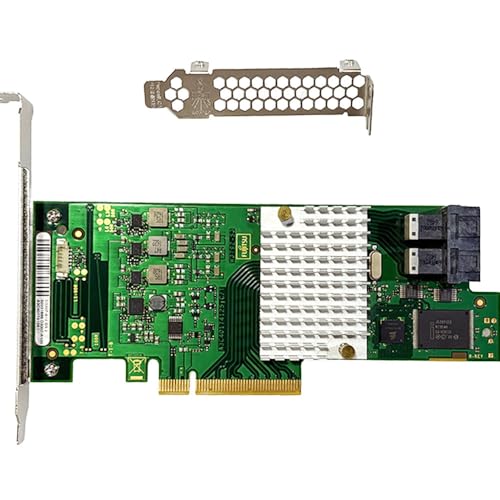
- IT mode for clean ZFS/JBOD passthrough
- 8 drives via dual SFF-8643 internal ports
- 12Gb/s SAS with SATA backward compatibility
Best For: Home lab NAS users building TrueNAS, unRAID, or Proxmox storage with an IT-mode HBA.
Best for IT Mode Expansion
LSI 9211-4i IT Mode 4-Port SAS HBA

- IT mode firmware for ZFS, TrueNAS, and unRAID
- Includes SFF-8087 to 4x SATA cable
- Supports 4 drives with SAS expander compatibility
Best For: Home lab and NAS builders needing a simple IT-mode HBA for direct drive connectivity.
Best for Direct-Attach SAS Builds
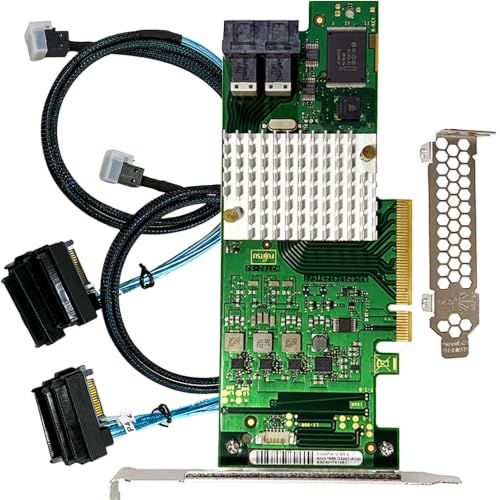
- IT mode passthrough for ZFS and NAS software
- PCIe 3.0 x8 with 12Gbps SAS performance
- Includes 2x SFF-8643 to 4x SFF-8482 SAS cables
Best For: Home-lab NAS builders who want a stable, expandable SAS HBA for direct-attached drives.
Best 8-Port IT Mode
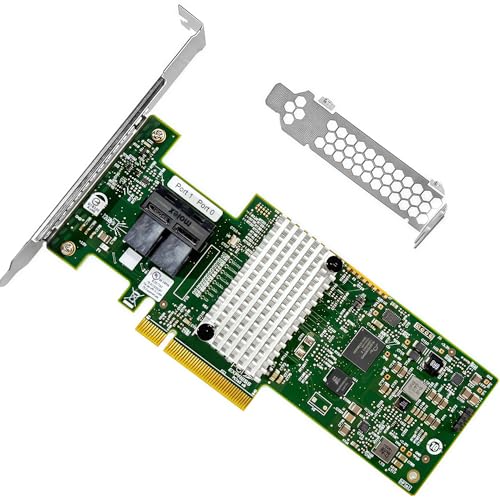
- IT mode LSI SAS3008 controller
- 2× SFF-8643 internal ports for 8 drives
- 12Gb/s SAS3 and PCIe 3.0 x8 support
Best For: Home lab NAS builds that need a compatible, expandable HBA for ZFS, TrueNAS, or unRAID.
Best 16-Port Expandability
LSI 9305-16i 16-Port 12Gbps SAS HBA

- 16-port SAS3 HBA with 12Gb/s per lane
- IT mode for ZFS, TrueNAS, and unRAID
- Includes four SFF-8643 to 8482 SAS cables
Best For: Homelab NAS builders needing a high-port-count IT-mode HBA for SAS drives and expandable arrays.
Best for 16-Bay Expansion
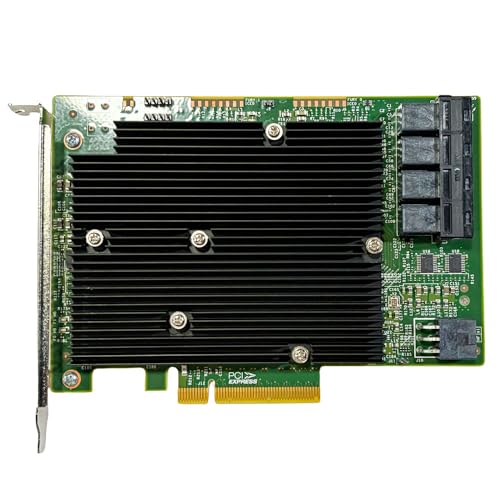
- 16 ports with 4× SFF-8643 internal connectors
- IT mode firmware for ZFS, TrueNAS, and unRAID
- 12Gb/s SAS with SATA backward compatibility
Best For: Home lab NAS builders planning a larger 16-drive or expander-based array.
Best for High-Density ZFS Builds
LSI 9400-16i IT Mode 16-Port HBA

- IT mode for clean JBOD passthrough
- 4x SFF-8643 ports for up to 16 drives
- 12Gbps SAS / 6Gbps SATA support
Best For: ZFS and TrueNAS builders who want a scalable, direct-attached HBA for larger NAS arrays.
Best for 16-Port Expansion

- IT mode passthrough for ZFS and TrueNAS
- Up to 16 SAS/SATA drives with breakout cables
- 12Gbps SAS performance with expander support
Best For: Home-lab NAS builders who need a high-port-count IT mode HBA for direct-attached storage.
Best for 8-Drive NAS Builds – LSI 9300-8i SAS HBA Card
If you’re comparing sas hba cards for home lab nas builds, this LSI 9300-8i IT mode card is a straightforward way to add clean, non-RAID storage connectivity for ZFS, TrueNAS, unRAID, Proxmox, or ESXi. It supports up to 8 direct-attached drives, uses PCIe 3.0 x8, and includes breakout cables in the box for SATA-only arrays.
Best For: Home lab builders who want a simple 8-port HBA for SATA-based NAS arrays and ZFS-friendly passthrough.
Pros:
- LSI/Broadcom SAS3008 in IT mode is ideal for ZFS and other direct-disk setups
- 8-port, 12Gbps design gives plenty of headroom for modern home NAS storage
- Includes 2x SFF-8643 to 4x SATA cables, so you can get started faster
- Compatible with popular platforms like TrueNAS, unRAID, Proxmox, and ESXi
Cons:
- Included cables are for SATA drives only, not SAS drives
- May be more controller than needed for very small NAS builds
- External SAS Expander support is useful, but adds complexity for larger arrays
For sas hba cards for home lab nas setups, this card stands out as a practical IT-mode option with the right mix of speed, compatibility, and expansion flexibility. It’s especially appealing if you want a proven LSI-based controller and enough ports to grow without moving into a full RAID card.
Best for Expanding Drives – LSI 9211-4i IT Mode SAS HBA Card
If you need one of the more flexible sas hba cards for home lab nas builds, this LSI SAS2008-based card is a practical pick for connecting up to four SATA/SAS drives directly and scaling out through an expander later. It runs in IT mode for clean passthrough, which makes it a solid fit for ZFS-focused systems like TrueNAS, FreeNAS, and unRAID.
Best For: Home lab NAS builders who want a simple IT-mode HBA with room to grow from a small array to a larger expander setup.
Pros:
- LSI SAS2008 controller in IT mode for straightforward drive passthrough
- Includes SFF-8087 to 4x 8482 cable for immediate 4-drive hookup
- Supports SAS/SATA at 6Gb/s and PCIe 2.0 x4 hosts
- Works well with TrueNAS, FreeNAS, unRAID, ZFS, and JBOD setups
Cons:
- Only one internal Mini SAS port, so direct-drive capacity is limited without an expander
- PCIe 2.0 is older hardware compared with newer HBA options
- May require extra airflow in compact cases
This card makes sense if you want dependable sas hba cards for home lab nas use without paying for extra features you may not need. The included breakout cable and IT-mode firmware make it an easy, utility-first choice for a storage server build.
Best for TrueNAS IT Mode Builds – LSI 9300-8i 8-Port SAS HBA
If you’re comparing sas hba cards for home lab nas setups, this LSI 9300-8i-class card is a practical pick for direct-attach storage and simple IT-mode passthrough. It gives you 8 ports over two SFF-8643 connectors, 12Gb/s SAS support, and broad compatibility with ZFS-focused builds like TrueNAS and unRAID.
Best For: Home lab NAS builders who want a straightforward IT-mode HBA for ZFS, TrueNAS, unRAID, or Proxmox passthrough.
Pros:
- LSI/Broadcom SAS3008 controller in IT mode for clean passthrough
- 8-drive support with two internal SFF-8643 connectors
- 12Gb/s SAS speed with SATA 6Gb/s backward compatibility
- Works well for ZFS, TrueNAS, unRAID, and JBOD arrays
Cons:
- Not a RAID card, so it won’t manage arrays in hardware
- Needs the right breakout cables or expander for some drive layouts
For builders who want a dependable SAS HBA without RAID complexity, this card hits the core requirements well. It’s a strong fit for sas hba cards for home lab nas buyers who value compatibility, expandability, and IT-mode simplicity over extra controller features.
Best for IT Mode Expansion – LSI 9211-4i IT Mode 4-Port SAS HBA
If you want a straightforward add-in card for sas hba cards for home lab nas builds, this LSI 9211-4i compatible HBA is aimed at simple, reliable drive connectivity rather than RAID features. It runs in IT mode, supports 6Gb/s SAS/SATA, and includes an SFF-8087 to 4x SATA cable, making it a practical pick for ZFS, TrueNAS, unRAID, and JBOD-style storage setups.
Best For: Home lab builders and NAS users who want a basic IT-mode HBA for direct-attached drives and easy expansion.
Pros:
- IT mode firmware is ideal for ZFS, TrueNAS, and unRAID pass-through
- Includes one SFF-8087 to 4x SATA cable for immediate use
- Supports up to 4 direct-attached drives, with SAS expander compatibility
- PCIe 2.0 x4 and 6Gb/s per port are enough for many home lab NAS builds
Cons:
- Only four internal ports, so larger arrays need an expander
- Older PCIe 2.0 hardware is less future-proof than newer controllers
- Basic HBA design offers no RAID features or advanced management tools
For practical sas hba cards for home lab nas use, this card makes the most sense when you want a no-frills HBA that is easy to slot into a storage server and let the OS handle the disks.
Best for Direct-Attach SAS Builds – LSI 9300-8i 8-Port SAS HBA
If you’re comparing sas hba cards for home lab nas, this LSI SAS3008-based card is a straightforward pick for direct-disk storage builds. It runs in IT mode for clean passthrough, supports up to 12Gbps SAS and 6Gbps SATA, and gives you two Mini-SAS HD ports for up to eight drives without RAID overhead.
Best For: Home-lab NAS builders who want a simple, stable HBA for TrueNAS, unRAID, Proxmox, or ESXi with direct-attached SAS storage.
Pros:
- IT mode firmware is ideal for ZFS and software-defined storage
- PCIe 3.0 x8 and SAS3008 controller deliver solid 12Gbps throughput
- Includes two SFF-8643 to 4x SFF-8482 cables for SAS drive hookups
- Expandable design can work with an external SAS expander for larger arrays
Cons:
- Included cables are for SAS drives only, not SATA
- May require separate SATA breakout cables if your build uses SATA disks
- More card than needed for very small or low-drive-count NAS setups
For builders focused on sas hba cards for home lab nas, this model stands out for its no-RAID IT mode, broad compatibility, and included SAS cabling. It’s a practical choice if you want dependable passthrough now and room to scale later.
Best 8-Port IT Mode – LSI 9302-8i SAS HBA
If you’re comparing sas hba cards for home lab nas builds, this LSI 9302-8i compatible HBA is a straightforward pick for ZFS, TrueNAS, and unRAID storage setups. It runs in IT mode, offers 12Gb/s SAS3 performance, and gives you two internal SFF-8643 ports for up to eight direct-connected drives or a larger array through an expander.
Best For: Home lab builders who want a simple, compatible SAS HBA for a small-to-medium NAS with room to expand.
Pros:
- LSI SAS3008 controller with IT mode for clean passthrough to ZFS and NAS software
- 2× SFF-8643 internal ports support up to 8 drives directly
- PCIe 3.0 x8 interface and 12Gb/s SAS3 speeds for solid storage bandwidth
- Works well for TrueNAS, FreeNAS, unRAID, and DAS enclosures
Cons:
- Requires the right breakout cables or expander hardware to use all lanes
- Not the best choice if you need more than 8 direct-attached drives without expansion
For buyers focused on sas hba cards for home lab nas projects, this card hits the important basics: IT mode compatibility, SAS3 throughput, and flexible expansion. It’s a practical option if you want a dependable HBA without chasing enterprise pricing.
Best 16-Port Expandability – LSI 9305-16i 16-Port 12Gbps SAS HBA
If you want one of the more capable sas hba cards for home lab nas builds, this LSI 9305-16i-compatible board is built around Broadcom SAS3216 hardware and runs in IT mode for clean passthrough to ZFS, TrueNAS, unRAID, and similar storage stacks. Its PCIe 3.0 x8 interface, 12Gb/s SAS3 lanes, and support for direct-attach or expanded drive counts make it a strong fit for larger DIY arrays.
Best For: Builders who need a 16-port IT-mode HBA for NAS, JBOD, or Proxmox/ESXi storage projects.
Pros:
- 16-port SAS3 design with 12Gb/s lanes and PCIe 3.0 x8 host interface
- IT mode firmware works well with ZFS, TrueNAS, and unRAID passthrough
- Includes four SFF-8643 to 8482 cables in the box for SAS drive hookups
Cons:
- Included cables are for SAS drives only, not SATA drives
- May be more HBA than small NAS builds need
For homelab users comparing sas hba cards for home lab nas storage, this card stands out for drive count, modern SAS3 bandwidth, and straightforward IT-mode compatibility. Just plan on separate breakout cables if your array uses SATA drives.
Best for 16-Bay Expansion – LSI 9300-16i IT Mode SAS HBA
If you need one of the more expansion-friendly sas hba cards for home lab nas, this LSI 9300-16i compatible card is built for larger storage pools. It runs in IT mode, supports 12Gb/s SAS with SATA backward compatibility, and gives you four internal SFF-8643 ports for direct-drive cabling or use with an SAS expander.
Best For: Builders who want a straightforward 16-port HBA for ZFS, TrueNAS, unRAID, or JBOD setups without paying for a top-tier branded card.
Pros:
- 16-port design with 4× SFF-8643 connectors for flexible drive layouts
- IT mode firmware is ideal for passthrough-friendly NAS and ZFS use
- 12Gb/s SAS support with SATA 6Gb/s/3Gb/s backward compatibility
- PCIe 3.0 x8 interface suits high-drive-count home lab builds
Cons:
- Not the cheapest option if you only need a few drive connections
- May require breakouts or an expander for neat large-array cabling
For builders comparing sas hba cards for home lab nas, this one stands out for its high port count and practical IT mode setup. It’s a sensible fit when you want room to grow into a larger ZFS or TrueNAS array.
Best for High-Density ZFS Builds – LSI 9400-16i IT Mode 16-Port HBA
If you’re comparing sas hba cards for home lab nas, this 16-port IT-mode HBA stands out for builders who want simple, direct-attached storage without RAID complexity. It supports Broadcom SAS3416 tri-mode hardware, 4x internal SFF-8643 ports, and up to 12Gbps SAS speeds for modern backplanes and disk arrays.
Best For: ZFS, TrueNAS, unRAID, and Proxmox users who want a clean JBOD passthrough card for larger SATA/SAS storage pools.
Pros:
- IT mode firmware is ideal for ZFS and other software-defined storage setups
- Four internal SFF-8643 ports support up to 16 drives with breakout cables
- 12Gbps SAS / 6Gbps SATA support suits mixed home-lab and NAS storage
- PCIe 3.1 x8 interface fits high-bandwidth storage builds
Cons:
- Cables are not included, so you’ll need compatible breakout leads
- May be overkill for small NAS builds with only a few drives
- Bracket type can vary by shipment batch
This is a strong pick if you want dependable expansion for sas hba cards for home lab nas without relying on RAID features. It is especially appealing for users planning a scalable ZFS or TrueNAS array with room to grow.
Best for 16-Port Expansion – LSI 9400-16i 16-Port HBA
If you need one of the more capable sas hba cards for home lab nas builds, this LSI 9400-16i-compatible HBA is built for dense drive shelves, clean JBOD passthrough, and ZFS-friendly storage layouts. Its IT mode firmware and 4x SFF-8643 internal ports make it a practical fit for direct-attached SAS/SATA arrays without RAID overhead.
Best For: Home-lab and NAS users who want a 16-port IT mode HBA for TrueNAS, unRAID, Proxmox, or ESXi with room to grow.
Pros:
- IT mode passthrough is ideal for ZFS, TrueNAS, and unRAID
- Supports up to 16 SAS/SATA drives via breakout cables
- 12Gbps SAS / 6Gbps SATA performance suits modern backplanes
- Can scale further with an external SAS expander
Cons:
- Cables and drives are not included
- May be overkill for small 2-4 drive builds
- Low-profile or full-height bracket may vary by shipment
For builders comparing sas hba cards for home lab nas systems, this card stands out when you want a straightforward, high-port-count controller that prioritizes compatibility and expandability over RAID features. It’s a strong match for larger DIY storage servers that need dependable direct-attached drive support.
How We Picked These Sas Hba Cards for Home Lab Nas Builds
We looked for cards that fit the most common home lab use cases: reliable IT mode support, solid port counts, broad compatibility with SATA and SAS drives, and sensible PCIe bandwidth for multi-drive arrays. We also favored models with clear expansion options, since many Sas Hba Cards for Home Lab Nas are chosen for their ability to support direct-attached drives or external expanders.
Where relevant, we considered connector style, lane requirements, and whether a card is better suited to a small starter NAS or a larger storage server. The goal was to prioritize stable storage access over flashy specs.
Quick Comparison: Which Card Type Fits Which Build?
For a compact NAS with a few drives, 4-port 6 Gb/s cards are usually the simplest and most budget-friendly choice. For most enthusiast builds, 8-port 12 Gb/s cards offer the best balance of throughput, cabling flexibility, and future expansion. If you are planning a larger array, 16-port models make more sense, especially when you want fewer cards and cleaner wiring.
Also pay attention to the connector standard. Many older systems use SFF-8087, while newer cards may use SFF-8643. Matching the connector to your backplane or breakout cables avoids unnecessary adapter purchases.
Key Buying Factors for Sas Hba Cards for Home Lab Nas
IT Mode Versus RAID Mode
For NAS and home lab storage, IT mode is usually the right choice because it passes drives through to your operating system without hardware RAID abstraction. That makes it easier to use software RAID, ZFS, Unraid, TrueNAS, or similar platforms.
Port Count and Drive Growth
Choose a port count based on your near-term expansion, not just your current disks. A 4-port card may be enough today, but an 8-port card often saves money later if you expect to add more drives or move to a larger chassis.
PCIe Generation and Lane Width
Most home lab NAS users should target PCIe 3.0 x8-class cards when possible, since they better support multiple drives under load. PCIe 2.0 cards can still work well for smaller builds, but they are more limiting for high-drive-count systems.
Connector and Cable Compatibility
Check whether your card uses SFF-8087, SFF-8643, or another interface before buying. Cable compatibility is one of the easiest things to overlook, and it can affect both installation time and total build cost.
Who Should Buy Which Sas Hba Cards for Home Lab Nas?
If you are building a first NAS or a small backup box, a 4-port model is usually enough. If you want the best all-around option for Sas Hba Cards for Home Lab Nas, an 8-port IT-mode card is the most versatile choice. If you are running a larger storage server, multiple VM hosts, or a dense drive shelf, a 16-port card is worth considering for simpler scaling and fewer expansion slots used.
In short, match the card to your chassis, cabling, and future drive count. The best HBA is the one that gives you stable passthrough today and room to grow tomorrow.