If you are comparing a LENTION 6-in-1 USB-C Hub review against simpler adapters, the key question is whether you need more than basic port expansion.
This model is aimed at people who want a compact hub that covers display output, wired networking, card reading, and charging in one place.
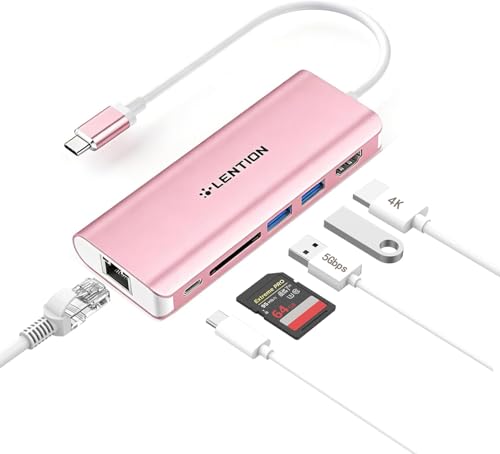
LENTION 6-in-1 USB-C Hub Review Summary
The LENTION 6-in-1 USB-C Hub makes sense for buyers who want a practical desk and travel accessory instead of a bare-bones dongle.
Based on the listing, it combines dual USB 3.0 ports, HDMI output, Ethernet, a card reader, and USB-C power pass-through, which means it is built for people who move between work, study, and portable setups and do not want to carry several separate adapters.
Best for: laptop users who need a simple multiport hub with wired internet, memory card access, and display support in one compact unit.
Less ideal for: buyers who need a much larger port array, higher-resolution display output than 4K at 30Hz, or a hub that is clearly positioned for heavy workstation expansion.
Review Scorecard
| Category | Score | Why it scores that way |
|---|---|---|
| Port variety | 8/10 | Covers the core daily needs: USB-A, HDMI, Ethernet, card reading, and charging passthrough. |
| Display flexibility | 7/10 | HDMI 1.4 with 4K at 30Hz is useful, but not the top tier for smooth high-refresh use. |
| Connectivity reliability | 8/10 | Built-in gigabit Ethernet is a strong fit for stable wired internet. |
| Power pass-through | 7/10 | Up to 100W input is appealing, though the listing notes up to 60W passed through to devices. |
| Device compatibility | 8/10 | The listing covers MacBook, Surface, Chromebook, tablets, and phones with USB-C. |
| Portability | 9/10 | Small hub format makes it easy to keep in a bag or use on the go. |
| Value for everyday use | 8/10 | It bundles several practical functions without pushing into niche complexity. |
Review CTAs
If your setup regularly needs both a screen and a network cable, this kind of hub is more useful than a simple USB splitter.
It is especially compelling when your laptop has only one USB-C port available and you still need to charge while staying connected.
Key Features and Specifications of LENTION 6-in-1 USB-C Hub
The strongest part of the LENTION 6-in-1 USB-C Hub is how it packages several common needs into a single accessory.
The listing describes two USB 3.0 ports with transfer speeds up to 5Gbps, an HDMI 1.4 port, Ethernet, a card slot, and USB-C power delivery support.
The hub also targets a wide range of devices.
The product page says it is compatible with recent MacBook Pro and MacBook Air models, iMac and iMac Pro, Surface devices with USB-C, Chromebooks, and other full-function USB-C laptops, tablets, and smartphones.
That broad compatibility matters because this type of accessory is often bought as a shared tool across different machines.
Key listing details worth noting:
- Dual USB 3.0 ports for peripherals like keyboards, mice, flash drives, and hard drives
- Card reader support for SD, SDHC, SDXC, and MMC cards
- HDMI output for mirrored or extended displays
- Up to 4K at 30Hz or 2K at 60Hz through the video port
- Ethernet for 10/100/1000 Mbps wired networking
- USB-C power delivery pass-through rated up to 100W input, with the listing describing up to 60W passed to the device
- Stable Driver 3.0 certification, which the brand says is meant to reduce interference, support power delivery, and keep temperatures under control
That set of features points to a hub designed for predictable, everyday utility.
It is not trying to be a giant docking station.
Instead, it focuses on the most common tasks a lightweight USB-C workstation needs.
Pros and Cons of LENTION 6-in-1 USB-C Hub
Pros
- Covers several essential ports in one compact adapter
- Includes Ethernet, which many thin laptops do not have built in
- HDMI output is useful for external monitors, TVs, and projectors
- USB 3.0 support is a solid fit for everyday peripherals and drives
- Card reader support is useful for photographers, students, and office users moving files often
- Broad compatibility makes it easier to use across different USB-C devices
Cons
- HDMI tops out at 4K at 30Hz, which will not satisfy everyone
- The hub is functional rather than feature-heavy, so power users may want more ports
- The listing’s charging language requires close reading because input and pass-through figures are not identical
- It is a practical utility product, not a premium docking ecosystem
The overall tradeoff is straightforward.
You get a focused set of features that match normal laptop expansion needs, but you do not get the broad expansion or display flexibility of a larger dock.
Who Should Buy LENTION 6-in-1 USB-C Hub?
This hub is a good fit for people who want to keep a laptop setup clean without giving up practical connections.
If you use a USB-C notebook for work, class, remote meetings, or travel, the combination of HDMI, Ethernet, USB-A ports, and a card reader can cover most day-to-day situations.
It is also sensible for users who move between multiple spaces.
A student may want the hub for a monitor and memory cards at a desk, then unplug it and carry it in a bag.
A remote worker may care more about the wired internet connection than about having a giant desktop dock.
The listing’s broad compatibility also makes it a reasonable shared accessory for households or small offices with mixed USB-C devices.
Who should skip it:
- Buyers who need more than two USB-A ports
- Users who want a higher refresh-rate display experience
- People building a permanent multi-monitor workstation and expecting advanced dock features
- Anyone who does not need Ethernet or card reading, because a simpler adapter may be enough
In other words, the LENTION 6-in-1 USB-C Hub is for practical expansion, not maximum expansion.
That distinction matters when choosing between a small hub and a larger desktop dock.
Everyday Use and Compatibility of LENTION 6-in-1 USB-C Hub
For desk setups
On a desk, the most valuable parts of this hub are the Ethernet port and HDMI output.
Together they solve two of the most common laptop limitations: unstable wireless connections and the lack of a direct monitor connection.
If your routine includes docking to a screen, then this hub can reduce clutter while still keeping the setup simple.
For travel and shared spaces
The compact 6-in-1 format makes more sense for travel than a full dock.
It can handle a hotel monitor, a classroom projector, or an office desk without asking you to carry a bulky accessory.
The broad device compatibility also matters if you use more than one USB-C machine across the week.
For cards and peripherals
The built-in card slot expands the hub beyond standard USB charging and display tasks.
That is useful if you frequently move photos, documents, or media files from memory cards.
The dual USB 3.0 ports add just enough room for common accessories like a mouse, keyboard, or external drive.
For charging while connected
The pass-through charging support is what keeps this hub from feeling like a compromise.
Instead of choosing between accessories and battery life, you can keep the laptop powered while using the other ports.
That is one of the most important features in a compact USB-C hub, especially for people working away from a full desktop setup.
Alternatives to LENTION 6-in-1 USB-C Hub
If you want a similar USB-C hub but need different port combinations or display behavior, these are reasonable alternatives to compare:
Anker and UGREEN are often worth checking first if you want broadly available hub options with a similar everyday-use focus.
Satechi is a common comparison point when the buyer wants a more premium-feeling desk accessory.
Hiearcool is another name to look at if you are shopping for a compact, travel-friendly multiport adapter and want to compare feature sets rather than lock into one brand immediately.
Is LENTION 6-in-1 USB-C Hub Worth It?
Yes, if your goal is practical USB-C expansion rather than maximum dock capability.
The LENTION 6-in-1 USB-C Hub looks well matched to buyers who need HDMI, Ethernet, card access, charging passthrough, and a couple of USB-A ports in one portable device.
It is not the right pick for everyone.
If you need more display muscle, more ports, or a workstation-style dock, you should look higher up the category ladder.
But for everyday laptop use, especially where wired internet and basic external display support matter, this is a sensible and well-targeted hub.