PCCOOLER DC360 review: this 360mm AIO stands out for buyers who want real cooling hardware plus a customizable LCD.
It looks aimed at gaming and creator builds that need both thermal headroom and visual polish.
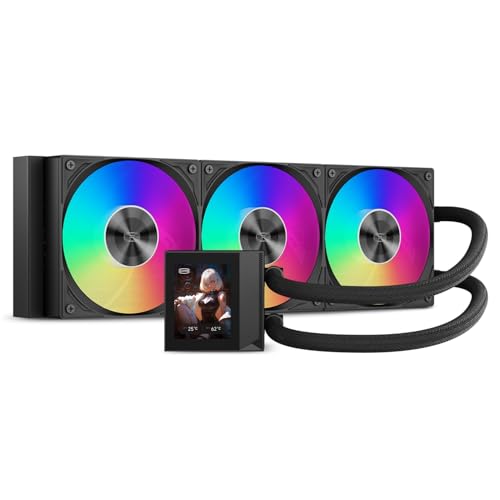
DC360 Review Summary
The PCCOOLER DC360 makes sense if you want a feature-rich 360mm liquid cooler for a modern desktop and you care about presentation as much as airflow.
Its selling points are straightforward: a 2.4-inch IPS LCD, ARGB fans, a 2600 RPM pump, and support for current Intel and AMD sockets.
It is especially relevant for builders who are tired of plain pump blocks and want a cooler that can show system data or custom media.
At the same time, it is still a practical part, not just a display piece, because the radiator size, pump speed, and high-static-pressure fans are all aimed at moving heat away from demanding CPUs.
Review Scorecard
| Category | Score | Buyer-focused rationale |
|---|---|---|
| Cooling headroom | 8 | A 360mm radiator with three 120mm fans is the right class for demanding gaming and creator CPUs. |
| Feature set | 9 | The 2.4-inch IPS LCD and media support make it more versatile than a basic AIO. |
| Build compatibility | 8 | Broad socket coverage helps, but case clearance and internal USB availability still matter. |
| Cable management | 8 | Pre-installed fans and organized cabling should reduce clutter during assembly. |
| Noise-to-performance balance | 7 | PWM control is useful, but the listing emphasizes speed and airflow more than silence. |
| Aesthetic value | 9 | The LCD and ARGB lighting give it strong visual appeal for showcase builds. |
| Overall value proposition | 8 | It combines cooling, compatibility, and presentation in one package, which is the main reason to buy it. |
In plain terms, the DC360 is a good fit for builders who want an LCD AIO without giving up mainstream compatibility.
If your case supports a 360mm radiator and you have the internal USB header it needs, this is the kind of cooler that can anchor a clean, high-end build.
Key Features and Specifications of DC360
The DC360 is a 360mm all-in-one liquid cooler with a 2.4-inch IPS LCD on the pump block.
PCCOOLER says the screen can show real-time system information or custom PNG, JPG, GIF, and MP4 content through its software, and the screen orientation can be adjusted for different mounting layouts.
The cooling hardware is built around a 360mm aluminum radiator, a 2600 RPM pump, and three 120mm high-static-pressure fans.
The fans are PWM controlled and run from 500 to 2500 RPM, which gives the cooler the range to adapt between lighter daily use and heavier thermal loads.
ARGB lighting is handled through a standard 5V 3-pin header, so the lighting can sync with a compatible motherboard ecosystem.
PCCOOLER also says the fans come pre-installed and the cabling is organized to reduce setup effort and help the finished build look cleaner.
Here are the practical fit details that matter most:
| Spec | What it means for buyers |
|---|---|
| 360mm radiator | Best suited to cases with full 360mm radiator support. |
| 2.4-inch IPS LCD | Useful for temperatures, hardware info, or custom visuals. |
| 2600 RPM pump | A higher-speed pump is part of the cooler’s thermal-focused design. |
| Three 120mm fans | Standard 360mm format with a strong airflow profile. |
| Fan speed range: 500 to 2500 RPM | Broad control range for performance tuning. |
| Tubing length: 400mm | Helps with top or front mounting in compatible cases. |
| Socket support | Intel LGA1851, LGA1700, LGA1200, LGA115X and AMD AM5, AM4. |
| Internal USB connection required | Necessary for LCD function, so header availability matters. |
One important caveat is physical fit.
PCCOOLER lists a radiator size of 394 × 120 × 27 mm plus 25 mm fans, so the total footprint is not trivial.
If your case is already tight around the top panel, VRM heatsinks, or front drive cage, this is the sort of cooler that can become a mechanical problem even when the socket support looks perfect on paper.
Pros and Cons of DC360
Pros
- The 2.4-inch IPS LCD adds real utility and a better showcase look than a plain pump block.
- Broad Intel and AMD socket support makes it relevant across many current and recent builds.
- The 360mm radiator and three high-static-pressure fans suit power-hungry CPUs.
- PWM fan control gives you room to tune performance and acoustics.
- Pre-installed fans and organized cabling should simplify the install.
- ARGB support helps the cooler blend into synchronized lighting builds.
Cons
- It is only a good choice if your case can physically handle a 360mm radiator.
- The LCD requires an internal USB connection, which can be a constraint in some systems.
- The listing emphasizes performance and features more than quiet operation, so silence-focused buyers may want to compare options carefully.
- The display is a plus only if you actually want to configure and maintain it.
The short version: the strengths are obvious, but so are the setup requirements.
This is not a universal cooler.
It is a feature-led 360mm AIO that makes sense when the case, header layout, and build goals all line up.
Who Should Buy DC360?
Buy the DC360 if you are building around a modern Intel or AMD CPU and want a cooler that is both functional and visually distinctive.
It fits especially well in gaming PCs, creator rigs, and showcase systems where the pump block display is part of the design language.
It also makes sense if you prefer a single purchase that covers thermal hardware and aesthetic impact at the same time.
A lot of LCD coolers lean hard into the novelty side; this one still looks like it is built around a genuine 360mm cooling platform.
You should probably skip it if your case does not support a 360mm radiator, if you do not have the internal USB connection needed for the LCD, or if you just want a simple low-fuss cooler.
Builders who prioritize minimal software, basic appearance, or absolute case compatibility should look at simpler 240mm or air-cooling alternatives instead.
Cooling and Build Fit
360mm Format Matters
The DC360’s 360mm radiator is the core of the product.
That size is what makes it suitable for demanding desktops, but it also makes the case fit check non-negotiable.
If the case is too compact, the value of the LCD and ARGB features drops quickly because the cooler simply will not install comfortably.
LCD Utility vs. Decoration
The 2.4-inch IPS LCD is more than a gimmick if you plan to use it for system information or custom media.
For a lot of builders, that is the difference between a cooler that disappears into the build and one that becomes a centerpiece.
If you will never configure the screen, though, you are paying for functionality you may not use.
Socket and Header Compatibility
Support for Intel LGA1851, LGA1700, LGA1200, LGA115X and AMD AM5, AM4 makes the DC360 broadly relevant.
The internal USB requirement is the other piece to verify early, because the LCD depends on it.
In practice, the right buyer is someone who checks both motherboard headers and radiator clearance before ordering.
Cable and Assembly Experience
Pre-installed fans and cleaner cabling are the kind of details that matter during a real build.
They do not make the cooler special on paper, but they can reduce frustration when you are routing power, ARGB, and USB connections in a crowded chassis.
For builders who hate clutter, that is a legitimate benefit.
Alternatives to DC360
If you want a comparable 360mm LCD AIO, look at the NZXT Kraken 360 as a premium-style alternative with a similar focus on display-driven builds.
If you want a different balance of performance and polish, the Corsair iCUE H150i line is a common 360mm comparison point for mainstream high-end systems.
If you prefer broader cooling ecosystems and often compare enthusiast options, the ASUS ROG Ryujin III 360 is another obvious LCD-equipped rival to research.
If you care more about cooling-first value than the screen itself, the Arctic Liquid Freezer III 360 is worth checking because it shifts the focus toward thermal performance.
If you want a more budget-conscious 360mm class option, the Cooler Master MasterLiquid 360 family is a sensible place to compare features and case fit.
Is DC360 Worth It?
Yes, if you want a 360mm AIO with an LCD and your case can support it. The PCCOOLER DC360 is worth considering for builders who want a cooler that combines real socket coverage, a substantial radiator, ARGB lighting, and a customizable display.
No, if you only need basic cooling or your case is tight. The DC360 is best seen as a feature-rich showcase cooler with legitimate thermal ambitions, not a universal recommendation.
If your build can accommodate it and you will use the screen, it is an easy product to justify.
If not, a simpler cooler will be the better buy.