The best professional portable OLED monitors combine rich contrast, wide color coverage, and a travel-friendly design for photographers, video editors, consultants, and mobile professionals. The right model can turn a laptop into a more capable workstation without the bulk of a desktop display.
Our roundup compares 10 OLED options across resolution, screen size, connectivity, portability, touch support, refresh rate, and productivity features. Use the guide below to narrow the choices based on how and where you work.
Best 10 Professional Portable OLED Monitors Picks for 2026
Color-Accurate Classic

- 15.6-inch Full HD OLED with 100% DCI-P3
- USB-C and mini-HDMI connectivity
- 360-degree kickstand and tripod socket
Best For: Mobile photo/video editing and flexible business setups
4K Travel Specialist

- 4K UHD OLED panel with 1ms response
- Only 1.5 pounds and 0.6 inches thick
- USB-C power delivery plus mini-HDMI
Best For: Creative professionals needing maximum detail on the go
Best 4K OLED Detail
UPERFECT 13.3-inch 4K OLED Monitor

- 4K OLED with 109% DCI-P3 color
- 500 nits and 1ms response time
- Compact aluminum USB-C/HDMI design
Best For: Mobile creators and 4K editing
Best Productivity Screen
AOC 16-inch OLED Portable Monitor

- 16:10 OLED panel for extra vertical workspace
- Dual USB-C plus Mini HDMI connectivity
- Integrated adjustable kickstand and speakers
Best For: Traveling professionals and multitaskers
Best for 4K Editing
INNOCN 15.6-inch 4K OLED Touch Monitor
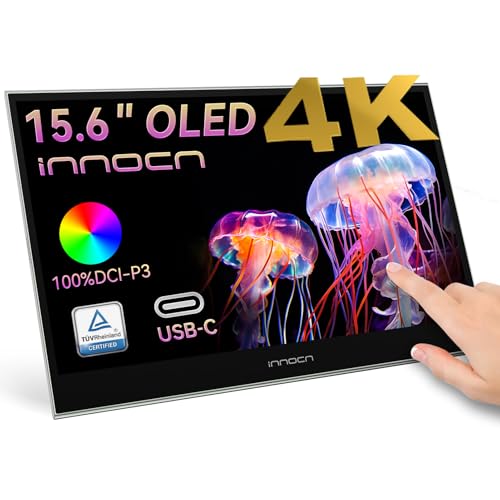
- 4K OLED panel with 100% DCI-P3
- 10-point touchscreen for creative workflows
- USB-C and mini HDMI connectivity
Best For: Photo and video editing with high-resolution detail
Color-Accurate Classic – ASUS ZenScreen MQ16AHE
For professionals who need dependable color and flexible connections on the move, the ASUS ZenScreen MQ16AHE is a practical choice among professional portable OLED monitors. Its 15.6-inch Full HD OLED panel combines 100% DCI-P3 coverage, HDR-10 support, and a 1ms rated response time in a travel-ready design.
Best For: Photo and video editing, business work, and laptop or smartphone users who want a versatile second screen.
Pros:
- 100% DCI-P3 coverage with OLED contrast and HDR support.
- USB-C and mini-HDMI connectivity support flexible setups.
- 360-degree kickstand, tripod socket, and automatic orientation switching add versatility.
- Includes blue-light filtering and flicker-free eye-care features.
Cons:
- Full HD resolution is lower than the 4K option in this roundup.
- The listed weight is 4.7 pounds, making it less travel-friendly than lighter alternatives.
- Refresh rate is limited to 60Hz.
The MQ16AHE stands out for its color coverage, HDR capability, and adaptable stand design. It is best suited to users who value connectivity and positioning flexibility more than minimum carry weight or 4K detail.
4K Travel Specialist – ViewSonic VX1655-4K-OLED
The ViewSonic VX1655-4K-OLED is a strong fit for professionals who want sharp detail without carrying a bulky display. This 16-inch OLED monitor delivers 4K UHD resolution, a 1ms response time, and a slim 1.5-pound design for mobile workstations.
Best For: Creative professionals, work nomads, and users who prioritize 4K detail and low carry weight.
Pros:
- 4K UHD OLED resolution provides high pixel density for detailed work.
- At 1.5 pounds and 0.6 inches thick, it is especially portable.
- Single-cable USB-C connection supports 60W two-way power.
- Dual USB-C ports, mini-HDMI, and a cover with portrait or landscape kickstand support offer flexibility.
Cons:
- 60Hz refresh rate is not designed for high-refresh gaming.
- 4K operation may place greater demands on the connected device and cable setup.
- Its 16-inch class panel may take more bag space than smaller portable displays.
With 4K resolution, OLED contrast, and exceptionally low weight, the VX1655-4K-OLED is one of the most travel-friendly professional portable OLED monitors here. It makes the most sense for detail-focused users who can take advantage of USB-C power delivery.
Dual-Screen Powerhouse – ASUS ZenScreen Duo MQ149CD
The ASUS ZenScreen Duo MQ149CD expands a laptop workspace with two foldable 14-inch OLED panels. For professionals comparing professional portable OLED monitors, its 16:10 screens, 1920×1200 resolution, 100% DCI-P3 coverage, and Delta-E under 2 accuracy make it particularly suited to color-conscious multitasking.
Best For: Business multitasking, photo editing, travel workstations, and users who need a portable dual-screen setup.
Pros:
- Two OLED panels create a 21-inch workspace from a foldable design.
- 100% DCI-P3, Delta-E under 2, and DisplayHDR 400 True Black support accurate, high-contrast visuals.
- 360-degree hinge, integrated kickstand, and tripod mount support multiple orientations.
- Dual USB-C ports and mini-HDMI provide flexible connectivity.
Cons:
- At 2.4 pounds, it is heavier than the lightest single-screen option.
- Each panel is 14 inches, so individual viewing areas are smaller than a single 16-inch display.
- The dual-panel design may require more setup space than a conventional portable monitor.
The MQ149CD is the productivity choice for users who benefit from two screens more than maximum simplicity. Its color accuracy and foldable hinge make it unusually capable for mobile creative and business workflows.
Colorist’s Mobile Studio – ViewSonic VP16-OLED
The ViewSonic VP16-OLED targets creative professionals who need color confidence away from the desk. Its Full HD OLED panel is Pantone Validated, while the integrated height-adjustable stand, tripod mount, monitor hood, and screen cover make it a practical member of the professional portable OLED monitors category.
Best For: Photo and video editors who value Pantone-validated color and a more adjustable mobile workstation.
Pros:
- Pantone Validated display supports professional-oriented color work.
- OLED technology provides strong contrast and individually lit pixels.
- Height-adjustable stand, tripod mount, hood, and screen cover improve working flexibility.
- USB-C supports data, audio, video, and up to 40W charging; micro-HDMI adds another input.
Cons:
- Resolution is Full HD rather than 4K.
- The supplied details list a 5.9-pound item weight, which is relatively heavy for a portable monitor.
- It uses a glossy screen finish that may reflect ambient light.
The VP16-OLED is best viewed as a portable creative workstation rather than the lightest travel screen. Its Pantone validation and included hood are compelling for editing, while the stand provides more ergonomic control than many compact alternatives.
Best 4K OLED Detail – UPERFECT 13.3-inch 4K OLED Monitor
For shoppers seeking professional portable OLED monitors, the UPERFECT stands out with a compact 13.3-inch 4K OLED panel, 500-nit brightness, and wide-gamut color. It is especially suited to creators who prioritize detail and contrast in a travel-friendly second screen.
Best For: Content creation, 4K video editing, digital art, presentations, and premium mobile productivity.
Pros:
- 3840×2160 resolution with 109% DCI-P3 coverage and a 100,000:1 contrast ratio.
- 500-nit brightness, HDR support, and 1ms response time for vivid, responsive images.
- USB-C and HDMI connectivity, with one-cable USB-C video and power support.
- Aluminum-alloy housing, built-in speakers, and a slim 16-ounce design.
Cons:
- The 13.3-inch screen is smaller than many portable productivity monitors.
- The glossy finish may be less suitable for brightly lit environments.
- Its 4K resolution can place greater power demands on the connected device.
This is the strongest choice when image precision and OLED contrast matter more than screen size. Its small footprint and broad connectivity make it practical for mobile creative workflows.
Best Productivity Screen – AOC 16-inch OLED Portable Monitor
The AOC 16T40D is a practical option among professional portable OLED monitors for users who want a roomier workspace without giving up portability. Its 16:10 WUXGA panel, built-in kickstand, and dual USB-C ports support everyday work and travel setups.
Best For: Laptop multitasking, business travel, video calls, streaming, and general productivity.
Pros:
- 16-inch OLED display with 1920×1200 resolution and a productive 16:10 aspect ratio.
- 95% DCI-P3 coverage provides vivid color for work and entertainment.
- Dual USB-C ports and Mini HDMI support laptops, Macs, tablets, and consoles.
- Built-in 0°–180° kickstand, dual speakers, and a lightweight 1.12-pound design.
Cons:
- WUXGA resolution is less detailed than the 4K models in this roundup.
- The glossy screen finish can reflect ambient light.
- Its 170° viewing angle is narrower than some competing portable displays.
Choose the AOC when workspace and convenience are the priorities. The taller 16:10 format and integrated kickstand make it particularly well suited to extending a laptop screen while traveling.
Best Large 4K Alternative – InnoView 15.6-inch 4K Portable Monitor
Although it uses an LCD panel rather than OLED, the InnoView is a compelling alternative for buyers comparing professional portable OLED monitors and needing a larger 4K workspace. It combines 100% sRGB coverage, HDR, broad compatibility, and a travel-ready design.
Best For: Business users, photo editing, gaming, remote work, and anyone who prefers a larger 4K portable display.
Pros:
- 15.6-inch 3840×2160 display with HDR, 100% sRGB coverage, and 1.07 billion colors.
- Dual full-function USB-C ports, HDMI, and a 3.5mm audio jack support varied setups.
- 178° viewing angle, FreeSync support, and 3ms response time suit work and gaming.
- Lightweight 1.7-pound build, slim profile, protective sleeve, and included adapter.
Cons:
- It is an LCD monitor, so it does not provide OLED-level contrast.
- At 300 nits, it is less bright than the UPERFECT OLED.
- The supplied notes warn that insufficient device power may cause flickering.
This is the better fit for users who value screen area and 4K resolution over OLED technology. The included adapter helps address power requirements, while the port selection supports laptops, consoles, and desktop-style workflows.
Best Touchscreen Pick – UPERFECT 14-inch 3K OLED Touch Monitor
For professionals seeking portable OLED monitors with responsive touch control, this UPERFECT model combines a sharp 14-inch 3K display with a 120Hz refresh rate. Its compact metal design suits mobile workstations, presentations, editing, and gaming.
Best For: Professionals who want a lightweight touchscreen monitor for travel, creative work, and fluid everyday use.
Pros:
- 2880×1800 OLED resolution delivers deep blacks and detailed images.
- Pixel-accurate touchscreen supports tapping, swiping, and drawing.
- 120Hz refresh rate and 0.1ms response provide smooth motion; full 120Hz requires USB-C.
- Thin 0.12-inch, 1.29-pound metal design includes an adjustable stand and VESA support.
Cons:
- HDMI connection limits 3K operation to 100Hz.
- Glossy finish may reflect surrounding light.
This is a well-rounded choice when touch input and portability matter as much as image quality. Verify your device supports the desired USB-C or HDMI connection before buying.
Best for 4K Editing – INNOCN 15.6-inch 4K OLED Touch Monitor
Among professional portable OLED monitors, the INNOCN stands out for its large 15.6-inch 4K OLED panel and editing-oriented color specifications. USB-C and mini HDMI connectivity make it suitable as a second screen for compatible laptops, desktops, phones, cameras, and consoles.
Best For: Photo and video editors who prioritize 4K detail, wide color coverage, and a spacious touchscreen workspace.
Pros:
- 3840×2160 4K resolution provides high-detail viewing for creative work.
- 100% DCI-P3 coverage, 10-bit color, and 100,000:1 contrast support vivid imagery.
- 10-point touch enables tapping, swiping, and pinch-to-zoom gestures.
- Supports secondary, mirrored, or extended-screen modes on compatible devices.
Cons:
- 60Hz refresh rate is less fluid than the 120Hz alternatives.
- Its 15.6-inch size is less compact than smaller portable monitors.
- Video output requires a compatible USB-C or mini HDMI connection.
The INNOCN is the stronger fit for detail-focused editing and a roomy second display rather than high-refresh gaming. Check your device’s video-output compatibility before connecting.
Best High-Refresh Option – UPERFECT 14-inch 3K OLED Monitor
This UPERFECT model is one of the more performance-focused professional portable OLED monitors, pairing a 14-inch 3K OLED display with 120Hz refresh and a 0.1ms response time. Its wide-gamut panel, 500-nit brightness, and full-metal chassis also suit mobile creative setups.
Best For: Professionals, creators, and gamers who want fast motion, vivid color, and a highly portable second display.
Pros:
- 3K 2880×1800 OLED imagery offers true blacks and strong contrast.
- 120Hz refresh and 0.1ms response support fluid gaming and editing.
- 120% DCI-P3 gamut and 8-bit+FRC provide vivid, detailed color.
- 500-nit brightness, built-in stand, and VESA holes add setup flexibility.
Cons:
- HDMI runs at 100Hz at 2880×1800; full 120Hz requires USB-C.
- The supplied notes advise connecting the power adapter before use.
- Glossy screen finish can be reflective in bright surroundings.
Choose this version when refresh rate and color range are central to your workflow. Its compact build is travel-friendly, but users should plan around USB-C for maximum refresh performance.
How We Picked These Professional Portable OLED Monitors
We selected models that offer a useful combination of OLED image quality, portability, professional color performance, and practical connectivity. The lineup includes Full HD, 3K, and 4K displays, along with standard and dual-screen designs. We also considered USB-C convenience, HDMI availability, brightness, HDR support, refresh rates, touch input, built-in stands, and travel-friendly construction.
Because portable monitors serve different workflows, no single specification determines the winner. A photo editor may prioritize color gamut and resolution, while a consultant may care more about weight, screen orientation, and compatibility with a laptop or tablet.
Quick Comparison
- Best for general professional use: ASUS ZenScreen 16-inch OLED offers a balanced feature set with Full HD resolution, 100% DCI-P3 coverage, HDR, and flexible positioning.
- Best for maximum detail: ViewSonic VX1655-4K-OLED and the 4K UPERFECT and INNOCN models suit editing and high-resolution workflows.
- Best for multitasking: ASUS ZenScreen Duo OLED provides two 14-inch panels in a foldable design.
- Best for smooth motion: The 14-inch 3K UPERFECT OLED models pair high resolution with a 120Hz refresh rate.
- Best for a simple travel setup: The AOC 16T40D and ViewSonic VP16-OLED focus on portable single-screen productivity.
Key Buying Factors for Professional Portable OLED Monitors
Resolution and Screen Size
A 15- or 16-inch display gives documents and timelines more room, while a 13.3- or 14-inch model is easier to pack. Full HD is adequate for email and office work, but 3K or 4K provides sharper text and more workspace for photo, video, and design applications.
Color, Brightness, and HDR
Look for wide-gamut coverage such as 100% DCI-P3 when color accuracy matters. sRGB coverage can be sufficient for web content. OLED delivers excellent black levels, but peak brightness and HDR implementation still affect how well images remain visible in bright rooms.
Connectivity and Power
USB-C with DisplayPort support is the most convenient connection, but not every USB-C port carries video. Mini HDMI is valuable for cameras, consoles, and laptops without compatible USB-C output. Check whether the monitor needs one or two cables, and whether your laptop can provide enough power.
Stand, Orientation, and Extras
A reliable built-in stand, 360-degree positioning, portrait support, or a foldable dual-screen design can matter more than a small resolution difference. Touch input and proximity or eye-care features may also improve specialized workflows.
Who Should Buy Which Professional Portable OLED Monitors?
Choose a color-focused 4K OLED model if you edit photos or video and need fine detail. Pick a Full HD 15- or 16-inch display for everyday business travel and a larger, straightforward second screen. A dual-screen ZenScreen Duo is the strongest fit for multitaskers who frequently compare documents or keep reference material visible. For gaming alongside professional work, the 3K 120Hz UPERFECT models offer smoother motion, while a touchscreen model suits interactive creative tools and presentations. Before buying, verify your laptop’s video-output standards, USB-C power capability, operating-system support, and carrying requirements.