SABRENT EC-PM2L review is about one thing: squeezing storage and networking into a single PCIe slot without forcing a complicated motherboard setup.
If you want a compact way to add both 10GbE and three NVMe drives, this is a serious option.
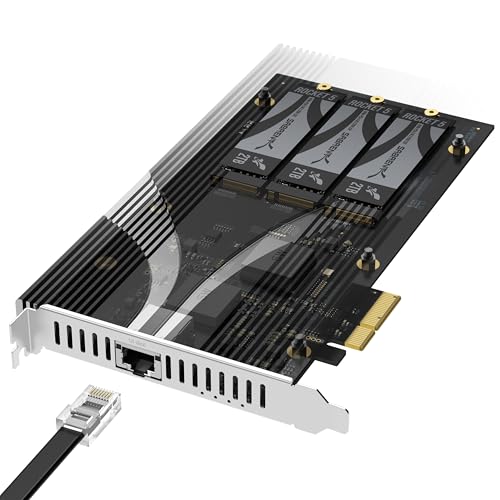
SABRENT EC-PM2L Review Summary
The SABRENT EC-PM2L is best for builders who want more capability per slot rather than the cheapest possible expansion card.
It suits NAS owners, homelab users, servers, and desktop PCs with a free PCIe 3.0 x4 or larger physical slot, especially when the goal is to add fast wired networking and multiple NVMe drives without redesigning the whole system.
Its biggest appeal is the combination of features: three M.2 NVMe slots, a built-in 10GbE port, and no requirement for PCIe bifurcation.
That makes it easier to deploy than many multi-drive cards that depend on motherboard support or lane splitting.
The tradeoff is straightforward: this is a focused expansion card for systems that can already spare a slot and benefit from both storage and networking upgrades.
Review Scorecard
| Category | Score | Why it matters |
|---|---|---|
| Expansion value | 9/10 | Adds three NVMe slots and 10GbE in one card. |
| Installation simplicity | 9/10 | No bifurcation required; works in a physical x4 or larger slot. |
| Storage flexibility | 8/10 | Supports 2230 to 2280 drives and a wide PCIe generation range. |
| Network upgrade potential | 9/10 | Built-in 10GbE is a major step up from basic onboard Ethernet. |
| Cooling design | 8/10 | Tool-free aluminum heatsink and thermal padding help with sustained use. |
| Compatibility | 8/10 | Broad fit for NAS, servers, and desktops with the right slot. |
Bottom line: if you need one card that upgrades both storage and networking, the EC-PM2L is a practical, high-utility buy.
Key Features and Specifications of SABRENT EC-PM2L
The listing positions this card as an all-in-one expansion solution built on a PCIe 3.0 x4 interface.
It combines three M.2 NVMe SSD slots with a Marvell-based 10 Gigabit Ethernet port, so you can use a single slot to expand both local storage and network throughput.
Key database facts:
| Feature | Details |
|---|---|
| Interface | PCIe 3.0 x4 |
| Storage slots | 3 x M.2 NVMe |
| Drive sizes | 2230 to 2280 |
| NVMe support | PCIe Gen 2.0 to 5.0 drives listed |
| Network | Integrated 10GbE Ethernet |
| Cooling | Tool-free aluminum heatsink with thermal padding |
| Compatibility | NAS, servers, and desktop PCs with a physical x4 or larger slot |
| Lane behavior | Each M.2 slot operates up to x2 PCIe 3.0 bandwidth |
| Bifurcation | Not required |
That feature set matters because it reduces setup friction.
Many multi-drive adapters are limited by motherboard lane-splitting requirements, but this card is designed to avoid that dependency.
The built-in 10GbE port also means the card is doing double duty, which is useful when motherboard expansion slots are scarce.
The heatsink is another important part of the design.
This is not a decorative add-on; the listing emphasizes aluminum construction, thermal padding, and tool-free installation.
For drives that may sit under sustained write or transfer workloads, that is a meaningful part of the product story.
Pros and Cons of SABRENT EC-PM2L
Pros
- Combines three NVMe slots and 10GbE on one card.
- Does not require PCIe bifurcation.
- Supports a wide range of M.2 drive lengths from 2230 to 2280.
- Tool-free heatsink design makes drive access easier.
- Useful for NAS, server, and desktop expansion where slots are limited.
Cons
- Needs a free PCIe 3.0 x4 or larger physical slot.
- Not every system will need both storage and networking on one card.
- Each M.2 slot is limited to up to x2 PCIe 3.0 bandwidth.
- Best value depends on whether you will use both the NVMe and 10GbE functions.
The pros and cons of SABRENT EC-PM2L mostly come down to utilization.
If you use all of its features, it is efficient and elegant.
If you only need one of them, a simpler single-purpose card may make more sense.
Who Should Buy SABRENT EC-PM2L?
This is a good choice for NAS builders who want storage expansion and faster networking from one add-in card.
It also fits homelab users who like compact, modular upgrades and want to keep motherboard configuration requirements low.
It can also make sense for small server builds and desktop workstations that need extra NVMe capacity without replacing the board.
If you are building around a physical x4 or larger slot and want a cleaner internal layout, the EC-PM2L is well aligned with that goal.
You should probably skip it if you only need one M.2 slot, if your system lacks a suitable PCIe slot, or if you are not planning to use 10GbE.
In those cases, a simpler storage adapter or network card may be more cost-effective in practical terms.
Storage and Network Design Choices
One Slot, Two Jobs
The core design choice is obvious and sensible: merge storage expansion and networking into a single PCIe card.
That saves space and reduces the number of separate add-ins you need to manage.
In cramped systems, that can be the difference between a clean build and a compromise.
No Bifurcation Required
The no-bifurcation design is one of the strongest technical points in the listing.
It lowers the barrier to entry because you do not have to depend on motherboard lane splitting or special firmware support.
For many buyers, that is the difference between a card they can use immediately and one that needs compatibility research first.
Cooling for Sustained Use
The tool-free aluminum heatsink and thermal padding suggest SABRENT expects this card to be used for real workloads, not just occasional file transfers.
That matters when the card is sitting in a NAS or server where heat management is part of long-term reliability, especially with multiple NVMe drives installed.
Where the Bandwidth Makes Sense
Each M.2 slot operates up to x2 PCIe 3.0 bandwidth, which tells you this product is about balanced expansion rather than maximum per-drive saturation.
That is a reasonable trade for the category because the card is trying to do two jobs at once.
Buyers should think of it as a practical multi-function adapter, not a pure benchmarking play.
Alternatives to SABRENT EC-PM2L
If you want a simpler or more specialized path, there are a few credible alternatives worth considering:
- ASUS Hyper M.2 x16 Card
- SilverStone M.2 NVMe adapter cards
- Intel 10GbE network cards
- StarTech M.2 SSD adapter cards
The ASUS Hyper card is the better-known route if you only want multiple NVMe slots and already have the motherboard support to use it.
SilverStone and StarTech are worth checking if you want a more conventional adapter with less integration.
Intel 10GbE cards make sense if your network upgrade is the main priority and you do not need onboard storage expansion.
Is SABRENT EC-PM2L Worth It?
Yes, if you will use both the NVMe expansion and the 10GbE port.
That is the condition that makes this card compelling.
The SABRENT EC-PM2L is worth it for buyers who want a practical, low-friction expansion path in a NAS, server, or desktop system with a free PCIe 3.0 x4 or larger slot.
It is especially attractive if you want to avoid bifurcation issues and prefer a card that bundles multiple upgrades into one install.
If you only need storage or only need networking, a simpler alternative will usually be the smarter buy.