When it comes to enhancing your gaming experience, cooling accessories play a crucial role in maintaining ideal performance. You might not realize how temperature affects your system until you start noticing lag or thermal throttling. The right tools can help manage heat effectively. Let’s explore ten essential cooling accessories that could make a significant difference in your setup, ensuring you stay in the game longer and at peak performance.
Kootek Laptop Cooling Pad with 5 Quiet Fans

The Kootek Laptop Cooling Pad with 5 Quiet Fans is perfect for gamers and professionals who use laptops ranging from 12 to 17 inches, including popular models like the Apple Macbook Pro and Dell. With dimensions of 14.96 x 1.38 x 11.81 inches and weighing just 2.55 pounds, it’s portable yet effective. Featuring a powerful combination of one large fan and four smaller ones, you’ll enjoy noise-free operation while staying cool. The ergonomic design offers six height adjustments for comfort, and the dual USB hub lets you connect additional devices. With a 4.4-star rating, it’s a reliable choice for enhancing your gaming experience.
Best For: Gamers and professionals using laptops between 12 to 17 inches looking for an effective cooling solution.
Pros:
- Quiet operation allows for focus during work or gaming without distractions.
- Ergonomic design with adjustable height provides comfort during extended use.
- Dual USB hub enables connectivity for additional devices, enhancing functionality.
Cons:
- Requires an adapter for Type C devices, limiting direct compatibility.
- Weight of 2.55 pounds may be considered bulky for ultra-portable needs.
- Limited fan control options, as fans must be controlled in groups rather than individually.
EZDIY-FAB ARGB M.2 SSD Heatsink with PWM Fan

For gamers who demand peak performance from their systems, the EZDIY-FAB ARGB M.2 SSD Heatsink with PWM Fan offers exceptional cooling capabilities. This heatsink lowers SSD temperatures by 5°C to 30°C, effectively preventing thermal throttling during intense gaming sessions. Its integrated PWM fan reaches up to 13,000 RPM, adjusting speed as needed. The premium aluminum construction not only enhances durability but also features a vibrant ARGB effect that syncs with your motherboard. Compact and optimized for M.2 2280 SSDs, it fits snugly in tight builds, ensuring your system runs cool and looks great while you play.
Best For: Gamers and PC builders who require efficient cooling solutions for their M.2 SSDs to prevent thermal throttling during high-intensity tasks.
Pros:
- High-performance cooling that reduces SSD temperatures by 5°C to 30°C, enhancing system stability.
- Integrated PWM fan operates at up to 13,000 RPM, dynamically adjusting for optimal cooling needs.
- Stylish ARGB lighting adds aesthetic appeal and is compatible with motherboard sync for a cohesive look.
Cons:
- May not be compatible with SSDs larger than M.2 2280 size.
- The compact design may limit airflow in certain builds if not positioned correctly.
- Premium build quality may come at a higher price point compared to basic heatsinks.
WOLFBOX MF50 Compressed Air Duster

Looking for a powerful and efficient way to keep your gaming setup dust-free? The WOLFBOX MF50 Compressed Air Duster is your go-to solution. With speeds reaching up to 110,000 RPM and three adjustable settings, it effectively blasts away dust and debris. Weighing just 0.45 lb, its compact design makes it easy to carry, whether you’re indoors or outdoors. Plus, it’s a reusable alternative to disposable air cans, offering up to 240 minutes of use on a single charge. Complete with four nozzles for versatile cleaning, this duster guarantees your gaming gear stays pristine and performs at its best.
Best For: Anyone looking for an efficient and environmentally friendly solution to keep their gaming setup and electronic devices dust-free.
Pros:
- Economical: Reusable design eliminates the need for disposable air cans, saving money in the long run.
- Versatile: Comes with four nozzles suitable for a variety of cleaning tasks, from electronics to home and car cleaning.
- Long Battery Life: Provides up to 240 minutes of use on the lowest setting, ensuring ample time for thorough cleaning.
Cons:
- Charging Time: Requires 3.5 hours to fully charge, which may be inconvenient for urgent cleaning needs.
- Weight: While lightweight, some users may prefer an even more compact alternative for on-the-go use.
- Noise Level: The high-speed operation may be louder than traditional compressed air cans, potentially disturbing in quiet environments.
E-outstanding Dual Fan Mount Rack for Computer Radiator

If you’re a gamer seeking to maximize your PC’s cooling efficiency, the E-outstanding Dual Fan Mount Rack is an ideal solution. This durable metal rack supports both 12cm and 14cm fans, ensuring excellent compatibility with most graphics cards. Its simple design makes installation a breeze, thanks to the included fixed screw fasteners. The black painted surface not only looks great but also provides rust and corrosion resistance. By improving heat dissipation and reducing noise, this mount rack enhances your system’s overall performance, allowing you to game without interruptions. Equip your rig with this essential accessory to elevate your gaming experience.
Best For: Gamers and PC enthusiasts looking to enhance cooling efficiency and overall performance of their systems.
Pros:
- Improves heat dissipation effectively, keeping your components cooler during intense gaming sessions.
- Easy installation with included fixed screw fasteners, making it user-friendly for all skill levels.
- Durable construction with rust-resistant and corrosion-resistant properties, ensuring longevity.
Cons:
- Limited fan size compatibility as it only supports 12cm and 14cm fans.
- May require additional fans for optimal cooling performance, which could increase overall cost.
- Installation space constraints may affect compatibility with some cases or layouts.
Kootek Laptop Cooling Pad with 5 Quiet Fans

Gamers with laptops ranging from 12 to 17 inches will find the Kootek Laptop Cooling Pad with 5 Quiet Fans to be an essential accessory for maintaining peak performance. This cooling pad features one large fan and four smaller fans, delivering excellent airflow to prevent overheating during intense gaming sessions. You can easily control the fans and LED lights with dual switches, choosing to run one, four, or all five fans. Its ergonomic design offers six adjustable height settings for comfort, while the built-in USB hub allows for easy connectivity. Plus, it securely holds your laptop in place with stoppers, ensuring stability.
Best For: Gamers and professionals using laptops between 12 to 17 inches who need enhanced cooling and comfort during extended use.
Pros:
- Efficient Cooling: Features 5 fans for optimal airflow, preventing overheating during intense gaming or working sessions.
- Ergonomic Design: Offers 6 adjustable height settings for improved posture and comfort.
- USB Hub: Built-in dual USB hub allows for easy connectivity of additional devices.
Cons:
- Weight: At 2.92 pounds, it may be heavier than some users prefer for portability.
- USB Compatibility: Type C devices require an adapter for connection, which may be inconvenient for some users.
- Fan Noise: While designed to be quiet, some users may still find the fan noise noticeable during use.
Fan Holder Galvanized Steel Bracket for PC Case

For those seeking to enhance their gaming or workstation experience, the Fan Holder Galvanized Steel 120LS Fan Bracket is an essential accessory. This sturdy, corrosion-resistant bracket holds fans securely, optimizing airflow and temperature management in your PC case. Measuring approximately 130x120x21mm, it easily accommodates various fan sizes, making installation a breeze. Whether you’re setting up a home office, gaming rig, or professional workstation, this bracket guarantees your system stays cool and performs efficiently. With a perfect customer rating of 5.0 stars, it’s a reliable choice for maintaining peak performance and efficient cooling in any setup.
Best For: Individuals seeking to enhance cooling efficiency in their home office, gaming setups, or professional workstations.
Pros:
- Crafted from durable galvanized steel, ensuring long-lasting performance and resistance to corrosion.
- Easy installation process compatible with various fan sizes for versatile use.
- High customer satisfaction with a perfect rating of 5.0 stars from user reviews.
Cons:
- Limited to wall mount installation, which may not suit all setups.
- No specific weight mentioned, which could be a concern for larger configurations.
- Warranty information is only available upon request, which may not provide immediate reassurance to buyers.
FOSA G1/4 Inner Thread Water Cooling System Filter

The FOSA G1/4 Inner Thread Water Cooling System Filter stands out as an essential accessory for anyone serious about enhancing their PC’s cooling performance. Its funnel shape and G1/4 microwire filters make installation a breeze in liquid cooling systems. This filter effectively traps impurities generated by the cooling system, protecting your pump and ensuring consistent performance. With its long tube design, it enhances filtering speed and efficiency, keeping your system running cool and stable. Specifically designed for computer cooling setups, it guarantees peak performance and reliability, making it a must-have for dedicated gamers and PC enthusiasts alike.
Best For: Enthusiasts and gamers looking to optimize their PC cooling systems for improved performance and reliability.
Pros:
- Easy Installation: The funnel shape and G1/4 microwire filters simplify the setup process for liquid cooling systems.
- Effective Filtration: Traps impurities effectively, protecting the pump and ensuring consistent system performance.
- Enhanced Efficiency: The long tube design promotes rapid filtering, contributing to better overall cooling efficiency.
Cons:
- Compatibility Limitations: Specifically designed for computer cooling systems, may not be suitable for other applications.
- Potential for Clogging: Fine filter screen could clog over time, requiring regular maintenance and cleaning.
- Size Constraints: The long tube design may not fit all PC cases, limiting installation options in compact setups.
YAODHAOD Fan Mounting Bracket for Computer Chassis Cooling
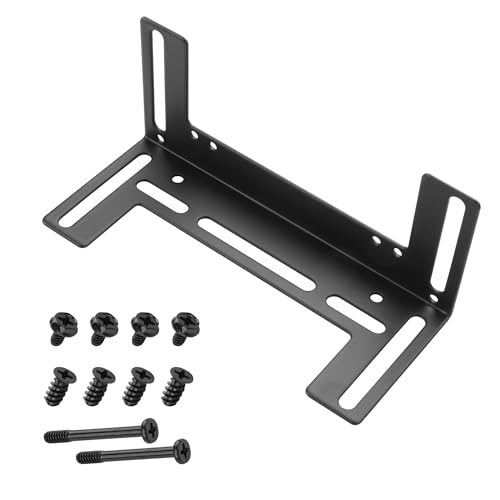
If you’re looking to enhance your PC’s cooling performance, the YAODHAOD Fan Mounting Bracket is an ideal choice for anyone serious about optimizing airflow. This sturdy bracket accommodates 8cm, 9cm, and 12cm fans, ensuring compatibility with various setups. Made from high-quality metal with a sleek black finish, it not only looks great but also resists rust and corrosion. Installation is a breeze, requiring no specialized tools, and it considerably reduces heat accumulation while lowering noise levels to just 1 decibel. With the YAODHAOD bracket, you’ll enjoy improved system performance, making it a must-have for gamers and professionals alike.
Best For: The YAODHAOD Fan Mounting Bracket is best for PC enthusiasts, gamers, and professionals looking to optimize their system’s cooling efficiency and performance.
Pros:
- Easy installation with no specialized tools required.
- Enhances cooling efficiency by securely mounting fans for optimal airflow.
- Durable and aesthetically pleasing design that complements any PC build.
Cons:
- Limited to specific fan sizes (8cm, 9cm, 12cm), which may not suit all setups.
- Maximum rotational speed of 1 RPM may not be sufficient for high-performance cooling needs.
- Only includes one mounting bracket, requiring multiple purchases for larger setups.
Laptop Cooling Pad with 9 Quiet Fans and Adjustable Height

Game enthusiasts seeking an effective solution to laptop overheating will appreciate the AIMIUZI F9-7 Cooling Pad, featuring nine quiet fans that deliver ideal airflow. With a noise level of just 28dB at full speed, you can game without distractions. Its adjustable height offers five levels for ergonomic comfort, helping you avoid neck and back pain during long sessions. The pad includes two USB-A ports for easy connectivity, perfect for your keyboard or mouse. Plus, the anti-slip baffle keeps your laptop secure, while the light button lets you customize its vibrant aesthetics. Enjoy gaming without overheating worries!
Best For: Game enthusiasts who need an efficient cooling solution for their laptops during extended gaming sessions.
Pros:
- 9 quiet fans provide optimal airflow with minimal noise, enhancing the gaming experience.
- Adjustable height with five levels promotes ergonomic comfort, reducing neck and back strain.
- Two USB-A ports allow for easy connection of external devices like keyboards and mice.
Cons:
- May be bulky for those who prefer a more portable cooling solution.
- Limited compatibility as it is designed for laptops sized 12-17 inches only.
- Colorful lighting features may not appeal to all users who prefer a more understated design.
MECCANIXITY CPU Heatsink Fan Buckles (4pcs)

Designed for gamers and PC builders seeking perfect cooling solutions, the MECCANIXITY CPU Heatsink Fan Buckles provide a reliable way to secure your fans within the chassis. These lightweight, metal buckles measure 10.3cm long and feature a nickel-plated surface for durability. They’re compatible with various fan types, ensuring efficient heat dissipation and enhanced air circulation. Installation is simple: just power off your PC, insert the buckle into the fixing hole, and apply even pressure to secure it. With four pieces included, you can easily achieve optimal performance, reducing noise while keeping your system cool during intense gaming sessions.
Best For: Gamers and PC builders looking for an efficient and reliable cooling solution for their systems.
Pros:
- Lightweight and compact design enhances ease of installation and handling.
- Durable nickel-plated metal construction ensures longevity and resistance to corrosion.
- Versatile compatibility with various fan types promotes effective heat dissipation and air circulation.
Cons:
- Limited to specific fixing hole sizes, which may not fit all PC chassis configurations.
- Requires manual installation, which may be challenging for inexperienced users.
- No additional hardware included, which could necessitate a separate purchase for complete setup.
Factors to Consider When Choosing PC Performance Cooling Accessories
When you’re choosing PC performance cooling accessories, you’ll want to think about several key factors. Consider cooling efficiency levels, compatibility with your devices, and noise levels, as these can greatly impact your gaming experience. Also, don’t overlook ease of installation and the design’s aesthetics, since they contribute to both functionality and your setup’s look.
Cooling Efficiency Levels
Choosing the right cooling accessories for your PC is essential, especially if you want to maintain peak performance during intense gaming sessions. Cooling efficiency levels are vital to prevent thermal throttling, with effective accessories able to lower temperatures by 5°C to 30°C under heavy workloads. Active cooling solutions like fans and heatsinks boost airflow and heat dissipation, enhancing system stability. Don’t overlook noise levels; quieter models operate around 28dB or less, creating a distraction-free environment. Additionally, consider adjustable fan speeds controlled by PWM technology, which optimize performance based on temperature demands. Finally, pay attention to materials and design—aluminum and galvanized steel can improve durability and long-term cooling efficiency, ensuring your system runs smoothly over time.
Compatibility With Devices
How can you guarantee your cooling accessories are a perfect fit for your setup? Start by confirming compatibility with your specific device type, whether it’s a laptop or desktop PC, since different components have unique requirements. Check the dimensions and specifications of cooling pads and fan mounts to confirm they match your laptop or PC case size. If you’re using M.2 SSD heatsinks, make sure they support the SSD size, like M.2 2280. Additionally, consider the mounting type of fan brackets to verify they align with your fan sizes, such as 12cm or 14cm. Finally, verify that any cooling solution requiring power connects properly with your device’s available ports, like USB or specific connectors.
Noise Levels and Operation
While selecting cooling accessories for your PC, it’s essential to take into account noise levels, as excessive sound can disrupt your gaming experience or work concentration. Noise levels are measured in decibels (dB), with lower values indicating quieter operation; for instance, some laptop cooling pads run at around 28dB at full fan speed. Look for fans with advanced technologies like PWM (Pulse Width Modulation) that adjust their speed according to temperature demands, keeping noise levels down while optimizing cooling performance. If you choose products with multiple fans, you can balance cooling needs and noise preferences by activating only a subset of fans. Prioritizing quiet operation can greatly enhance your comfort during long gaming sessions or important tasks.
Ease of Installation
When selecting PC performance cooling accessories, ease of installation plays an essential role in your overall experience. Look for accessories with simple designs and straightforward installation processes, allowing you to set them up quickly without needing specialized tools. Verify the products include all necessary mounting hardware or fasteners for easy assembly and attachment. Accessories compatible with various fan sizes can enhance your adaptability in different setups, making your options more versatile. Clear installation instructions are a must, guiding you through the process to achieve ideal results. Additionally, lightweight components can make handling and installation easier, especially in tight spaces within your computer case. Choosing the right accessories can save you time and frustration down the line.
Design and Aesthetics
Aesthetics play an essential role in creating a visually appealing PC build, and the design of your cooling accessories can greatly influence that look. You should choose cooling options that complement your overall setup, whether it’s premium aluminum finishes or vibrant RGB effects that enhance visual appeal. For small form-factor systems, compact and lightweight designs guarantee that aesthetics don’t compromise performance. Consider features like adjustable height settings in cooling pads for ergonomic benefits while maintaining a sleek appearance. A well-finished surface, like a black painted or anodized coating, enhances durability and adds a professional touch. Plus, customizable lighting options offer an engaging element, letting you synchronize with other components for a cohesive and stunning look.
Material Durability
Choosing the right materials for your PC performance cooling accessories is essential for ensuring long-lasting durability and efficiency. Options like galvanized steel and premium aluminum resist corrosion, enhancing the lifespan of your components. Some high-quality accessories boast durability ratings of up to 60,000 hours or more, giving you peace of mind. The material choice also impacts heat dissipation efficiency; solid metal bases optimize heat transfer, keeping your system cool. Accessories made from rust-resistant materials minimize the risk of failure due to environmental factors, ensuring reliable performance over time. By selecting well-constructed materials, you’ll maintain efficient airflow and temperature management, preventing thermal throttling during demanding workloads. Choose wisely to maximize your gaming experience!
Adjustability and Ergonomics
Adjusting your cooling accessories can greatly enhance your gaming experience and overall comfort. Look for adjustable cooling pads and stands that offer multiple height settings; this helps reduce strain on your neck and back during long gaming sessions. Ergonomic designs with adjustable angles promote better posture, making them perfect for both gaming and professional work. Many cooling pads feature anti-slip surfaces and adjustable heights, ensuring your laptop stays secure while maximizing airflow. Plus, adjustable solutions cater to various laptop sizes, providing effective cooling for all your devices. Height adjustability not only improves comfort but also boosts airflow efficiency, enhancing your system’s overall cooling performance. Investing in these features can considerably elevate your gaming experience.