If you’re in the market for an LG Blu-ray burner, you’ve got some impressive options in 2026. These devices balance performance and convenience, whether you need an internal model for your PC or a portable external drive for on-the-go use. With features like M-Disc compatibility and high-speed burning, they cater to various storage needs. So, which models stand out as the best picks? Let’s explore your top choices.
LG WH14NS40 Blu-ray DVD CD Internal Burner Drive Bundle
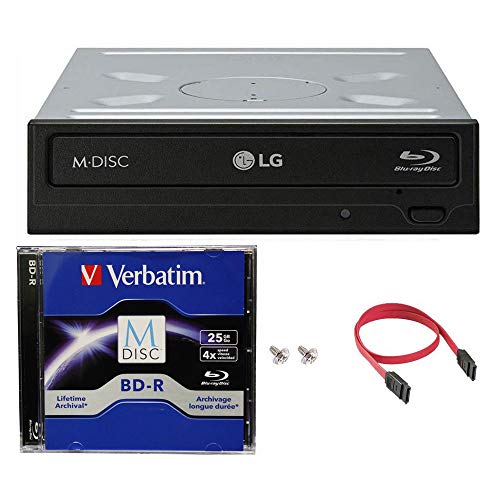
If you’re looking for a reliable and high-performance internal burner, the LG WH14NS40 Blu-ray DVD CD drive bundle is an excellent choice for both casual users and professionals. This drive supports 14X Blu-ray BDXL burning and offers impressive speeds: 16X for DVD-R/+R and 48X for CD-R. With M-DISC technology, your data stays secure for up to 1,000 years, ensuring durability like no other. It includes essential components like a SATA cable, power connection cable, and mounting screws. Compatible with various Windows operating systems, it also features a 4.0MB buffer for enhanced writing reliability. Trust LG for your media needs!
Best For: Casual users and professionals seeking a reliable and high-performance internal burner for Blu-ray, DVD, and CD media.
Pros:
- Supports high burn speeds: 14X for Blu-ray, 16X for DVD, and 48X for CD.
- M-DISC technology ensures data durability for up to 1,000 years.
- Includes necessary components for easy installation, such as SATA cable and mounting screws.
Cons:
- Requires more power for laser-etching compared to typical optical drives.
- Compatibility limited to specific Windows operating systems (XP, Vista, 7, and 8).
- May not be suitable for users on newer operating systems without additional drivers.
6 in 1 Portable External Blu-ray Drive Burner

The 6-in-1 Portable External Blu-ray Drive Burner is the perfect choice for tech-savvy users who need versatility and speed. With USB 3.0 and Type-C interfaces, you’ll enjoy transfer rates up to 5Gbps, making it six times faster than USB 2.0. This multifunctional drive features an SD card slot, a TF card slot, and four USB ports, allowing seamless file transfers between devices. Plus, it supports M-Disc for long-term storage and 3D Blu-ray playback for an immersive experience. At just 325g, its lightweight design and hidden cable storage make it a portable solution for your media needs.
Best For: Tech-savvy users looking for a versatile and efficient external drive for data transfer and media playback.
Pros:
- Multifunctional design with multiple ports for seamless file transfers between various devices.
- High-speed performance with transfer rates up to 5Gbps, significantly faster than older USB standards.
- Lightweight and portable, with hidden cable storage for easy transport and organization.
Cons:
- Not compatible with tablets, iPads, smartphones, TVs, projectors, or cars.
- Additional software required for Blu-ray playback and writing, which is not included in the purchase.
- Limited compatibility with certain operating systems, excluding some older versions or specialized systems.
External Blu-ray Drive Player for PC and Mac

For tech-savvy individuals who need a reliable and portable solution for high-capacity media, the LG Blu-ray Burner 2026 excels as an external Blu-ray drive player compatible with both PC and Mac. It supports various formats, including BD, DVDs, and CDs, ensuring you can enjoy all your media. With USB 3.0 and Type-C compatibility, you’ll experience fast reading speeds and efficient performance. Its compact design makes it perfect for business trips or vacations. Plus, you get a one-year warranty and 24/7 expert support for any troubleshooting needs. Just remember, you’ll need specific software for playback and writing.
Best For: Tech-savvy individuals seeking a portable and reliable external Blu-ray drive for high-capacity media on both PC and Mac.
Pros:
- Fast reading speeds with USB 3.0, significantly enhancing media playback and transfer.
- Compact and lightweight design, making it easy to carry for travel.
- One-year warranty and 24/7 expert support ensure help is available for troubleshooting.
Cons:
- Requires specific software for Blu-ray playback and writing, which is not included.
- May not be compatible with older systems or software versions outside the specified requirements.
- Limited to USB 3.0 and Type-C connections, which may not suit all devices without adapters.
Produplicator LG BP60NB10 Portable Blu-ray Burner

Looking for a reliable and portable solution for all your media burning needs? The Produplicator LG BP60NB10 Portable Blu-ray Burner is your answer. This external drive offers 6X Ultra HD Blu-ray burning and supports various formats, including BDXL and M-Disc for long-term storage. With its silent and jamless play technologies, you’ll enjoy smooth playback without distractions. Plus, USB 2.0 connectivity guarantees easy setup on Windows and macOS systems. Backed by a one-year warranty, you can trust this burner for quality performance. So, whether you’re archiving memories or creating backups, the BP60NB10 is a smart choice.
Best For: Those looking for a portable and reliable Blu-ray burner for high-quality media storage and playback.
Pros:
- Supports a wide range of disc formats, including BDXL and M-Disc for long-term data protection.
- Silent Play and Jamless Play technologies ensure a smooth and quiet playback experience.
- Easy USB 2.0 connectivity makes setup simple on both Windows and macOS systems.
Cons:
- Limited write speed of 6X may be slower compared to some newer models.
- USB 2.0 connectivity could be a drawback for users seeking faster transfer speeds found in USB 3.0 drives.
- Potential higher restocking fees for returns due to customer misuse or tampering.
Digital LG Blu-ray Internal Burner Drive Bundle

If you’re seeking a reliable solution for high-capacity media storage and duplication, the Digital LG Blu-ray Internal Burner Drive Bundle stands out as an ideal choice. This authentic LG drive, manufactured by HLDS, offers a powerful 16X Blu-ray BDXL DVD CD recording capability. You’ll appreciate the included free 25GB BD-R, SATA cable, and mounting screws, making installation a breeze. With enhanced recording preservation control, it guarantees stable disc creation and an improved lifespan. Plus, its robust reading function lets you access slightly scratched media effortlessly. This burner supports various formats, guaranteeing maximum compatibility for all your media needs.
Best For: Those in need of a reliable and high-capacity solution for media storage and duplication.
Pros:
- High-speed recording capabilities with 16X Blu-ray support for efficient media creation.
- Includes essential accessories such as a free 25GB BD-R, SATA cable, and mounting screws for easy installation.
- Robust reading functionality that can handle slightly scratched discs, ensuring reliable access to your media.
Cons:
- Internal drive may require technical knowledge for installation in a compatible system.
- Limited to internal use, which may not suit users looking for external drive options.
- Potential compatibility issues with some less common media formats not covered in the extensive database.
Produplicator LG BP60NB10 Portable Blu-ray Burner

The Produplicator LG BP60NB10 Portable Blu-ray Burner stands out as the perfect choice for those needing a reliable and versatile external drive for both entertainment and data storage. With its 6X Ultra HD 4K recording capability and support for BDXL discs, you can store up to 100GB of data. Its M-Disc compatibility guarantees long-term protection against scratches. Plus, features like Silent Play and Jamless Play technologies enhance your viewing experience by minimizing noise and guaranteeing smooth playback. Compact and USB 2.0 compatible, it’s ideal for on-the-go use with laptops and PCs, making it an essential tool for any media enthusiast.
Best For: Those seeking a reliable, portable solution for high-capacity data storage and seamless media playback.
Pros:
- BDXL support allows for storing up to 100GB of data on a single disc.
- M-Disc compatibility provides long-term data protection with scratch-resistant technology.
- Silent Play and Jamless Play technologies enhance the viewing experience by reducing noise and ensuring smooth playback.
Cons:
- USB 2.0 connectivity may limit transfer speeds compared to USB 3.0 options.
- Limited write speed of 6X may be slower than some other external drives on the market.
- Only compatible with certain operating systems, which may exclude some users.
Haiway Aluminum External Blu Ray Drive (USB 3.0 and Type-C)

Designed for movie enthusiasts and professionals alike, the Haiway Aluminum External Blu Ray Drive offers seamless compatibility with both USB 3.0 and Type-C interfaces, making it an ideal choice for those who demand high-quality performance. You’ll appreciate its ability to read and write 25GB discs, ensuring smooth playback of high-definition movies and music. With a sleek aluminum shell, it’s durable and portable, perfect for travel. Plus, the fast USB 3.0 connectivity delivers speeds up to 5Gbps, while the Type-C interface enhances error correction. For prime use, pair it with recommended software like Macgo or PowerDVD.
Best For: Movie enthusiasts and professionals seeking a high-quality external Blu-ray drive with versatile compatibility and portability.
Pros:
- Fast performance with USB 3.0 speeds up to 5Gbps, making data transfers quick and efficient.
- Durable aluminum design protects against scratches and impacts while maintaining a sleek appearance.
- Compatible with various operating systems including Mac OS and Windows, ensuring usability across different devices.
Cons:
- Requires additional software for reading and burning Blu-ray discs, which may incur extra costs.
- Does not support 4K Ultra HD discs, limiting usage for those seeking the highest resolution available.
- May need a dedicated power source for stable operation during high-load tasks, which can be inconvenient for mobile use.
LG External Portable Blu-ray Burner with Software Bundle

For those who need a reliable and portable solution for burning Blu-ray discs, the LG External Portable Blu-ray Burner with Software Bundle stands out. This burner offers a maximum burn speed of 6x for BD-Rs and includes a 25GB Verbatim M-Disc BD-R, ensuring your data remains safe for up to 1000 years. With Cyberlink Burning Software bundled, you’ll enjoy a seamless burning experience. It’s compatible with various operating systems, including Mac OS X and Windows, making it versatile. Plus, the buffer under-run prevention feature enhances performance, allowing you to create high-quality media without interruptions.
Best For: Those seeking a durable and portable solution for long-term data storage and Blu-ray burning.
Pros:
- High durability with M-DISC technology, ensuring data lasts up to 1000 years.
- Compatible with multiple operating systems, including Mac OS X and Windows.
- Bundled software (Cyberlink Burning Software) provides an easy-to-use interface for seamless burning.
Cons:
- Maximum burn speed of 6x for BD-R may be slower compared to some other models.
- Requires certain system specifications, which may limit use for older computers.
- External design may require additional space and power source, making it less convenient for some users.
Wbacon 7 in 1 External Blu Ray Drive for PC

If you need a reliable solution for high-capacity file storage and media playback, the Wbacon 7 in 1 External Blu Ray Drive is perfect for you. This versatile drive works with PCs, laptops, and desktops, supporting 100GB discs for your large files and backups. It boasts impressive read speeds of 6x for Blu-ray, 8x for DVDs, and 24x for CDs. With multiple connectivity options, including Type-C and USB ports, it’s designed for easy use across various platforms like Windows and macOS. Plus, its lightweight, slim design makes it ideal for travel, ensuring you can access your media anywhere.
Best For: Those seeking a reliable external drive for high-capacity file storage and media playback on PCs and laptops.
Pros:
- Supports large 100GB discs for extensive file storage and backups.
- Fast read speeds for Blu-ray, DVD, and CD formats, enhancing media playback.
- Lightweight and slim design makes it portable and travel-friendly.
Cons:
- Requires specific software for Blu-ray playback, which may incur additional costs.
- SD and TF card slots cannot be used simultaneously, limiting card access options.
- Customer rating of 3.8 out of 5 stars suggests some user dissatisfaction.
External Blu Ray Drive for Laptop and PC

Whether you’re a movie buff wanting to back up your collection or a gamer needing extra storage, the LG Blu-ray burner is the perfect choice for laptops and PCs. It supports Blu-ray, DVD, and CD formats, making it versatile for all your media needs. With speeds up to 24X for CDs and 6X for Blu-rays, you can quickly read and write your favorite discs. The 7-in-1 USB hub offers multiple connectivity options, including USB 3.0 and Type-C ports, ensuring fast data transfer. Just remember to have compatible playback software ready for the best experience!
Best For: Movie enthusiasts and gamers looking for a reliable external drive to back up their media collections and expand storage options.
Pros:
- Supports multiple formats including Blu-ray, DVD, and CD for versatility.
- High-speed reading and writing capabilities with up to 24X for CDs and 6X for Blu-rays.
- Includes a 7-in-1 USB hub with various connectivity options for fast data transfer.
Cons:
- Not compatible with 4K Ultra HD discs or mobile devices like smartphones and TVs.
- No playback software is included, requiring users to purchase compatible software separately.
- May require an additional power source for stable operation during extended use.
Factors to Consider When Choosing Lg Blu Ray Burners
When choosing an LG Blu-ray burner, you should consider several key factors. Burn speed options, compatibility with your operating system, and portability can greatly affect your experience. Don’t forget to check for M-DISC support features and available connectivity options to guarantee you get the best fit for your needs.
Burn Speed Options
Choosing the right burn speed for your LG Blu-ray burner is essential for achieving ideal performance and quality. Blu-ray discs can be burned at speeds up to 14X, while DVDs max out at 16X and dual-layer DVDs typically reach around 8X. If you’re using M-DISC formats for long-term storage, be aware that they may require more power and have slightly different burn speeds. While faster speeds allow quicker data transfer, they also increase the risk of errors or reduced quality if your media isn’t compatible. Consider your buffer size, usually around 4MB, and the under-run prevention features, which help maintain reliability during high-speed burning for best results. Choose wisely based on your specific needs and media type.
Compatibility With Operating Systems
Selecting an LG Blu-ray burner that aligns with your operating system is crucial for ensuring seamless functionality. Many LG models support a range of operating systems, including Windows XP, Vista, 7, 8, 10, and macOS, which offers broad usability. If you’re using Linux, some burners cater to that preference as well. However, keep in mind that compatibility can vary; some devices may require specific software like PowerDVD or VLC for Blu-ray playback and writing. Always check the minimum CPU and RAM requirements for peak performance on your OS. Finally, not all LG Blu-ray burners work with tablets, smartphones, or certain media players, so make sure to verify compatibility based on your intended use.
Portability and Design
Portability and design play an essential role in your decision-making process for LG Blu-ray burners. Lightweight and slim designs make these external drives easy to carry in your bag, perfect for on-the-go use. Many models feature hidden cable storage grooves, reducing clutter and preventing cable loss during transport. A compact form factor means you can easily fit your burner into luggage or backpacks without hassle. Plus, external Blu-ray drives often come with dual connectivity options like USB 3.0 and Type-C, offering flexibility for various devices while maintaining portability. The durable construction, typically using aluminum or robust housing, guarantees protection against scratches and minor impacts, making them ideal companions for travel and everyday use.
M-DISC Support Features
When you’re considering an LG Blu-ray burner, M-DISC support stands out as an essential feature that can greatly enhance your data storage options. M-DISC technology utilizes a non-volatile, rock-like data layer, offering superior durability over conventional organic dye-based discs. This means your data can last over 1,000 years under proper conditions, making it ideal for permanent storage. Additionally, M-DISCs are resistant to environmental factors like light, heat, and humidity, ensuring your important files remain safe. Keep in mind that using M-DISCs typically requires optical drives that can provide higher laser power for etching. Many LG Blu-ray burners that support M-DISC also accommodate various formats, including BD-R, DVD, and CD, broadening their functionality for all your storage needs.
Connectivity Options Available
Connectivity options play an essential role in choosing an LG Blu-ray burner, as they can greatly impact your data transfer experience. Many LG models come with USB 3.0 and Type-C ports, allowing for speedy data transfers of up to 5 Gbps. This means you can quickly burn or access your media files without hassle. If you’re using an external drive, look for one with an additional power port for stable operation, especially when connected to devices with limited power. Internal burners typically use SATA connections, ensuring reliable performance. For added convenience, some portable models feature multiple USB ports and card slots, letting you connect various devices at once. Plus, most LG burners are compatible with both Windows and macOS, enhancing their versatility.
Software Requirements for Playback
Choosing an LG Blu-ray burner involves considering the software requirements for playback, which are vital for a smooth viewing experience. Many LG Blu-ray burners require specific software, like PowerDVD, VLC, or Leawo Blu-ray Player, to properly function with Blu-ray discs. It’s imperative to confirm that the playback software supports your desired Blu-ray format, including options for 3D and UHD. Some burners don’t include playback software, so you might need to purchase or download it separately. For peak performance, always check the system requirements of the software, including CPU and RAM specifications. Finally, remember that certain playback software may not support 4K Ultra HD discs, which is an important consideration when selecting a burner for high-definition content.
Warranty and Support Services
Considering the warranty and support services is essential when selecting an LG Blu-ray burner. Look for products that offer a one-year manufacturer warranty, giving you peace of mind. It’s also vital to find support services that provide 24/7 assistance for troubleshooting common issues, like Blu-ray errors or unrecognized drives. Review the return policy; many brands allow full refunds within 30 days for defective items. Be mindful of any conditions, such as restocking fees for misuse, which could affect your decision. Finally, check customer reviews and ratings to gauge the reliability of the warranty and support services. A reliable warranty and robust support can greatly enhance your overall experience with your LG Blu-ray burner.