If you’re serious about gaming in 2026, upgrading your network setup is essential. PCIe Ethernet cards can greatly boost your online performance, providing faster speeds and lower latency. With options that cater to various needs and budgets, you’ll find something that suits your gaming style. But what should you look for in a card? Let’s explore the top contenders that can elevate your online experience.
TP-Link 2.5GB PCIe Network Card (TX201)

If you’re a gamer looking to elevate your online experience, the TP-Link 2.5GB PCIe Network Card (TX201) is a standout choice. This adapter supports speeds up to 2.5 Gbps, making it 2.5 times faster than standard Gigabit options. With its 2.5G Base-T technology, it automatically negotiates between different speeds for peak performance. Plus, Quality of Service (QoS) prioritizes your gaming traffic, ensuring a smooth experience. Compatible with various operating systems and including both low-profile and full-height brackets, this card fits most setups. Backed by a 2-year warranty and 24/7 support, you can game confidently with the TX201.
Best For: Gamers seeking high-speed internet connectivity for an enhanced online experience.
Pros:
- High-speed performance: Delivers up to 2.5 Gbps, significantly faster than standard Gigabit adapters.
- Quality of Service (QoS): Prioritizes gaming traffic for a smoother online experience.
- Compatibility: Works with various operating systems and fits most setups with included brackets.
Cons:
- Limited to PCIe slots: Requires a compatible PCIe slot on the motherboard for installation.
- Potential overkill for casual users: May be unnecessary for those with standard internet needs.
- Price point: Higher cost compared to standard Gigabit network cards.
BrosTrend 5Gb PCIe Network Card for PC

The BrosTrend 5Gb PCIe Network Card is a game-changer for serious gamers and streamers seeking ultra-fast internet speeds. With speeds of up to 5 Gbps, it’s five times faster than typical Gigabit Ethernet cards, reducing latency and enhancing responsiveness during gaming sessions. Compatible with Windows 11, 10, and Server 2022, this card easily integrates into any desktop with a PCI Express slot. Its durable aluminum design guarantees maximum heat dissipation, providing reliable performance over time. Plus, you’ll enjoy improved local network efficiency, making it perfect for both client PCs and host servers. Experience gaming like never before!
Best For: Serious gamers and streamers seeking ultra-fast internet speeds and improved network efficiency.
Pros:
- Unparalleled speed of 5 Gbps, five times faster than regular Gigabit Ethernet cards.
- Durable design with high-quality aluminum for optimal heat dissipation and reliability.
- Improved local network efficiency, making it suitable for both client PCs and host servers.
Cons:
- Limited Linux support, requiring kernel 6.9 or newer.
- Installation may require a CD or downloading drivers from the website.
- Compatibility only with desktop PCs that have a PCI Express slot.
TP-Link 10GB PCIe Network Card (TX401)

For gamers seeking lightning-fast internet speeds and seamless local data transfers, the TP-Link 10GB PCIe Network Card (TX401) stands out as an exceptional choice. This PCIe adapter supports speeds up to 10 Gbps, making it ten times faster than typical Gigabit adapters. It’s compatible with various operating systems, including Windows 11 and Linux, and offers backwards compatibility with multiple data rates, ensuring versatility. Equipped with 10GBase-T technology and Quality of Service (QoS) features, it prioritizes your gaming performance. Plus, it includes a CAT6A Ethernet cable and installation brackets, ensuring you’re ready for peak connectivity right out of the box.
Best For: Gamers and professionals seeking ultra-fast internet speeds and seamless data transfers for enhanced performance.
Pros:
- Supports speeds up to 10 Gbps, ten times faster than typical Gigabit adapters.
- Compatible with multiple operating systems and backwards compatible with various data rates.
- Includes a high-quality CAT6A Ethernet cable and versatile installation brackets.
Cons:
- May require additional power supply for optimal performance in some systems.
- Limited to PCIe slots, which may not be available on all motherboards.
- Higher cost compared to standard Gigabit Ethernet adapters.
BrosTrend 2.5Gb Network Card, PCIe Network Adapter

Gaming enthusiasts looking to elevate their online experience will find the BrosTrend 2.5Gb Network Card an excellent choice, as it delivers speeds up to 2.5 Gbps—2.5 times faster than standard Gigabit adapters. This PCIe network adapter enhances latency and responsiveness, making it ideal for gaming and streaming. Compatible with multiple Windows versions, setup is a breeze, especially with its plug-and-play feature on Windows 10. The durable metal shielding reduces interference, ensuring stable connections and excellent heat dissipation. Plus, with a Limited Lifetime Warranty and 4.6-star ratings, you can trust that you’re making a smart investment in your gaming setup.
Best For: Gaming enthusiasts seeking to enhance their online experience with faster internet speeds and improved responsiveness.
Pros:
- Delivers speeds up to 2.5 Gbps, significantly faster than standard Gigabit adapters.
- Easy setup with plug-and-play functionality on Windows 10; compatible with a range of Windows operating systems.
- Durable design with metal shielding that reduces electromagnetic interference for stable connections.
Cons:
- Requires a PCIe slot, which may not be available on all computers.
- Limited to desktop computers, making it unsuitable for laptops or other devices.
- Driver installation may be necessary for operating systems other than Windows 10, which could be a hassle for some users.
TP-Link WiFi 6 PCIe WiFi Card for Desktop PC (Archer TX55E)

Offering impressive speeds up to 2.4 Gbps, the TP-Link WiFi 6 PCIe WiFi Card (Archer TX55E) is perfect for gamers who demand a fast and stable connection. With ultra-low latency and advanced technologies like OFDMA and MU-MIMO, you can enjoy real-time gaming and immersive VR without interruptions. The high-gain antennas boost your range, ensuring smoother gameplay. Plus, Bluetooth 5.2 enhances connectivity for game controllers, headphones, and more. Security is exceptional with WPA3 protection. Compatible with Windows 10 and 11, installation is straightforward, making it an ideal upgrade for any gaming setup seeking reliability and speed.
Best For: Gamers seeking a high-speed, reliable internet connection for real-time gaming and immersive VR experiences.
Pros:
- Impressive speeds of up to 2.4 Gbps ensure a fast and stable connection for gaming.
- Advanced technologies like OFDMA and MU-MIMO minimize lag and interruptions during gameplay.
- Bluetooth 5.2 provides enhanced connectivity options for various devices, such as game controllers and headphones.
Cons:
- Limited compatibility as it only supports Windows 10 and 11 (64-bit).
- Installation may require connecting a Bluetooth USB cable to a specific F_USB connector, which could be tricky for some users.
- Higher price point compared to standard Wi-Fi cards, which might not be justified for casual users.
TP-Link WiFi 7 BE9300 PCIe WiFi Card for Desktop PC

If you’re looking to enhance your gaming experience with blazing-fast internet speeds, the TP-Link WiFi 7 BE9300 PCIe WiFi Card could be your ideal solution. This tri-band wireless adapter supports speeds up to 5760 Mbps on the 6 GHz band, ensuring minimal lag during gaming and VR sessions. With two adjustable antennas and beamforming technology, you’ll enjoy stable connections throughout your home. Installation is a breeze, thanks to the included USB drive, and WPA3 encryption keeps your data secure. Rated 4.4 out of 5 stars, this card is a top choice for gamers seeking superior performance.
Best For: Gamers and VR enthusiasts looking for high-speed, reliable internet connections with enhanced coverage.
Pros:
- Exceptional Speed: Supports up to 5760 Mbps on the 6 GHz band for minimal lag.
- Stable Connection: Features beamforming technology and adjustable antennas for enhanced signal coverage.
- Easy Installation: Comes with an included USB drive for a quick and straightforward setup.
Cons:
- Limited Compatibility: Not compatible with Windows 10, which may restrict some users.
- Size: The card may require larger cases due to its dimensions (4.76L x 3.75W x 0.85H inches).
- Price Point: Higher cost compared to standard Wi-Fi cards, which may not be justified for casual users.
TP-Link WiFi 6 AX3000 PCIe WiFi Card (Archer TX3000E)

For gamers seeking ultra-fast internet speeds and seamless connectivity, the TP-Link WiFi 6 AX3000 PCIe WiFi Card (Archer TX3000E) stands out as an ideal choice. With speeds up to 2400Mbps, it utilizes Wi-Fi 6 technology to deliver ultra-low latency and reliable performance, even in crowded networks. The two multi-directional antennas enhance your Wi-Fi reception, ensuring you stay connected during intense gaming sessions. Plus, Bluetooth 5.3 support lets you connect multiple devices quickly and effectively. Installation is straightforward with the included low-profile bracket. Upgrade your gaming experience and enjoy immersive VR with this powerful WiFi card.
Best For: Gamers seeking ultra-fast internet speeds and seamless connectivity in crowded networks.
Pros:
- High speeds up to 2400Mbps for lag-free gaming and streaming.
- Wi-Fi 6 technology ensures low latency and stable connections.
- Bluetooth 5.3 support allows for multiple device connections with enhanced speed and coverage.
Cons:
- Requires driver installation for Bluetooth functionality.
- Limited to compatibility with Windows 10 and 11 (64bit).
- May need additional configuration for optimal performance in certain setups.
Gigabit 4 Port PCIe Ethernet Adapter (Intel I350 Controller)
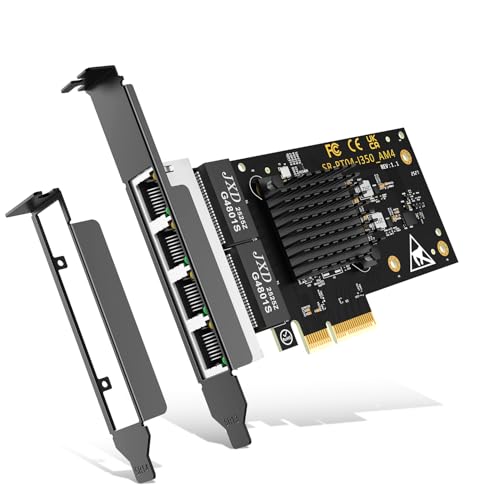
The Gigabit 4 Port PCIe Ethernet Adapter, powered by the Intel I350 Controller, is an ideal choice for gamers seeking high-performance networking. With four RJ45 ports supporting speeds up to 1 Gbps, you’ll enjoy seamless gameplay, live broadcasts, and quick downloads. It’s compatible with a range of operating systems, including Windows 10/11 and various Linux distributions, ensuring versatility in your setup. The PCI Express 2.1 design allows for excellent heat dissipation, maintaining stable connections. Plus, with lifetime technical support, you can count on prompt assistance whenever needed. Elevate your gaming experience with this reliable, high-speed adapter.
Best For: Gamers and professionals seeking a high-performance networking solution with multiple ports for seamless online activities.
Pros:
- Super-fast networking capabilities with speeds up to 1 Gbps for optimal gaming and streaming experiences.
- Wide compatibility with various operating systems, ensuring versatility for different setups.
- Lifetime technical support available, providing peace of mind and prompt assistance for any issues.
Cons:
- Limited to PCIe slots, which may not be available on older systems or certain compact builds.
- May require additional configuration for optimal performance on some operating systems or network setups.
- Physical installation may be complicated for users unfamiliar with hardware upgrades.
NICGIGA 2.5G Base-T PCIe Network Adapter
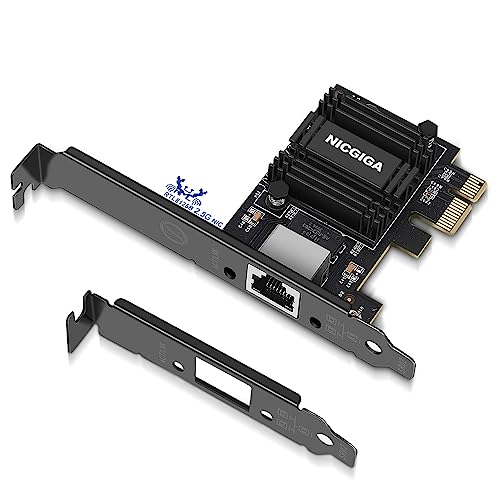
Gaming enthusiasts seeking a reliable and high-speed connection will find the NICGIGA 2.5G Base-T PCIe Network Adapter to be an excellent choice. With the Realtek RTL8125B chip, it supports data transfer rates of 2.5Gbps, 1Gbps, and 100Mbps, making it perfect for gaming and live broadcasts. This adapter easily converts a PCIe slot into a 2.5G RJ45 Ethernet port, ensuring compatibility with various operating systems without needing drivers for Windows 10. Its design includes standard and low-profile brackets, excellent heat dissipation, and a lifetime technical support guarantee, giving you peace of mind during intense gaming sessions.
Best For: Gaming enthusiasts and bandwidth-demanding users seeking a high-speed and reliable network connection.
Pros:
- Supports multiple data transfer rates (2.5Gbps, 1Gbps, 100Mbps) for versatile usage.
- No drivers needed for Windows 10, simplifying installation and setup.
- Excellent heat dissipation design for stable performance during high-intensity tasks.
Cons:
- Requires a PCIe slot, making it incompatible with older PCI slots.
- Limited compatibility with some operating systems may require driver downloads.
- Physical dimensions might not fit in all mini PC cases without the low-profile bracket.
TP-Link Gigabit Ethernet PCI Express Network Card (TG-3468)

If you’re looking to boost your internet speed for a smoother gaming experience, the TP-Link Gigabit Ethernet PCI Express Network Card (TG-3468) is an excellent choice. This adapter supports speeds of up to 1000Mbps, ensuring you get the most out of your internet connection. It’s compatible with a variety of Windows versions, including Windows 11, making installation a breeze. With features like Wake-on-LAN and power management, you can enjoy efficient performance and energy savings. Plus, TP-Link offers a 2-year warranty and 24/7 technical support, so you’ll always have help when you need it.
Best For: Gamers and users looking to enhance their internet speed and connection stability on Windows PCs.
Pros:
- High-Speed Performance: Supports speeds up to 1000Mbps for optimal internet connectivity.
- Wide Compatibility: Works seamlessly with various Windows versions, including the latest Windows 11.
- Energy Efficient: Features like Wake-on-LAN and power management help save energy during use.
Cons:
- Limited to Windows: Primarily designed for Windows operating systems, may not support other platforms.
- Physical Installation Required: Requires installation in a PCIe slot, which may not be feasible for all users.
- No built-in Wi-Fi: This product is strictly an Ethernet adapter and lacks wireless connectivity options.
Factors to Consider When Choosing PCIe Ethernet Cards for Gaming
When you’re choosing a PCIe Ethernet card for gaming, there are several key factors to keep in mind. Speed and performance, compatibility with your system, and latency can all impact your gaming experience. Plus, consider the quality of service and how easy the installation will be for you.
Speed and Performance
Choosing the right PCIe Ethernet card can greatly impact your gaming experience, especially regarding speed and performance. Aim for cards that deliver speeds of at least 2.5 Gbps, which provide smoother gameplay and reduced latency compared to standard Gigabit adapters. Look for performance features like Quality of Service (QoS) technology to prioritize gaming traffic, minimizing lag during peak usage. Advanced technologies such as 2.5GBASE-T or 10GBase-T can further enhance your internet speed and local network efficiency for bandwidth-intensive games. Additionally, opt for cards with Wake on LAN (WOL) functionality for remote management during gaming sessions. Finally, verify the card is backwards compatible with lower data rates, offering flexibility and reliability across various network setups.
Compatibility With Systems
Finding the right PCIe Ethernet card isn’t just about speed and performance; compatibility with your system is just as important. First, verify the card supports your operating system, whether it’s Windows, Linux, or macOS. Next, check your motherboard for the appropriate PCI Express slot type—x1, x4, x8, or x16—to guarantee a proper fit. It’s wise to look for backward compatibility with older data rates like 2.5 Gbps and 1 Gbps, ensuring you can maximize performance with your existing setup. Additionally, confirm that the card comes with the necessary brackets for installation in either low-profile or standard cases. Finally, review driver availability and installation support for smooth integration, especially if you’re using a less common operating system.
Latency and Responsiveness
To enhance your gaming experience, focusing on latency and responsiveness is essential in selecting a PCIe Ethernet card. Low latency minimizes the delay between your input and the game’s response, making every action feel instant. Look for cards that support higher data transfer rates, like 2.5 Gbps or 5 Gbps, as they can handle more data simultaneously, reducing lag during multiplayer sessions. Advanced technologies that prioritize gaming traffic can also improve responsiveness during high-demand moments. Features like Wake on LAN (WOL) enable quick access to your gaming machine, minimizing downtime. Additionally, choose cards with optimized heat dissipation to prevent thermal throttling, ensuring stable performance and reduced latency during those intense gaming marathons.
Quality of Service
When it comes to enhancing your gaming performance, Quality of Service (QoS) should be a top consideration for your PCIe Ethernet card selection. QoS technology prioritizes network traffic, ensuring gaming applications get the bandwidth they need for peak performance. With QoS features, you can set rules for bandwidth allocation, helping to reduce lag during peak usage times. High-performance Ethernet cards equipped with QoS can automatically detect and prioritize gaming packets, which minimizes network congestion. By optimizing data flow and reducing latency, QoS enhances the responsiveness of online games, giving you a competitive edge. Implementing QoS also helps maintain a stable connection, even with multiple devices on the same network, ensuring smooth gameplay when it matters most.
Installation and Setup
Choosing the right PCIe Ethernet card for gaming involves careful consideration during installation and setup. First, verify the card is compatible with your motherboard by checking the available PCIe slot types, like x1, x4, x8, or x16. Follow the manufacturer’s instructions for installation, which usually means inserting the card into the PCIe slot and securing it with screws. Most cards require driver installation for peak performance, so check if drivers are on a CD or available online. After installation, verify that your operating system recognizes the card and configure any necessary settings in the network adapter settings. For the best performance, use high-speed Ethernet cables (Cat5e or higher) and confirm your router supports the card’s speeds.
Build Quality and Reliability
While selecting a PCIe Ethernet card for gaming, you can’t overlook build quality and reliability, as these factors directly impact your gaming experience. A card made from durable materials can greatly reduce electromagnetic interference and enhance stability during intense gaming sessions. Look for high-quality heat dissipation features, like dense fins or aluminum construction, to prevent overheating and guarantee consistent performance. Reliable cards boast robust components that withstand heavy data transmission, minimizing connection drops and latency issues. Additionally, cards with extra shielding and superior manufacturing processes tend to last longer and maintain performance under pressure. Finally, consider the overall design and engineering, as they affect not only performance but also ease of installation and compatibility with your setup.
Warranty and Support Options
Considering warranty and support options is essential for anyone investing in a PCIe Ethernet card for gaming. Look for cards that offer a warranty of up to two years, giving you peace of mind against any defects. It’s also beneficial to choose products that include lifetime technical support, so you can get help with troubleshooting or setup whenever you need it. Pay attention to customer feedback ratings, as cards with high ratings, like 4.6 out of 5 stars, indicate reliability and satisfaction. Additionally, check for favorable return policies, like a 30-day full refund for damaged or unopened items. Finally, verify the manufacturer provides easy access to customer service with prompt responses, ideally within 24 hours, to resolve any issues quickly.