If you’re in the market for a reliable all-in-one printer, Xerox has some impressive options for 2026. With models that combine fast print speeds, automatic duplexing, and user-friendly features, choosing the right one can be a challenge. This guide will help you navigate through the top 10 Xerox printers, highlighting what sets each apart. You’ll want to evaluate performance and security features carefully before making your decision. So, what should you look for?
Xerox C235dni Wireless Color Laser Multifunction Printer

If you’re looking for a versatile solution that excels in both home and small business environments, the Xerox C235dni Wireless Color Laser Multifunction Printer is an ideal choice. With print speeds of up to 24 pages per minute, this printer handles color and black & white jobs efficiently. It offers essential functions like copying, scanning, and faxing, plus automatic two-sided printing to save paper. The user-friendly 2.8-inch touchscreen and built-in Wi-Fi make setup a breeze. You’ll appreciate the 250-sheet capacity and the ability to print from mobile devices. Plus, it meets environmental standards, ensuring eco-friendly operation.
Best For: The Xerox C235dni Wireless Color Laser Multifunction Printer is best for home users and small businesses seeking a reliable, all-in-one printing solution with high-quality output.
Pros:
- Versatile functionality: Offers printing, copying, scanning, and faxing in one device.
- Fast print speeds: Capable of printing up to 24 pages per minute for efficient workflow.
- Mobile printing support: Built-in Wi-Fi enables easy printing from smartphones and tablets.
Cons:
- Monthly print volume limitation: Recommended maximum monthly print volume of 1,500 pages may not suffice for larger businesses.
- Initial cost: Higher upfront investment compared to basic printers.
- Limited advanced features: Some advanced capabilities require additional optional software.
Xerox B225DNI All-in-One Printer (Wireless, Laser)
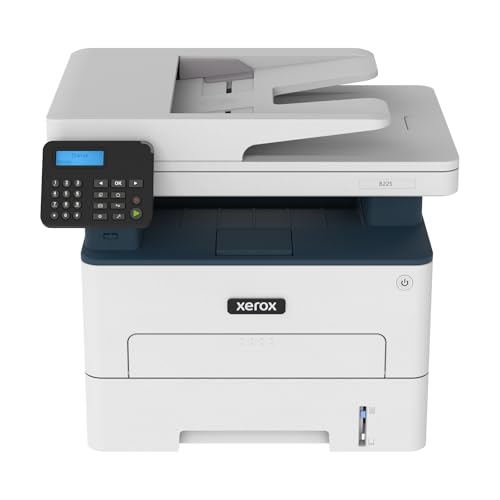
For busy professionals or small businesses looking for a reliable all-in-one solution, the Xerox B225DNI stands out with its impressive speed of up to 36 pages per minute. This wireless, black-and-white laser printer offers essential functions like printing, scanning, and copying. With automatic duplex printing and a monthly duty cycle of 30,000 pages, it handles heavy workloads effortlessly. Its built-in Wi-Fi, Ethernet, and USB connectivity make installation a breeze, while extensive security features keep your data safe. Plus, the intuitive interface simplifies operation, ensuring you can focus on your work without hassle.
Best For: Busy professionals and small businesses seeking a reliable, high-speed all-in-one printing solution.
Pros:
- Fast printing speed of up to 36 pages per minute.
- Automatic duplex printing and a high monthly duty cycle of 30,000 pages for heavy workloads.
- Extensive connectivity options including Wi-Fi, Ethernet, and USB, along with robust security features.
Cons:
- Only supports black-and-white printing, limiting versatility for color documents.
- Weighs 28.6 pounds, which may be cumbersome for frequent relocation.
- Customer reviews indicate a mixed satisfaction rating of 3.9 out of 5 stars.
Xerox C325dni Wireless Multifunction Printer

The Xerox C325dni Wireless Multifunction Printer stands out as an exceptional choice for home offices and small to mid-sized businesses seeking efficiency and versatility. With fast print speeds up to 35 pages per minute, you’ll breeze through tasks like printing, copying, scanning, faxing, and emailing. Its 250-sheet tray handles your documents effortlessly, while automatic two-sided printing saves paper. Built-in Wi-Fi, Apple AirPrint, and Mopria support allow you to print seamlessly from any device. Plus, the Xerox Easy Assist App makes setup and maintenance straightforward, ensuring you spend less time troubleshooting and more time focusing on your work.
Best For: Home offices and small to mid-sized businesses looking for a multifunction printer that offers speed and versatility.
Pros:
- Fast print speeds of up to 35 pages per minute enhance productivity.
- Automatic two-sided printing helps reduce paper usage and costs.
- Easy setup and maintenance through the Xerox Easy Assist App simplifies user experience.
Cons:
- Monthly duty cycle of 6,000 pages may not be sufficient for larger businesses with high-volume printing needs.
- Limited paper tray capacity of 250 sheets might require frequent refilling for extensive tasks.
- Potential connectivity issues with wireless printing depending on network stability.
Xerox B235DNI All-in-One Printer

Ideal for small businesses or home offices, the Xerox B235DNI All-in-One Printer combines efficiency and versatility with its ability to print, scan, copy, and fax. With a print speed of up to 36 pages per minute and a monthly volume of 2,500 pages, it handles your workload effortlessly. Enjoy seamless connectivity via built-in Wi-Fi and compatibility with various devices, including laptops and smartphones. Its automatic duplex printing and 50-sheet ADF simplify document management. Plus, with robust security features and Energy Star certification, it’s an environmentally friendly choice. The limited one-year warranty guarantees your investment is protected.
Best For: Small businesses or home offices seeking an efficient all-in-one laser printer for printing, scanning, copying, and faxing.
Pros:
- Fast print speed of up to 36 pages per minute enhances productivity.
- Built-in Wi-Fi and device compatibility streamline connectivity and ease of use.
- Energy Star certified, promoting environmentally friendly operations.
Cons:
- Limited to black and white printing, which may not suit all users’ needs.
- Average customer rating of 3.6 out of 5 stars may indicate mixed user experiences.
- Weight of 22 pounds may make it less portable for some users.
Xerox B315DNI All-in-One Laser Printer
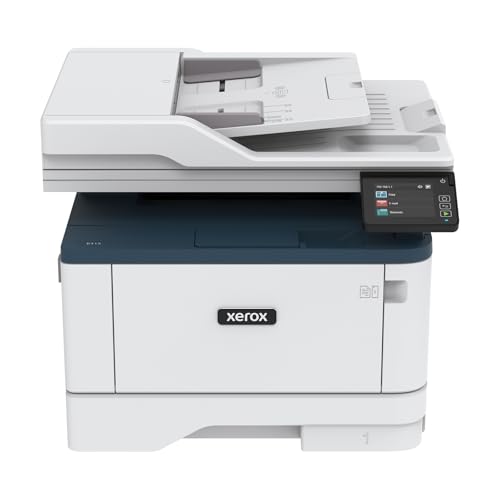
With a print speed of up to 42 pages per minute, the Xerox B315DNI All-in-One Laser Printer is a powerhouse designed for busy professionals and small businesses that demand efficiency. It handles printing, scanning, copying, and faxing with ease, boasting a monthly print volume of 2,500 pages. The 250-sheet paper capacity, expandable to 350, and a 50-sheet automatic document feeder add to its convenience. With built-in Wi-Fi, Ethernet, and USB connectivity, you can print from various devices effortlessly. Plus, its extensive security features keep your data safe, making it a smart investment for your office needs.
Best For: The Xerox B315DNI All-in-One Laser Printer is best for busy professionals and small businesses looking for an efficient, multifunctional printing solution.
Pros:
- High print speed of up to 42 pages per minute, enhancing productivity.
- Versatile functionality with printing, scanning, copying, and faxing capabilities.
- Built-in Wi-Fi and multiple connectivity options allow easy printing from various devices.
Cons:
- Maximum print resolution limited to 600 x 600 dpi, which may not meet high-quality graphic printing needs.
- Relatively heavy at 28.2 pounds, making it less portable.
- The monthly print volume of 2,500 pages may be insufficient for larger businesses with higher demands.
HP LaserJet Pro MFP 3101fdw Wireless All-in-One Laser Printer

For small teams and remote workers, the HP LaserJet Pro MFP 3101fdw stands out as a reliable choice among all-in-one printers. This wireless black-and-white laser printer offers impressive functionality, including printing, scanning, copying, and faxing at speeds up to 35 pages per minute. With features like auto two-sided printing and an automatic document feeder, efficiency is key. You can easily connect via Wi-Fi, Ethernet, or Bluetooth, ensuring compatibility with various devices. Plus, HP’s security features safeguard your documents. With a limited one-year warranty and a solid customer rating, this printer is built to support your productivity seamlessly.
Best For: The HP LaserJet Pro MFP 3101fdw is best for small teams and remote workers seeking a reliable all-in-one printer for efficient document handling.
Pros:
- High-speed performance: Prints up to 35 pages per minute, enhancing productivity.
- Versatile connectivity: Supports wireless printing from various devices, including mobile phones and tablets.
- Comprehensive functionality: Offers printing, scanning, copying, and faxing capabilities in one device.
Cons:
- Black and white only: Limited to monochrome printing, which may not suit users needing color outputs.
- Size and weight: At 10.5 kg, it may be less portable compared to smaller printers.
- Dynamic security restrictions: Requires original HP chip cartridges, limiting the use of third-party toner options.
Brother DCP-L2640DW Wireless Monochrome Laser Printer

The Brother DCP-L2640DW Wireless Monochrome Laser Printer is a powerhouse for small businesses seeking efficiency and quality in a compact design. It combines printing, scanning, and copying, delivering high-quality black-and-white prints at up to 1200 x 1200 DPI. With a lightning-fast print speed of 36 pages per minute and a 50-page auto document feeder, you’ll breeze through tasks. Dual-band wireless connectivity and USB options guarantee easy setup, while ENERGY STAR® compliance and automatic duplex printing keep your operations eco-friendly. Plus, enjoy a one-year warranty and optional toner subscription for hassle-free maintenance.
Best For: Small businesses looking for an efficient, multi-functional printer that offers high-quality monochrome printing and scanning capabilities.
Pros:
- Fast printing speeds of up to 36 pages per minute, enhancing productivity.
- Compact design that saves space while providing multiple functionalities (printing, scanning, copying).
- Eco-friendly features like automatic duplex printing and ENERGY STAR® compliance to reduce environmental impact.
Cons:
- Limited color printing capabilities as it is a monochrome printer.
- Initial setup may require some technical knowledge, especially for wireless connectivity.
- Toner subscription service may not be suitable for users who prefer purchasing toner on their own.
Canon Color imageCLASS MF753Cdw II All-in-One Wireless Laser Printer

Designed for small and home offices, the Canon Color imageCLASS MF753Cdw II All-in-One Wireless Laser Printer delivers exceptional performance with impressive print speeds of up to 35 pages per minute. You’ll appreciate its quick first print time of just 7 seconds and maximum print resolution of 1200 x 1200 dpi. The 50-sheet duplex Automatic Document Feeder makes scanning and copying efficient. Plus, with wireless connectivity options like Apple AirPrint and the Canon PRINT app, printing from your mobile device is a breeze. Backed by a 3-Year limited warranty, this printer is a reliable choice for your workspace.
Best For: Small and home offices seeking a reliable all-in-one printer with high performance and wireless capabilities.
Pros:
- Fast print speeds of up to 35 pages per minute, making it efficient for busy work environments.
- High-quality prints with a maximum resolution of 1200 x 1200 dpi for sharp and vibrant documents.
- Versatile connectivity options, including wireless, Ethernet, and mobile printing, for easy access from various devices.
Cons:
- Limited paper capacity without optional expansion, which may not be suitable for larger print jobs.
- Initial cost may be higher compared to basic printers, reflecting its advanced features and capabilities.
- Size and weight may be cumbersome for very small home office spaces.
HP Laserjet Pro MFP 4101fdw Wireless All-in-One Laser Printer

If you’re seeking a reliable all-in-one solution for a small team of up to 10 users, the HP Laserjet Pro MFP 4101fdw stands out with its impressive print speed of up to 42 pages per minute. This wireless black-and-white printer combines printing, scanning, copying, and faxing in one compact design. With a maximum print resolution of 1200 x 1200 dpi and support for various media types, it adapts to your needs. Its intelligent Wi-Fi connectivity guarantees seamless wireless printing, while HP Wolf Pro Security protects your data. Plus, with a one-year warranty, you can depend on its performance in your office.
Best For: Small teams of up to 10 users seeking a versatile and efficient all-in-one printer solution.
Pros:
- Fast print speed of up to 42 pages per minute enhances productivity.
- Intelligent Wi-Fi connectivity allows for seamless wireless printing from various devices.
- HP Wolf Pro Security ensures data protection with customizable security settings.
Cons:
- Only supports black-and-white printing, limiting color document options.
- Weighs 33 pounds, which may be cumbersome for some users to move.
- Limited to a one-year hardware warranty, which may not be sufficient for heavy users.
Brother MFC-L2820DW Wireless Compact Monochrome All-in-One Laser Printer

For small offices or home workspaces that need a reliable and compact printing solution, the Brother MFC-L2820DW Wireless Compact Monochrome All-in-One Laser Printer stands out as an ideal choice. It prints, copies, scans, and faxes, making it a versatile tool. With a print speed of up to 36 pages per minute and a 50-page auto document feeder, you’ll breeze through multi-page tasks. You can connect via dual-band wireless, Ethernet, or USB, and the 2.7” touchscreen simplifies navigation. Plus, the Brother Mobile Connect App lets you manage functions remotely, ensuring you stay productive without hassle.
Best For: Small offices or home workspaces that require a reliable and compact all-in-one printing solution.
Pros:
- Fast printing speed of up to 36 pages per minute, enhancing productivity.
- Versatile functionality with print, copy, scan, and fax capabilities.
- Multiple connectivity options including dual-band wireless, Ethernet, and USB for flexible use.
Cons:
- Monochrome printing only, limiting color printing needs.
- Limited scanning speed for color documents at 7.9 ipm, which may slow down workflows.
- Touchscreen interface may not be as intuitive for all users compared to larger displays.
Factors to Consider When Choosing Xerox All in One Printers
When choosing a Xerox all-in-one printer, you’ll want to take into account several key factors. Think about print speed efficiency, monthly print volume, and the available connectivity options to guarantee it meets your needs. Don’t forget to check for a user-friendly interface and environmental sustainability features that can make a difference in your overall experience.
Print Speed Efficiency
Understanding print speed efficiency is essential for choosing the right Xerox all-in-one printer, especially if you need to keep up with a busy work environment. Look for models that offer print speeds between 24 to 42 pages per minute (ppm), as these can greatly boost your productivity. If you have high-volume needs, consider printers designed for monthly totals up to 6,000 pages. Automatic duplex printing saves you time by allowing double-sided printing without manual effort. Additionally, features like automatic document feeders (ADF) can enhance scanning and copying speed, achieving up to 23.6 images per minute (ipm). Don’t forget to check the maximum print resolution, too, since higher resolutions can deliver sharper, more professional-quality documents.
Monthly Print Volume
Choosing the right monthly print volume is essential for ensuring your Xerox all-in-one printer meets your specific needs. Consider the recommended monthly print volume, as it indicates the ideal usage level for maximum performance and longevity. Xerox models vary widely, with some designed for workloads up to 1,500 pages, while others can handle up to 30,000 pages monthly. Selecting a printer that matches your expected print volume helps prevent frequent paper jams and excessive wear on the device. Additionally, balance your monthly print volume needs with the cost of supplies, since higher volume printers may require more toner and paper. Understanding whether you primarily print in black & white or color will also influence the monthly print volume you should target.
Connectivity Options Available
After determining your monthly print volume, the next step is to evaluate the connectivity options available with Xerox all-in-one printers. Many models come with built-in Wi-Fi, allowing wireless printing from various devices without physical connections. You’ll appreciate support for mobile printing options like Apple AirPrint and Mopria Print Service, which let you print directly from your smartphone or tablet seamlessly. If you’re in an office setting, Ethernet connectivity provides reliable network access for stable connections. Some printers also offer Wi-Fi Direct, enabling direct device connections without a local network. Additionally, USB connectivity remains standard, allowing direct printing from computers and laptops for those who prefer a wired approach. Make your choice based on your connectivity needs!
User-Friendly Interface
When you’re evaluating Xerox all-in-one printers, a user-friendly interface can make a significant difference in your printing experience. Look for models with a color touchscreen that simplifies navigation, giving you intuitive access to various functions. Mobile apps are a huge plus, letting you manage printing, scanning, and maintenance tasks straight from your smartphone or tablet. Easy setup wizards and real-time performance updates reduce installation and troubleshooting time, making it accessible for everyone. Features like automatic document feeders (ADF) and duplex printing streamline your workflow, allowing efficient multi-page scanning and double-sided printing. Additionally, thorough software can simplify complex tasks, enhancing productivity and usability for all your diverse needs.
Environmental Sustainability Features
As you explore options for Xerox all-in-one printers, it is essential to evaluate their environmental sustainability features, which can greatly affect your ecological footprint. Many Xerox printers are ENERGY STAR certified, ensuring they meet energy efficiency guidelines that help reduce your environmental impact. Look for models that comply with EPEAT environmental standards, which assess products’ eco-friendliness throughout their lifecycle. The Green World Alliance program also allows you to recycle toner cartridges, promoting responsible waste management. Additionally, some printers come with toner save modes, extending cartridge life and minimizing waste. Finally, Xerox’s commitment to sustainable practices includes using eco-friendly materials in manufacturing, further enhancing their printers’ sustainability profile. Make these features a priority for a greener choice.
Security Capabilities
While considering the environmental sustainability features of Xerox all-in-one printers, it’s also important to look at their security capabilities. Many models come equipped with robust security measures to protect against cyber threats, guaranteeing your sensitive data stays safe. Features like secure print, password protection, and user authentication help safeguard access to confidential print jobs. Some printers even include dynamic security measures that restrict the use of non-original cartridges, enhancing overall protection. Regular firmware updates keep your device secure against emerging threats. Additionally, certain models offer functionalities such as auto-redaction and document encryption, further bolstering data security during processing and storage. Prioritizing these features will guarantee your printing needs align with your security requirements.
Paper Handling Capacity
Choosing the right paper handling capacity is essential for maximizing the efficiency of your Xerox all-in-one printer. Look for models with a standard 250-sheet tray, but consider those with higher capacities if your printing needs demand it. Many Xerox printers feature a 50-sheet automatic document feeder (ADF), making multi-page scanning, copying, and faxing quick and easy. Pay attention to the recommended monthly print volume; some models can handle up to 6,000 pages, ideal for high-demand environments. Automatic duplex printing saves paper and reduces costs, while ensuring your printer accommodates various media types, including legal and letter-sized papers as well as specialty items like card stock and labels. Choose wisely to meet your workflow needs.
Warranty and Support Services
When investing in a Xerox all-in-one printer, warranty and support services play a significant role in your overall satisfaction. Most Xerox models come with a limited one-year warranty, covering manufacturing defects and common issues. You’ll find various customer support options, including FAQs, live chat, and phone assistance, making it easy to troubleshoot problems. Additionally, some models offer a 30-day return policy through retailers like Amazon, allowing you to evaluate performance risk-free. It’s also beneficial to look for extended support programs that provide ongoing software updates and security enhancements. Checking user reviews can give you valuable insights into the reliability and responsiveness of customer service, ensuring you make a well-informed decision.