A 34-inch ultrawide monitor can make a home office feel bigger, cleaner, and more efficient. The wide 21:9 layout is great for side-by-side windows, timelines, spreadsheets, and everyday multitasking.
In this roundup, we focus on models that balance screen space, image quality, eye comfort, and practical connectivity for productive work from home.
Best 10 34 Inch Ultrawide Monitor for Home Office Picks for 2026
Best for Value Gaming
Sceptre 34-Inch Curved Ultrawide WQHD Monitor

- 3440 x 1440 ultrawide workspace
- Up to 180Hz with 1ms response
- 99% sRGB and dual DisplayPorts
Best For: Home office users who want a fast, spacious ultrawide that doubles as a budget-friendly gaming monitor.
Best for Speedy Multitasking
SANSUI 34-Inch Curved UWQHD Monitor

- 3440 x 1440 ultrawide resolution
- Up to 200Hz refresh rate with 1ms response
- PIP/PBP plus HDMI 2.1 and DP 1.4
Best For: Workers who want a fast ultrawide for productivity and occasional gaming.
Best for Clean USB-C Desktops
LG 34U530A-W 34-Inch UltraWide Monitor

- 34-inch 21:9 screen for easy multitasking
- USB-C, HDMI, and DisplayPort for flexible hookups
- 100Hz IPS panel with HDR 400 support
Best For: Hybrid workers and laptop users who want an uncluttered ultrawide home office setup.
Best for USB-C Simplicity
Dell 34 Plus USB-C Curved Monitor S3425DW

- Single USB-C cable with up to 65W power delivery
- 120Hz refresh rate with AMD FreeSync Premium
- 99% sRGB and 95% DCI-P3 color coverage
Best For: Remote workers who want a clean, single-cable ultrawide for everyday productivity and entertainment.
Best for Streaming and WFH
LG 34SR60QC-W 34-Inch Curved Smart Monitor

- Wide 3440x1440 ultrawide workspace for multitasking
- Built-in webOS streaming and cloud access without a PC
- 100Hz, HDR10, and 99% sRGB for smoother, richer visuals
Best For: Remote workers who want a wide workspace plus built-in streaming and smart features in one monitor.
Best for Value Ultrawide
Gawfolk 34-inch IPS 120Hz Ultrawide Monitor
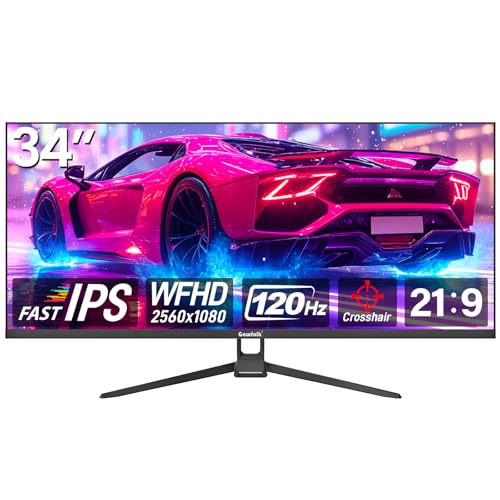
- 34-inch 21:9 ultrawide design for multitasking
- 120Hz refresh rate for smooth scrolling and gaming
- IPS panel with HDMI, DisplayPort, and VESA support
Best For: Budget-minded buyers who want a wide, productive desktop display that can also handle casual gaming.
Best for USB-C Docking
LG 34U650A-B 34-inch UltraWide WQHD Monitor

- Single-cable USB-C setup with 96W charging
- 34-inch 3440 x 1440 IPS panel for multitasking
- 100Hz refresh and ergonomic stand improve daily comfort
Best For: Remote workers and laptop users who want a clean, productive ultrawide setup.
Best for Multitasking
Samsung 34" ViewFinity S50GC Ultrawide Monitor

- 21:9 Ultra-WQHD for easy side-by-side work
- 100Hz with FreeSync for smoother motion
- Eye care features help reduce all-day strain
Best For: Remote workers and home office users who want one wide screen for productive multitasking.
Best for Value Gaming – Sceptre 34-Inch Curved Ultrawide WQHD Monitor
If you want a 34 inch ultrawide monitor for home office use that can also handle after-hours gaming, this Sceptre model is a strong all-around pick. The 3440 x 1440 WQHD panel gives you plenty of horizontal workspace for spreadsheets, docs, and multitasking, while the curved 21:9 format makes it easier to keep multiple windows in view.
Best For: Home office buyers who want a large ultrawide with fast refresh rates, decent color, and a gaming-friendly design without moving into premium pricing.
Pros:
- 3440 x 1440 resolution offers more working room than a standard 1080p or 16:9 monitor.
- Up to 180Hz refresh rate and 1ms response time make it unusually quick for the price.
- 99% sRGB support is a nice plus for everyday creative work and vivid desktop use.
- Dual DisplayPorts and HDMI inputs make it flexible for a PC, laptop, or console setup.
Cons:
- Built-in speakers are convenient, but they are unlikely to satisfy most users for daily audio.
- The design leans more gaming-oriented than minimalist office-friendly.
- No USB-C hub or ergonomic extras, so some home office setups may need add-ons.
Overall, this is a practical 34 inch ultrawide monitor for home office users who want a big productivity boost and also care about fast motion handling. It stands out more for feature-per-dollar value than for a polished premium finish.
Best for Comfort and Everyday Use – Dell S2725HS 27-Inch 100Hz Monitor
If you’re shopping for a 34 inch ultrawide monitor for home office work but want a simpler, more affordable display, the Dell S2725HS is a practical alternative. Its 27-inch Full HD panel, 100Hz refresh rate, and ComfortView Plus make it a solid choice for long work sessions, light streaming, and general productivity.
Best For: Home office users who want a comfortable, flexible monitor with smoother-than-basic everyday performance.
Pros:
- 100Hz refresh rate makes scrolling and motion feel smoother than standard office monitors.
- ComfortView Plus and TÜV Rheinland Eye Comfort 4-star rating help reduce eye strain.
- Height, tilt, swivel, and pivot adjustments make it easy to fit different desk setups.
- Built-in 2x5W speakers and dual HDMI ports add convenience for mixed use.
Cons:
- 27-inch FHD resolution is not as spacious as a true ultrawide home office monitor.
- Not ideal for users who need lots of side-by-side screen real estate.
For buyers comparing a 34 inch ultrawide monitor for home office use, this Dell stands out more for comfort and everyday usability than sheer workspace width. It’s a good pick if you value eye comfort, smooth navigation, and easy adjustability over a larger ultrawide format.
Best for Speedy Multitasking – SANSUI 34-Inch Curved UWQHD Monitor
If you want a 34 inch ultrawide monitor for home office work and still care about smooth motion for after-hours gaming, this SANSUI model packs a lot into a single display. The 3440 x 1440 panel gives you plenty of horizontal space for spreadsheets, timelines, and side-by-side windows, while the 200Hz refresh rate and 1ms response time make it feel much faster than a typical productivity monitor.
Best For: Buyers who want a wide, high-refresh monitor for workday multitasking and occasional gaming without moving up to a pricier premium ultrawide.
Pros:
- 3440 x 1440 resolution offers sharp text and lots of workspace for office tasks
- Up to 200Hz refresh rate is unusually fast for a 34-inch ultrawide
- PIP/PBP, HDMI 2.1, and DisplayPort 1.4 add flexible multitasking and connectivity
- Curved 1500R design helps keep the wide screen feeling immersive and manageable
Cons:
- VA panel performance is strong, but not ideal if you need top-tier color-critical accuracy
- No built-in speakers
- Gaming-focused extras may be more than some home office buyers need
For anyone comparing a 34 inch ultrawide monitor for home office use, this SANSUI stands out by combining strong workspace value with refresh rates that are far beyond standard productivity displays. It is a practical pick if you want one screen that handles work, split-screen multitasking, and light gaming well.
Best for Clean USB-C Desktops – LG 34U530A-W 34-Inch UltraWide Monitor
If you want a 34 inch ultrawide monitor for home office use that keeps your desk tidy and your workflow open, the LG 34U530A-W is a strong practical pick. Its 21:9 2560 x 1080 IPS panel gives you extra horizontal room for side-by-side windows, while USB-C, HDMI, and DisplayPort make it easy to connect a laptop or desktop.
Best For: Hybrid workers, laptop users, and anyone who wants a spacious ultrawide with simple single-cable connectivity.
Pros:
- 34-inch 21:9 screen makes multitasking and document work easier
- USB-C helps reduce cable clutter on a home office desk
- 100Hz refresh rate keeps scrolling and video calls smooth
- IPS panel with HDR 400 and sRGB 99% offers solid everyday color
Cons:
- 2560 x 1080 resolution is good for productivity, but not as sharp as higher-res ultrawides
- Built-in speakers are convenient, but not a substitute for dedicated audio
Overall, the LG 34U530A-W is a smart 34 inch ultrawide monitor for home office setups that prioritize workspace, simplicity, and smooth day-to-day use over maximum resolution.
Best for USB-C Simplicity – Dell 34 Plus USB-C Curved Monitor S3425DW
If you want a 34 inch ultrawide monitor for home office use that keeps the desk clean and the picture sharp, the Dell 34 Plus S3425DW is an easy fit. Its 3440 x 1440 VA panel, 120Hz refresh rate, and USB-C connection make it a practical all-in-one display for work, light creative tasks, and after-hours entertainment.
Best For: Remote workers who want a single-cable ultrawide with strong color, good contrast, and comfortable all-day use.
Pros:
- USB-C with up to 65W power delivery helps reduce cable clutter.
- 120Hz refresh rate and AMD FreeSync Premium make motion feel smooth for work and play.
- 99% sRGB and 95% DCI-P3 coverage give it rich, accurate-looking color.
- ComfortView Plus is designed to cut blue light without dulling the image.
Cons:
- VA panel performance is solid, but not as color-critical as a true pro-grade IPS or OLED display.
- Integrated speakers are convenient, but they are unlikely to replace a good external audio setup.
For a 34 inch ultrawide monitor for home office setups, this Dell stands out by balancing productivity-friendly connectivity with a curved screen, strong contrast, and smooth everyday responsiveness. It is a sensible pick if you want one monitor to handle spreadsheets, video calls, and streaming without extra desk clutter.
Best for Streaming and WFH – LG 34SR60QC-W 34-Inch Curved Smart Monitor
If you want a 34 inch ultrawide monitor for home office use that can double as a work screen and a streaming display, the LG 34SR60QC-W is an easy fit. Its 34-inch 3440×1440 curved panel gives you plenty of room for side-by-side windows, while webOS lets you jump into apps and cloud tools without turning on a PC.
Best For: Remote workers who want a wide workspace plus built-in streaming and smart features in one monitor.
Pros:
- 34-inch 21:9 ultrawide QHD panel is ideal for multitasking and split-screen work
- Built-in webOS with major streaming apps and LG Channels reduces device clutter
- HDR10, 99% sRGB, and 100Hz support help with sharper visuals and smoother motion
- Two HDMI ports, three USB ports, Bluetooth, and screen sharing add flexible connectivity
Cons:
- Built-in speakers are convenient, but not a replacement for dedicated desktop audio
- Smart features are helpful, though some buyers may prefer a simpler traditional monitor
For a 34 inch ultrawide monitor for home office setups that also covers after-hours entertainment, this LG stands out for convenience and versatility. It is especially appealing if you want one display that can handle work, streaming, and casual use without extra hardware.
Best for Value Ultrawide – Gawfolk 34-inch IPS 120Hz Ultrawide Monitor
If you want a 34 inch ultrawide monitor for home office use without paying premium prices, this Gawfolk model delivers a lot of screen for the money. The 2560×1080 IPS panel gives you extra horizontal workspace for spreadsheets, side-by-side windows, and light creative work, while the 120Hz refresh rate keeps scrolling and multitasking feeling smooth.
Best For: Budget-minded buyers who want a wide, productive desktop display that can also handle casual gaming.
Pros:
- 34-inch 21:9 ultrawide format adds space for multitasking
- 120Hz refresh rate makes everyday use feel fluid
- IPS panel offers good viewing angles and solid color coverage
- HDMI, DisplayPort, and 75x75mm VESA mounting support
Cons:
- 1080p-class vertical resolution is less sharp than 1440p ultrawides
- Limited ergonomic adjustment beyond tilt
- Not the best pick if you want a premium color-critical panel
For shoppers prioritizing affordability and screen real estate, this 34 inch ultrawide monitor for home office setups is a practical middle ground. It won’t match higher-resolution productivity displays, but it covers the essentials well and adds enough smoothness to double as a casual gaming monitor.
Best for Eye Comfort – Samsung ViewFinity S65UA 34-Inch Curved Ultrawide
If you want a 34 inch ultrawide monitor for home office use that makes multitasking easier without adding desk clutter, the Samsung ViewFinity S65UA is a strong fit. Its 21:9 Ultra WQHD panel gives you plenty of room for spreadsheets, timelines, and side-by-side windows, while the 1000R curve helps the screen feel more natural during long work sessions.
Best For: Remote workers, creative pros, and anyone who spends long hours in front of a single, spacious monitor and wants better comfort plus cleaner cable management.
Pros:
- 34-inch curved 21:9 display is great for multitasking on one screen
- USB-C with 90W charging helps simplify a laptop-based setup
- 1000R curve, TUV eye care, and flicker-free support reduce fatigue
- 100Hz refresh rate feels smoother than typical office monitors
Cons:
- Not a true productivity budget pick
- Curved design may not suit users who prefer flat panels for precision work
- Built-in extras are practical, but not as feature-packed as premium workstation displays
For buyers comparing a 34 inch ultrawide monitor for home office work, this model stands out most for comfort, USB-C convenience, and an easy-to-manage all-in-one setup. It’s a balanced choice if you want a larger workspace without stepping into high-end pricing.
Best for USB-C Docking – LG 34U650A-B 34-inch UltraWide WQHD Monitor
If you want a practical 34 inch ultrawide monitor for home office use, the LG 34U650A-B stands out for its USB-C simplicity, wide 21:9 workspace, and clean desk-friendly design. The 3440 x 1440 IPS panel gives you room for side-by-side apps, while 100Hz smoothing and HDR10 make daily work, calls, and light media feel more polished.
Best For: Remote workers and laptop users who want a single-cable ultrawide setup with charging, decent color, and easy multitasking.
Pros:
- USB-C supports display, data, and up to 96W laptop charging
- 34-inch 3440 x 1440 IPS panel offers strong multitasking space
- 100Hz refresh rate keeps scrolling and motion smoother than basic office monitors
- Height, tilt, and swivel adjustments make it easier to dial in ergonomics
Cons:
- Curved ultrawide layout may take a little adjustment if you’re used to flat monitors
- Built-in speakers are convenient, but not a replacement for good external audio
- USB-C power delivery is excellent for many laptops, but not all users will need it
Overall, this is a strong pick if your priority is a tidy, productive workstation rather than gaming-first specs. For anyone shopping a 34 inch ultrawide monitor for home office use, it delivers the right mix of screen space, connectivity, and everyday comfort.
Best for Multitasking – Samsung 34" ViewFinity S50GC Ultrawide Monitor
If you want a practical 34 inch ultrawide monitor for home office use, the Samsung ViewFinity S50GC is built around screen space and everyday comfort. Its 21:9 Ultra-WQHD panel gives you room for side-by-side windows, while 100Hz and FreeSync help keep scrolling and motion feeling smooth during work and light entertainment.
Best For: Remote workers, multitaskers, and anyone who wants one wide screen for spreadsheets, documents, and video calls.
Pros:
- 21:9 Ultra-WQHD display makes multitasking easier without a dual-monitor setup
- 100Hz refresh rate improves smoothness for work, browsing, and media
- HDR10 support adds better contrast and color depth than basic SDR panels
- Eye Saver Mode, Flicker Free, and ambient brightness adjustment help reduce strain
Cons:
- Not as feature-rich as higher-end ultrawides for creative pros
- FreeSync is useful, but this is still more work-first than gaming-first
- Large footprint may be too wide for compact desks
This Samsung is a strong fit if you mainly need an efficient 34 inch ultrawide monitor for home office productivity rather than a flashy premium display. It focuses on usable space, eye comfort, and smoother performance, which makes it an easy recommendation for day-to-day work.
How We Picked the Best 34 Inch Ultrawide Monitor for Home Office
We looked for monitors that offer enough horizontal space to replace a dual-screen setup, while still being comfortable for long work sessions. Priority went to sharp 3440 x 1440 resolutions, reliable IPS or quality VA panels, USB-C or DisplayPort connectivity, and stands or mounts that support ergonomic desk setups.
We also considered productivity features that matter in a 34 Inch Ultrawide Monitor for Home Office, including split-screen support, eye-comfort tuning, built-in speakers where useful, and refresh rates that make scrolling and cursor movement feel smooth.
Quick Comparison
For most buyers, the best all-around choice is a 3440 x 1440 model with USB-C and an adjustable stand. If you want a simpler value option, 2560 x 1080 models are easier on the budget but less sharp. If your day includes lots of app switching, spreadsheets, or content creation, higher-resolution ultrawides are the better long-term fit.
Key Buying Factors for a 34-Inch Ultrawide Monitor for Home Office
Resolution and Text Clarity
At 34 inches, 3440 x 1440 is the sweet spot for crisp text and comfortable scaling. Lower-resolution WFHD models can still work, but they are best for lighter office use or shoppers prioritizing price.
Panel Type and Comfort
IPS panels usually provide better viewing angles and more consistent color, which helps when you work with documents, photo assets, or shared screens. VA panels often deliver stronger contrast, which can make dark text and media look deeper, though response times and viewing angles vary.
Connectivity and Desk Setup
USB-C is especially valuable if you want a cleaner workspace and a single-cable laptop connection for video, data, and sometimes charging. HDMI and DisplayPort remain important for desktop PCs, docks, and multi-device flexibility.
Ergonomics and Extra Features
A height-adjustable stand, VESA support, and a mild curve can improve comfort over long workdays. Built-in speakers, PIP/PBP, and HDR are helpful extras, but they should not outweigh core productivity basics.
Who Should Buy Which 34 Inch Ultrawide Monitor for Home Office?
If you want the most balanced setup, choose a sharp 3440 x 1440 ultrawide with USB-C and an ergonomic stand. If your budget is tighter, a 2560 x 1080 monitor can still deliver the ultrawide experience for documents, email, and web work.
If you split time between office tasks and entertainment, look for a model with higher refresh rates, good contrast, and HDR support. If you use a laptop as your main machine, prioritize USB-C and power delivery for the cleanest home office setup.