A 5K2K ultrawide gives you a wide workspace without sacrificing the vertical resolution that makes documents, timelines, and spreadsheets easier to manage. It can replace a two-monitor setup while keeping your work in one continuous view.
These nine options span office-focused IPS displays and faster gaming-oriented screens. The right choice depends less on the biggest specification and more on your desk space, laptop connections, and daily workload.
Best 9 5k2k Monitor for Productivity Picks for 2026
Best for Connected Workstations

- 39.7-inch curved 5120 × 2160 display
- 120Hz matte screen
- USB hub, Ethernet, adjustable stand
Best For: Multitasking desks needing extensive connectivity
Best for Single-Cable Laptops

- 40-inch curved 5120 × 2160 screen
- 120Hz IPS Black panel
- USB-C video with 65W charging
Best For: Laptop users building a single-cable ultrawide desk
Best for Two-Computer Desks
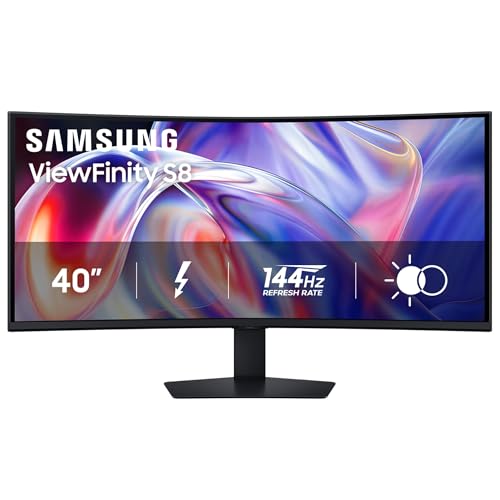
- 40-inch curved 5120 × 2160 display
- Built-in KVM and Picture-by-Picture
- Thunderbolt 5 with up to 140W charging
Best For: Office setups sharing one screen across two computers
Versatile Value Pick
Deco Gear PRO40 40-Inch Curved Nano IPS

- 40-inch 5120 × 2160 workspace
- 120 Hz with Adaptive Sync
- USB-C with 65 W charging
Best For: Multitasking with occasional gaming
Gaming-First OLED

- 39-inch 5K2K OLED at 143 PPI
- 165 Hz at 5K2K resolution
- 330 Hz Wide Full HD mode
Best For: Desktop work and high-refresh gaming
Creator Connectivity Pick

- 40-inch Nano IPS Black 5K2K screen
- Thunderbolt 5 with 96 W charging
- DisplayHDR 600 and 120 Hz
Best For: Creative work and Thunderbolt laptop setups
Biggest Canvas

- 52-inch 21:9 workspace
- 240Hz refresh and 1ms GtG response
- USB-C with up to 90W charging
Best For: Expansive multitasking plus high-refresh gaming
Creative Workstation

- 40-inch Nano IPS Black panel
- Thunderbolt 5 with up to 96W power
- Built-in KVM and Ethernet
Best For: Creative workflows and laptop-based multitasking
Dual-Mode Pick
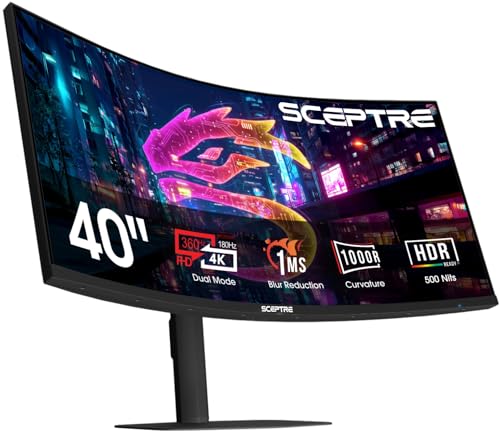
- 5120 × 2160 at up to 180Hz
- 360Hz mode at 2560 × 1080
- Height-adjustable curved screen
Best For: Multitasking with a separate high-speed gaming mode
Best for Connected Workstations – Dell UltraSharp U4025QW
If you want a 5k2k monitor for productivity with room for several windows, the Dell UltraSharp U4025QW pairs a 39.7-inch curved, matte screen with 5120 × 2160 resolution. Its 120Hz refresh rate helps scrolling feel smooth, while the USB hub and Ethernet connection suit a busy desk.
Best For: Multitaskers who want a large ultrawide display and plenty of workstation connections.
Pros:
- 5120 × 2160 resolution across a 39.7-inch, 21:9 screen.
- 120Hz refresh rate and matte, anti-glare finish.
- USB hub, Ethernet, and height, swivel, and tilt adjustments.
Cons:
- At 41.9 pounds, it is a substantial monitor to position.
- Only one HDMI port is listed.
The U4025QW is a strong fit when screen space, desk connectivity, and adjustability matter more than a compact footprint.
Best for Single-Cable Laptops – M² Vision 40-inch Ultrawide
The M² Vision is a 5k2k monitor for productivity if your laptop setup needs a wide workspace without two separate screens. Its 40-inch curved IPS Black panel runs at 5120 × 2160 and 120Hz, while USB-C can carry video and provide up to 65W of laptop charging.
Best For: Laptop users who want an ultrawide workspace with USB-C video and charging.
Pros:
- 40-inch, 21:9 display provides space for side-by-side work.
- 120Hz refresh rate and Adaptive Sync support smooth motion.
- USB-C with 65W charging and a height-adjustable stand.
Cons:
- Glossy screen finish may not suit every lighting setup.
- 65W charging may be insufficient for laptops that require more power.
Choose this model for a streamlined laptop desk, but check your laptop’s charging needs and your tolerance for a glossy screen.
Best for Two-Computer Desks – Samsung ViewFinity S8 S85TH
For a 5k2k monitor for productivity across two computers, the Samsung ViewFinity S8 S85TH offers a 40-inch curved, 5120 × 2160 workspace. Its built-in KVM switch, Picture-by-Picture mode, and Thunderbolt 5 connection make switching and viewing sources central to the setup.
Best For: Office users managing two computers from one ultrawide monitor.
Pros:
- Built-in KVM switch supports one keyboard and mouse across two sources.
- Thunderbolt 5 supports up to 140W charging; built-in LAN adds wired networking.
- 144Hz refresh rate and adjustable height, swivel, and tilt.
Cons:
- Its 36.56-inch width and 14.25-inch depth require ample desk space.
- Only one HDMI port is listed.
The S85TH makes the most sense when source sharing and high-power laptop charging are priorities, provided your desk can accommodate its size.
Versatile Value Pick – Deco Gear PRO40 40-Inch Curved Nano IPS
The Deco Gear PRO40 is a 5k2k monitor for productivity that pairs a roomy 40-inch, 5120 × 2160 canvas with a 2500R curve. Its 120 Hz refresh rate and Adaptive Sync also make it useful when work gives way to gaming.
Best For: Multitaskers who want a large ultrawide workspace, USB-C laptop connectivity, and smooth motion in one display.
Pros:
- 40-inch 21:9 screen provides space for multiple windows.
- USB-C supplies up to 65 W of power; four USB-A ports add peripheral connectivity.
- Nano IPS panel is specified for 99% DCI-P3 coverage, with a 120 Hz refresh rate.
Cons:
- 65 W USB-C charging may not cover the needs of higher-power laptops.
- Specified 250-nit brightness is modest for bright rooms.
This is a flexible work-and-play option, but check your laptop’s charging needs and workspace lighting before choosing it.
Gaming-First OLED – LG UltraGear evo 39GX950B-B
The LG UltraGear evo 39GX950B-B is a 5k2k monitor for productivity if you also want a gaming-focused OLED. Its 39-inch, 5120 × 2160 screen offers room for documents and creative timelines, while 143 PPI helps keep text and fine details crisp.
Best For: People who split their screen time between detailed desktop work and fast-paced gaming.
Pros:
- 21:9 5K2K display accommodates multiple windows or editing timelines.
- OLED panel offers deep blacks and up to 99.5% typical DCI-P3 coverage.
- Runs at 165 Hz in 5K2K mode, with a 330 Hz Wide Full HD option.
Cons:
- The 330 Hz mode uses a lower resolution than 5K2K.
- Its 1500R curve may not suit buyers who prefer a flatter work surface.
Choose this model when gaming performance matters as much as workspace resolution; its dual-mode refresh rates are the clearest reason to pick it over a work-first display.
Creator Connectivity Pick – LG UltraFine evo 40U990A-W
The LG UltraFine evo 40U990A-W is a 5k2k monitor for productivity built around a 40-inch Nano IPS Black workspace and Thunderbolt 5 connectivity. Its 5120 × 2160 resolution gives editors, designers, and programmers room for detailed work alongside reference windows.
Best For: Creative professionals who want a spacious display and a streamlined, single-cable laptop setup.
Pros:
- Thunderbolt 5 supports data transfer, display output, and up to 96 W charging through one cable.
- Nano IPS Black panel specifies 2000:1 contrast and up to 99% DCI-P3 coverage.
- DisplayHDR 600, 120 Hz refresh, and daisy-chain support add flexibility.
Cons:
- The 40-inch screen measures 37.3 inches wide, so it needs substantial desk space.
- Its 2500R curve may not appeal to buyers seeking a flat panel.
This is the strongest fit of the three for a Thunderbolt-centered creative desk, particularly when 96 W laptop charging and multi-monitor connectivity are priorities.
Biggest Canvas – LG UltraGear evo 52-inch 5K2K
If your search for a 5k2k monitor for productivity also includes serious gaming, this 52-inch, 21:9 LG offers an enormous workspace. Its 1000R curve and 5120 × 2160 resolution give you room to spread out windows, though its gaming-first design deserves consideration.
Best For: Users who want a huge ultrawide workspace and 240Hz gaming on the same screen.
Pros:
- 52-inch 5K2K display provides extensive room for side-by-side work.
- USB-C carries display and data while supplying up to 90W charging.
- 240Hz refresh rate, 1ms GtG response, and FreeSync Premium suit fast-paced games.
Cons:
- The 52-inch size requires substantial desk space.
- The pronounced 1000R curve may not suit buyers who prefer a flatter work display.
Choose this LG when screen area and gaming speed matter equally. For a more compact, workstation-oriented setup, a smaller 5K2K option may be easier to accommodate.
Creative Workstation – LG UltraFine evo 40-inch 5K2K
For a 5k2k monitor for productivity centered on editing and multitasking, the LG UltraFine evo combines a 40-inch, 5120 × 2160 canvas with a gently curved 2500R Nano IPS Black panel. Its connectivity is particularly useful for a laptop-based desk.
Best For: Creators and multitaskers who want a high-resolution display with extensive workstation connections.
Pros:
- 40-inch 21:9 resolution accommodates timelines and multiple windows.
- Thunderbolt 5 supports data transfer and up to 96W power delivery; a built-in KVM and Ethernet add desk flexibility.
- 99% DCI-P3 coverage, a 2000:1 stated contrast ratio, and DisplayHDR True Black 600 support visual work.
Cons:
- The glossy screen finish may be distracting under bright room lighting.
- One listed HDMI port could limit setups with several HDMI devices.
This is the most workstation-focused choice of the three, especially if you can make use of Thunderbolt 5 and the built-in KVM. The bundle also includes an HDMI cable, cable ties, and a cleaning kit.
Dual-Mode Pick – Sceptre 39.7-inch Curved 5K2K
The Sceptre is a 5k2k monitor for productivity that also makes room for high-speed play. Its approximately 40-inch, 21:9 screen runs at 5120 × 2160 up to 180Hz, while a second mode switches to 2560 × 1080 at up to 360Hz.
Best For: Buyers who want a large 5K2K workspace and a separate, faster lower-resolution gaming mode.
Pros:
- 5120 × 2160 resolution provides ample space for documents and editing tools.
- Dual mode offers up to 180Hz at 5K2K or 360Hz at 2560 × 1080.
- Height adjustment, built-in speakers, and Blue-Light Shift add everyday convenience.
Cons:
- Maximum 360Hz operation requires switching down to 2560 × 1080.
- The strong 1000R curve may not appeal to users who prefer a flatter display.
Consider this Sceptre if you will actually use both display modes. For productivity alone, its main attraction is the broad 5K2K workspace rather than the 360Hz specification.
How We Picked the Best 5k2k Monitor for Productivity
We focused on the nine selected monitors’ stated specifications and how those features affect everyday work: 5120 × 2160 resolution, screen size, panel type, refresh rate, laptop connectivity, and adjustability. A higher refresh rate can make scrolling smoother, but it should not outweigh readable text, a comfortable setup, or the ports you actually need. Check the current listing and manufacturer specifications before buying, especially where similarly named models may have different configurations.
Quick Comparison
The 39- and 40-inch models are the most straightforward starting point for a conventional ultrawide desk. The Dell UltraSharp U4025QW, Samsung ViewFinity S8, M² Vision, Deco Gear, and LG UltraFine evo listings cover different combinations of office features and faster refresh rates. The two LG 40U990A listings appear to reference closely related versions of the same monitor; compare the exact model number, included accessories, and seller rather than assuming they are meaningfully different.
The LG 39GX950B-B adds an OLED gaming option, while the Sceptre emphasizes a high refresh rate. The 52-inch LG 52G930B-B offers substantially more physical screen area, but requires more viewing distance and desk planning than a typical 40-inch display.
Key Buying Factors for a 5k2k Monitor for Productivity
Workspace and Ergonomics
At 5120 × 2160, these monitors provide more vertical pixels than a 3440 × 1440 ultrawide. That is useful for long documents, code, and stacked application windows. Consider your desk depth as well as width: a strongly curved or especially large screen may be less comfortable when viewed up close. Confirm stand adjustments or VESA-mount support if screen height matters to your setup.
Ports and Laptop Charging
For a one-cable laptop desk, verify that the specific USB-C or Thunderbolt port carries video and supplies enough power for your computer. The M² Vision and Deco Gear listings specify 65 W USB-C power delivery, which may not cover every power-hungry laptop. The LG UltraFine evo listings advertise Thunderbolt 5, but your computer and cable also need compatible capabilities to take advantage of it. Check the display inputs required for full resolution and refresh rate before ordering.
Panel Type and Refresh Rate
IPS-family panels are sensible for long sessions with persistent menus and spreadsheets. OLED offers strong contrast and gaming appeal, but buyers who leave static interface elements on-screen for hours should review warranty terms and image-retention precautions. A 120 Hz or faster display feels smoother than 60 Hz, yet 165–240 Hz is most valuable if you also game and your computer can drive it.
Who Should Buy Which 5k2k Monitor for Productivity?
Start with the Dell UltraSharp, Samsung ViewFinity, or LG UltraFine evo if your priority is an office-oriented 40-inch workspace; choose by ports, ergonomics, and price. Consider M² Vision or Deco Gear if their stated 120 Hz and USB-C feature sets match your needs and you have checked seller support. Look at the LG OLED or faster Sceptre when gaming is a substantial part of the purchase. Choose the 52-inch LG only if you have the space and want its unusually large canvas—not simply because it has the highest refresh rate.