Choosing the right rackmount workstation PCs for render farms can make a real difference in throughput, cooling, and long-term reliability. The best setups balance CPU cores, GPU acceleration, memory capacity, and chassis fit for your rack.
In this roundup, we focus on practical buying priorities so you can match each system to your render workload, budget, and expansion plans.
Best 10 Rackmount Workstation PCs for Render Farms Picks for 2026
Best Dual-CPU Value
Dell Precision T7810 Dual Xeon 128GB Workstation

- Dual Xeon CPUs for strong multi-threaded rendering
- 128GB DDR4 for large scenes and heavy queues
- Renewed pricing helps stretch render-farm budgets
Best For: Budget-conscious teams that need a CPU-focused render node with lots of memory.
Best Remote-Managed Barebones
ASUS ExpertCenter Pro ER100A Rack Workstation

- 1U barebones platform with EPYC 4004/4005 support
- DDR5 ECC, PCIe 5.0 x16, and flexible SATA/U.2 storage
- Dual 2.5Gb LAN and BMC/IPMI for farm-friendly management
Best For: Render-farm buyers who want a compact, remotely manageable 1U workstation foundation.
Best for Raw Dual-CPU Throughput
ThinkStation P920 Dual Xeon Workstation
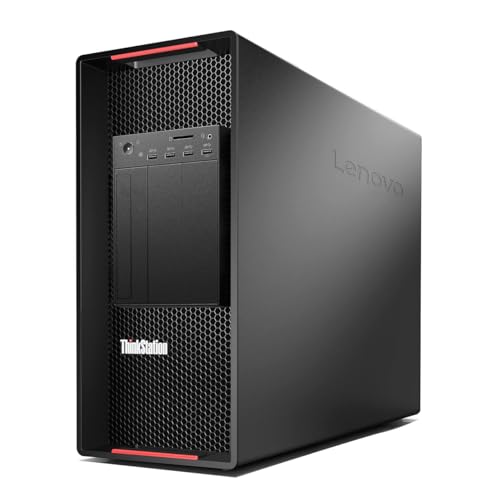
- Dual Xeon Gold 6148 CPUs deliver 40 cores / 80 threads
- 128GB DDR4 helps with large render jobs and multitasking
- No drives or OS lets you customize the build for your pipeline
Best For: Teams or creators who need a compute-heavy workstation for rendering, simulation, or virtualization.
Best High-Performance 4U Rackmount
Quiet Rackmount i9/RTX 5080 Workstation

- i9-14900KF and RTX 5080 for demanding rendering jobs
- 64GB DDR5 RAM and 2TB Gen4 SSD for smooth workflow
- 4U rackmount case fits studio and server-room installs
Best For: Creators and small render teams needing a rack-ready GPU workstation.
Best for Heavy CPU Rendering
PCSP Precision 7920 Dual Xeon Workstation

- 48-core / 96-thread dual Xeon setup for CPU-bound rendering
- Up to 1.5TB DDR4 RAM for massive scenes and virtualization
- 1TB NVMe + 4TB HDD balances speed and storage capacity
Best For: CPU-heavy render farms, CAD, and virtualization workloads that need lots of cores and memory.
Best for Quiet 2U Rack Builds
Quiet 2U Rackmount Workstation

- Core Ultra 7 CPU suits render-node and multitasking workloads
- 32GB DDR5 and 2TB NVMe SSD provide fast, practical performance
- 2U rackmount design with Windows 11 Pro and business-ready support
Best For: Teams and buyers who need a quiet, CPU-focused 2U rackmount workstation for render farms and business use.
Best for DIY GPU Builds
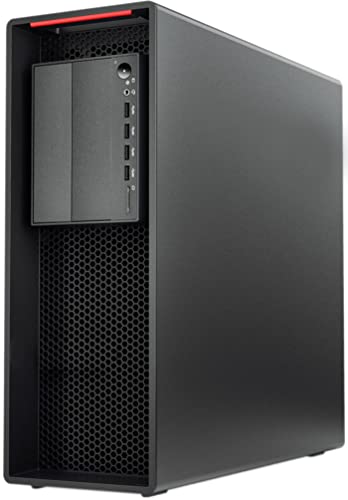
- Xeon W-2135 CPU with 64GB ECC RAM
- 900W Platinum PSU for high-end GPUs
- Dual M.2, SATA bays, and RAID support
Best For: Custom render nodes and workstation builds that need strong power and upgrade headroom.
Best Barebones Build
PCSP P520 Xeon W-2135 Workstation
- Xeon W-2135 6-core workstation CPU
- 32GB DDR4 RAM with 900W Platinum PSU
- Add your own GPU, drives, and OS
Best For: Builders who want a ready chassis base for a custom render node.
Best Dual-CPU Power
ThinkStation P920 Dual Xeon Workstation

- 48 cores / 96 threads for CPU-heavy rendering
- 128GB RAM plus 1TB NVMe for fast workflows
- Pro Quadro graphics and expandable tower design
Best For: Studios and power users needing a high-core-count workstation for rendering and simulation.
Best GPU-Heavy Render Node – Quiet Rackmount 5090 Workstation
If you want a rackmount workstation that can pull double duty for creative work and demanding GPU jobs, this 4U build is aimed squarely at that niche. For buyers comparing rackmount workstation pcs for render farms, the RTX 5090 32GB, Ryzen 9 9950X, and 96GB of DDR5 make it a strong fit for fast local rendering, simulation, and multitasking.
Best For: Artists, studios, and power users who need a 4U rackmount system for heavy GPU rendering, 3D content creation, and high-end workstation tasks.
Pros:
- RTX 5090 32GB gives it serious GPU acceleration for render workloads.
- Ryzen 9 9950X and 96GB RAM are well suited to multitasking and CPU-heavy work.
- 4TB Gen4 SSD provides ample fast storage for projects and cache files.
- 4U rackmount chassis keeps it compatible with rack-based setups.
Cons:
- Likely overkill for simple office or light editing use.
- 4U size is not ideal if you need a compact rackmount system.
- High-end specs usually mean a higher price than entry-level workstation PCs.
This is a capable option if your priority is maximizing GPU throughput in a rack-friendly form factor. Among rackmount workstation pcs for render farms, it stands out most for users who want top-tier graphics performance without giving up the convenience of a server-style chassis.
Best Dual-CPU Value – Dell Precision T7810 Dual Xeon 128GB Workstation
If you need affordable rackmount workstation pcs for render farms, this renewed Dell Precision T7810 stands out for its dual Xeon E5-2670 v3 processors, generous 128GB of DDR4 memory, and SSD storage that can help keep jobs moving without the cost of a brand-new tower.
Best For: Studios, freelancers, and IT teams that want a high-core-count workstation for distributed rendering, batch jobs, and light-to-moderate 3D production work.
Pros:
- Dual Intel Xeon E5-2670 v3 CPUs provide strong multi-threaded performance
- 128GB DDR4 memory is well suited to large scenes and render queues
- 480GB SSD offers fast boot and project loading compared with HDD-based systems
- Renewed pricing can make render-farm expansion more cost-effective
Cons:
- Quadro NVS 315 is basic and not ideal for GPU-heavy creative workflows
- No operating system is included, so setup time is required
- Older platform means less efficiency than newer workstation hardware
As a value-minded node for rackmount workstation pcs for render farms, this Precision T7810 makes the most sense when CPU throughput and RAM capacity matter more than modern graphics power. It is a practical buy for teams building out render capacity on a budget.
Best Remote-Managed Barebones – ASUS ExpertCenter Pro ER100A Rack Workstation
If you want a compact platform for rackmount workstation pcs for render farms, the ASUS ExpertCenter Pro ER100A is built around server-style manageability and modern AMD EPYC 4004/4005 support. It gives you a 1U chassis, PCIe 5.0 x16 expansion, DDR5 ECC memory support, and flexible storage options, but you’ll need to add the CPU, RAM, drives, GPU, and cooling before it’s ready to render.
Best For: Buyers who want a barebones 1U workstation they can customize for managed rendering nodes, AI tasks, and low-latency networked workflows.
Pros:
- AMD EPYC 4004/4005 support with DDR5 ECC for reliability-focused builds
- PCIe 5.0 x16 and NVIDIA RTX A1000/A400 support for accelerated workloads
- Dual 2.5Gb LAN plus BMC/IPMI remote management for farm deployment
- Flexible 2.5-inch SATA and U.2 storage layout in a dense 1U footprint
Cons:
- It’s a barebones system, so core components must be purchased separately
- Limited GPU support narrows it to lighter workstation accelerators
- 1U cooling constraints may require careful component selection
This is a strong fit for rackmount workstation pcs for render farms when you value remote administration, ECC memory support, and a compact chassis over out-of-box convenience. If you’re building a scalable node that can be monitored and maintained centrally, it offers the right kind of server-like foundation.
Best for Raw Dual-CPU Throughput – ThinkStation P920 Dual Xeon Workstation
If you need rackmount workstation pcs for render farms, this renewed ThinkStation P920 is a strong pick for brute-force CPU workloads. It pairs dual Xeon Gold 6148 processors with 128GB of RAM, giving you plenty of cores and memory for rendering, simulation, virtualization, and other long-running jobs.
Best For: Buyers who want a high-core-count, server-grade workstation for distributed rendering, heavy multitasking, or a custom deployment with their own storage and operating system.
Pros:
- 40 cores / 80 threads from dual Xeon Gold 6148 CPUs for demanding parallel workloads
- 128GB DDR4 memory is well suited to render queues and large project files
- No drives or OS included, so you can configure it for your exact storage and software stack
- 1400W 80+ Platinum PSU and dual Ethernet suit 24/7 workstation or server use
Cons:
- Quadro K620 is only a basic GPU, so it is not ideal for graphics-heavy interactive work
- Refurbished and partially empty configuration means extra setup is required
- Large tower form factor is less flexible than true rackmount systems
For rackmount workstation pcs for render farms, the main appeal here is compute density and reliability rather than polish. If you can handle your own storage, OS installation, and any chassis or placement planning, this renewed ThinkStation offers a lot of CPU power for the money.
Best High-Performance 4U Rackmount – Quiet Rackmount i9/RTX 5080 Workstation
If you need rackmount workstation pcs for render farms, this 4U build is aimed at serious throughput: an Intel Core i9-14900KF, RTX 5080 graphics, 64GB of DDR5 memory, and a fast 2TB PCIe Gen4 SSD. It’s a practical fit for creators and small studios that want a rack-friendly system for rendering, editing, and multi-monitor workflows without dealing with extra setup friction.
Best For: Creators, editors, and small render teams that want a powerful 4U rackmount workstation for GPU-accelerated workloads.
Pros:
- Top-tier CPU/GPU combination for fast 3D rendering and content creation
- 64GB DDR5 RAM and 2TB NVMe SSD support heavy multitasking and quick project loading
- 4U rackmount chassis suits studio, office, and server-room setups
- Includes Windows 11 Pro plus keyboard and mouse for a ready-to-run start
Cons:
- Overkill for basic office use or light editing
- High-end components can mean a higher total system cost
- At 4U, it needs enough rack space and airflow planning
For buyers comparing rackmount workstation pcs for render farms, this model stands out for packing workstation-grade specs into a rack-ready chassis. It makes the most sense when you want strong single-system performance for rendering, streaming, and creative workloads rather than a barebones server.
Best for Heavy CPU Rendering – PCSP Precision 7920 Dual Xeon Workstation
If you need rackmount workstation pcs for render farms that prioritize raw CPU throughput over flashy gaming specs, this dual-Xeon Precision 7920 build is a strong fit. It combines 48 cores, 96 threads, and a huge memory ceiling with fast NVMe storage, making it well suited to distributed rendering, simulation, and other sustained workstation jobs.
Best For: Teams and power users who want a high-core-count workstation for CPU-bound rendering, virtualization, CAD, and large project workloads.
Pros:
- Dual Intel Xeon Platinum 8160 CPUs deliver 48 cores and 96 threads for demanding render jobs.
- Supports up to 1.5TB DDR4 RAM, which is ideal for large scenes, VMs, and simulation work.
- 1TB NVMe SSD plus 4TB HDD gives you both fast boot times and roomy project storage.
- Professional Quadro P2000 graphics and dual LAN add practical workstation connectivity.
Cons:
- The Quadro P2000 is modest for GPU-heavy rendering or modern 3D visualization.
- As a renewed tower workstation, availability and included component mix can vary.
This is a sensible pick if your priority is dependable CPU horsepower in rackmount workstation pcs for render farms, especially when large RAM capacity and stable workstation features matter more than gaming-class graphics.
Best for Quiet 2U Rack Builds – Quiet 2U Rackmount Workstation
If you want rackmount workstation pcs for render farms that balance compact 2U packaging with solid everyday performance, this Quiet Rackmount Computer is a practical fit. Its Core Ultra 7 processor, 32GB DDR5 memory, and 2TB NVMe SSD make it a strong option for distributed rendering nodes, light content creation, and general business workloads.
Best For: Buyers who need a quiet, prebuilt 2U rackmount workstation for render nodes, office tasks, or mixed business use.
Pros:
- Intel Core Ultra 7 265 chip gives it plenty of CPU headroom for multi-tasking and render workloads
- 2TB PCIe NVMe SSD and 32GB DDR5 RAM help keep projects and assets responsive
- 2U rackmount form factor with included Windows 11 Pro suits server rooms and business setups
- Assembled in the USA with lifetime technical support and a 3-year hardware warranty
Cons:
- Integrated Intel UHD Graphics limits GPU-accelerated rendering performance
- Not ideal if your render farm depends on multiple discrete GPUs
- 2U layout and rack components may be more than some home users need
Overall, this is a sensible choice for rackmount workstation pcs for render farms when you want a quiet, ready-to-run CPU-focused node rather than a heavily GPU-driven machine. It is especially appealing for teams that value support, warranty coverage, and straightforward deployment.
Best for DIY GPU Builds – PCSP P520 Xeon Workstation
If you want a configurable base for rackmount workstation pcs for render farms, this refurbished PCSP P520 is a strong starting point. It pairs a Xeon W-2135 CPU and 64GB of ECC memory with a 900W Platinum PSU, so you can add your own GPU, storage, and operating system around the workloads you actually need to run.
Best For: Buyers who want a ready-to-customize workstation chassis for render nodes, CAD, simulation, or GPU-heavy builds.
Pros:
- Intel Xeon W-2135 and 64GB ECC RAM provide a solid workstation foundation
- 900W 80+ Platinum power supply leaves room for high-end GPUs like RTX or Quadro cards
- Flexible storage support with dual M.2 slots, SATA bays, and RAID options
- Windows/Linux-ready hardware with dual Ethernet for dependable workstation use
Cons:
- No GPU, storage, or operating system included
- Refurbished unit may need setup time before it is production-ready
For rackmount workstation pcs for render farms, the main appeal here is customization: you get strong CPU and memory specs plus plenty of power headroom, but you still need to build out the graphics and storage stack yourself. That makes it a better fit for teams who know exactly what they want to deploy rather than anyone looking for an all-in-one turnkey machine.
Best Barebones Build – PCSP P520 Xeon W-2135 Workstation
The PCSP P520 is a good fit for buyers who want a configurable base for rackmount workstation pcs for render farms rather than an all-in-one turnkey system. With a Xeon W-2135 processor, 32GB of DDR4 memory, a 900W Platinum PSU, and room for your own storage and GPU, it gives you a solid starting point for a custom render node.
Best For: Teams and builders who want to add their own drives, graphics card, and operating system to a refurbished workstation chassis.
Pros:
- Xeon W-2135 6-core CPU is built for workstation reliability
- 32GB DDR4 RAM is enough to get a node online quickly
- 900W 80 PLUS Platinum PSU leaves headroom for a discrete GPU
- Multiple storage options with 2x M.2 NVMe slots and 2x 3.5-inch bays
Cons:
- No graphics card included, so you must add one for GPU-based workloads
- No drives or operating system included, which adds setup time
- Only 6 CPU cores, so it may be modest for very heavy multi-node render tasks
For rackmount workstation pcs for render farms, this P520 makes sense when you prefer a strong chassis and power platform over bundled extras. It is especially appealing if you already have spare GPUs, NVMe drives, and an OS license ready to deploy.
Best Dual-CPU Power – ThinkStation P920 Dual Xeon Workstation
If you need a serious compute box for rackmount workstation pcs for render farms, this renewed ThinkStation P920 brings dual-socket Xeon power, lots of memory, and pro-grade expandability in a tower format. It is better suited to CPU-heavy rendering, simulation, and multitasking than compact, graphics-first workstations.
Best For: Studios and power users who want a high-core-count workstation for CPU rendering, VFX workloads, and demanding production tasks.
Pros:
- Dual Intel Xeon Platinum 8160 CPUs deliver 48 cores and 96 threads for heavy render workloads.
- 128GB DDR4 RAM and a 1TB NVMe SSD provide fast load times and plenty of headroom.
- Quadro P2000 adds stable pro graphics with four DisplayPort outputs for multi-monitor setups.
- 1400W Platinum PSU and expandable drive bays support future upgrades.
Cons:
- It is a full-size tower, so it is not a true rackmount chassis.
- Quadro P2000 is solid for pro apps, but it is not a top-end GPU for GPU rendering.
- Refurbished units can vary slightly in cosmetic condition.
For buyers comparing rackmount workstation pcs for render farms, this is a strong value if your pipeline leans on CPU threads and memory more than raw GPU horsepower. The tower design limits rack integration, but the core specs make it a practical render and production workstation.
How We Picked the Best Rackmount Workstation PCs for Render Farms
We prioritized systems that make sense for Rackmount Workstation PCs for Render Farms: strong multi-core CPUs, workstation-class stability, ample RAM support, and chassis layouts that fit common rack environments. We also considered GPU capability, storage flexibility, and whether a system is better suited to CPU-heavy rendering, GPU rendering, or mixed workloads.
Quick Comparison
For fast comparison, look first at core count and GPU tier. Dual-socket Xeon systems tend to suit large CPU render queues, while newer high-clock options with powerful RTX cards are better for GPU-accelerated engines and hybrid workflows. Entry-level barebones systems are a smart choice if you want to customize around your own storage, memory, and graphics needs.
Key Buying Factors for Rackmount Workstation PCs for Render Farms
CPU Performance
Rendering often scales with cores, but not every engine behaves the same way. If your pipeline is CPU-bound, prioritize more cores and threads. If your software benefits from higher per-core speed, a modern high-frequency CPU may outperform older dual-socket platforms in real-world jobs.
GPU and VRAM
For GPU rendering, the graphics card matters as much as the processor. Look for enough VRAM for your scenes, textures, and denoising workflows. Newer RTX GPUs are generally better for modern render engines than older workstation cards with limited memory.
Memory and ECC Support
Render nodes should have enough RAM to avoid bottlenecks and crashes on large scenes. ECC memory is especially valuable in always-on environments because it improves data integrity during long render jobs.
Storage and I/O
Fast NVMe storage helps with asset loading, cache files, and project transfers. If your render farm moves large files often, consider systems with multiple drive bays or hot-swap support.
Thermals, Power, and Rack Fit
Dense racks need good airflow and stable power delivery. Check whether you need 1U, 2U, or 4U clearance, and make sure the chassis can handle the heat output of your chosen CPU and GPU combination.
Who Should Buy Which Rackmount Workstation PCs for Render Farms?
If you want maximum GPU rendering speed, choose a newer rackmount system with an RTX-class card and modern CPU support. If your workload is mostly CPU-based, dual Xeon workstations can still be a strong value for multi-threaded rendering. If you prefer flexibility, a barebone rack workstation lets you build around your exact memory, storage, and graphics requirements.
For smaller studios, a balanced 2U or 4U machine is often the easiest way to get dependable performance without overcomplicating cooling or expansion. Larger teams should focus on standardizing a configuration that is easy to service, easy to clone, and consistent across every node in the farm.