Choosing the right refurbished workstation PC with warranty can save serious money without sacrificing performance. The best options balance dependable parts, modern storage, and enough upgrade headroom for your workload.
This roundup focuses on value, support, and real-world usability, so you can compare desktops that are ready for business, creative work, and multitasking in 2026.
Best 10 Refurbished Workstation PCs with Warranty Picks for 2026
Best for CAD Workloads
PCSP ThinkStation P520 Xeon Workstation

- Xeon W-2123 and 32GB DDR4 for reliable multitasking
- Quadro M2000 supports up to four 4K displays
- 512GB NVMe SSD and 900W Platinum PSU add speed and headroom
Best For: CAD users, engineers, and multi-monitor professionals needing a renewed tower workstation.
Best for Balanced Power
Dell OptiPlex 7050 i7 SFF 32GB/1TB SSD

- Fast 1TB SSD and 32GB RAM
- Compact SFF design with dual-monitor support
- WiFi, Bluetooth, and Windows 11 Pro included
Best For: Small offices and home users who want a compact refurbished desktop with strong everyday performance.
Best for CAD and Light 3D
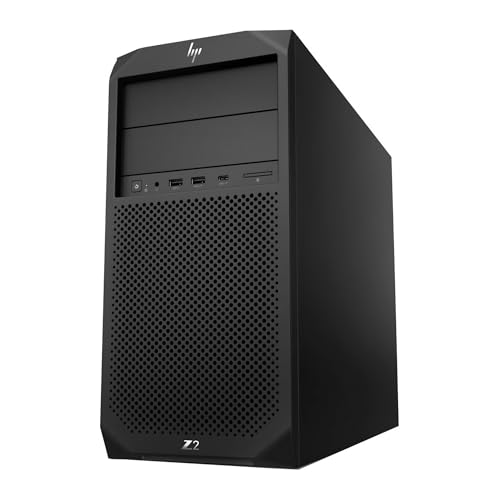
- Xeon CPU with 16GB DDR4 for solid multitasking
- 512GB NVMe SSD for faster startup and storage
- Windows 11 Pro and tower PSU suit business use
Best For: Business users and light design buyers who want a dependable refurbished tower.
Best for Quiet Power
Dell OptiPlex 3060 i5 Refurbished Desktop

- 32GB RAM and 1TB SSD for fast multitasking
- Built-in Wi-Fi, Bluetooth, and Windows 11 Pro
- Microsoft Authorized Refurbisher with support
Best For: Buyers who want a dependable renewed desktop for office work and everyday productivity.
Best for Compact Business Desktops
Dell OptiPlex 5050 SFF i7 Renewed

- Small form factor fits tight workspaces
- i7 + 16GB RAM + NVMe SSD keep it snappy
- Windows 11 Pro suits office use
Best For: Office and home users who want a compact refurbished desktop for everyday productivity.
Best for Creative Work
HP Workstation PC with Quadro K1200, 32GB RAM

- 32GB RAM and Core i5 handle multitasking smoothly.
- Quadro K1200 suits Adobe, AutoCAD, and design apps.
- 1TB SSD plus 4TB HDD gives fast startup and big storage.
Best For: Creative professionals and small teams needing a refurbished workstation for editing and CAD.
Best for a Budget Workhorse
Dell OptiPlex 7050 SFF i7/32GB/1TB SSD

- Core i7-7700 with 32GB RAM for everyday productivity
- 1TB SSD for quick boot and responsive storage
- Renewed condition with 90-day seller warranty
Best For: Small businesses and remote workers who need a compact renewed desktop with strong value.
Best Dual-Drive Value

- 8th-gen Core i5 with 16GB DDR4 RAM
- 500GB SSD + 1TB HDD for speed and storage
- WiFi, Bluetooth, and LAN connectivity
Best For: Home offices, students, and small businesses needing a reliable renewed desktop with plenty of storage.
Best for High-Core Value
Dell OptiPlex 7070 SFF i7 Refurbished Desktop

- 8-core i7-9700 with 32GB RAM for smooth multitasking
- 1TB NVMe SSD for fast startup and file access
- Compact SFF design with Wi‑Fi 6E and Windows 11 Pro
Best For: Home offices and small businesses that want a compact refurbished desktop with strong everyday performance.
Best for Dual-Monitor Offices
Dell OptiPlex 7060 i7 SFF Workstation

- 6-core i7-8700 with 32GB RAM for smooth multitasking
- 512GB NVMe SSD for faster boots and app loading
- WiFi, Bluetooth, and dual DisplayPort support included
Best For: Home offices and small businesses that need a compact, capable Windows 11 Pro desktop.
Best for CAD Workloads – PCSP ThinkStation P520 Xeon Workstation
If you want one of the more dependable refurbished workstation pcs with warranty potential for design and office production, this ThinkStation P520 is built around a Xeon CPU, pro-grade Quadro graphics, and plenty of memory for everyday multitasking.
Best For: CAD users, engineers, and power buyers who need a renewed tower workstation for multi-monitor productivity and steady 24/7 use.
Pros:
- Xeon W-2123 and 32GB DDR4 deliver stable performance for professional workloads
- Quadro M2000 with 4 DisplayPort outputs supports up to four 4K monitors
- 512GB NVMe SSD helps the system boot fast and stay responsive
- 900W Platinum PSU and expandable tower design leave room for upgrades
Cons:
- Older Quadro M2000 graphics are solid, but not ideal for heavy modern 3D rendering
- Full-size tower takes more desk space than compact office PCs
Overall, this is a practical pick if you value workstation stability, expansion, and pro graphics over flashy specs. For shoppers comparing refurbished workstation pcs with warranty, it stands out as a capable renewal option for serious productivity work.
Best for Balanced Power – Dell OptiPlex 7050 i7 SFF 32GB/1TB SSD
If you want refurbished workstation pcs with warranty that feel ready for daily office work, the Dell OptiPlex 7050 SFF is a practical pick. Its 7th-gen Core i7, 32GB of RAM, and 1TB SSD give it a strong mix of speed, multitasking headroom, and storage for business apps, browsing, and light content work.
Best For: Small offices, remote workers, and buyers who want a compact refurbished desktop with solid performance and modern Windows 11 Pro support.
Pros:
- Core i7-7700 and 32GB RAM handle multitasking smoothly
- 1TB SSD offers fast boot times and plenty of storage
- Small form factor saves desk space while still supporting dual monitors
- WiFi, Bluetooth, HDMI, and Windows 11 Pro add convenience
Cons:
- Older 7th-gen platform is not ideal for heavy modern workstation workloads
- Integrated graphics limit demanding creative or 3D tasks
- Refurbished condition can vary by seller grading
Overall, this Dell is a sensible middle-ground choice for anyone comparing refurbished workstation pcs with warranty and wanting dependable everyday performance without paying for a new business desktop. It is especially appealing if compact size, memory capacity, and SSD speed matter more than cutting-edge hardware.
Best for CAD and Light 3D – PCSP Z2 G4 Xeon Workstation
If you want refurbished workstation pcs with warranty for office productivity, light design work, or a dependable home setup, this PCSP Z2 G4 Tower is a practical pick. It pairs a Xeon E-2124G processor with a 512GB NVMe SSD and Windows 11 Pro, so it feels faster than many basic refurbs without moving into high-end pricing.
Best For: Buyers who need a reliable refurbished tower for business apps, multitasking, and entry-level creative or CAD workloads.
Pros:
- Xeon E-2124G and 16GB DDR4 handle everyday multitasking smoothly
- 512GB NVMe M.2 SSD helps boot times and file access feel quick
- Windows 11 Pro is included for business-ready features
- 500W 90% efficient PSU and tower format support workstation-style reliability
Cons:
- Integrated UHD Graphics P630 is not ideal for demanding gaming or heavy 3D rendering
- Only 16GB RAM in this configuration may limit larger creative projects
- Refurbished hardware can vary more than buying new, even with warranty coverage
Overall, this is a sensible option if you care more about stable performance and warranty-backed value than flashy specs. For shoppers comparing refurbished workstation pcs with warranty, it stands out as a balanced business machine with enough speed for everyday professional use.
Best for Quiet Power – Dell OptiPlex 3060 i5 Refurbished Desktop
If you want refurbished workstation pcs with warranty and a straightforward spec sheet, this Dell OptiPlex 3060 is a practical pick. It pairs an Intel i5-8500, 32GB of RAM, and a 1TB SSD with Windows 11 Professional, making it a strong fit for everyday business work, multitasking, and home office use.
Best For: Buyers who want a dependable renewed desktop for office apps, browsing, file work, and light productivity without overspending.
Pros:
- 32GB RAM and a 1TB SSD give it plenty of speed and storage for multitasking.
- Built-in Wi-Fi and Bluetooth make setup easier without extra adapters.
- Windows 11 Professional is ready for work-focused use right out of the box.
- Refurbished by a Microsoft Authorized Refurbisher with quality guarantee and tech support.
Cons:
- Not designed as a high-end workstation for heavy graphics or CAD workloads.
- The RGB lighting is more of a bonus feature than a business essential.
Overall, this is a sensible choice if you want refurbished workstation pcs with warranty and a strong balance of speed, storage, and support. It is especially appealing for buyers who value reliability and simple day-to-day performance over flashy extras.
Best for Compact Business Desktops – Dell OptiPlex 5050 SFF i7 Renewed
If you want a compact, ready-to-run option in the world of refurbished workstation pcs with warranty, this Dell OptiPlex 5050 SFF is a practical pick for everyday office work, light multitasking, and home productivity. It combines a fast 7th-gen Core i7, 16GB of RAM, and a 512GB NVMe SSD in a small chassis that fits easily on or under a desk.
Best For: Buyers who need a space-saving business desktop for productivity, browsing, spreadsheets, and general office use.
Pros:
- Compact small form factor saves desk space
- Core i7, 16GB RAM, and NVMe SSD deliver responsive everyday performance
- Windows 11 Pro is included for business-friendly features
- Good fit for standard office and home productivity setups
Cons:
- Not ideal for demanding creative workloads or modern gaming
- Small chassis limits upgrade and expansion flexibility
- Renewed hardware may show minor cosmetic wear
Overall, this OptiPlex makes sense if you want a dependable, space-saving desktop without paying full new-system pricing. For shoppers comparing refurbished workstation pcs with warranty, it stands out as a balanced choice for practical business use.
Best for Creative Work – HP Workstation PC with Quadro K1200, 32GB RAM
If you want refurbished workstation pcs with warranty for editing, design, and CAD work, this HP workstation is built around a practical mix of performance and storage. The 8th Gen Intel Core i5, 32GB of RAM, and NVIDIA Quadro K1200 make it a sensible pick for creators who need stable everyday workstation performance without paying for a new pro rig.
Best For: Photo editors, designers, and small studios that want a refurbished workstation for Adobe, AutoCAD, and similar software.
Pros:
- 32GB DDR4 RAM and a Core i5 give it solid multitasking headroom for creative apps.
- Quadro K1200 GPU is a better fit than typical office graphics for design and CAD workloads.
- 1TB SSD + 4TB HDD offers fast boot times plus plenty of project storage.
- Wi-Fi 5G, Bluetooth, and Windows 11 Pro make it ready for modern office setups.
Cons:
- Older Core i5 and Quadro hardware won’t match newer workstations for heavy 3D or video rendering.
- Renewed hardware may vary in cosmetic condition.
As refurbished workstation pcs with warranty go, this model stands out for buyers who care more about dependable creative software support and storage than raw top-end speed. It’s a balanced value choice for practical production work.
Best for a Budget Workhorse – Dell OptiPlex 7050 SFF i7/32GB/1TB SSD
If you want refurbished workstation pcs with warranty that feel ready for day-one office use, this Dell OptiPlex 7050 SFF is a strong practical pick. It combines a 7th-gen Core i7, 32GB of RAM, and a 1TB SSD in a compact tower, making it a sensible option for multitasking, productivity, and dual-monitor setups without paying for a new business desktop.
Best For: Office users, remote workers, and small businesses that need a compact, certified renewed desktop with solid everyday performance.
Pros:
- Intel Core i7-7700 plus 32GB DDR4 handles common business workloads smoothly
- 1TB SSD provides fast boot times and plenty of storage
- Includes WiFi, Bluetooth, keyboard, mouse, and Windows 11 Pro
- Professional renewal and 90-day seller warranty add peace of mind
Cons:
- Older 7th-gen CPU is not ideal for heavier creative or engineering work
- Small form factor limits upgrade and expansion room versus larger towers
This is the kind of refurbished workstation pcs with warranty choice that makes sense when you want dependable specs, a compact footprint, and bundled essentials rather than a flashy high-end machine.
Best Dual-Drive Value – Dell OptiPlex 5060 i5 Desktop
If you want refurbished workstation pcs with warranty that balance everyday speed with lots of storage, this Dell OptiPlex 5060 is a practical pick. The 8th-gen Core i5, 16GB of RAM, and SSD plus HDD combo make it well-suited for office work, browsing, and light content creation without feeling sluggish.
Best For: Home offices, students, and small businesses that want a dependable renewed desktop with roomy storage and solid multitasking.
Pros:
- 16GB DDR4 RAM supports smooth multitasking across everyday apps
- 500GB SSD and 1TB HDD give you both fast boot times and extra file storage
- WiFi, Bluetooth, and LAN add flexible connectivity for home or office setups
- Intel UHD Graphics 630 handles standard visuals and video playback well
Cons:
- Integrated graphics are not ideal for demanding gaming or creative workloads
- Renewed desktop may show minor cosmetic wear
- Not as compact as a mini PC if desk space is limited
Overall, this OptiPlex stands out as a sensible choice among refurbished workstation pcs with warranty when storage capacity and everyday reliability matter more than flashy specs. It delivers a good mix of speed, flexibility, and value for typical productivity tasks.
Best for High-Core Value – Dell OptiPlex 7070 SFF i7 Refurbished Desktop
If you want refurbished workstation pcs with warranty that still feel fast in everyday office use, this Dell OptiPlex 7070 SFF is a smart place to start. It combines a 9th-gen Core i7, 32GB of RAM, and a 1TB NVMe SSD in a compact business chassis, making it a practical pick for multitasking, remote work, and general productivity.
Best For: Home offices, small businesses, and buyers who want a compact refurbished desktop with strong multitasking performance.
Pros:
- 8-core Intel Core i7-9700 and 32GB RAM handle heavy multitasking well.
- 1TB NVMe SSD delivers quick boot times and responsive app loading.
- Small-form-factor design fits easily on or under a desk.
- Wi‑Fi 6E, Windows 11 Pro, and bundled keyboard/mouse add convenience.
Cons:
- Integrated graphics limit it for demanding creative or gaming workloads.
- Refurbished condition may vary compared with a new workstation.
This is a strong value choice for buyers comparing refurbished workstation pcs with warranty, especially if the priority is business-class reliability, fast storage, and enough CPU headroom for office software, browsing, and light content work.
Best for Dual-Monitor Offices – Dell OptiPlex 7060 i7 SFF Workstation
If you want a dependable business desktop that feels ready for daily work right out of the box, this refurbished Dell OptiPlex 7060 is a strong fit. It pairs an 8th Gen Core i7, 32GB of RAM, and a 512GB NVMe SSD for fast boot times, smooth multitasking, and the kind of practical performance buyers expect from refurbished workstation pcs with warranty.
Best For: Home offices, small businesses, and anyone who needs a compact Windows 11 Pro desktop with room for expansion and dual-monitor support.
Pros:
- 6-core Intel i7-8700 and 32GB RAM handle everyday productivity well
- 512GB NVMe SSD helps with quick startup and responsive app loading
- Dual DisplayPort outputs plus multiple USB ports suit office setups
- Includes WiFi, Bluetooth, and wireless keyboard/mouse for convenience
Cons:
- Small form factor limits internal upgrade space compared with larger towers
- Refurbished condition may vary slightly in cosmetic appearance
Overall, this OptiPlex is a sensible pick if you care more about dependable performance than flashy design. For shoppers comparing refurbished workstation pcs with warranty, it stands out as a compact, business-friendly option with enough power for office work, remote work, and light multitasking.
How We Picked the Best Refurbished Workstation PCs with Warranty
We focused on Refurbished Workstation PCs with Warranty that offer the best mix of processor strength, RAM, SSD capacity, graphics capability, and form factor. We also favored listings with Windows 11 Pro, business-class platforms, and practical warranty coverage that adds peace of mind.
Quick Comparison
For most office users, an Intel Core i5 or i7 with 16GB to 32GB RAM and an SSD is the sweet spot. Creative users and heavier multitaskers may benefit from Xeon-based towers or systems with discrete Quadro graphics, while compact SFF desktops are ideal when space matters more than expansion.
Key Buying Factors for Refurbished Workstation PCs with Warranty
Processor Generation
Newer CPU generations usually improve responsiveness, power efficiency, and Windows 11 compatibility. For everyday business work, 6-core and 8-core Intel Core models are usually plenty. Xeon systems are worth considering if you want workstation-class stability or plan to run demanding professional apps.
Memory and Storage
Look for at least 16GB RAM, with 32GB being a better long-term choice for heavy multitasking, browser tabs, spreadsheets, editing, or virtual machines. An NVMe SSD is preferable for faster boot times and application loading. Larger drives help if you store media, project files, or local backups.
Graphics and Expansion
If your work includes photo editing, CAD, light 3D, or multi-monitor setups, a workstation with a discrete GPU can be a smart upgrade. If you mainly need productivity performance, integrated graphics are often enough and can keep costs lower.
Warranty and Condition
Warranty coverage matters more on refurbished systems than on brand-new desktops. Check whether the warranty is seller-backed, how long it lasts, what it covers, and whether support includes parts, labor, or replacement options. Also confirm whether the system is fully tested, cleaned, and restored to proper working condition.
Who Should Buy Which Refurbished Workstation PCs with Warranty?
Buy a compact SFF desktop if you want a quiet, space-saving office machine. Choose a tower workstation if upgrade flexibility, cooling, and graphics headroom matter more. Pick higher-RAM i7 or Xeon configurations for creators, power users, and heavier multitaskers. For basic business use, a well-equipped Core i5 model with SSD storage is often the best value.
In short, the best Refurbished Workstation PCs with Warranty are the ones that match your workload first, then your budget, rather than the other way around.