Running large language models locally demands more than a fast CPU. You need enough memory, strong GPU performance, and storage that keeps up when models, datasets, and caches grow.
This roundup of local llm workstations with 128gb ram focuses on systems that can handle demanding AI workflows with fewer bottlenecks, whether you want a compact mini PC or a full-size desktop tower.
Best 10 Local LLM Workstations with 128gb RAM Picks for 2026
Best for Local 70B LLMs
GMKtec EVO-X2 AI Mini PC Ryzen AI Max+ 395

- 128GB unified memory for large local models
- Ryzen AI Max+ 395 with strong AI and graphics performance
- Compact mini PC with Wi-Fi 7, USB4, and quad-display support
Best For: People who want a compact workstation for local LLM inference, multitasking, and light gaming.
128GB AI Workhorse
Lenovo ThinkStation P2 Gen 2, 128GB RAM
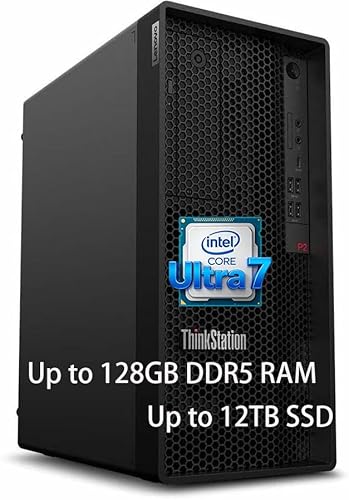
- 128GB DDR5 memory for larger local model workflows
- Core Ultra 7 CPU for strong everyday workstation performance
- 3TB total storage for models, datasets, and project files
Best For: Developers and small teams needing a dependable Windows workstation for local LLM work.
Best for 128GB AI Workloads
GMKtec EVO-X2 Ryzen AI Max+ 395 128GB Mini PC

- 128GB LPDDR5X memory for larger local models
- Ryzen AI Max+ 395 with XDNA 2 NPU and strong iGPU
- 2TB SSD, Wi‑Fi 7, USB4, and quad-display support
Best For: Developers and AI power users who want a compact local LLM machine with desktop-class memory.
Best Dual-CPU Multitasker
Dual CPU RTX 5060 Workstation, 128GB RAM

- 128GB DDR4 for heavy multitasking and larger local workloads
- Dual Xeon CPUs for strong multi-threaded performance
- RTX 5060 plus 1TB SSD/4TB HDD for a balanced workstation build
Best For: Users who want a high-memory local AI workstation that can also handle productivity, gaming, and creative tasks.
Best for Private On-Device AI

- 128GB LPDDR5x suits large local model workflows and fine-tuning
- GB10 Superchip targets sustained AI performance in a compact chassis
- Built for private inference, agentic workflows, and future stacking
Best For: AI developers and researchers who need a compact, high-memory local AI workstation.
Best for Dense LLM Builds

- 128GB LPDDR5X with a high-VRAM configuration for local AI work
- Ryzen AI Max+ 395 offers strong CPU/NPU performance in a compact chassis
- Dual USB4, Wi-Fi 7, and 2TB SSD support fast workstation setups
Best For: Developers and creators who want a compact, high-memory local AI workstation.
Best for Maximum Headroom
HP OMEN 45L RTX 5090 128GB Desktop

- 128GB DDR5 for large local models and heavy multitasking
- RTX 5090 acceleration for AI, rendering, and creative work
- 4TB SSD and Windows 11 Pro make it ready for serious workflows
Best For: Power users who want a high-end desktop for local AI, creative production, and big-memory workloads.
Best High-RAM Compact Pick
BOSGAME AI MAX+ 395 128GB Desktop

- 128GB LPDDR5x memory for large local models and heavy multitasking
- 2TB PCIe 4.0 SSD for fast, roomy local storage
- Compact desktop with Wi‑Fi 7, BT 5.4, and triple 8K display support
Best For: Developers and power users who want a compact 128GB workstation for local AI and productivity.
Best for Heavy Local AI Loads
HP Omen MAX 45L RTX 5090, 128GB RAM
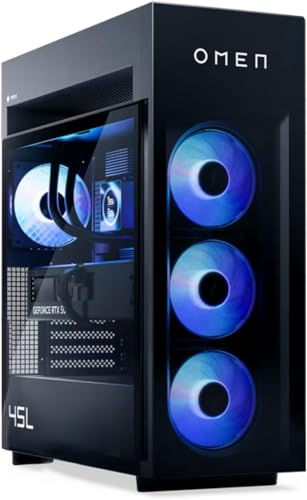
- 128GB DDR5 RAM for large local models and multitasking
- RTX 5090 with 32GB GDDR7 for AI-heavy workloads
- 8TB SSD and strong cooling for sustained performance
Best For: Power users running large local AI models, creative apps, and demanding multitasking.
Best for Local 70B LLMs – GMKtec EVO-X2 AI Mini PC Ryzen AI Max+ 395
If you want one of the most capable local llm workstations with 128gb ram in a compact form factor, the GMKtec EVO-X2 stands out for its Ryzen AI Max+ 395 APU, integrated Radeon 8060S graphics, and full 128GB LPDDR5X memory. It’s a strong fit for running larger models in LM Studio and other consumer-friendly local AI tools without building a full tower.
Best For: Users who want a compact, high-memory AI workstation for local model inference, multitasking, and light gaming.
Pros:
- 128GB unified LPDDR5X memory is well suited to large local model workloads.
- Ryzen AI Max+ 395 combines 16 Zen 5 cores, strong NPU capability, and a powerful iGPU.
- USB4, Wi-Fi 7, 2.5GbE, and quad-display support make it flexible for modern setups.
- Compact mini PC design saves desk space versus a traditional workstation tower.
Cons:
- LPDDR5X memory is onboard, so it’s not user-upgradeable later.
- Premium specs likely put it above entry-level mini PC pricing.
For buyers comparing local llm workstations with 128gb ram, this model is especially appealing because it pairs very large memory capacity with unusually strong integrated graphics and AI-focused silicon. That makes it a practical all-in-one option for running models locally without moving to a discrete-GPU desktop.
128GB AI Workhorse – Lenovo ThinkStation P2 Gen 2, 128GB RAM
If you want one of the more practical local llm workstations with 128gb ram, this ThinkStation P2 Gen 2 gives you a strong starting point: a Core Ultra 7 265K, a full 128GB of DDR5, and a roomy 3TB of combined storage. It is aimed at users who need a responsive desktop for running local models, indexing large datasets, and keeping development tools open without constant memory pressure.
Best For: Developers, AI hobbyists, and small teams who need a ready-to-use Windows workstation for local LLM testing and heavy multitasking.
Pros:
- 128GB DDR5 memory is ideal for larger local model workflows and heavy multitasking
- Core Ultra 7 processor offers solid general-purpose performance for AI and productivity tasks
- 3TB of storage gives you space for models, datasets, and project files
- WiFi 7, Ethernet, and Bluetooth 5 make it well-equipped for modern connectivity
Cons:
- Not a purpose-built GPU-accelerated AI tower, so inference speed will depend on your graphics setup
- Combined SSD and HDD storage is convenient, but an all-SSD build would be faster for some workflows
- May be more machine than casual users need if you only run smaller local models
For buyers comparing local llm workstations with 128gb ram, this Lenovo stands out as a balanced desktop that prioritizes memory capacity, storage headroom, and everyday usability over flashy extras. It makes the most sense if you want a dependable workstation first and an AI dev box second.
Best for 128GB AI Workloads – GMKtec EVO-X2 Ryzen AI Max+ 395 128GB Mini PC
If you want one of the most compelling local llm workstations with 128gb ram in a compact desktop, the GMKtec EVO-X2 stands out for its Ryzen AI Max+ 395 APU, 128GB of LPDDR5X memory, and high-end integrated graphics. It is built for people who want to run larger models locally, multitask across multiple displays, and keep the system small enough for a desk or studio setup.
Best For: Developers, AI hobbyists, and power users who want a compact machine for local LLM inference, light creation work, and everyday desktop use.
Pros:
- 128GB LPDDR5X memory is ideal for larger local models and heavy multitasking
- Ryzen AI Max+ 395 offers strong CPU performance plus a capable XDNA 2 NPU
- Fast 2TB PCIe 4.0 SSD, Wi‑Fi 7, and USB4 make it well-equipped out of the box
- Quad-display 8K support adds flexibility for productivity workflows
Cons:
- LPDDR5X memory is soldered, so you cannot upgrade RAM later
- Integrated graphics are strong for an iGPU, but still not a replacement for a discrete GPU
- Premium specs likely put it above budget-friendly mini PC options
This is a niche but powerful choice if your priority is a small system that can handle local llm workstations with 128gb ram without moving into a full tower build. It makes the most sense for buyers who value memory capacity, efficiency, and compactness over upgradeability.
Best Dual-CPU Multitasker – Dual CPU RTX 5060 Workstation, 128GB RAM
If you want local llm workstations with 128gb ram that can juggle model loading, data prep, and everyday productivity without immediately running out of headroom, this dual-CPU desktop is built for that kind of heavy lifting. The 36-core/72-thread configuration, 128GB of DDR4 memory, RTX 5060 graphics, and mixed SSD/HDD storage make it a practical all-around tower for inference workflows, experimentation, and general workstation use.
Best For: Buyers who want a high-memory local AI workstation that can also handle multitasking, gaming, and creative work on a single machine.
Pros:
- 128GB RAM is the key draw for larger local models, caching, and heavy multitasking.
- Dual Xeon E5-2697 v4 CPUs deliver strong multi-threaded throughput for background workloads.
- RTX 5060 adds modern GPU acceleration for AI-adjacent apps and smoother graphics performance.
- 1TB SSD plus 4TB HDD gives you fast boot times with plenty of storage for datasets and projects.
Cons:
- Older dual-Xeon platform is less efficient than newer AI-focused workstation builds.
- GPU memory details aren’t specified here, so large-model performance may still be limited by VRAM.
- Bulky, power-hungry tower design is better for desks than for compact setups.
This is a compelling value-style option for local llm workstations with 128gb ram if your priority is capacity and multitasking over cutting-edge platform efficiency. It is especially appealing for users who want one machine that can handle local AI tasks, creative workloads, and general desktop use without constant upgrades.
Best Compact AI Workstation – GEEKOM IT15 Mini PC
If you want a compact desktop that can handle editing, coding, and light local model work, the GEEKOM IT15 is a strong fit for buyers comparing local llm workstations with 128gb ram. It ships with 32GB DDR5 and supports upgrades to 128GB, plus a Core Ultra 9 285H, fast 2TB SSD, Wi‑Fi 7, and USB4 for a flexible small-form-factor setup.
Best For: Creators, developers, and power users who want a quiet mini PC they can grow into for AI tasks, multitasking, and desktop productivity.
Pros:
- Upgradeable to 128GB RAM for heavier local workflows
- Fast Core Ultra 9 285H with Intel Arc graphics for mixed AI and creative tasks
- 2TB Gen 4 SSD and USB4/dual HDMI connectivity for a capable desk setup
- Wi‑Fi 7 and 2.5GbE help keep remote work and collaboration responsive
Cons:
- Not as turnkey for large local LLMs as a full-size tower with a discrete GPU
- Base configuration includes 32GB RAM, so serious AI users will likely need an upgrade
For shoppers prioritizing size, efficiency, and upgrade headroom, this is a practical bridge between everyday productivity and more serious local llm workstations with 128gb ram. It is not the most powerful AI box you can buy, but it offers a lot of flexibility for the footprint.
Best for Private On-Device AI – ASUS Ascent GX10 128GB
If you need local llm workstations with 128gb ram for secure inference, fine-tuning, and long-running agent workflows, the ASUS Ascent GX10 is built around NVIDIA’s GB10 Grace Blackwell Superchip and a full AI software stack. It pairs 128GB LPDDR5x with a 1TB NVMe SSD and a compact chassis, making it a serious desktop option for developers who want high-end AI capability without relying on cloud compute.
Best For: AI developers and researchers who want a compact, high-memory workstation for private on-device model work and agentic workflows.
Pros:
- 128GB unified memory is well suited to larger local model workflows and 200B-class fine-tuning use cases.
- GB10 Superchip and NVLink-C2C are designed for fast CPU-GPU communication and sustained AI performance.
- Supports secure, on-device inference and framework compatibility for agentic development.
- Stackable chassis and ConnectX-7 networking add a clear upgrade path for scaling.
Cons:
- High-end specs make it a niche, expensive buy for most general users.
- 1TB SSD may feel limited if you store multiple large models and datasets locally.
- More workstation-focused than a traditional everyday desktop.
For buyers comparing local llm workstations with 128gb ram, this stands out for its blend of memory capacity, AI-first hardware, and small-footprint design. It’s a strong fit if you want a purpose-built machine for private model development rather than a conventional PC with an upgraded RAM config.
Best for Dense LLM Builds – GEEKOM A9 Mega AI Workstation
If you want local llm workstations with 128gb ram in a compact desktop, the GEEKOM A9 Mega is built around the Ryzen AI Max+ 395, 128GB LPDDR5X, and a claimed 96GB of allocated VRAM for heavier models and mixed AI workloads. It is aimed at users who need strong on-device inference, fast storage, and modern I/O without moving to a full tower.
Best For: Developers, AI builders, and creators who want a compact high-memory workstation for local model testing, multitasking, and 8K-capable media workflows.
Pros:
- 128GB RAM with a high-VRAM configuration is unusually strong for local AI and large-model experimentation
- Ryzen AI Max+ 395 platform offers strong CPU, NPU, and integrated GPU balance in a small footprint
- Dual USB4, Wi-Fi 7, dual 2.5GbE, and 2TB SSD make it easy to build a fast AI workstation setup
- 3-year warranty and vapor-chamber cooling add confidence for long workloads
Cons:
- Premium pricing and chip scarcity may make it harder to buy at a stable price
- Integrated graphics still won’t replace a top-end discrete GPU for the heaviest GPU-only workloads
- Compact design limits upgrade flexibility versus a full-size tower
This is a standout option among local llm workstations with 128gb ram if you care more about memory capacity, AI-oriented silicon, and compact efficiency than about future GPU expansion. It is especially compelling for developers who want a ready-to-run machine for local inference, storage-heavy projects, and serious multitasking in a small chassis.
Best for Maximum Headroom – HP OMEN 45L RTX 5090 128GB Desktop
If you want one of the most capable local llm workstations with 128gb ram, this HP OMEN 45L is built for heavy multitasking, large models, and mixed AI plus creative workloads. The Core Ultra 9 285K, RTX 5090, and 4TB SSD give it the kind of headroom that matters when you are loading big datasets, running inference locally, or keeping several tools open at once.
Best For: Developers, creators, and power users who need a ready-to-run desktop for local AI work, 3D, and content creation with lots of memory overhead.
Pros:
- 128GB DDR5 RAM is ideal for large local models and multitasking
- RTX 5090 delivers top-tier GPU acceleration for AI and creative apps
- 4TB NVMe SSD gives plenty of fast storage for models and project files
- Windows 11 Pro, Wi-Fi 6E, and plenty of ports make setup straightforward
Cons:
- Very expensive compared with midrange AI-ready desktops
- Large tower design is not suitable for compact desks
- Overkill if you only need lightweight local inference
For buyers comparing local llm workstations with 128gb ram, this OMEN stands out as a no-compromise option that prioritizes GPU power, memory capacity, and expansion-friendly hardware. It is a strong fit when you want a desktop that can handle demanding AI workloads now and still have room to grow.
Best High-RAM Compact Pick – BOSGAME AI MAX+ 395 128GB Desktop
If you want local llm workstations with 128gb ram in a compact desktop form factor, this BOSGAME AI MAX+ 395 is built around the right core specs: 128GB LPDDR5x memory, a 2TB PCIe 4.0 SSD, and an integrated Radeon 8060S iGPU for all-in-one development and light GPU-accelerated workloads. It’s a practical choice when you need plenty of memory for larger models, vector databases, and multitasking without jumping to a full tower.
Best For: Developers and power users who need a compact 128GB workstation for running local models, coding, and heavy multitasking.
Pros:
- 128GB LPDDR5x memory suits memory-hungry local AI and multitasking
- 2TB PCIe 4.0 SSD gives you generous fast storage out of the box
- Wi-Fi 7, Bluetooth 5.4, and triple 8K display support add modern connectivity
- Small desktop format is easier to place than a full-size workstation tower
Cons:
- Integrated graphics won’t match a discrete GPU for heavier AI acceleration
- LPDDR5x memory is not a user-upgrade-friendly desktop RAM setup
For buyers comparing local llm workstations with 128gb ram, this model stands out for packing a high-memory configuration into a relatively clean, modern desktop build. It makes the most sense if you value capacity, storage, and convenience more than maximum discrete-GPU performance.
Best for Heavy Local AI Loads – HP Omen MAX 45L RTX 5090, 128GB RAM
If you want one of the most overbuilt local llm workstations with 128gb ram, this Omen MAX 45L stands out for its high-core Ryzen 9 9900X3D, RTX 5090 graphics, and massive 8TB SSD. It is a strong fit for running large models locally, keeping multiple tools open, and moving fast through AI, creative, and engineering workflows.
Best For: Power users who want a high-end Windows workstation for local AI models, 3D work, and heavy multitasking.
Pros:
- 128GB DDR5 RAM is ideal for large local models and many simultaneous apps.
- RTX 5090 with 32GB GDDR7 gives it serious acceleration for AI and GPU-heavy work.
- 8TB NVMe storage leaves plenty of room for datasets, models, and project files.
- Strong cooling and Wi-Fi 7 make it a polished all-in-one desktop tower.
Cons:
- Very expensive for buyers who only need basic local inference.
- Large gaming-tower footprint may be more than some desks can comfortably handle.
- Overkill if your LLM usage stays small or cloud-first.
This is a top-tier pick if you need local llm workstations with 128gb ram and want extra headroom for GPU-heavy workloads, but the price and size make sense only if you will actually use the full spec sheet.
How We Picked the Best Local LLM Workstations with 128gb RAM
We focused on systems that are relevant for Local LLM Workstations with 128gb RAM, prioritizing memory capacity, compute class, storage configuration, thermals, and overall fit for AI use. We also looked for a mix of platforms so buyers can choose between compact APUs, high-end CPU/GPU towers, and AI-centric systems.
In practice, 128GB RAM only matters if the rest of the machine can keep model loading, token generation, and multitasking smooth. That is why GPU capability, SSD size, and chassis cooling were major decision factors.
Quick Comparison
The lineup splits into three broad categories: compact AI mini PCs with integrated graphics, workstation desktops with strong CPU plus GPU balance, and extreme-performance towers built around flagship GPUs like the RTX 5090. Mini PCs are best for space-saving local inference and lightweight development. Full towers are better when you need higher throughput, faster fine-tuning, or room for expansion.
Key Buying Factors for Local LLM Workstations with 128gb RAM
Memory Type and Bandwidth
128GB is the baseline here, but not all memory is equal. LPDDR5X systems can offer excellent bandwidth in compact designs, while DDR5 towers may be easier to service or expand. For LLM work, memory speed can affect responsiveness when you are juggling large context windows and multiple tools.
GPU Vs. Integrated Graphics
For serious local inference, the GPU often matters more than raw CPU specs. Integrated graphics-based systems can still be useful for CPU-centric or smaller-model workflows, but discrete GPUs are the safer choice if you want stronger acceleration, better compatibility, and more headroom for larger models.
Storage Capacity and Speed
Large models consume space quickly. A 2TB SSD is a practical starting point, while 4TB to 8TB makes more sense if you plan to store multiple models, datasets, and project files locally. Fast NVMe storage also helps when loading weights or swapping between projects.
Cooling, Power, and Noise
LLM workloads can run for long periods, so stable cooling matters. Smaller systems may be quieter and more efficient, but large desktop towers typically sustain high performance better under load. Check the power supply and cooling design if you plan to run models continuously.
Who Should Buy Which Local LLM Workstations with 128gb RAM?
Choose a compact AI mini PC if you want a smaller footprint, lower power draw, and a machine that can still handle practical local inference and development. Choose a balanced workstation desktop if you want 128GB RAM plus better upgrade flexibility and stronger sustained performance. Choose a flagship GPU tower if your priority is maximum local throughput for larger models, faster experimentation, and heavier multitasking.
For most buyers, the best choice comes down to workload size, available desk space, and whether you value portability, expandability, or raw AI performance most.