If you’re building a serious AI rig, local LLM workstations with Threadripper Pro are in a different class from standard desktop PCs. They give you the PCIe lanes, memory capacity, and sustained performance that model workflows demand.
This roundup focuses on buyer-ready options for 2026, from expandability-first towers to compact AI systems that can still handle demanding local workloads.
Best 8 Local LLM Workstations with Threadripper Pro Picks for 2026
Best Threadripper Pro Starter

- 16-core Threadripper PRO CPU for parallel workloads
- WRX90 platform with strong upgrade potential
- Includes 32 GB DDR5, 1 TB SSD, and workstation tower chassis
Best For: Developers and power users who want a dependable Threadripper Pro workstation to start local LLM workflows without building from scratch.
Best Compact AI Dev Box
4X4 BOX-AI350 Ryzen AI 7 Mini PC
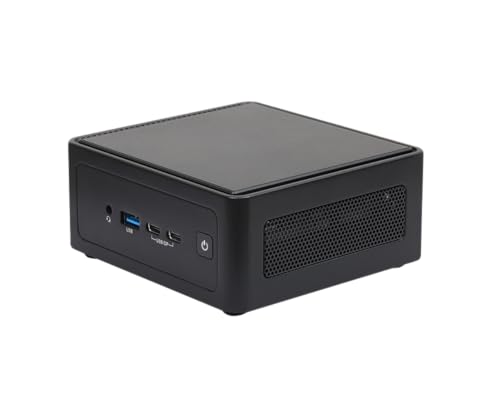
- Up to 96GB DDR5 for heavier local workloads
- USB4 and dual LAN for a flexible workstation setup
- NPU + RDNA 3.5 graphics suit compact AI tasks
Best For: Developers and power users who want a space-saving local AI machine for inference and testing.
Best for Balanced Threadripper Workflows

- 12-core Threadripper PRO 7945WX workstation CPU
- 64GB ECC DDR5 and 2TB NVMe SSD included
- Windows 11 Pro with Lenovo Premier Support
Best For: Developers and AI users who want a dependable Threadripper Pro desktop for local inference and multitasking.
Best Compact Creator Workstation

- Compact Ryzen 9 mini PC with DDR5 and Gen4 SSD
- Dual USB4 plus dual HDMI for four-display setups
- Upgradeable design with 3-year coverage
Best For: Creators and office users who want a small, quiet multitasking PC with upgrade room.
Best for Extreme AI Workloads
CLX Horus Threadripper 9980X Workstation

- 64-core Threadripper 9980X for heavy local AI and multitasking
- RTX 5090 paired with 256GB ECC memory for demanding workflows
- 4TB NVMe, 360mm cooling, and dual LAN for sustained workstation use
Best For: AI teams and power users running large local models, renders, and other sustained workstation workloads.
Best Compact 8-Core Workstation
GMKtec K8 Plus Ryzen 7 Mini PC

- 8-core Ryzen 7 8845HS in a tiny desktop footprint
- 32GB DDR5 RAM and 1TB SSD included
- USB4 and dual 2.5G NICs for flexible setup
Best For: Developers and power users who want a compact mini PC for local AI experiments and general productivity.
Best Compact AI Workstation
GEEKOM A9 Mega AI Workstation Desktop PC

- 126 TOPS AI compute for local inference and AI workloads
- 128GB RAM with 96GB allocated VRAM for larger models
- Compact 2L design with USB4, Wi‑Fi 7, and dual 2.5GbE
Best For: Developers and creators who want a compact workstation for local LLMs and heavy multitasking.
Best Compact Option

- Compact Ryzen 7 mini PC for everyday productivity
- 16GB DDR5, 512GB PCIe 4.0 SSD, and USB4
- Triple 4K output plus dual 2.5GbE networking
Best For: Entry-level local AI work, multitasking, and small desks.
Best Threadripper Pro Starter – Lenovo ThinkStation P8 7955WX
For buyers comparing local llm workstations with threadripper pro, this ThinkStation P8 lands in a practical middle ground: a 16-core Ryzen Threadripper PRO 7955WX platform, WRX90 chipset, 32 GB of DDR5, and a 1 TB SSD in a proven tower workstation chassis. It is a strong starting point for local model development, vector work, and heavy multitasking, with room to expand as your datasets and models grow.
Best For: Developers and power users who want a dependable Threadripper Pro workstation to start local LLM workflows without building from scratch.
Pros:
- 16-core Threadripper PRO CPU offers strong CPU-side throughput for data prep and parallel tasks
- WRX90 workstation platform gives a solid upgrade path for memory, storage, and add-in cards
- Includes 32 GB DDR5 and 1 TB SSD for an immediate out-of-box setup
- ThinkStation tower design is built for long sessions and easier serviceability
Cons:
- 32 GB RAM is modest for larger local models and serious multitasking
- NVIDIA T1000 8GB is not ideal for demanding GPU-heavy LLM workloads
- Premium workstation pricing may be steep if you only need light inference
Overall, this is a sensible entry into local llm workstations with threadripper pro if you value workstation reliability and upgrade headroom more than maximum out-of-box GPU power. It makes the most sense for buyers who plan to add memory, storage, or a stronger GPU over time.
Best Compact AI Dev Box – 4X4 BOX-AI350 Ryzen AI 7 Mini PC
If you want a small, quiet system for inference, coding, and light model experimentation, this 4X4 BOX-AI350 is a practical alternative to larger local llm workstations with threadripper pro. Its Ryzen AI 7 350 chip brings an XDNA 2 NPU, RDNA 3.5 graphics, and up to 96GB of DDR5, which makes it well suited to compact desktop AI workflows rather than full-scale training rigs.
Best For: Developers, students, and power users who want a space-saving AI mini PC for local model testing and everyday productivity.
Pros:
- Up to 96GB DDR5 gives it more headroom than typical mini PCs for local AI work
- USB4, dual LAN, and dual HDMI 2.1 make it flexible for modern desks and peripherals
- XDNA 2 NPU and RDNA 3.5 graphics help accelerate Copilot+ and other AI tasks
Cons:
- Not a Threadripper Pro-class workstation for heavy multi-GPU or large-model training
- Limited internal expandability compared with tower workstations
For buyers comparing local llm workstations with threadripper pro, this mini PC is the budget- and space-friendly option when your priority is efficient inference, coding, and general AI experimentation instead of maximum throughput.
Best for Balanced Threadripper Workflows – Lenovo ThinkStation P8 7945WX
If you want one of the more practical local llm workstations with threadripper pro, this Lenovo ThinkStation P8 lands in a strong middle ground: a 12-core Ryzen Threadripper PRO 7945WX, 64GB of ECC DDR5, and a fast 2TB NVMe SSD. It has enough muscle for model loading, data prep, and concurrent tools without jumping straight to a maxed-out enterprise build.
Best For: Developers, researchers, and AI power users who want a reliable Threadripper Pro desktop for local inference, preprocessing, and multitasking.
Pros:
- Threadripper PRO platform with ECC memory for workstation-grade stability
- 64GB RAM and 2TB SSD provide a solid starting point for local AI workflows
- Includes Windows 11 Pro and Lenovo Premier Support
- Useful rear/front I/O, Wi‑Fi 6E, and 10Gb Ethernet support
Cons:
- NVIDIA T1000 4GB is modest for heavier GPU-accelerated LLM workloads
- Not the best value if you need maximum VRAM out of the box
- 12 cores may be limiting for users running very large multitask pipelines
This is a sensible pick if you want one of the more balanced local llm workstations with threadripper pro: strong CPU performance, ECC memory, and dependable workstation features, but without the cost and power demands of a top-tier GPU-focused tower.
Best Compact Creator Workstation – GEEKOM A7 MAX Ryzen 9 Mini PC
If you want a compact desktop for creative work, multitasking, or light local AI experimentation, the GEEKOM A7 MAX offers strong value in a small footprint. It is not a true replacement for local llm workstations with threadripper pro, but its Ryzen 9 7940HS, DDR5 memory, and fast Gen4 SSD make it a practical choice for users who need responsive everyday performance without a tower.
Best For: Creators, office users, and power buyers who want a small, quiet PC with modern ports and upgrade flexibility.
Pros:
- Ryzen 9 7940HS and Radeon 780M handle productivity, editing, and casual gaming well.
- Dual USB4 and dual HDMI support up to four displays for a tidy multi-monitor setup.
- Upgradeable DDR5 memory and Gen4 SSD help extend its useful life.
- 3-year coverage adds reassurance for long-term everyday use.
Cons:
- 16GB RAM is modest for heavier AI or large creative projects out of the box.
- Integrated graphics are fine for light gaming, but not workstation-class GPU workloads.
- Not built for the CPU, RAM, and expansion demands of serious local LLM inference rigs.
This mini PC makes sense when desk space, noise, and efficiency matter more than brute-force compute. For local llm workstations with threadripper pro, you would still want a much larger platform, but the A7 MAX is a smart compact alternative for lighter AI tasks and general creator work.
Best for Extreme AI Workloads – CLX Horus Threadripper 9980X Workstation
If you need local llm workstations with threadripper pro-class muscle, this CLX Horus build is aimed squarely at heavy model work, large-context inference, and multitasking under sustained load. The 64-core Threadripper 9980X, RTX 5090, 256GB of ECC memory, and 4TB NVMe storage make it a serious desktop foundation for AI developers, creators, and researchers who want speed without immediately hitting a ceiling.
Best For: AI teams, power users, and creators running large local models, frequent renders, or mixed workstation workloads that benefit from maximum CPU/GPU headroom.
Pros:
- 64-core Threadripper and RTX 5090 deliver exceptional throughput for demanding AI and creation tasks.
- 256GB DDR5 ECC memory and 4TB SSD support big datasets, large projects, and smoother multitasking.
- 360mm liquid cooling, dual LAN, WiFi 6E, and Windows 11 Pro make it ready for sustained workstation use.
Cons:
- Very expensive, so it only makes sense if you will fully use the top-end hardware.
- Large, power-hungry build is overkill for lighter local AI or general office work.
This is not a casual creator PC; it is a purpose-built monster for users who want local llm workstations with threadripper pro-level scale and the GPU horsepower to keep up. If your workflow depends on running big models locally and you value uptime, memory capacity, and expansion headroom, this is one of the most capable prebuilt options in its class.
Best Compact 8-Core Workstation – GMKtec K8 Plus Ryzen 7 Mini PC
If you want a compact machine for prototyping and lighter inference tasks, the GMKtec Gaming Mini PC K8 Plus is a practical entry point in the world of local llm workstations with threadripper pro-style ambitions. It pairs an 8-core Ryzen 7 8845HS, 32GB of DDR5 memory, and a 1TB SSD with modern I/O like USB4 and dual 2.5G NICs, making it a flexible desktop for development, homelab use, and everyday AI workflows.
Best For: Developers and power users who want a small, fast mini PC for local AI experiments, coding, and multitasking.
Pros:
- 8-core/16-thread Ryzen 7 8845HS offers solid CPU performance for a mini workstation
- 32GB DDR5 RAM and 1TB SSD provide a ready-to-use baseline for local projects
- USB4 plus dual 2.5G Ethernet add useful connectivity for docks and networking
- Compact footprint makes it easy to fit on a desk or in a small lab
Cons:
- Not a true Threadripper Pro-class system for heavy multi-GPU or large-model workloads
- Limited compared with full tower workstations for memory and expansion
- Integrated graphics are fine for basic acceleration, but not a high-end AI GPU solution
This is a strong value pick if you want a responsive small form factor system, but local llm workstations with threadripper pro-level headroom will still need a much larger platform for serious model sizes and expandability.
Best Compact AI Workstation – GEEKOM A9 Mega AI Workstation Desktop PC
If you want local llm workstations with threadripper pro-class ambition in a far smaller footprint, the GEEKOM A9 Mega is worth a close look. Its Ryzen AI Max+ 395 platform, 128GB of fast LPDDR5X, and Radeon 8060S graphics give it a very different profile from a traditional tower, with enough memory and AI headroom for serious model testing, content work, and compact lab setups.
Best For: Developers, power users, and creators who want a dense AI workstation for local LLMs, multitasking, and 8K-capable media work without a full-size desktop.
Pros:
- 126 TOPS combined AI compute with a 50 TOPS NPU for local inference and AI workflows
- 128GB RAM and 96GB allocated VRAM help with large models and heavy multitasking
- Compact 2L chassis with USB4, Wi‑Fi 7, dual 2.5GbE, and quad-display support
- 3-year warranty adds reassurance for continuous workstation use
Cons:
- Not a Threadripper Pro system, so expansion and upgrade flexibility are limited
- Premium pricing reflects scarcity and high-end specs
- Mini PC design may not suit users who need full desktop PCIe expandability
For buyers comparing local llm workstations with threadripper pro, the A9 Mega stands out as a high-density alternative: it trades raw tower expandability for portability, integrated graphics strength, and a very large memory pool. That makes it a smart choice if you value compactness and AI-focused performance over a traditional workstation chassis.
Best Compact Option – BREN7P Ryzen 7 7840HS Mini PC
If you want a compact desktop for lighter AI tinkering, this BREN7P mini PC offers strong everyday speed, fast storage, and multiple display outputs. It is not a substitute for full-scale local llm workstations with threadripper pro, but it can handle smaller local models, preprocessing, and general multitasking in a small, efficient package.
Best For: Buyers who want a space-saving mini PC for entry-level local AI work, productivity, and multi-monitor use.
Pros:
- Ryzen 7 7840HS delivers solid CPU performance for compact workloads
- 16GB DDR5 and PCIe 4.0 SSD help with fast boot and app launches
- Triple 4K display support and dual 2.5GbE add flexibility for work setups
- USB4 and WiFi 6 improve connectivity for modern peripherals
Cons:
- Integrated graphics and 16GB RAM limit heavier AI and GPU-heavy tasks
- Storage and memory are modest compared with serious local llm workstations with threadripper pro
- Mini PC thermals and expandability are more constrained than tower workstations
For users comparing compact desktops to local llm workstations with threadripper pro, this system makes sense as a lower-cost starter machine, but not as a high-end inference or training box.
How We Picked the Best Local LLM Workstations with Threadripper Pro
We prioritized systems that make sense for Local LLM Workstations with Threadripper Pro, including high-core-count CPUs, strong memory ceilings, fast NVMe storage, and practical upgrade paths. We also considered whether a machine is better suited to inference, fine-tuning, mixed creator workloads, or compact deployment.
Quick Comparison
Full tower Threadripper Pro systems are the best fit when you want maximum expandability, multiple high-end GPUs, or ECC memory support. Mini PCs can still be useful for lightweight local models, dev testing, or edge AI tasks, but they are not substitutes for a true workstation when scale and sustained throughput matter. In this group, the workstation-class entries are the best matches for heavy local LLM use, while the smaller systems are better as secondary AI boxes.
Key Buying Factors for Local LLM Workstations with Threadripper Pro
Memory Capacity and ECC Support
Local models are often memory-bound before they are CPU-bound. Look for at least 64GB if you’re experimenting, and 128GB or more if you plan to run larger models, longer contexts, or multiple apps at once. ECC memory is valuable for stability during long sessions and heavy workloads.
PCIe Expansion and GPU Planning
Threadripper Pro platforms stand out because they support more PCIe lanes than mainstream desktops. That matters if you want one or more high-end GPUs, multiple NVMe drives, capture hardware, or high-speed networking. For LLM work, GPU selection usually has the biggest impact on inference speed, so make sure the chassis, power supply, and board layout can support your target card.
Storage and Thermal Headroom
Fast local storage helps with model loading, dataset access, and scratch files. Prefer systems with room for multiple NVMe drives. Also pay attention to cooling: sustained AI workloads can keep both CPU and GPU under load for long stretches, so a strong airflow design or robust liquid cooling is important.
Who Should Buy Which Local LLM Workstations with Threadripper Pro?
If you want the strongest foundation for serious local LLM work, choose a Threadripper Pro tower with lots of RAM and upgrade room. If your use case is mostly development, testing, or smaller models, a high-end mini PC can be a cost-effective companion machine. Creators who also need rendering, simulation, or heavy multitasking should lean toward the most expandable workstation in the lineup, while users focused on portability and lower power draw should favor the compact AI systems.
In short, the best choice depends on whether your priority is raw expansion, quiet desktop convenience, or a smaller footprint for lighter local inference tasks.