If you want one dock that can charge a modern laptop fast while driving serious display and data performance, Thunderbolt 5 is the new sweet spot. The best options combine high-wattage power delivery with more ports, faster storage expansion, and better multi-monitor support.
This roundup focuses on thunderbolt 5 docks with 140W charging that are built for demanding workstations, creator setups, and premium portable PCs.
Best 10 Thunderbolt 5 Docks with 140w Charging Picks for 2026
Best for Power Users
CalDigit TS5 Thunderbolt 5 Dock

- 140W charging for demanding laptops
- 15 ports with Thunderbolt 5 and 2.5GbE
- Dual 8K@60Hz display support
Best For: Power users who need top-tier charging, expansion, and multi-display support in one dock.
Best Value
TREBLEET 80Gbps TB5 eGPU Enclosure
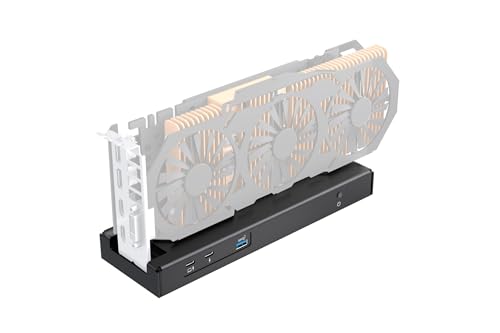
- 80Gbps Thunderbolt 5 / USB4 bandwidth
- Up to 140W Power Delivery charging
- Supports SFX, ATX, FLEX, and DC power
Best For: Power users who want an eGPU enclosure with fast charging and flexible power options.
Best for Heavy-Duty Workstations
UGREEN Maxidok Thunderbolt 5 Dock

- Dual Thunderbolt 5 ports with 120Gbps bandwidth
- Built-in M.2 NVMe slot supports up to 8TB
- Up to 140W charging and 2.5GbE networking
Best For: Power users building a high-performance multi-monitor Thunderbolt 5 desktop setup.
Best for Thunderbolt 5 Power Users
WAVLINK Intel Certified TB5 12-in-1 Dock

- 140W charging for demanding laptops
- Four Thunderbolt 5 ports for fast expansion
- 2.5G Ethernet and SD 4.0 for pro workflows
Best For: Windows 11 or Mac users who want a high-power Thunderbolt 5 dock with lots of ports and fast networking.
Best for Dual-Display Power Users

- 140W charging for demanding laptops
- Dual HDMI 2.1 with up to 8K/4K high-refresh output
- 6 USB-C ports, 2.5GbE, and UHS-II card readers
Best For: Users who want a high-end, plug-and-play Thunderbolt 5 dock for dual monitors and fast charging.
Best for Pro Workstations
Satechi Thunderbolt 5 CubeDock

- 140W charging with Thunderbolt 5 performance
- Built-in NVMe SSD enclosure for fast local storage
- Strong port mix with 2.5GbE, SD, and USB-C/A
Best For: Creators and power users who want a dock that can charge a laptop and replace multiple desk accessories.
Best for Mac Power Users
iVANKY FusionDock Ultra 26-in-1

- Quad 6K or dual 8K display support on compatible Macs
- 10GbE Ethernet and multiple high-speed USB-C ports
- 140W PD passthrough with 26 total ports
Best For: Mac creators and power users who need extreme display support and a full workstation dock.
Best for 140W Charging
WAVLINK TB5 Dock with 120Gbps, 140W PD

- 140W Power Delivery for laptop charging
- Thunderbolt 5 speeds up to 120Gbps boost mode
- 8K and multi-display support plus 4 USB-A ports
Best For: Power users who want a fast Thunderbolt 5 dock with high-watt charging and advanced display support.
Best Heavy-Duty Pick
Anker Prime TB5 Docking Station

- 140W max charging with PD 3.1 support
- 14-in-1 port layout with TB5, USB, SD/TF, Ethernet, and audio
- Up to 8K output with active cooling for sustained performance
Best For: Power users who want top-tier transfer speeds, strong charging, and a feature-rich Thunderbolt dock.
Best for Mac Multi-Display Power Users

- Triple 6K display support on compatible Macs
- 140W charging for demanding MacBook Pro setups
- 23-in-1 dock with 2.5GbE and active cooling
Best For: Mac users who want a high-end Thunderbolt 5 dock for multiple displays and lots of peripherals.
Best for Power Users – CalDigit TS5 Thunderbolt 5 Dock
If you want one of the most capable thunderbolt 5 docks with 140w charging, the CalDigit TS5 is built for demanding laptop setups that need speed, power, and serious port density. It combines a 140W host charge, Thunderbolt 5 bandwidth, and a wide mix of USB, display, and card-reader connections in a single dock.
Best For: MacBook Pro and high-end Windows users who need fast charging, multiple displays, and lots of high-speed peripherals in one desktop dock.
Pros:
- 140W host charging is strong enough for power-hungry laptops like 16-inch MacBook Pro models
- 15 total ports, including Thunderbolt 5, USB-C, USB-A, 2.5GbE, SD, and microSD
- Supports dual 8K@60Hz displays on compatible systems
- 240W PSU helps maintain consistent power delivery across the dock
Cons:
- Full performance requires a Thunderbolt 5 or USB4 v2 host
- More expensive and more dock than casual users need
- Some display and networking features depend on host compatibility
This is a strong pick if you want one of the most future-ready thunderbolt 5 docks with 140w charging and can take advantage of the extra bandwidth. The TS5 makes the most sense for users who will actually use its display support, 2.5GbE, and high-speed expansion rather than just basic charging and a few ports.
Best Value – TREBLEET 80Gbps TB5 eGPU Enclosure
If you want one of the more powerful thunderbolt 5 docks with 140w charging for an eGPU setup, TREBLEET’s 80Gbps enclosure is built for exactly that kind of heavy-duty use. It pairs a JHL9480 controller with Thunderbolt 5/USB4 support, adds 140W PD passthrough, and gives you a flexible dock-style chassis for gaming, editing, and expansion.
Best For: PC builders and laptop users who want an eGPU enclosure with high bandwidth, 140W laptop charging, and flexible power-supply options.
Pros:
- 80Gbps bandwidth with Thunderbolt 5 and USB4 compatibility
- Supports up to 140W Power Delivery for charging while connected
- Works with SFX, ATX, FLEX, and DC power input options
- Supports daisy chaining for added storage or displays
Cons:
- Requires some driver and compatibility setup
- More complex than a simple plug-and-play dock
- Not ideal if you only need basic docking and charging
This is a strong pick if you care more about raw expansion and GPU performance than simplicity. Among thunderbolt 5 docks with 140w charging, it stands out for its 80Gbps architecture and flexible power support, but it makes the most sense for users comfortable with hardware setup.
Best for Heavy-Duty Workstations – UGREEN Maxidok Thunderbolt 5 Dock
If you want one of the most fully loaded thunderbolt 5 docks with 140w charging, the UGREEN Maxidok is built for demanding desktop setups. It combines Thunderbolt 5 bandwidth, dual downstream TB5 ports, 2.5GbE, integrated M.2 storage, and broad display support in a single aluminum dock.
Best For: Power users who need a high-speed Thunderbolt 5 dock for a multi-monitor workspace, fast storage expansion, and a cleaner one-cable setup.
Pros:
- 17-in-1 design with USB-A, USB-C, audio, SD/TF, 2.5GbE, and dual Thunderbolt 5 downstream ports
- Built-in M.2 NVMe slot supports up to 8TB for fast external storage
- Supports up to single 8K or dual 6K@60Hz displays, plus strong Windows multi-monitor options
- 240W total power capacity with 140W charging support for compatible laptops
Cons:
- Likely overkill if you only need basic port expansion
- Full display flexibility is better on Windows than on Mac
- NVMe SSD is not included
This is a strong pick if you want thunderbolt 5 docks with 140w charging and need more than just a simple port hub. Its mix of high bandwidth, built-in storage support, and wired networking makes it especially appealing for creators and advanced laptop users.
Best for Thunderbolt 5 Power Users – WAVLINK Intel Certified TB5 12-in-1 Dock
If you want one of the most feature-packed thunderbolt 5 docks with 140w charging, the WAVLINK 12-in-1 is built for heavy desktop setups. It combines a 140W upstream power delivery path, four Thunderbolt 5 ports, 2.5G Ethernet, SD 4.0, and multiple USB-A ports, making it a strong fit for fast storage, networking, and multi-device workflows.
Best For: Windows 11 or Mac users with Thunderbolt 4/5 laptops who want a high-power dock with lots of expansion and fast wired connectivity.
Pros:
- 140W charging support helps power demanding laptops through a single cable
- Four Thunderbolt 5 ports plus 4x USB-A provide excellent expansion
- 2.5G Ethernet and SD 4.0 add useful pro-style connectivity
- Supports high-end multi-display setups, including very fast Windows configurations
Cons:
- Triple-display support is limited by host OS and laptop compatibility
- Requires a Thunderbolt 4/5-capable computer to get full benefits
- USB-C to HDMI/DP cables are not included
This is a strong choice if you need thunderbolt 5 docks with 140w charging and also want a dock that doubles as a serious expansion hub. It makes the most sense for users who care more about speed, port count, and display flexibility than compact size or simplicity.
Best for Dual-Display Power Users – Plugable Thunderbolt 5 Dock
For buyers comparing thunderbolt 5 docks with 140w charging, this Plugable model stands out as a clean, high-bandwidth option that combines 140W laptop power with native dual HDMI 2.1, 2.5GbE, and plenty of USB-C expansion. It’s a strong fit if you want a dock that can handle a demanding workstation setup without relying on adapters or extra drivers.
Best For: MacBook Pro, Thunderbolt 5 laptop, and hybrid-office users who want dual-display support, fast charging, and a simple plug-and-play setup.
Pros:
- 140W charging is ideal for power-hungry laptops
- Dual HDMI 2.1 supports up to 8K 60Hz or 4K 144Hz with Thunderbolt 5
- Six USB-C ports plus 2.5GbE and UHS-II card readers
- Fanless, driverless design keeps the setup quiet and simple
Cons:
- MacBook base M1/M2/M3 chips are limited to a single external display
- Dual 8K and top refresh-rate modes depend on host compatibility
- It’s a feature-rich dock, so it’s overkill for basic desk setups
Overall, this is one of the more capable thunderbolt 5 docks with 140w charging if your priority is a no-fuss dock with serious display output and strong laptop power delivery. It’s especially compelling for users who want fewer adapters and more built-in connectivity in one workstation hub.
Best for Pro Workstations – Satechi Thunderbolt 5 CubeDock
If you want thunderbolt 5 docks with 140w charging that can also handle displays, fast storage, and wired networking from a single cable, the Satechi Thunderbolt 5 CubeDock is built for that exact job. It combines 120Gbps bandwidth, up to 140W host power, and an integrated NVMe enclosure in a compact aluminum design.
Best For: Creators, power users, and workstation setups that need top-tier charging plus built-in expansion for monitors, SSDs, and peripherals.
Pros:
- Up to 140W charging and 120Gbps Thunderbolt 5 bandwidth for demanding laptops
- Built-in M.2 NVMe enclosure supports fast internal-style storage expansion
- Strong display support, including multi-8K output options on supported systems
- Useful everyday I/O: 2.5GbE, SD/microSD, and 10Gbps USB-C/A ports
Cons:
- Higher-end feature set makes it a pricey choice
- Best performance depends on using the included or certified Thunderbolt 5 cable
- Some advanced display modes depend on the laptop and operating system
For buyers comparing thunderbolt 5 docks with 140w charging, this is a standout if you want more than power delivery alone. The CubeDock adds serious storage and display flexibility, so it makes the most sense for users replacing several desk accessories with one dock.
Best for Mac Power Users – iVANKY FusionDock Ultra 26-in-1
If you need one of the most ambitious thunderbolt 5 docks with 140w charging for a Mac workstation, the iVANKY FusionDock Ultra stands out with 26 ports, 10GbE networking, and support for demanding multi-display setups. It’s built specifically for Mac M1-M5 Pro/Max systems, so it makes the most sense when you want maximum connectivity and don’t mind paying for a highly specialized dock.
Best For: Mac users who need a feature-packed dock for pro workflows, fast networking, and multiple high-resolution displays.
Pros:
- Supports quad 6K or dual 8K display setups on compatible MacBook Pro models
- Includes 10GbE Ethernet plus multiple high-speed downstream USB-C ports
- Delivers 140W PD passthrough for charging a MacBook while driving heavy workloads
- Very full port selection, including SD 4.0 and optical audio
Cons:
- Mac-only design means it is incompatible with Windows
- Its advanced display features only make sense for supported M-series Pro/Max systems
- Large, specialized feature set may be overkill for simple desk setups
For Mac-focused creators and power users, this is one of the most distinctive thunderbolt 5 docks with 140w charging because it combines serious display support, 10GbE, and a workstation-level port mix in a single dock.
Best for 140W Charging – WAVLINK TB5 Dock with 120Gbps, 140W PD
If you want one of the most feature-packed thunderbolt 5 docks with 140w charging, this WAVLINK station stands out for combining fast laptop power, high-bandwidth data, and serious display support in a single desktop hub. It’s aimed at users who need a cleaner workspace without giving up speed or multi-monitor flexibility.
Best For: Power users with Thunderbolt 4/5 laptops who want a high-wattage dock for charging, peripherals, and advanced display setups.
Pros:
- Up to 140W Power Delivery for strong laptop charging
- Thunderbolt 5 bandwidth up to 120Gbps in boost mode
- Supports up to one 8K display, dual 8K, or triple 4K on Windows 11
- Includes 4 USB-A ports, 2.5GbE, SD 4.0, and a cooling system
Cons:
- Triple-display support is limited to Windows 11 with a Thunderbolt 5 host
- Display cables and security lock are not included
Overall, this is a strong pick if you need thunderbolt 5 docks with 140w charging and want the extra headroom for demanding workflows, not just basic accessory expansion. The tradeoff is that you’ll only get the full display feature set with the right laptop and operating system.
Best Heavy-Duty Pick – Anker Prime TB5 Docking Station
If you need one of the fastest thunderbolt 5 docks with 140w charging, the Anker Prime TB5 Docking Station is built for heavy multitaskers who move large files, run high-resolution displays, and want a single dock that can replace a desk full of adapters. Its 14-in-1 layout, 120Gbps max transfer, and active cooling make it a serious workstation hub for modern Thunderbolt 5 and 4 laptops.
Best For: Power users who want top-tier transfer speeds, strong 140W charging, and multi-display flexibility from a single Thunderbolt dock.
Pros:
- 140W max upstream charging with PD 3.1 support
- 14-in-1 connectivity, including TB5 ports, USB-A, SD/TF, Ethernet, and audio
- Up to 8K display support and dual-display options on compatible laptops
- Active cooling helps maintain performance under sustained load
Cons:
- Premium pricing compared with basic Thunderbolt docks
- Full dual-display support depends on your laptop’s Thunderbolt and OS capabilities
- Not ideal if you need to attach external USB-A hubs
For buyers comparing thunderbolt 5 docks with 140w charging, this Anker model stands out for speed, charging headroom, and workstation-level port selection rather than bargain pricing. It makes the most sense if you want a dock that can handle demanding daily use without feeling under-specced.
Best for Mac Multi-Display Power Users – iVANKY FusionDock Max 2
If you need one of the more capable thunderbolt 5 docks with 140w charging for a Mac workspace, the iVANKY FusionDock Max 2 stands out for its triple-display support, fast 120Gbps bandwidth, and built-in cooling. It is designed specifically for Mac systems, so it’s a strong fit for users who want a high-end dock that can handle multiple monitors, lots of peripherals, and single-cable power delivery.
Best For: Mac users with M-series Pro or Max laptops who want a high-bandwidth dock for multiple 6K displays and a fully loaded desk setup.
Pros:
- Supports up to triple 6K@60Hz displays on compatible M-series Max Macs
- 140W PD helps keep power-hungry MacBook Pro models charged
- 23-in-1 layout with plenty of USB, Ethernet, and card-reader options
- Hybrid cooling system is built for sustained heavy use
Cons:
- Not compatible with Windows or Chrome laptops
- Display support varies by Mac chip, so buyers need to check compatibility carefully
- Limited to one Mac and does not support switching between devices
For Mac owners who need serious I/O and stable multi-monitor output, this is a specialized but compelling choice among thunderbolt 5 docks with 140w charging. Just make sure your exact Mac chip supports the display setup you want before buying.
How We Picked the Best Thunderbolt 5 Docks with 140w Charging
We prioritized docks that pair Thunderbolt 5 connectivity with 140W laptop charging, since that combination is ideal for high-performance notebooks that need a single-cable desk setup. We also looked at port variety, display capability, Ethernet speed, compatibility, and whether the dock adds meaningful expansion such as SSD bays or extra USB ports.
Because not every TB5 system is identical, we favored products that balance future-proof bandwidth with practical everyday usefulness rather than only chasing headline specs.
Quick Comparison
In simple terms, some Thunderbolt 5 Docks with 140w Charging are built for maximum versatility, while others lean toward creator workflows, network-heavy setups, or storage expansion. If you need dual monitors and lots of peripherals, prioritize a feature-rich dock. If you want a cleaner desk with fewer boxes, look for a dock that also includes NVMe storage or a fanless design.
Key Buying Factors for Thunderbolt 5 Docks with 140w Charging
Power Delivery
Confirm that the dock can provide a true 140W output and that your laptop can actually accept it. Some systems use that headroom for peak performance and fast charging, while others only need less. A lower-power laptop may still benefit, but overbuying on wattage alone is not necessary.
Display Support
Check whether you need dual 4K, dual 6K, or 8K-class support. Thunderbolt 5 expands bandwidth, but the exact monitor layout still depends on the dock and your computer’s display engine. Mac and Windows compatibility can differ, especially for multi-display routing.
Ports and Expansion
Think about what you plug in daily. USB-A remains useful for accessories, Ethernet matters for stable networking, and SD or microSD slots can save time for creators. Some docks also include NVMe storage, which is valuable if you want one hub to handle both connectivity and local scratch space.
Cooling, Noise, and Build
Higher-performance docks may include active cooling, while others are fanless for silent operation. Choose based on your workspace. A quieter dock is great for offices and studios, but active cooling can help sustain performance in dense, high-bandwidth setups.
Who Should Buy Which Thunderbolt 5 Docks with 140w Charging?
Choose a premium Thunderbolt 5 dock if you want the most balanced all-in-one hub for a work laptop, dual monitors, and fast charging. Choose a dock with extra storage if you also want to simplify your desk by combining expansion and cable management in one device. Choose a more network-focused or display-heavy option if your workflow depends on large monitors, wired Ethernet, or Mac-specific multi-screen needs.
For most buyers, the best Thunderbolt 5 Docks with 140w Charging are the ones that match your laptop’s power needs first, then your monitor setup, and finally the accessories you connect every day.