Mac mini docking stations for music production can turn a compact desktop into a far more capable studio hub. The right dock adds fast external storage, cleaner cable management, and easier access to drives, cards, and accessories.
Whether you are tracking at home, building a portable production rig, or managing sample libraries and session backups, a good dock should support speed, stability, and low-friction workflow.
Best 10 Mac Mini Docking Stations for Music Production Picks for 2026
Best for Big-Display Music Rigs
iVANKY 13-in-1 Mac mini M4 Dock

- 13-in-1 hub with HDMI, USB, SD/TF, and dual audio ports
- Built-in M.2 NVMe enclosure for fast project and sample storage
- Elevated stand design helps airflow around the Mac mini
Best For: Producers who want dual displays, extra storage, and a heavily connected Mac mini studio dock.
Best for High-Speed Media Offload
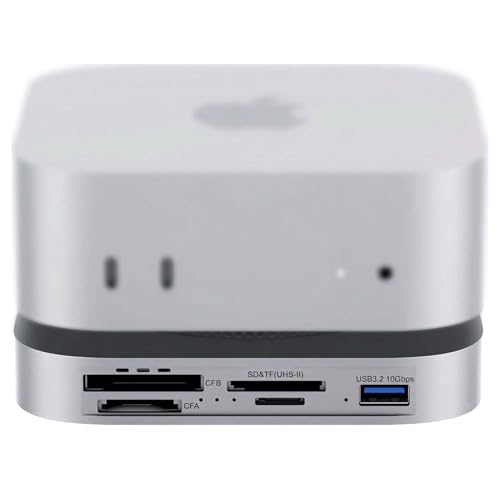
- 80Gbps USB4 2.0 / Thunderbolt 5-4 support
- PCIe 4.0 NVMe slot with up to 7000MB/s claims
- CFexpress A/B and UHS-II SD/microSD readers
Best For: Producers who also offload camera media and want fast SSD expansion in one dock.
Best for Fast Storage Expansion
UGREEN Mac mini M4 Dock with NVMe Enclosure

- Adds M.2 NVMe storage for samples and projects
- 10Gbps USB A/C ports for studio gear
- Compact dock keeps the setup clean
Best For: Mac mini M4 users who want fast storage expansion and extra ports for a music-production desk.
Best for Built-In SSD Expansion

- Adds NVMe/SATA SSD storage inside the dock
- Front-facing USB-C, USB-A, card readers, and audio
- Aluminum stand helps airflow and desk organization
Best For: Mac mini M2/M1 users who want fast local storage and a compact, front-access hub.
Best for SSD Expansion
Mac mini Hub with M.2 NVMe SSD Enclosure

- Built-in M.2 NVMe slot supports up to 2TB
- USB-C and USB-A 10Gbps data ports
- Vertical stand saves desk space and adds card readers
Best For: Mac mini users who want extra fast storage and a tidy all-in-one desktop hub.
Best for Built-In NVMe Expansion
UGREEN Mac mini M4 Dock & Stand with SSD Enclosure

- Up to 8TB NVMe SSD expansion
- Three 10Gbps USB-A ports plus USB-C data
- Compact dock-and-stand design for tidy desks
Best For: Producers who want a Mac mini M4 dock with fast expandable storage and a clean studio setup.
Best for All-in-One Expansion
Acer Gadget Mac mini M4 Dock with SSD Enclosure

- Up to 8TB M.2 SSD expansion
- 10Gbps USB-C and USB-A ports
- SD/TF readers and rear audio jack
Best For: Mac mini users who want storage expansion and a tidy hub for studio workflows.
Best Simple Pick
Stouchi Mac mini M4 Dock Stand

- 8TB SSD enclosure for sample libraries and project files
- 10Gbps USB-A plus SD/TF, HDMI, and 3.5mm audio
- Bottom power button and shielded design for easier studio use
Best For: Mac mini owners who want a single dock for storage, connectivity, and a cleaner music-production desk.
Best for Big-Display Music Rigs – iVANKY 13-in-1 Mac mini M4 Dock
If you want one of the more fully loaded mac mini docking stations for music production, this iVANKY dock is built for desks that need displays, storage, and lots of peripherals in one footprint. It adds dual-display support, an M.2 SSD enclosure, and plenty of USB options, which is helpful when your Mac mini is running a DAW, sample libraries, audio interfaces, and control devices at the same time.
Best For: Producers who want a Mac mini dock with expanded storage, dual monitors, and lots of connectivity for a crowded studio setup.
Pros:
- 13-in-1 layout adds HDMI, USB-A, USB-C, SD/TF, and dual audio ports.
- Built-in M.2 NVMe enclosure supports fast local storage for sample libraries and project files.
- 20W PD adapter helps keep multiple connected devices more stable under load.
- Elevated stand design can improve airflow around the Mac mini.
Cons:
- SSD is not included, so storage expansion adds extra cost.
- Peak speeds and display behavior depend on your Mac, monitor, and connected gear.
- May be more dock than some minimal studio setups actually need.
For mac mini docking stations for music production, this model stands out when you need a compact hub that also handles storage expansion and multi-monitor workflows. It is a strong fit for creators who want to keep their desk organized without giving up the connectivity that a serious home studio often needs.
Best for High-Speed Media Offload – 80Gbps Dock for Mac mini M4
If you want one of the most capable mac mini docking stations for music production, this 80Gbps dock stands out for its fast storage expansion and broad card support. It adds an internal NVMe slot, UHS-II SD/microSD, and CFexpress readers, making it easy to move large sample libraries, session backups, and camera media without juggling adapters.
Best For: Producers who also handle large media files, want fast local SSD expansion, and need a single hub for high-speed transfers.
Pros:
- 80Gbps USB4 2.0 / Thunderbolt 5-4 support for high-bandwidth workflows
- Built-in PCIe 4.0 NVMe slot for up to 7000MB/s storage expansion
- CFexpress Type A/B plus UHS-II SD and microSD readers for media offload
- Dual PWM fans and optional auxiliary power help during heavy transfers
Cons:
- Overkill if you only need basic USB ports and display connectivity
- Top performance depends on the SSD and host interface you pair it with
- Likely more expensive than simpler Mac mini docks
For creators who need speed, expandability, and serious card-reader support, this is a strong fit among mac mini docking stations for music production. It makes the most sense when your Mac mini also serves as a hub for large sample libraries, project archives, or mixed audio-and-video workflows.
Best for Storage-Heavy Studios – TobenONE 13-in-1 Mac mini M4 Dock
If you want one of the more feature-packed mac mini docking stations for music production, this TobenONE dock is built for streamlined studio setups. It combines a Mac mini stand, a 13-port hub, and an NVMe SSD enclosure, so you can keep sample libraries, project files, and peripherals connected without spreading gear across the desk.
Best For: Producers who want extra local storage, a clean desk, and easy access to USB, display, and audio connections in one dock.
Pros:
- Built-in SSD enclosure supports up to 8TB for large sample libraries and project storage
- Five USB ports plus SD/microSD and 3.5mm audio cover common studio peripherals
- DisplayPort 4K@144Hz and HDMI 4K@60Hz give you flexible multi-monitor support
- One-touch power button and docked stand help keep the workspace tidy and fast to use
Cons:
- SSD is not included, so you’ll need to buy your own NVMe drive
- SATA drives are not supported, which limits upgrade options
- More of a workspace hub than a dedicated audio interface replacement
For music creators who need a tidy desk and lots of local storage, this dock hits a useful balance of expansion and convenience. Among mac mini docking stations for music production, it stands out most for users who manage large libraries and want everything in one compact desktop base.
Best for Desktop Display – M5 Retro Dock for Mac mini M4
If you want one of the more distinctive mac mini docking stations for music production, this retro-style dock adds both extra connectivity and a built-in 5-inch display for keeping session notes, timers, or track info visible while you work. It also includes an M.2 NVMe SSD enclosure, SD/microSD readers, multiple USB ports, and audio output, making it a practical all-in-one desk hub for compact studios.
Best For: Producers who want a space-saving Mac mini dock with a small built-in screen, extra storage, and flexible expansion for a tidy music workstation.
Pros:
- Built-in 5-inch HD display is handy for monitoring info without using a main screen.
- M.2 NVMe SSD enclosure adds fast, expandable storage for samples and projects.
- Multiple USB-A/USB-C ports and card readers support common studio peripherals.
- Compact integrated design helps reduce cable clutter on crowded desks.
Cons:
- The built-in display is small, so it is not a substitute for a full monitor.
- Not every feature will matter if you only need basic port expansion.
- Advanced bandwidth options vary by version, so check the model before buying.
For mac mini docking stations for music production, this model stands out more for desk organization and built-in convenience than raw studio power. If you want a dock that combines storage, ports, and a compact secondary display in one unit, it is an interesting fit for a minimalist production setup.
Best for Fast Storage Expansion – UGREEN Mac mini M4 Dock with NVMe Enclosure
If you want one of the more capable mac mini docking stations for music production, this UGREEN dock stands out by adding both a hub and an M.2 NVMe SSD enclosure in a clean, Mac mini-sized footprint. It is a practical way to expand sample-library storage, keep audio projects organized, and add front-facing connectivity without cluttering your desk.
Best For: Producers who need fast local SSD storage, extra USB ports, and a tidy all-in-one dock for a Mac mini M4 setup.
Pros:
- Built-in M.2 NVMe enclosure supports 2230/2242/2260/2280 SSDs for fast project and sample storage
- 10Gbps USB A/C ports help connect audio interfaces, controllers, and external drives quickly
- SD/TF slots and audio support add useful extras for a production workstation
- Matches the Mac mini form factor and includes a power-button lever for easier access
Cons:
- SSD is not included, so the full setup cost can be higher
- Display-focused features are less relevant if you mainly want audio peripherals
- Best suited to Mac mini M4/M4 Pro users, not older Mac mini models
For buyers comparing mac mini docking stations for music production, this model is strongest when storage speed and desk organization matter as much as port expansion. It is a smart pick if you want to keep large sample libraries close at hand while maintaining a compact, studio-friendly setup.
Best for Built-In SSD Expansion – Satechi Mac mini Hub & Stand
If you want one of the more capable mac mini docking stations for music production, this Satechi hub adds front-facing ports plus internal NVMe/SATA SSD expansion in a Mac mini-sized stand. It’s a practical way to keep sample libraries, project files, and peripherals close at hand while preserving a clean desktop layout.
Best For: Mac mini M2/M1 owners who need fast local storage expansion and a tidy, front-access hub for audio gear and studio accessories.
Pros:
- Built-in SSD enclosure supports NVMe and SATA M.2 drives for fast project and sample storage
- Useful front I/O with USB-C, multiple USB-A ports, card readers, and a 3.5mm audio jack
- Aluminum stand design matches the Mac mini and helps with airflow during heavy sessions
Cons:
- Not compatible with Mac mini M4
- SSD is not included, so total cost is higher than a basic hub
- Some USB-A limitations make it less ideal for certain bus-powered accessories
For music producers who value storage speed and a streamlined desk setup, this Satechi is more than just a dock. Among mac mini docking stations for music production, it stands out for combining expansion, cooling, and convenience in one compact unit.
Best for SSD Expansion – Mac mini Hub with M.2 NVMe SSD Enclosure
If you want one of the more versatile mac mini docking stations for music production, this vertical hub adds the ports most desktop audio setups actually use while also giving you room for fast internal-style scratch storage. It combines USB data ports, card readers, and a built-in M.2 NVMe enclosure, which can be handy for sample libraries, session backups, and project files.
Best For: Mac mini owners who want a compact dock with extra SSD storage for music projects and everyday peripherals.
Pros:
- Built-in M.2 NVMe enclosure supports up to 2TB for fast project and sample storage
- Includes USB-C and USB-A 10Gbps data ports plus two USB-A 2.0 ports
- Vertical stand design helps save desk space and keep a Mac mini setup tidy
- SD/TF card slots and 3.5mm audio/mic jack add useful creator-friendly connectivity
Cons:
- Not compatible with Mac mini M4 2024
- USB ports are data-only and do not support charging or video output
- SSD is not included, and SATA drives are not supported
For producers who need a cleaner desk and faster access to files, this dock is a smart multitasker among mac mini docking stations for music production. It is especially appealing if you want one unit to handle storage expansion, card transfers, and basic USB peripherals without adding another box to the setup.
Best for Built-In NVMe Expansion – UGREEN Mac mini M4 Dock & Stand with SSD Enclosure
If you want one of the more practical mac mini docking stations for music production, this UGREEN dock is appealing because it combines a compact stand with fast storage expansion and plenty of hub ports. The built-in NVMe enclosure lets you add speedy local storage for sample libraries, session files, and backups, while the 10Gbps USB connections help keep peripherals responsive.
Best For: Producers who want a tidy Mac mini M4 setup with extra SSD storage and enough ports for audio gear, drives, and accessories.
Pros:
- Built-in NVMe SSD enclosure supports up to 8TB of expandable storage.
- Three 10Gbps USB-A ports plus USB-C data connectivity for fast peripherals.
- Compact dock-and-stand design helps keep a music desk organized.
- SD/TF card reader is useful for sample transfers and media imports.
Cons:
- SSD is not included, so you’ll need to budget for an NVMe drive separately.
- Best feature set may be more than you need if you only want basic port expansion.
- External power is recommended for heavier multi-device setups.
For buyers comparing mac mini docking stations for music production, this model stands out when local storage matters as much as connectivity. It’s a strong fit if you want a cleaner desk, quick access to your drives, and a dock that can support a more organized studio workflow.
Best for All-in-One Expansion – Acer Gadget Mac mini M4 Dock with SSD Enclosure
If you want one of the more feature-packed mac mini docking stations for music production, this Acer Gadget dock bundles fast storage expansion, extra USB ports, and cleaner cable management into a single aluminum base. It’s a practical fit for producers who need quick access to sample libraries, session backups, audio interfaces, and card transfers without cluttering the desk.
Best For: Mac mini users who want built-in SSD expansion and a tidy desktop hub for recording, mixing, and file transfers.
Pros:
- Supports up to 8TB M.2 NVMe or SATA SSD storage for large sample libraries and project archives
- 10Gbps USB-C and USB-A ports help move sessions, stems, and backups quickly
- Includes SD/TF card readers plus a rear 3.5mm audio jack for flexible studio connections
- Elevated aluminum design improves airflow and keeps the setup cleaner
Cons:
- SSD is not included, so total cost depends on the drive you add
- Requires the included 5V/3A power adapter for stable performance under load
- Bulkier than a simple USB hub, so it’s less ideal if you want the smallest footprint possible
This is a strong pick if you need mac mini docking stations for music production that do more than just add ports. The built-in storage bay makes it especially appealing for large sample-based workflows, though buyers who only need basic connectivity may find simpler docks a better value.
Best Simple Pick – Stouchi Mac mini M4 Dock Stand
If you want one dock that covers storage, ports, and day-to-day convenience, this is a strong pick in the mac mini docking stations for music production category. It adds an internal SSD enclosure for fast project storage, gives you the ports most studio setups actually need, and keeps the Mac mini easy to power on without moving the machine.
Best For: Mac mini users who want a tidy, plug-and-play hub for sample libraries, audio accessories, and external storage.
Pros:
- Built-in SSD enclosure supports up to 8TB for fast sample libraries and project files
- Useful mix of 10Gbps USB-A, SD/TF, HDMI, and 3.5mm audio connections
- Bottom power button and secure stand design make desktop use easier
- Shielded construction is designed to help preserve Wi-Fi stability
Cons:
- SSD is not included, so you’ll need to buy storage separately
- Made specifically for Mac mini M4 models, so compatibility is limited
- Plastic build may feel less premium than metal alternatives
For music producers who want to simplify cabling and keep fast local storage close at hand, this dock covers a lot of bases without adding much desk clutter. It’s especially appealing if you’re comparing mac mini docking stations for music production and value convenience plus expansion over a minimalist port-only hub.
How We Picked the Best Mac Mini Docking Stations for Music Production
We focused on Mac Mini Docking Stations for Music Production that balance high-speed storage, dependable connectivity, and practical port layouts. Priority went to models with NVMe expansion, fast USB 10Gbps or better, audio-friendly output options, and support for dual-display or high-bandwidth workflows where relevant.
We also considered how well each dock fits a studio desk: footprint, vertical stand design, card readers for field recording, and the ability to keep drives, interfaces, and peripherals within easy reach.
Quick Comparison
If you mostly need sample-library storage, choose a dock with an NVMe enclosure and strong sustained transfer speeds. If your setup uses many controllers, interfaces, and drives, look for more USB-A and USB-C ports. If you work with camera or recorder media, SD/microSD support can save time during imports and backups.
For music production, the best option is usually the one that reduces bottlenecks in your daily workflow rather than simply offering the most ports on paper.
Key Buying Factors for Mac Mini Docking Stations for Music Production
Storage Speed and Expansion
Sample libraries, stems, and multitrack sessions benefit from fast NVMe storage. If you regularly run large projects, a dock with an SSD enclosure can improve responsiveness and keep your internal drive free for system tasks.
Port Selection
Look for enough USB-A and USB-C ports for MIDI controllers, audio interfaces, external drives, dongles, and backup devices. For studio use, a dedicated audio jack can be convenient, but it should not replace a proper interface for recording or monitoring.
Display and Bandwidth Support
Dual-monitor support can help with DAW windows, plugins, and mixer views. Higher refresh rates matter less for audio work, but robust video output often indicates a stronger overall hub design.
Card Readers and Workflow Extras
If you import loops, field recordings, or video assets, built-in SD or microSD readers can simplify the process. Some docks also add useful extras like front-access USB-C or vertically integrated stands that keep your desk cleaner.
Who Should Buy Which Mac Mini Docking Stations for Music Production?
Choose a storage-first dock if your main concern is loading big projects quickly and keeping libraries organized. Choose a port-rich dock if you run a crowded studio with multiple controllers, interfaces, and peripherals. Choose a compact stand-style dock if you want a cleaner desk and a simple all-in-one setup around a Mac mini.
In short, the best Mac Mini Docking Stations for Music Production are the ones that support your real workflow: fast storage, dependable connectivity, and a layout that helps you create without constant cable swapping.