If you edit high-resolution photos, grade video, or work across color-critical apps, the right display matters as much as the PC behind it. Mini LED panels can deliver the brightness, contrast, and local dimming needed for serious 4K workflows.
This roundup focuses on creator-friendly options with strong color coverage, modern connectivity, and the features that help you see more detail with fewer compromises.
Best 10 Mini LED Monitors for 4K Content Creation Picks for 2026
Best for Color-Critical Dual-Mode
KOORUI 27" 4K QD-Mini LED Monitor

- 1152-zone Mini LED panel with HDR1400
- 99% Adobe RGB and factory calibration
- 90W USB-C with HDMI 2.1 and DP 1.4
Best For: Creators who also game and want strong color accuracy, HDR impact, and flexible connectivity.
Best for HDR Color Grading
ASUS ROG Swift 32" 4K Mini-LED Monitor

- Mini-LED IPS with local dimming for strong HDR contrast
- 4K 32-inch workspace suits editing, grading, and multitasking
- 144Hz and G-SYNC Ultimate add premium gaming flexibility
Best For: Creators who want a high-end 4K Mini-LED display for HDR-heavy editing and mixed work/play use.
Best High-Refresh Mini-LED Value
AOC Q27G3XMN 27" QHD Mini-LED Monitor

- 336-zone Mini-LED backlight with strong contrast
- HDR 1000 and wide color gamut for vivid visuals
- 180Hz refresh rate suits both work and gaming
Best For: Creators who want Mini-LED punch and fast motion handling on a tighter budget, with QHD instead of true 4K.
Best for Color-Accurate Hybrid Work
INNOCN 27" 4K 120Hz USB-C Monitor

- Factory-calibrated DeltaE <1 color accuracy
- 4K 120Hz plus FHD 240Hz dual-mode refresh
- USB-C 90W power delivery for single-cable setups
Best For: Designers, video editors, and MacBook users who want accurate 4K work plus fast refresh for play.
Best HDR Precision Pick
TCL 27R94 27" 4K QD-Mini LED Monitor
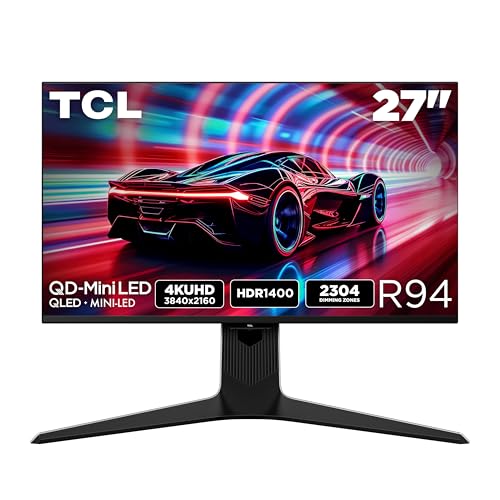
- 4K detail on a 27-inch display
- HDR1400 with LD2304 dimming for strong contrast
- 165Hz, 1ms, FreeSync, and G-SYNC support
Best For: Creators who want a bright, high-contrast 4K monitor that can also handle serious gaming.
Best for Fast 4K and High-Brightness HDR
TCL 27" C2A Pro QD-Mini LED 4K

- 4K UHD on a 27-inch panel with crisp detail
- QD-Mini LED dimming and HDR2000 brightness
- Dual Mode: UHD 160Hz or FHD 320Hz
Best For: Creators who want a bright, fast 4K mini-LED monitor for mixed editing and gaming.
Best for Hybrid Gaming and Editing
AOC 27-inch Mini-LED 4K 160Hz Monitor

- 4K IPS panel with 1,152 local dimming zones
- Up to 160Hz at 4K for smoother motion
- HDR1000, G-SYNC Compatible, and USB hub
Best For: Creators who want a sharp 4K mini-LED display with strong HDR and gaming-speed refresh.
Best for Color-Critical Dual-Mode – KOORUI 27" 4K QD-Mini LED Monitor
If you want one of the more versatile mini led monitors for 4k content creation, this KOORUI 27-inch model is built to straddle both editing and gaming. Its 4K Mini LED panel, wide Adobe RGB coverage, and factory calibration make it appealing for creators who need strong color performance, while the 160Hz UHD mode adds extra smoothness for timeline work, previews, and general desktop use.
Best For: Creators who also want a fast display for gaming, with strong color coverage, HDR punch, and flexible USB-C connectivity.
Pros:
- 1152-zone Mini LED backlight with HDR1400 for high contrast and bright highlights
- 99% Adobe RGB and factory calibration suit photo, video, and design workflows
- 90W USB-C plus HDMI 2.1 and DP 1.4 make it easy to connect modern laptops and consoles
- Dual-mode operation gives you 4K 160Hz for creative use and 1080p 320Hz for esports
Cons:
- 27 inches may feel small for users who want a larger 4K timeline canvas
- Dual-mode focus may be more than some creators need if gaming is not a priority
- Color-critical buyers may still want to verify calibration for their own workflow
For creators who want mini led monitors for 4k content creation with extra gaming flexibility, this KOORUI stands out as a high-spec all-rounder rather than a pure studio display. It is especially attractive if you value HDR impact, broad color coverage, and single-cable USB-C convenience.
Best for HDR Color Grading – ASUS ROG Swift 32" 4K Mini-LED Monitor
If you want one of the most capable mini led monitors for 4k content creation, the ASUS ROG Swift PG32UQX stands out for its Mini-LED IPS panel, Quantum Dot color, and DisplayHDR 1400 support. It is built for creators who need strong contrast, high brightness, and accurate 4K detail, while still doubling as a very fast gaming display.
Best For: Creators who want a high-end 4K Mini-LED monitor with excellent HDR performance for color work, editing, and mixed creative/gaming use.
Pros:
- Mini-LED backlighting with local dimming delivers excellent HDR punch and contrast
- 4K UHD resolution on a 32-inch screen gives plenty of workspace for editing timelines and panels
- Quantum Dot and IPS help support wide, vivid color performance
- 144Hz refresh rate is a bonus for motion-heavy work and gaming
Cons:
- Very expensive compared with most creator-focused 4K monitors
- Gaming-first design may be more than some professionals need
- HDR performance is strong, but mini-LED bloom can still appear in some scenes
For buyers comparing mini led monitors for 4k content creation, this model makes sense when HDR impact and top-tier brightness matter as much as resolution. It is overkill for basic editing, but a compelling choice if you want one monitor that can handle creative work and premium gaming equally well.
Best Dual-Mode Speed Pick – KTC 27-Inch 4K Mini LED Monitor
If you want one display that can handle both sharp editing work and fast-paced gaming, this KTC is a strong fit for mini led monitors for 4k content creation. The 27-inch 4K panel, Mini LED backlight, and HDR1400 support make it appealing for creators who want punchy contrast and wide color coverage without giving up high refresh rates.
Best For: Creators who also game and want a 4K Mini LED monitor with strong color, high brightness, and flexible connectivity.
Pros:
- 4K UHD resolution with Mini LED and 1152 local dimming zones for strong contrast
- Wide color coverage with RGB 99% and DCI-P3 98% for vibrant content work
- USB-C 65W, HDMI 2.1, DisplayPort 1.4, USB hub, and KVM support
- Adjustable stand plus VESA mount support for flexible desk setups
Cons:
- 27 inches may feel small if you prefer a larger editing canvas
- Dual-mode gaming features add cost that some pure creators may not need
- White chassis may not match every studio setup
This model stands out if you want mini led monitors for 4k content creation with a gaming-first twist, especially when you care about HDR impact, fast response, and simple single-cable laptop use.
Best High-Refresh Mini-LED Value – AOC Q27G3XMN 27" QHD Mini-LED Monitor
If you want a fast Mini-LED display that balances contrast, color, and price, the AOC Q27G3XMN is worth a close look. For buyers comparing mini led monitors for 4k content creation, it stands out for its HDR 1000 rating, strong gamut coverage, and 336-zone backlight—though its 2560×1440 resolution is not true 4K.
Best For: Creators who want Mini-LED contrast and vivid HDR performance on a more affordable QHD monitor, especially if motion handling also matters.
Pros:
- Mini-LED backlight with 336 dimming zones for deeper blacks and brighter highlights
- Wide color coverage and VESA DisplayHDR 1000 help HDR edits and content previewing
- 180Hz refresh rate and 1ms GtG make it unusually fast for a creator-leaning display
Cons:
- 2560×1440 resolution is sharp, but it is not a 4K panel
- HDMI 2.0 limits some connectivity flexibility compared with newer standards
- VA panel viewing angles may not suit every color-critical workflow
As a value-minded Mini-LED pick, this AOC is more compelling for mixed work and play than for strict 4K post-production. If your priority is bright HDR impact and fast response, it earns a spot among mini led monitors for 4k content creation alternatives, even though serious 4K editors may still prefer a native 4K model.
Best for Color-Accurate Hybrid Work – INNOCN 27" 4K 120Hz USB-C Monitor
If you want mini led monitors for 4k content creation but also need a screen that can pull double duty for gaming and everyday work, the INNOCN CB27U1 is a strong all-rounder. Its factory calibration, DeltaE<1 rating, and HDR500 support make it a practical pick for editing photos, grading video, and general creator workflows without giving up speed.
Best For: Designers, video editors, and MacBook users who want one monitor for accurate 4K work and smooth high-refresh play.
Pros:
- DeltaE <1 factory calibration helps keep color work more reliable out of the box
- 4K 120Hz panel is great for both content creation and everyday multitasking
- USB-C with 90W charging simplifies single-cable laptop setups
- HDMI 2.1, DP 1.4, and FreeSync add flexibility for consoles and PCs
Cons:
- IPS contrast is solid, but it won’t match true mini-LED black levels
- HDR500 is useful, though not as dramatic as higher-end HDR displays
- 27-inch size may feel small for users who prefer larger timelines or dual-window layouts
For creators comparing mini led monitors for 4k content creation, this model stands out more for balanced accuracy, speed, and cable simplicity than for deep HDR performance. It’s a smart choice if you want a creator-friendly 4K display that can also handle gaming and shared-device setups.
Best HDR Precision Pick – TCL 27R94 27" 4K QD-Mini LED Monitor
If you want one of the more capable mini led monitors for 4k content creation, the TCL 27R94 stands out for its 4K sharpness, HDR1400 brightness, and scene-by-scene dimming control. It is also tuned for gaming, so creators who edit in motion-heavy timelines or switch between work and play get a very fast panel with strong contrast and vivid highlights.
Best For: Creators who want a bright, high-contrast 4K monitor that can also handle serious gaming after hours.
Pros:
- 4K UHD on a 27-inch screen gives you crisp text and detailed image work.
- QD-Mini LED, LD2304 dimming, and HDR1400 deliver punchy contrast and bright highlights.
- 165Hz refresh rate with 1ms response time makes motion look smooth and responsive.
- USB-C power delivery, FreeSync Premium, and G-SYNC add flexibility for mixed-use setups.
Cons:
- Gaming-first tuning may matter more than color-critical creator features.
- 27 inches can feel compact if you prefer a larger canvas for timelines and panels.
- Premium mini-LED features usually come with a higher price than basic 4K displays.
For mini led monitors for 4k content creation, this TCL is a strong fit if you care most about HDR impact, sharp detail, and a display that still feels fast and modern. It is especially appealing for hybrid users who need a monitor that can switch between editing, previewing, and gaming without feeling like a compromise.
Best for Color-Accurate High-Refresh Workflows – INNOCN 32" Mini LED 4K 160Hz Monitor
If you want one of the more capable mini led monitors for 4k content creation, this INNOCN 32-inch model stands out by combining a Mini LED backlight with a 4K IPS panel, 99% DCI-P3 coverage, and a fast 160Hz refresh rate. It is a strong fit for creators who also game, or anyone who wants punchy HDR performance without giving up everyday productivity.
Best For: Creators who need accurate color, strong contrast, and a high refresh rate for mixed work-and-play use.
Pros:
- Mini LED backlighting with 2304 zones helps improve contrast and HDR impact
- Wide color support with 99% DCI-P3 and factory calibration for creative work
- USB-C, HDMI 2.1, and DisplayPort 1.4 make it flexible for modern devices
- 160Hz refresh rate adds extra smoothness for motion and gaming
Cons:
- More than many creators need if your focus is strictly editing and not gaming
- Built-in speakers are convenient, but not a replacement for dedicated audio
This is a compelling choice if you want mini led monitors for 4k content creation with the added benefit of HDR-ready contrast and high refresh performance. It is especially appealing for hybrid users who edit, design, and play on the same display.
Best for Fast 4K and High-Brightness HDR – TCL 27" C2A Pro QD-Mini LED 4K
If you want mini led monitors for 4k content creation that can also pull double duty for gaming, the TCL 27C2A Pro brings a sharp 4K panel, strong local dimming, and very high HDR brightness to the table. It’s geared more toward creators who also want a speedy, flexible display than toward reference-grade color work, but the specs are compelling for mixed-use setups.
Best For: Creators and power users who want a bright 4K mini-LED monitor that can handle editing, media review, and fast-paced gaming in one screen.
Pros:
- 4K UHD resolution on a 27-inch screen for crisp timelines, previews, and fine detail
- QD-Mini LED with LD2304 precise dimming for stronger contrast and deeper blacks
- HDR2000 brightness helps highlights stand out in bright rooms and HDR content
- Dual Mode offers UHD 160Hz or FHD 320Hz for flexible use
Cons:
- More gaming-focused than creator-optimized, so color-critical workflows may want a more calibrated display
- 27 inches can feel compact for heavy 4K editing compared with larger monitors
This is a strong fit if you want mini led monitors for 4k content creation with excellent brightness, responsive performance, and a feature set that leans well beyond basic office use.
Best High-Refresh Mini-LED Pick – KTC 27" Mini-LED QHD Monitor
If you want mini led monitors for 4k content creation but also need a fast panel for gaming or motion-heavy timelines, the KTC M27T6 is an interesting hybrid. Its 27-inch QHD Mini-LED display, 1152-zone local dimming, HDR1400 support, and DeltaE<2 color claim give it strong contrast and punchy highlights for everyday creative work.
Best For: Creators who want strong HDR contrast and a high-refresh display for editing, color review, and after-hours gaming.
Pros:
- Mini-LED backlight with 1152 local dimming zones for deeper blacks and brighter highlights
- HDR1400, 1,400 cd/m² peak brightness, and Quantum Dot tech for vivid image presentation
- 180Hz refresh rate with 1ms GTG response makes it great for smooth motion
- Fully adjustable stand plus 100x100mm VESA support for flexible setup
Cons:
- QHD resolution is not true 4K, so it is not ideal if you need native 4K editing space
- Creative-first buyers may find the gaming-focused design less specialized than pro-reference monitors
For buyers comparing mini led monitors for 4k content creation, this KTC stands out more for HDR impact and speed than for native 4K detail. It makes the most sense if you want a bright, contrast-rich monitor that can handle both creative work and competitive play.
Best for Hybrid Gaming and Editing – AOC 27-inch Mini-LED 4K 160Hz Monitor
If you want one screen that can handle both fast gameplay and detailed visual work, this AOC is a strong option among mini led monitors for 4k content creation. The 27-inch 4K IPS panel, 1,152 local dimming zones, and HDR1000 support deliver punchy contrast and bright highlights, while the dual-mode refresh rate adds flexibility for creators who also game after hours.
Best For: Creators who want a sharp 4K mini-LED display with strong HDR and enough speed for gaming.
Pros:
- 4K UHD resolution with 1,152 mini-LED local dimming zones for strong detail and contrast
- Up to 160Hz at 4K, plus 1ms GtG response for smoother motion
- HDR1000 and G-SYNC Compatible support improve visual impact and tear-free play
- USB hub and ergonomic stand add practical setup flexibility
Cons:
- 27 inches may feel small for users who want a larger editing workspace
- Best HDR performance will depend on content and calibration
- More gaming-focused than color-critical professional reference displays
This model makes sense if you want a display that leans bright, sharp, and versatile rather than purely studio-focused. For shoppers comparing mini led monitors for 4k content creation, it stands out as a hybrid pick that balances HDR impact, resolution, and high refresh rate performance.
How We Picked These Mini LED Monitors for 4K Content Creation
We prioritized panels that make sense for creative work first: 4K resolution, accurate color coverage, dependable HDR performance, USB-C or flexible video input options, and ergonomic stands for long sessions. We also weighed refresh rate, because many buyers want a display that can handle both creation and occasional gaming without sacrificing image quality.
Quick Comparison
In this category, the main trade-offs are size, brightness, panel tuning, and connectivity. 27-inch models are ideal if you want sharp text and compact desktop use, while 32-inch options offer more room for timelines, palettes, and side-by-side windows. Dual-mode monitors are appealing if you want high-refresh gaming flexibility, but creators should still verify color accuracy, HDR behavior, and USB-C power delivery before buying.
Key Buying Factors for Mini LED Monitors for 4K Content Creation
Color Accuracy and Gamut
Look for strong Adobe RGB or DCI-P3 coverage and, ideally, factory calibration data. If you work in photography, print, or digital art, color consistency matters more than raw brightness.
HDR Performance and Local Dimming
Mini LED is valued for its local dimming zones and improved contrast. For editing HDR video, higher peak brightness and more precise dimming can help you evaluate highlights and shadow detail more confidently.
Connectivity and Power Delivery
For many creators, USB-C with charging can simplify a desk setup for a laptop or MacBook. HDMI 2.1 and DisplayPort 1.4 are also useful if you move between PCs, consoles, or external GPUs.
Size, Ergonomics, and Desk Fit
A 27-inch monitor is a safe all-around pick for dense 4K detail, while 32-inch screens are better if you want more comfortable scaling or a larger working canvas. Height, tilt, pivot, and VESA support are worth paying attention to for long editing sessions.
Who Should Buy Which Mini LED Monitors for 4K Content Creation?
If you want the best balance of sharpness and workspace efficiency, a 27-inch 4K Mini LED monitor is usually the easiest recommendation. Choose a 32-inch model if you prefer a larger image and more comfortable multitasking. Pick a dual-mode display if you want one screen for both creative work and high-refresh gaming, but prioritize creator specs over headline gaming numbers.
For buyers comparing Mini LED Monitors for 4K Content Creation, the best choice is the one that matches your workflow: color-critical editing, HDR review, laptop docking, or a hybrid work-and-play setup.