If your wrist or forearm gets sore after long computer sessions, a vertical mouse can make everyday work feel more natural. The right shape helps reduce twisting, while the right features keep your workflow fast and comfortable.
Below, we focus on the best vertical mice for PC work in 2026, balancing comfort, button layout, DPI control, wireless options, and value for office and home setups.
Best 10 Vertical Mice for PC Work Picks for 2026
Best for Small to Medium Hands
Logitech Lift Vertical Ergonomic Mouse

- 57-degree vertical shape for a more natural wrist position
- Quiet clicks, SmartWheel, and customizable buttons
- Bluetooth or Logi Bolt support with long battery life
Best For: Small to medium hands, especially right-handed users who want comfortable all-day PC work.
Best for Wrist-Friendly Productivity
Logitech MX Vertical Wireless Mouse

- 57° vertical angle supports a more natural hand position
- 4000 DPI sensor improves precision with less hand movement
- Rechargeable wireless design with textured grip and thumb rest
Best For: PC users who want a comfortable ergonomic mouse for long work sessions.
Best for Quiet Office Use
TECKNET Vertical Wireless Mouse

- Quiet clicks for shared workspaces
- 5 DPI levels up to 4800
- Simple 2.4G plug-and-play setup
Best For: Right-handed office and home users who want a quiet ergonomic mouse for PC work.
Best for Multi-Device Switching
seenda Bluetooth Vertical Mouse with Volume Knob
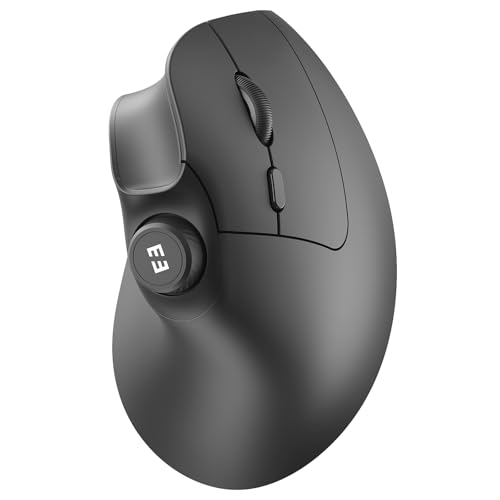
- Pairs with 3 devices over Bluetooth or 2.4G USB
- Silent clicks and adjustable DPI for office-friendly use
- Built-in volume knob adds quick media control
Best For: Hybrid workers and office users who switch between multiple devices all day.
Best for Multi-Device Work

- Triple-mode connectivity for PC, laptop, and more
- 4800 DPI tracking with five sensitivity steps
- Quiet clicks and programmable buttons for office use
Best For: People who want a comfortable vertical mouse for switching between multiple devices.
Best for Comfort
Transformers Vertical Ergonomic Mouse with LED Screen

- 3-device connectivity via 2.4G and dual Bluetooth
- LED screen plus knob control for quick interaction
- Quiet clicks and rechargeable battery for office use
Best For: Multi-device users who want an ergonomic wireless mouse with extra controls.
Best for Quiet Multi-Device Switching
UGREEN Vertical Wireless Mouse

- Quiet clicks keep shared workspaces calmer
- Bluetooth and 2.4G support up to 3 devices
- 4 DPI levels cover office work and faster navigation
Best For: People who want a quiet ergonomic mouse for switching between multiple work devices.
Best for Easy Setup
LEKVEY Vertical Wireless Mouse

- Plug-and-play 2.4G wireless setup
- Rechargeable battery with long runtime
- 3 DPI levels plus browsing buttons
Best For: PC users who want an easy-to-set-up ergonomic mouse for everyday work.
Best for Quiet Multi-Device Work
AOC Wireless Vertical Mouse, 4800 DPI

- 52° vertical shape for a more natural hand position
- Bluetooth, 2.4GHz, and wired connectivity
- Quiet clicks with rechargeable battery and use-while-charging
Best For: Office and creative users who want a quiet, comfortable vertical mouse with flexible connectivity.
Best for Small to Medium Hands – Logitech Lift Vertical Ergonomic Mouse
The Logitech Lift is a strong fit for anyone comparing vertical mice for pc work and wanting a comfortable, easy-to-live-with option for long desk sessions. Its 57-degree vertical angle, quiet clicks, and simple wireless connectivity make it a practical ergonomic upgrade for everyday productivity.
Best For: Small to medium hands, especially right-handed users who want a softer grip and a more natural wrist angle for daily PC work.
Pros:
- 57-degree vertical design helps reduce wrist strain and encourages a more natural forearm position
- Quiet clicks, SmartWheel scrolling, and customizable buttons suit focused office work
- Works with Bluetooth or Logi Bolt USB receiver across Windows, macOS, iPadOS, and more
- Long battery life and ergonomic certification add convenience and confidence
Cons:
- Best suited to small and medium hands, so larger hands may not get an ideal fit
- Right-handed version only in this configuration
- Some advanced features rely on Logi Options+ software
If you want one of the most approachable vertical mice for pc work, the Lift stands out for comfort first, with enough features to feel polished rather than basic. It is especially appealing if you want an ergonomic mouse that is easy to set up and comfortable to use all day.
Best for Rechargeable Convenience – TECKNET Rechargeable Vertical Mouse
If you want one of the more practical vertical mice for pc work, the TECKNET rechargeable model stands out for its no-battery design, quiet clicks, and simple plug-and-play setup. It is built for long desk sessions where comfort, low noise, and easy sensitivity changes matter more than flashy features.
Best For: Office workers, students, and remote professionals who want a comfortable wireless vertical mouse with rechargeable power and silent buttons.
Pros:
- Rechargeable 600mAh battery with Type-C charging removes the need for disposable batteries.
- Vertical ergonomic shape helps reduce wrist strain during long computer sessions.
- Silent left/right clicks are well-suited to shared offices, libraries, and late-night use.
- 5 DPI levels up to 4800 make it easy to switch between everyday work and faster navigation.
Cons:
- USB-A receiver means it is not a direct fit for USB-C-only laptops without an adapter.
- Silent-click feature applies only to the main buttons, not all controls.
- May feel better for productivity than precision-focused creative work.
This is a strong pick among vertical mice for pc work if you value comfort and convenience over advanced customization. The rechargeable battery, stable wireless connection, and quiet operation make it an easy everyday upgrade for a home office or shared workspace.
Best for Wrist-Friendly Productivity – Logitech MX Vertical Wireless Mouse
The Logitech MX Vertical is a strong pick for buyers comparing vertical mice for pc work because it prioritizes comfort without sacrificing precision. Its 57° handshake angle, 4000 DPI sensor, and ergonomic shape are designed to reduce wrist strain during long desk sessions.
Best For: Office users, power users, and anyone who wants a more natural hand position for all-day PC work.
Pros:
- Natural handshake design helps reduce muscular activity and wrist pressure
- 4000 DPI tracking delivers precise control with less hand movement
- Comfortable textured grip and thumb rest suit long work sessions
- Rechargeable wireless design keeps the desk cleaner and more flexible
Cons:
- Ergonomic shape takes time to adjust to if you’re new to vertical mice
- Bulkier than a standard mouse, so it may not suit travel use
For vertical mice for pc work, the MX Vertical stands out as a practical ergonomic upgrade: it’s aimed at reducing strain first, while still giving you the precision and features needed for everyday productivity.
Best for Quiet Office Use – TECKNET Vertical Wireless Mouse
If you want a simple, affordable option in vertical mice for pc work, the TECKNET 2.4G Vertical Wireless Mouse focuses on comfort, quiet operation, and easy plug-and-play setup. Its upright shape helps reduce wrist twist, while the 4800 DPI sensor and five sensitivity levels give you enough control for everyday office tasks.
Best For: Right-handed users who want a quiet, ergonomic vertical mouse for laptop or desktop work.
Pros:
- Vertical design helps support a more natural hand and wrist position
- 5 DPI settings up to 4800 for flexible pointer control
- Quiet clicks are ideal for shared offices, meetings, or home use
- 2.4G wireless connection is easy to set up with a USB-A receiver
Cons:
- Requires 2 AAA batteries, which are not included
- Side buttons do not work on Mac systems
- Users may need 1-2 weeks to adjust to the vertical shape
For shoppers comparing vertical mice for pc work, this TECKNET model stands out as a practical pick for comfort and silence rather than advanced features. It is a good fit if you want an ergonomic mouse that keeps things straightforward for everyday productivity.
Best for Multi-Device Switching – seenda Bluetooth Vertical Mouse with Volume Knob
The seenda MOU-302 is a practical pick for vertical mice for pc work if you split time between a desktop, laptop, and tablet. Its handshake-style shape aims to reduce wrist strain, while the silent clicks, adjustable DPI, and built-in volume control make it easy to stay productive in shared or quiet spaces.
Best For: Hybrid workers, office users, and multitaskers who want one vertical mouse that can jump between multiple devices with minimal fuss.
Pros:
- Connects to up to 3 devices via Bluetooth and 2.4G USB
- Vertical ergonomic shape helps keep the wrist in a more natural position
- Silent buttons and 1000/1600/2400 DPI settings suit office use
- Volume knob adds handy media control for calls and playback
Cons:
- Right-handed vertical shape may not suit left-handed users
- Extra controls can feel unnecessary if you only want a basic mouse
Overall, this seenda model stands out among vertical mice for pc work because it combines comfort features with useful extras like multi-device pairing and a volume dial, making it a smart fit for busy desks.
Best for Multi-Device Work – AOC Ergonomic Vertical Mouse
If you want one of the more feature-rich vertical mice for pc work, this AOC model stands out with triple-mode connectivity, quiet clicks, and adjustable DPI for office tasks, design work, and everyday multitasking. Its 52° vertical shape is meant to reduce wrist strain during long sessions, especially if you prefer a handshake-style grip.
Best For: Professionals who switch between a PC, laptop, and other devices and want a comfortable vertical mouse with flexible connectivity.
Pros:
- 52° ergonomic vertical design helps reduce wrist twisting
- Bluetooth, 2.4GHz, and wired modes support up to three devices
- Adjustable DPI up to 4800 for more precise cursor control
- Quiet left/right clicks suit shared office environments
Cons:
- Optimized for small to medium hands, so it may feel cramped for larger hands
- RGB lighting shortens battery life compared with no-light use
- Only the main clicks are silent; side buttons still make normal sounds
For vertical mice for pc work, this is a practical pick if you value comfort plus connectivity over a bare-bones design. The programmable controls and battery readout add convenience, while the ergonomic shape does the heavy lifting for all-day use.
Best for Comfort – Transformers Vertical Ergonomic Mouse with LED Screen
If you want one of the more feature-rich vertical mice for pc work, this model stands out for its LED screen, knob control, and support for three devices. It is aimed at users who move between a desktop, laptop, and tablet or secondary computer and want quieter clicking plus a more ergonomic hand position.
Best For: People who switch between multiple devices and want a vertical mouse with extra controls and a modern feature set.
Pros:
- 3-device connectivity with 2.4G and dual Bluetooth
- LED screen and knob control add quick status and adjustment options
- Quiet clicks are better for shared offices or home workspaces
- Rechargeable design avoids disposable batteries
Cons:
- Extra features may be more than some buyers need
- Wireless setup can be less plug-and-play than a basic wired mouse
Overall, this is a strong fit if you want vertical mice for pc work and value convenience features as much as ergonomics. The added controls and multi-device support make it especially practical for busy desks, though minimalist users may prefer a simpler model.
Best for Quiet Multi-Device Switching – UGREEN Vertical Wireless Mouse
If you want vertical mice for pc work that reduce wrist twist without sacrificing everyday convenience, the UGREEN Vertical Mouse is a practical pick. Its handshake-style shape, quiet clicks, and dual-mode wireless connection make it well suited to office setups that move between a desktop, laptop, and tablet.
Best For: Workers who need a comfortable vertical mouse with silent operation and easy switching between multiple devices.
Pros:
- Vertical ergonomic shape helps keep the wrist in a more natural position during long sessions
- Quiet clicks and a 5-button layout support distraction-free productivity
- Dual Bluetooth and 2.4G wireless with support for up to 3 devices
- 4 DPI settings provide flexible cursor speed for office tasks and general use
Cons:
- AA battery power means you will need replacements instead of rechargeable charging
- The vertical shape may take a little time to adjust to if you are new to ergonomic mice
For vertical mice for pc work, this UGREEN model stands out most for quiet use and flexible connectivity rather than flashy extras. It is a solid everyday ergonomic choice if comfort, multi-device switching, and low-noise clicking matter more than premium materials or advanced customization.
Best for Easy Setup – LEKVEY Vertical Wireless Mouse
If you want vertical mice for pc work without a steep learning curve, the LEKVEY Vertical Wireless Mouse is a straightforward plug-and-play option. Its handshake-style shape aims to reduce wrist strain, while the rechargeable battery and simple USB receiver make it easy to use at a desk or on the go.
Best For: Office users, students, and anyone who wants a comfortable vertical mouse with no Bluetooth pairing or driver setup.
Pros:
- Easy plug-and-play 2.4G wireless connection with a nano USB receiver
- Rechargeable battery eliminates disposable battery replacements
- Three DPI settings help you tune cursor speed for everyday work
- Page Back and Page Forward buttons add convenience for browsing
Cons:
- Best suited to medium or large hands
- Vertical shape can take a few days to get used to
- Not ideal if you specifically need Bluetooth connectivity
For vertical mice for pc work, this LEKVEY model stands out for comfort, simplicity, and solid everyday features at a friendly price. It’s a practical pick if you want an ergonomic upgrade that reduces wrist pressure without complicating your setup.
Best for Quiet Multi-Device Work – AOC Wireless Vertical Mouse, 4800 DPI
If you want vertical mice for pc work that balance comfort, speed, and flexibility, this AOC model is built for long desk sessions. Its 52° handshake-style shape helps reduce wrist strain, while the adjustable DPI and triple-mode connectivity make it easy to move between office tasks, creative work, and multiple devices.
Best For: Office workers, designers, and multitaskers who want a quiet vertical mouse with strong wireless flexibility and customizable controls.
Pros:
- 52° vertical design supports a more natural wrist and forearm position
- Triple-mode connectivity: Bluetooth, 2.4GHz wireless, and USB wired
- Up to 4800 DPI with 5 sensitivity levels for precise control
- Quiet left/right clicks and rechargeable battery with use-while-charging
Cons:
- Not recommended for small hands
- RGB lighting reduces battery life noticeably
- Extra buttons may require app setup to fully customize
Overall, this is a strong pick for vertical mice for pc work if you value a comfortable shape, quiet operation, and easy switching across devices. It is especially appealing for productivity users who want more control than a basic ergonomic mouse without giving up everyday convenience.
How We Picked These Vertical Mice for PC Work
We focused on models that support long desk sessions without adding friction to daily use. That means ergonomic shape, reliable wireless connectivity, sensible button placement, adjustable DPI, and features like quiet clicks or multi-device switching when they improve productivity.
For Vertical Mice for PC Work, comfort matters most, but we also looked for practical extras that help in real offices: rechargeable batteries, Bluetooth and USB receiver options, and designs that suit different hand sizes and grip styles.
Quick Comparison: What Matters Most
If you want the simplest decision rule, start with your setup. Choose a basic vertical mouse if you mainly want wrist relief and a cleaner desk. Choose a premium or multi-device model if you regularly move between laptops, desktops, or operating systems. Choose a higher-DPI option if you use large monitors, design tools, or fast pointer movement across wide screens.
Best for Different Work Styles
Quiet office environments benefit from silent-click models. Shared desks or travel setups benefit from dual-mode wireless. Productivity-heavy users may prefer extra buttons or a scroll-wheel function that speeds up navigation.
Key Buying Factors for Vertical Mice for PC Work
Shape and hand fit: A vertical mouse should let your hand rest in a more neutral position. Make sure the size suits your hand, because too small or too large can undermine comfort.
Connectivity: Bluetooth is convenient for modern laptops, while 2.4GHz USB receivers often deliver a simple plug-and-play experience. Some of the best Vertical Mice for PC Work include both.
DPI range: Higher DPI can help on large or multiple monitors, but lower settings may feel steadier for detailed tasks. Adjustable DPI is the safest choice.
Buttons and controls: Extra buttons can speed up browsing, file management, and app switching. Keep the layout simple if you want an easy transition from a standard mouse.
Noise and battery life: Quiet clicks are useful in shared spaces, and rechargeable batteries reduce ongoing costs.
Who Should Buy Which Vertical Mice for PC Work?
Office workers and home users: Start with a comfortable, straightforward vertical mouse that prioritizes grip, quiet clicking, and stable wireless performance.
Power users: Look for multi-device support, more buttons, and a wider DPI range for faster workflow control.
Travelers and hybrid workers: A lightweight rechargeable model with Bluetooth and 2.4GHz support offers the most flexibility.
Budget shoppers: Focus on core ergonomics first. Even an affordable vertical mouse can improve comfort if it fits your hand and tracks smoothly.