Looking for a reliable nas for time machine and windows pc backup? The best options make it easy to protect Macs and PCs in one place, while keeping files accessible across your network.
In this roundup, we focus on storage capacity, backup features, network speed, and ease of setup so you can choose a NAS that fits your home or office workflow.
Best 10 Nas for Time Machine and Windows PC Picks for 2026
Best for Mac + PC Backup
Synology DS223 2-Bay Backup Hub

- Automated backups for Macs, PCs, phones, and external drives
- Two-bay NAS with room to expand storage later
- Useful for file sharing plus basic IP camera monitoring
Best For: Homes and small offices that want one backup hub for both Time Machine and Windows PCs.
Best for Hybrid NAS + Mini PC Use

- Two HDD bays and three M.2 SSD slots for flexible expansion
- 5GbE + 2.5GbE networking for faster backups and transfers
- Works as both a NAS and a compact everyday mini PC
Best For: Households that want one box for Time Machine, Windows backups, and light media or server tasks.
Best for Out-of-the-Box RAID
BUFFALO TeraStation Essentials 2025 4-Bay NAS

- 32TB included with drives pre-installed
- Ships in RAID 5 for immediate protection
- 2.5GbE port and cloud sync for flexible backups
Best For: Users who want a ready-made NAS for Mac Time Machine and Windows PC backups.
Best Speedy NAS for Mixed Backups
Asustor AS5402T 2-Bay NVMe NAS

- Dual 2.5GbE speeds up Time Machine and Windows backups.
- Four NVMe slots boost cache or all-flash performance.
- Upgradeable RAM and HDMI add extra versatility.
Best For: Users who want a fast two-bay NAS for Time Machine, Windows backups, and home media.
Best for Heavy-Duty Home Lab
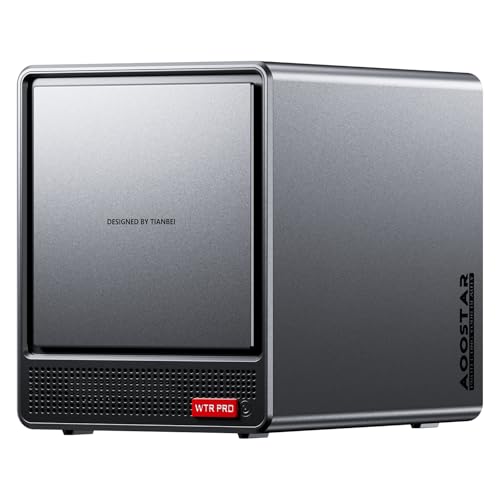
- Ryzen 7 5825U for backups, containers, and multitasking
- 4+2 bays with RAID support and up to 96TB capacity
- Dual 2.5GbE plus 4K multi-display support
Best For: Power users who want one box for backups, home lab tasks, and server-style workloads.
Best for Secure Dual-Drive Backups
Buffalo LinkStation 720 4TB 2-Bay NAS

- RAID 1 mirror backup or full 4 TB in RAID 0
- Includes Windows and Mac backup utilities
- Subscription-free personal cloud with SSL encryption
Best For: Households or small offices that want a secure 2-bay NAS for automatic backups and shared storage.
Best for Fast Backups

- 10GbE networking speeds up backups and transfers
- 4 bays plus 2 M.2 NVMe slots offer strong expansion
- Works well across Windows and macOS in mixed-device setups
Best For: Mac and Windows users who want a fast, expandable private backup hub.
Best Multi-Bay NAS

- Six M.2 NVMe slots for up to 24TB total storage
- Dual 2.5G LAN for faster backups and sharing
- Supports TrueNAS, UNRAID, and media-server use
Best For: Families or power users who need a compact NAS for Time Machine and Windows PC backups.
Best Entry-Level NAS for Backup
UGREEN NAS DH2300 2-Bay Desktop NASync

- Beginner-friendly 2-bay NAS for home backups
- Works across Windows, macOS, iOS, and Android
- Up to 64TB capacity with AI photo organization
Best For: Home users who want an easy private backup NAS for Time Machine and Windows PCs.
Best for Power Users

- 4-bay design supports up to 136TB total storage
- Dual 2.5G + 1G LAN for faster backups
- Works with Windows 11 Pro, TrueNAS, and Unraid
Best For: Power users who want a customizable NAS for mixed Mac and Windows backups.
Best for Mac + PC Backup – Synology DS223 2-Bay Backup Hub
The Synology DS223 is a practical pick if you want a nas for time machine and windows pc backup in one place without juggling cloud subscriptions or external drives. It gives you a centralized two-bay setup for file storage, automated backups, and basic home monitoring, making it a flexible fit for mixed Mac and Windows households.
Best For: Home offices and small teams that need reliable cross-platform backup, shared file access, and a simple path to expand storage later.
Pros:
- Supports automated backups for Macs, PCs, phones, and external drives
- Good fit for shared file syncing and collaboration without recurring cloud fees
- Can be used with IP cameras for basic surveillance and remote viewing
- Two-bay design leaves room to build a more capable storage setup over time
Cons:
- Diskless model means you must buy hard drives separately
- Not the fastest choice for power users who want higher-end NAS performance
- Surveillance and advanced features may require more setup than a plug-and-play backup drive
For buyers comparing a nas for time machine and windows pc, the DS223 stands out because it balances backup, file sharing, and light-duty extras in a single appliance. It is especially appealing if you want a straightforward backup hub that can grow with your storage needs.
Best for Hybrid NAS + Mini PC Use – Beelink Me Pro Mini PC NAS
If you want a compact nas for time machine and windows pc that can also act like a full mini PC, the Beelink Me Pro stands out with its mix of SSD slots, dual HDD bays, and fast dual-LAN networking. It’s a practical choice for shared backups, media storage, and light server duties without needing a separate tower or dedicated NAS box.
Best For: Home users who want one device for Time Machine backups, Windows PC file storage, and a private cloud/media server.
Pros:
- Two HDD bays plus three M.2 SSD slots provide plenty of storage flexibility.
- 5GbE and 2.5GbE ports help speed up backups and file transfers.
- Intel N150 and 16GB LPDDR5 are sufficient for everyday NAS and mini PC tasks.
- Quiet cooling design is better suited to 24/7 operation.
Cons:
- More complex than a basic plug-and-play NAS.
- Storage expansion costs can add up once you populate the bays and M.2 slots.
This is a strong fit if you need a flexible nas for time machine and windows pc backups and want extra value from a single box that can also handle media streaming, soft routing, and general home server work.
Best for Out-of-the-Box RAID – BUFFALO TeraStation Essentials 2025 4-Bay NAS
BUFFALO TeraStation Essentials 2025 4-Bay Value Desktop NAS 32TB (4x8TB) with Hard Drives Included
Check Price On AmazonIf you want a nas for time machine and windows pc backups with minimal setup, this BUFFALO TeraStation is built around convenience and data protection. It ships with four drives installed, RAID pre-configured, and a 2.5GbE port for faster transfers, making it a practical choice for a small office or home user who wants reliable shared storage without piecing everything together.
Best For: Buyers who want a ready-to-run 4-bay NAS with included drives, easy RAID protection, and solid backup support for mixed Mac and Windows environments.
Pros:
- Comes with 32TB installed and ships pre-configured in RAID 5 for immediate use
- 2.5GbE networking helps speed up file transfers without needing a cable upgrade
- Built-in encryption, replication, and cloud sync options add flexible backup layers
- 3-year warranty includes hard drives plus US-based support and recovery service
Cons:
- RAID 5 default reduces usable capacity to 24TB out of the box
- More of a practical business-style NAS than a feature-rich enthusiast model
For shoppers comparing a nas for time machine and windows pc backups, this model stands out for being prebuilt, protected, and easy to deploy. It’s not the cheapest route to network storage, but it does reduce setup friction and gives you a straightforward path to dependable backup storage.
Best Speedy NAS for Mixed Backups – Asustor AS5402T 2-Bay NVMe NAS
If you want a fast, compact nas for time machine and windows pc backups, the Asustor AS5402T is built around speed first. Its Intel N5105 processor, dual 2.5GbE ports, and four M.2 NVMe slots give it far more performance headroom than typical entry-level NAS units, making it a strong fit for frequent backups, shared folders, and streaming.
Best For: Users who want a responsive two-bay NAS for Time Machine, Windows file backups, and high-speed home storage.
Pros:
- Dual 2.5GbE networking helps backups and large file transfers move much faster.
- Four NVMe slots can be used for cache or all-flash storage for better responsiveness.
- Upgradeable 4GB DDR4 RAM supports more demanding multitasking and backup jobs.
- HDMI and USB 3.2 Gen2 add flexibility for media playback and external storage.
Cons:
- Diskless design means you still need to buy your own drives.
- Two-bay capacity is limiting if you need lots of storage or more RAID options.
- To fully benefit from 2.5GbE, your network and client devices should support it.
For buyers comparing a nas for time machine and windows pc use, the AS5402T stands out for its unusually strong hardware and expansion options in a compact 2-bay chassis. It is a better match for speed-focused home users than basic backup-only NAS boxes.
Best for Heavy-Duty Home Lab – AOOSTAR WTR PRO R7 5825U NAS
If you want a nas for time machine and windows pc backups that can also handle virtualization, Docker, and 24/7 file sharing, the AOOSTAR WTR PRO stands out for its Ryzen 7 5825U performance and flexible 4+2 bay layout. It’s a strong fit for users who want a compact NAS that can double as a mini home server without feeling underpowered.
Best For: Power users, home lab builders, and small offices that need a fast, expandable NAS with room for backups and multi-service workloads.
Pros:
- 8-core Ryzen 7 5825U handles backups, containers, and light virtualization with ease
- 4+2 bay design with RAID support and up to 96TB capacity for growth
- Dual 2.5GbE LAN plus Wi-Fi 6/Bluetooth 5.2 for flexible networking
- Supports 4K multi-display output for NAS, server, or desktop-style use
Cons:
- Sold without RAM, SSDs, or OS, so total setup cost will be higher
- More capable than many basic backup NAS units, which may be overkill for simple use
For buyers comparing a nas for time machine and windows pc use, this model makes sense when you want backup storage plus real server-class flexibility. It’s especially appealing if you expect your NAS to do more than just store files.
Best for Secure Dual-Drive Backups – Buffalo LinkStation 720 4TB 2-Bay NAS
If you want a straightforward nas for time machine and windows pc backup, the Buffalo LinkStation 720 is built around easy shared storage, automatic protection, and a closed system that favors security over app-heavy extras. It’s a practical fit for home offices that need one box for Mac and Windows backups, file sharing, and personal cloud access.
Best For: Households or small offices that want a secure 2-bay NAS for automatic backups, shared files, and simple everyday storage.
Pros:
- 2-bay design supports RAID 1 mirror backup or full-capacity RAID 0
- Works with Windows and MacOS, with included PC backup tools and NAS Navigator
- Subscription-free personal cloud access for photos, videos, and files
- SSL encryption and a closed system help reduce security exposure
Cons:
- Only 2 TB is usable in the default RAID 1 setup
- Less flexible than a more open NAS with third-party apps
- 4 TB raw capacity may feel limited for larger media libraries
For buyers comparing a nas for time machine and windows pc use, the LinkStation 720 makes the most sense when reliability and simplicity matter more than advanced customization. It’s a secure, easy backup hub rather than a hobbyist NAS with tons of add-ons.
Best for Fast Backups – UGREEN DXP4800 Plus 4-Bay NAS
If you want a nas for time machine and windows pc with speed to spare, the UGREEN DXP4800 Plus is a strong all-around pick. Its 4-bay design, 10GbE networking, and SSD/NVMe expansion make it a good fit for households or small offices that need centralized backups, shared storage, and room to grow.
Best For: Mac and Windows users who want a fast, private backup hub with plenty of expansion headroom.
Pros:
- 10GbE and 2.5GbE ports help backup and file transfers move quickly.
- Four drive bays plus dual M.2 NVMe slots give it strong storage and caching flexibility.
- Works across Windows, macOS, and other platforms for mixed-device homes or offices.
- Useful extras like Docker support, VMs, and 4K HDMI add versatility.
Cons:
- Drives are not included, so total cost rises once you add storage.
- It may be more NAS than a simple backup-only user needs.
For buyers comparing options for nas for time machine and windows pc, this model stands out because it combines fast wired networking with broad compatibility and enough expansion to handle growing backup needs. It is a practical choice if you want a private cloud that can serve both Mac and PC workflows without feeling underpowered.
Best Multi-Bay NAS – Beelink ME Mini Desktop NAS
If you want a compact, low-power nas for time machine and windows pc backups, the Beelink ME Mini stands out for its six M.2 NVMe slots, dual 2.5G LAN, and support for NAS-focused systems like TrueNAS and UNRAID. It can also double as a small home server or media box, so it’s a practical pick if you want storage, sharing, and backup flexibility in one device.
Best For: Buyers who want a high-capacity desktop NAS for mixed Mac Time Machine and Windows PC backup duties, plus light media-server use.
Pros:
- Six M.2 NVMe bays support up to 24TB total storage.
- Dual 2.5G LAN helps improve transfer speed and network sharing.
- Runs NAS platforms like TrueNAS, UNRAID, and FNOS, with room for media apps.
- Quiet cooling design keeps noise relatively low during everyday use.
Cons:
- SSD drives are not included, so total cost rises quickly.
- Best value depends on whether you already own compatible M.2 drives.
This is a strong fit if you want a flexible nas for time machine and windows pc backups and also plan to expand into file sharing or streaming later. The six-bay design is the headline feature, but the real appeal is how much storage and network performance it packs into a tiny desktop footprint.
Best Entry-Level NAS for Backup – UGREEN NAS DH2300 2-Bay Desktop NASync
If you want a straightforward nas for time machine and windows pc backups without paying for cloud subscriptions, the UGREEN NAS DH2300 is a practical entry-level option. It is diskless, beginner-friendly, and aimed at people who want private storage for photos, files, and basic media sharing on a home network.
Best For: Beginners who want a simple 2-bay NAS for private backups, Time Machine use, and Windows PC storage at home.
Pros:
- Easy-to-use setup for first-time NAS buyers
- Supports automatic backups across Windows, macOS, iOS, and Android
- 4GB RAM, 1GbE networking, and up to 64TB capacity for growing storage needs
- AI photo organization helps tag and clean up large image libraries
Cons:
- Diskless model means you must buy drives separately
- No Docker or virtual machine support
- 1GbE is fine for basics, but not ideal for heavy multitasking or fast large-file workflows
The DH2300 makes sense if you mainly need a simple nas for time machine and windows pc backups, plus private storage you control. It is not the most advanced NAS, but for home users who value easy setup and local data ownership, it covers the essentials well.
Best for Power Users – ACEMAGIC NAS N3A 4-Bay NAS
If you want a flexible nas for time machine and windows pc backups, the ACEMAGIC NAS N3A stands out for its 4-bay design, dual 2.5G networking, and open support for popular operating systems. It gives you room to grow from a simple home backup box into a private media server or small office storage hub without paying cloud fees.
Best For: Users who need a high-capacity, customizable NAS for mixed Mac and Windows backups, with room for media, projects, and future expansion.
Pros:
- 4-bay chassis with support for up to 136TB total storage
- Dual 2.5G + 1G LAN for faster transfers and better network flexibility
- Runs Windows 11 Pro, TrueNAS, Unraid, and other OS options
- Includes 8GB DDR4 RAM and a pre-installed 128GB PCIe SSD
Cons:
- Drives are not included, so total setup cost is higher
- Better suited to enthusiasts than plug-and-play beginners
For buyers comparing a nas for time machine and windows pc use, this model is appealing because it combines large expansion potential with networking and software flexibility. It is a strong pick if you want to control your own backup environment and may later add media streaming, Docker, or office storage tasks.
How We Picked the Best Nas for Time Machine and Windows PC
To narrow down the best Nas for Time Machine and Windows PC setups, we prioritized multi-device backup support, dependable hardware, sensible expansion options, and user-friendly software. We also looked at whether each model is better suited to simple backup duty or broader file-sharing and media tasks.
Quick Comparison
For straightforward backups, two-bay models are usually the most affordable and easiest to manage. If you need more redundancy, larger capacity, or room to grow, four-bay systems are the better long-term fit. Mini PC-style NAS units can offer stronger specs and faster networking, but they often require more hands-on setup.
Key Buying Factors for Nas for Time Machine and Windows PC
Capacity and Drive Bays
Choose a two-bay NAS if you mainly want compact backup storage for a few devices. Go with four bays if you expect larger archives, multiple users, or want more flexible RAID choices and future expansion.
Backup Compatibility
Make sure the NAS supports Time Machine targets for Macs and offers easy Windows backup options such as shared folders, scheduled backup tools, or third-party backup app support.
Network Speed
For mixed Mac and PC use, 2.5GbE is a strong baseline. If you move large files or run backups frequently, 10GbE can cut wait times significantly, provided your switch and clients support it.
Ease of Use and Management
Beginners should favor systems with guided setup, clear mobile apps, and simple permission controls. Advanced users may prefer more configurable hardware, NVMe cache slots, and broader app ecosystems.
Redundancy and Data Protection
RAID can help keep data available if a drive fails, but it is not a substitute for backups. For a true protection strategy, keep local NAS backups plus an additional copy in cloud storage or an external drive.
Who Should Buy Which Nas for Time Machine and Windows PC?
If you want the simplest path to shared backups, a two-bay desktop NAS is the easiest place to start. If you need stronger performance, better multitasking, or faster file access for a busy household or small business, step up to a four-bay model with faster networking.
If your priority is maximum flexibility and hardware value, mini PC-based NAS devices are worth a look, especially for tech-savvy buyers who do not mind configuring storage and software themselves. For buyers who want the least friction, systems with included drives and beginner-friendly software are usually the safest choice.