Open frame cases are a smart pick when you want your hardware on display and your components running cool. They make testing, tuning, and showcasing a build much easier than a closed tower.
Below, we focus on open air PC cases for showcase builds that balance stability, expandability, and practical airflow for real-world use.
Best 10 Open Air PC Cases for Showcase Builds Picks for 2026
Compact Open Test Bench

- Supports ATX, Micro ATX, and ITX boards
- Open design with no stated GPU length limit
- 0.8mm SPCC steel construction with 2-year warranty
Best For: Hands-on builders and showcase setups that need flexible motherboard support
Modular Aluminum Frame

- Supports ITX through EATX motherboards
- Works with ATX, SFX, and 1U PSUs
- Unlimited GPU length and water/air cooling support
Best For: Flexible showcase builds that need broad component compatibility
Portable Open Test Stand

- Portable frame can stand up or lie flat
- Supports up to 256 mm GPUs and 360 mm water cooling
- 1 mm steel construction with M-ATX/ITX support
Best For: Portable test-bench builds using M-ATX or ITX hardware
Stackable Open Frame Rack
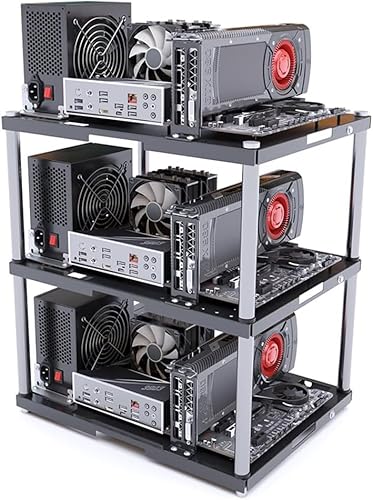
- Stackable layout can expand up to 10 layers
- Heavy-duty metal frame holds up to 20 kg per layer
- Supports ATX, MATX, and ITX motherboard builds
Best For: Expandable showcase or studio setups that may grow into multiple layers
Premium DIY Showcase Frame
Aluminium Open Case for EATX Builds

- Supports EATX, ATX, mATX, and ITX boards
- Works with ATX, SFX, and 1U power supplies
- Open layout fits long GPUs and water or air cooling
Best For: Custom showcase builds with broad hardware compatibility
Budget Test Bench Pick

- Supports ATX, Micro ATX, and ITX boards
- No graphics card length limit
- Simple open frame with one-drive support
Best For: Affordable test bench and showcase builds
Heavy-Duty Open Frame
Aluminum ATX Water-Cooling Bench

- 8mm aluminum alloy frame for a sturdier feel
- Supports ATX boards, ATX PSU, and up to four drives
- Built for integrated water cooling up to 360 mm
Best For: ATX showcase builds with liquid cooling
Compact Desktop Test Bench
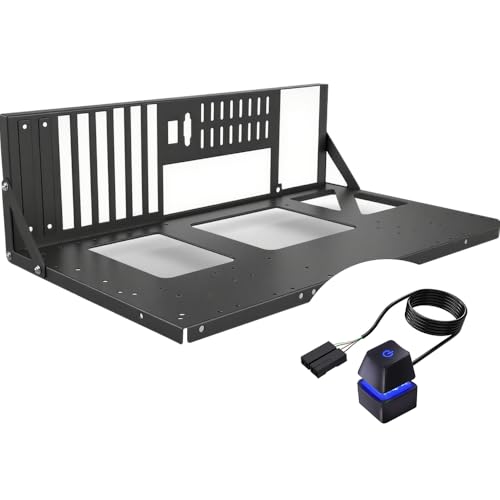
- Fits ATX, mATX, ITX, and listed server board types
- Open layout makes testing, upgrades, and airflow easy
- Tool-free design with mounting points for PSU and storage
Best For: Hands-on builders wanting a simple showcase bench for common motherboard sizes
Flexible Vertical Showcase Frame
EATX Open Aluminum Assembly Frame

- Supports EATX, ATX, mATX, and ITX boards
- Adjustable layout works around long GPUs and radiators
- Open aluminum build supports up to two water-cooling installs
Best For: Large showcase builds with custom cooling and a configurable frame
Compact Open Test Bench – DIY Pc Test Bench
If you want open air pc cases for showcase builds that also double as a practical test bench, this ALAMENGDA frame keeps the focus on easy access and broad compatibility. It supports ATX, Micro ATX, and ITX boards, uses a sturdy 0.8mm SPCC steel build, and leaves graphics card length open-ended for flexible hardware choices.
Best For: Builders who want a compact open chassis for quick hardware swaps, showcase setups, and mixed ATX/Micro ATX/ITX testing.
Pros:
- Supports ATX, Micro ATX, and ITX motherboards within 305 x 245 mm
- No stated graphics card length limit, which helps with larger GPUs
- Metal construction with 0.8mm SPCC steel and black sand grain paint
- Designed for air or water cooling with room for up to 8 fans
Cons:
- Open-frame layout offers less component protection than a closed case
- Product details list both ATX and Micro ATX support, so buyers should verify fit for their board
Overall, this is a straightforward open bench for builders who value accessibility, cooling flexibility, and a simple display-oriented layout over enclosure features. It works best as a hands-on build platform rather than a finished, enclosed desktop case.
Modular Aluminum Frame – DIY Open Frame PC Chassis
For open air pc cases for showcase builds where cooling and hardware visibility matter, this aluminum open-frame chassis is built around flexibility. It supports ITX through EATX motherboards, accepts ATX, SFX, and 1U power supplies, and is designed for both air and water cooling.
Best For: Enthusiasts building a highly flexible showcase rig with broad motherboard and PSU compatibility.
Pros:
- Wide motherboard support including ITX, MATX, ATX, and EATX
- Compatible with ATX, SFX, and 1U power supplies
- Unlimited graphics card length according to the notes
- Aluminum frame with open design for strong cooling access
Cons:
- Open-frame construction leaves components exposed to dust and handling
- Only two fans are listed in the details, so active airflow planning matters
This chassis makes sense if you want a display-friendly platform that can adapt to very different builds. Its broad part support and cooling-friendly layout make it more versatile than a basic test bench.
Portable Open Test Stand – Open Computer Case
This open air pc case for showcase builds is aimed at simple access and bench-style use, with a portable steel frame that can stand or lie down. It supports M-ATX and ITX mounting per the notes, handles up to 256 mm graphics cards, and includes support for 360 mm water cooling.
Best For: Builders who want a compact, portable test stand for M-ATX or ITX systems and short-to-mid-length GPUs.
Pros:
- Open portable frame that can stand upright or lie flat
- Supports up to 256 mm graphics cards
- Can fit 360 mm water cooling
- Made from 1 mm thick sheet steel for a sturdier feel
Cons:
- Notes warn that ATX motherboard screw holes may not align on this version
- More limited motherboard support than larger open frames
If your build is centered on quick testing, portability, and visible hardware access, this stand fits that role well. Just confirm motherboard sizing carefully before buying, especially if you plan to use ATX hardware.
Stackable Open Frame Rack – Modular PC Frame Chassis
Among open air pc cases for showcase builds, this stackable rack stands out when you want a modular setup that can grow over time. It supports ATX, MATX, and ITX motherboards, uses an open-air layout for airflow, and is built with a heavy-duty metal frame that each layer can support up to 20 kg.
Best For: Studio, mining, or DIY builders who want a stackable open frame that can scale into multi-layer setups.
Pros:
- Stackable design supports expansion up to 10 layers
- Open frame promotes strong airflow and cooling access
- Works with ATX, MATX, and ITX motherboards
- Each layer is rated to hold up to 20 kg
Cons:
- Single-layer purchase only; extra layers are sold separately
- Listed as a Micro ATX-supported product in details, so buyers should double-check fit for larger boards
This is a smart pick if you want one platform that can start small and expand later. The modular structure makes it especially useful for display rigs, studio systems, or rack-style multi-build projects.
Premium DIY Showcase Frame – Aluminium Open Case for EATX Builds
If you want one of the more flexible open air pc cases for showcase builds, this aluminium chassis is built around customization. It supports EATX, ATX, mATX, and ITX motherboards, works with ATX, SFX, and 1U power supplies, and leaves room for long graphics cards, making it a practical base for high-visibility gaming or workstation setups.
Best For: Builders who want a customizable open frame with wide motherboard, PSU, and cooling support.
Pros:
- Supports EATX, ATX, mATX, and ITX motherboards.
- Compatible with ATX, SFX, and 1U power supplies.
- Unlimited graphics card length support gives plenty of room for large GPUs.
- Supports both water and air cooling for the CPU.
Cons:
- DIY installation may take more effort than a standard enclosed case.
- Open design offers less protection from dust and handling.
- No detailed drive mounting flexibility is highlighted beyond 3.5-inch support.
This is a strong option if your priority is a modular showcase build rather than a traditional closed tower. The aluminium construction and broad compatibility make it especially appealing for builders who like to experiment with layouts and cooling.
Budget Test Bench Pick – ATX Open Frame Rack
Among open air pc cases for showcase builds, this ATX test bench is a straightforward choice for builders who want an easy-access frame without extra complexity. It supports ATX, Micro ATX, and ITX boards, uses a standard ATX power supply, and leaves the graphics card length unrestricted, which makes it useful for testing parts or assembling a simple display-focused rig.
Best For: Budget-minded builders who need a practical open frame for ATX testing and showcase setups.
Pros:
- Supports ATX, Micro ATX, and ITX motherboards.
- Graphics card length is not limited.
- Uses a standard ATX power supply.
- Includes support for one HDD or SSD.
Cons:
- Cooling support is limited to air cooling.
- Only one drive is supported.
- Basic SPCC construction is less premium than aluminum options.
This model makes sense if you want a simple open rack for frequent hardware swaps or a budget showcase build. Its stripped-down approach keeps the focus on accessibility and compatibility rather than extras.
Heavy-Duty Open Frame – Aluminum ATX Water-Cooling Bench
If your goal is a more substantial open air pc case for showcase builds, this aluminum frame leans toward durability and water-cooling support. It is built for ATX motherboards, supports a standard ATX power supply, allows up to four drives, and includes integrated water-cooling compatibility for 120, 140, 240, 280, and 360 mm radiators.
Best For: Builders who want a sturdy ATX open frame with integrated water-cooling support.
Pros:
- Made from aerospace magnesium aluminum alloy with 8mm thickness.
- Supports ATX motherboards and a standard ATX power supply.
- Compatible with integrated water cooling from 120 mm to 360 mm.
- Supports up to four drives.
Cons:
- ATX-only support limits motherboard flexibility.
- Arrives unassembled and requires following instructions.
- Water-cooling focus may be more than needed for simpler builds.
This frame is a better fit for builders who want a strong presentation platform and planned liquid cooling. The open layout and solid materials make it practical for long-term use, but it is not the most plug-and-play option.
Compact Desktop Test Bench – Compact ATX Open Frame Rack
If you want open air pc cases for showcase builds that still work like a practical bench, this ATX open frame model keeps everything easy to reach. Its open-frame layout is built for fast part swaps, testing, and simple maintenance, while the steel-and-aluminum construction keeps the platform light and straightforward to place on a desk.
Best For: Builders who want a compact open-frame case for ATX, mATX, or ITX showcase setups and frequent hardware changes.
Pros:
- Supports ATX, mATX, ITX, and server-style board sizes listed in the notes
- Open frame design improves airflow and makes component access easy
- Tool-free layout is convenient for testing, upgrades, and quick changes
- Dedicated mounting brackets for the motherboard, PSU, and storage
Cons:
- No enclosed panels, so dust protection is limited by design
- Best suited to hands-on builders rather than a quiet closed-case setup
- Compact footprint may feel basic compared with more elaborate display frames
Overall, this is a straightforward open-air option for builders who value access and flexibility over flashy enclosure features. It fits well as a test bench that can also live on a desk as a visible showcase build.
Flexible Vertical Showcase Frame – EATX Open Aluminum Assembly Frame
For open air pc cases for showcase builds with lots of room to experiment, this vertical aluminum frame stands out for flexibility. It supports EATX through ITX boards, lets you mount water cooling, and offers adjustable positioning so you can tailor the layout around longer GPUs or a specific display setup.
Best For: Builders working on larger showcase systems, especially EATX rigs with custom cooling and modular layout needs.
Pros:
- Supports EATX, ATX, mATX, and ITX motherboards
- Open aluminum structure is designed for strong airflow and easy visibility
- Supports water cooling and can accommodate up to two cooling installations
- Adjustable cooling position adds layout flexibility for GPU and radiator planning
Cons:
- Graphics card vertical mounting needs extra extension cables
- Notes specify ITX and mATX may be awkward with air-cooled CPUs in this frame
- More complex cooling layout may not suit minimal builds
This is a better match for builders who want a larger, highly configurable open-frame platform. If your priority is an adjustable showcase case for a high-end board and custom cooling, it offers more room to plan around your hardware.
RGB-Friendly Techbench – Horizontal Cooler Open Frame Bench
This open-frame bench is a strong fit if you want open air pc cases for showcase builds that highlight RGB parts and custom cooling. The aluminum chassis supports ATX, mATX, and ITX boards, with room for both air and water cooling, plus horizontal or vertical GPU mounting for a more tailored display.
Best For: DIY builders who want a compact, highly visible test bench for RGB-heavy or liquid-cooled showcase systems.
Pros:
- Premium aluminum build with a modular open-frame layout
- Supports ATX, mATX, ITX, and multiple PSU types including ATX, SFX, and SFX-L
- Compatible with horizontal or vertical GPU mounting
- Supports multiple fan and radiator sizes, including 240mm and 280mm coolers
Cons:
- Vertical GPU mounting requires an additional riser cable
- Open design offers no dust-blocking enclosure
- Compact bench dimensions may limit how much extra hardware you add
As a showcase platform, this model is especially appealing if you want your components to stay visible and easy to reconfigure. Its cooling and mounting flexibility make it one of the more versatile choices for a display-first test bench.
How We Picked the Best Open Air PC Cases for Showcase Builds
We prioritized frame stability, motherboard support, cooling flexibility, and everyday usability. For showcase builds, an open chassis should look good, but it also needs enough structure to protect components, support heavier parts, and keep installation straightforward.
We also looked for useful features such as water-cooling support, stackable or modular layouts, Type-C connectivity, and compatibility with common ATX, MATX, ITX, and, where relevant, EATX boards.
Quick Comparison
Most buyers will fall into one of three groups: compact display builds, flexible test benches, or larger open rigs for custom cooling and expansion. Smaller frames are better for simple showcase systems, while larger aluminum benches are a stronger fit for high-end parts, multiple drives, and liquid-cooling hardware.
Key Buying Factors for Open Air PC Cases for Showcase Builds
Motherboard and PSU Compatibility
Start with size support. Make sure the frame matches your motherboard form factor and leaves enough room for your power supply, GPU length, and any front-panel or storage hardware you plan to add.
Cooling and Radiator Clearance
Open designs naturally help airflow, but not every chassis supports the same cooling setup. If you want quiet thermals or a custom loop, check for fan mounts, radiator space, and clearance around pump and tubing locations.
Material and Build Stability
Aluminum frames are popular because they are lightweight, rigid, and easy to move. Steel can feel more solid, while modular stackable designs are useful if you plan to swap hardware often or expand over time.
Assembly and Cable Management
Even with an open layout, a clean build matters. Look for good cutouts, mounting points, and enough room behind the tray or along the frame to keep cables tidy and airflow unobstructed.
Who Should Buy Which Open Air PC Cases for Showcase Builds?
If you want a display-first build with easy access, choose a compact open frame with strong motherboard compatibility. If you are building a test system, mining rig, or hardware bench, a larger modular chassis will be more practical. For high-end showcase systems with liquid cooling, pick one of the bigger Open Air PC Cases for Showcase Builds that clearly supports radiators and heavier components.
In short, the best choice is the one that matches your hardware size, cooling plan, and how often you expect to upgrade or rebuild.