Choosing the right desk can make a dual-monitor setup feel organized, comfortable, and far more productive. The best options balance surface space, stability, and storage without crowding your room.
Below, we’ve rounded up 10 strong picks for different spaces and budgets, from compact desks to larger L-shaped and standing models.
Best 10 Computer Desks for Dual Monitors Picks for 2026
Dual-Screen Corner Hub

- Two movable monitor stands for dual screens
- Built-in outlets plus USB and Type-C charging
- Four fabric drawers and a PC tower stand
Best For: users who want a flexible corner desk with dual-monitor support and charging
Clean Workspace Pick

- 54-inch surface fits a roomy monitor layout
- Sturdy steel-and-particleboard frame
- Simple setup with visual instructions
Best For: minimalist workspaces that need a straightforward desk for dual monitors
Feature-Rich Command Center
PRAISUN 66" L Shaped Gaming Desk
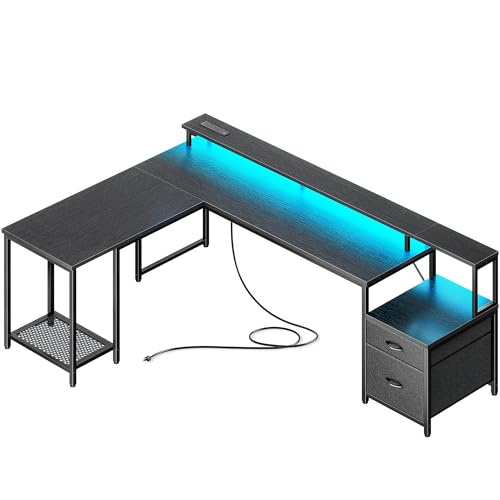
- Large surface supports dual monitors and accessories
- Built-in power with AC, USB-C, and USB-A ports
- Includes LED lights, drawers, printer stand, and CPU stand
Best For: power users who want a feature-heavy dual-monitor workstation
Compact Monitor-Stand Desk
Pamray 32" Small Computer Desk

- Compact size fits bedrooms, dorms, and small corners
- Built-in monitor stand raises a screen for comfort
- Side hook and X-brace add practical utility
Best For: small spaces where a compact desk is more important than dual-monitor capacity
Standing Desk with Storage
HUANUO 48” Electric Standing Desk

- 48" desktop with drawer storage
- C-clamp mount compatible rear edge
- 4 presets and sit-stand adjustability
Best For: Compact home offices needing storage and adjustable monitor placement
L-Shaped Dual Monitor Desk
Furologee 66" Reversible Corner Desk

- Two movable monitor stands
- Built-in outlets and USB charging
- Reversible L-shaped layout with storage
Best For: Corner workstations that need dual-screen support and charging
Farmhouse Office Desk

- Wide 65" desktop for dual screens
- Elevated monitor stand and power strip
- Drawers, cabinet, and printer rack storage
Best For: Storage-focused home offices with room for multiple devices
Corner Power Hub
AODK 53 Inch Reversible L-Shaped Desk

- Reversible L-shape fits corner layouts
- 3 outlets plus 2 USB charging ports
- Shelf, CPU stand, hook, and storage bag
Best For: Compact home office or gaming setups with dual monitors
Shared Workstation Pick
Tribesigns 78.74 Inch Two Person Desk

- 78.74-inch wide surface for two users
- Comes with 2 monitor stands and 4 shelves
- Supports up to 350 lb with adjustable leg pads
Best For: Shared work, gaming, or study setups with two users
Compact Storage Corner

- Reversible corner layout saves space
- 4 AC outlets, USB, and Type-C included
- Three fabric drawers add hidden storage
Best For: Small offices needing storage and a dual-monitor corner setup
Dual-Screen Corner Hub – Korfile 59" L Shaped Desk
If you want computer desks for dual monitors with extra storage and built-in charging, this Korfile L-shaped model is designed to keep a multi-screen setup organized. The two movable monitor stands help raise displays to eye level, while the reversible layout lets you adapt the desk to a corner or straight wall arrangement.
Best For: Home office or gaming users who want dual monitor support, built-in power, and flexible storage in one desk.
Pros:
- Includes two adjustable monitor stands for dual-screen setups.
- Built-in charging station with 3 power outlets, USB, and Type-C ports.
- Four repositionable fabric drawers plus a PC tower stand for storage.
- Reversible L-shape design adapts to different room layouts.
Cons:
- At 59 inches, it may feel tight in smaller rooms.
- Fabric drawers are lightweight rather than rigid wood storage.
- Assembly may take time because of the multiple components.
This is a strong pick if you need a corner desk that supports a dual-monitor workflow and keeps cables, devices, and accessories in reach. The storage and charging features make it especially practical for busy workstations.
Clean Workspace Pick – Huuger 55" Simple Desk
For buyers comparing computer desks for dual monitors, this Huuger desk stands out for its wide 55-inch surface and simple layout. It does not add extra hardware like a riser or outlet hub, but it gives you a sturdy, spacious base for a monitor-arm setup or a pair of screens with room for everyday essentials.
Best For: Minimalist home offices, study areas, and gaming setups that need a roomy, straightforward desk.
Pros:
- 54-inch desktop provides a broad work surface.
- Sturdy particleboard and steel construction with reinforcement struts.
- Simple design suits bedrooms, offices, and study rooms.
- Easy assembly with visual instructions and included tools.
Cons:
- No built-in monitor stand specifically for lifting screens.
- Only one drawer, so storage is limited.
- Lacks integrated charging ports or cable-management extras.
This desk makes sense if you want a clean, dependable workspace without paying for features you may not need. It is best viewed as a solid foundation for your own dual-monitor accessories rather than an all-in-one workstation.
Feature-Rich Command Center – PRAISUN 66" L Shaped Gaming Desk
If you need computer desks for dual monitors with more built-in features, this PRAISUN L-shaped desk is packed with practical extras. The spacious desktop supports dual screens, and the included monitor riser, CPU stand, drawers, LED lights, and charging station turn it into a full workstation for work or gaming.
Best For: Users who want a large dual-monitor desk with storage, lighting, and built-in power for a busy setup.
Pros:
- Switches between L-shape and straight-table layouts.
- Spacious desktop is designed to hold dual monitors and accessories.
- Built-in charging station with AC, USB-C, and USB-A ports.
- Includes LED lights, drawers, printer stand, monitor riser, and CPU stand.
Cons:
- Larger footprint may be too much for compact rooms.
- More features can mean a more involved setup.
- Best value depends on whether you will use the lighting and storage extras.
This desk is a strong option if you want a single piece of furniture to handle monitors, devices, storage, and atmosphere. It leans more toward a command-center layout than a basic office table, which is ideal for power users.
Compact Monitor-Stand Desk – Pamray 32" Small Computer Desk
When space is limited, this Pamray desk offers a compact answer for computer desks for dual monitors only if you are using one screen on the included stand or a very simple single-monitor setup. Its main advantage is the raised monitor shelf, which improves viewing height while keeping the desktop clear for a keyboard, notebook, or other small items.
Best For: Small bedrooms, dorms, or study corners where compact size matters more than expansive screen space.
Pros:
- Compact 32-inch size works well in tight spaces.
- Includes a sturdy monitor stand for better viewing height.
- Side hook adds a convenient spot for a bag or headphones.
- X-shaped back brace helps improve stability.
Cons:
- Too small for most dual-monitor setups.
- Limited desktop area leaves less room for accessories.
- Storage options are minimal.
This is best treated as a space-saving desk rather than a full dual-monitor workstation. If your priority is fitting a small setup neatly into a bedroom or dorm, it delivers useful basics in a very compact footprint.
Standing Desk with Storage – HUANUO 48” Electric Standing Desk
If you want computer desks for dual monitors that also support flexible work habits, this HUANUO standing desk is built around space, storage, and ergonomic adjustment. The 48″ x 24″ top gives you room for a dual-screen setup, while the rear edge is compatible with a C-clamp monitor mount or direct screen placement on the riser for better viewing height.
Best For: Home offices, study spaces, and anyone who wants a compact standing desk with storage and monitor-mount compatibility.
Pros:
- Two desktop drawers plus an open cubicle help keep accessories out of sight and within reach.
- Works with C-clamp monitor mounts thanks to the extended rear platform edge.
- 4 memory presets and a 27.5″ to 46.4″ height range make sit-stand changes easy.
- Curved ergonomic edges add comfort during long work sessions.
Cons:
- 48″ width is more compact than larger dual-monitor desks.
- Assembly is required and the manufacturer recommends two people.
Overall, this is a practical pick if you want a tidy, height-adjustable workstation that can handle a dual-monitor layout without giving up storage.
L-Shaped Dual Monitor Desk – Furologee 66" Reversible Corner Desk
For shoppers comparing computer desks for dual monitors, this Furologee L-shaped model stands out for its two movable monitor stands and extra-long 66-inch desktop. It also adds a built-in charging station, storage shelves, and a reversible layout, making it easy to set up a practical multi-device workspace.
Best For: Gamers, remote workers, and study setups that need two screens, charging access, and flexible corner placement.
Pros:
- Two movable monitor stands help position dual monitors at eye level.
- Built-in power outlets and USB ports simplify charging for devices.
- Reversible layout lets you place the file drawer on either side.
- Storage shelves and a fabric file drawer add useful organization.
Cons:
- At just over 18″ deep, desk depth is not especially large.
- Assembly may take longer for two people due to the number of components.
This is a strong fit if you want a corner-friendly desk that makes dual-monitor placement easier while keeping cables and accessories organized.
Farmhouse Office Desk – 65" Desk with Monitor Stand
If your priority is a larger desk surface for dual monitors plus extra storage, this 65-inch farmhouse-style office desk offers a lot in one layout. It includes an elevated monitor stand, three wooden drawers, a storage cabinet, a printer rack, and a built-in power strip, which makes it a solid all-in-one workspace.
Best For: Users who want a wide, storage-heavy desk for office tasks, printing, and a clean dual-monitor setup.
Pros:
- 65″ desktop provides generous room for monitors, a laptop, and office supplies.
- Elevated monitor stand helps improve viewing height and reduce neck strain.
- Three drawers, a cabinet, a printer rack, and an open partition add storage options.
- Built-in power strip with 2 sockets and 2 USB ports supports device charging.
Cons:
- Maximum weight recommendation is lower than some heavy-duty desks.
- The farmhouse finish may not suit every modern office style.
As a dual-monitor desk, this one leans more toward storage and organization than minimalism, which makes it appealing if you want a fuller workstation setup.
Corner Power Hub – AODK 53 Inch Reversible L-Shaped Desk
If you need computer desks for dual monitors in a tighter room, this 53-inch reversible L-shaped desk is built to make corner space work harder. It combines a monitor-ready upper rack option, built-in power, and multiple storage add-ons so you can keep a two-screen setup organized without crowding the surface.
Best For: Home office or gaming users who want a compact corner desk with charging and extra storage.
Pros:
- Reversible L-shape lets you place the top hutch on either side to fit your layout.
- Includes 3 power outlets and 2 USB ports for charging devices at the desk.
- Storage shelves, CPU stand, headphone hook, and storage bag help reduce clutter.
- The upper rack can also be used as a monitor stand, which helps with dual-screen positioning.
Cons:
- At 53 inches wide, it is better suited to compact dual-monitor setups than oversized displays.
- Assembly is required, even though instructions and labeled parts are included.
This is a practical pick if you want a corner-friendly desk that adds power access and storage without taking over the room. For dual monitors, the monitor-stand-style upper shelf and reversible layout are the biggest advantages.
Shared Workstation Pick – Tribesigns 78.74 Inch Two Person Desk
For buyers comparing computer desks for dual monitors, this long two-person workstation stands out for sheer width and shared-use flexibility. Its 78.74-inch surface, paired monitor stands, and open storage shelves make it a strong choice when two people need room to work, game, or study side by side.
Best For: Couples, roommates, or teammates who want one extra-long desk for two monitor setups.
Pros:
- 78.74-inch width gives each user substantial workspace.
- Includes 2 monitor stands that help raise screens to a more ergonomic viewing height.
- Four open shelves provide storage for supplies and even a CPU on the lower level.
- Supports up to 350 lb and uses adjustable leg pads for added stability.
Cons:
- Its large footprint is not ideal for small rooms or tight corners.
- Assembly is required, so expect a more involved setup than a simple single desk.
If your priority is giving two people enough room for productive screen work, this desk is one of the more practical choices here. The long span and included monitor stands make it especially useful for dual-monitor office or gaming layouts.
Compact Storage Corner – Huuger 47 Inch L-Shaped Desk
This compact L-shaped option is a smart fit if you want computer desks for dual monitors but only have a smaller corner to work with. The reversible layout, built-in outlets, and three drawers make it easy to keep essentials nearby while still leaving enough room for a practical dual-screen setup.
Best For: Small home offices or study spaces that need storage, charging, and a corner-friendly layout.
Pros:
- Reversible shelves let you configure the desk to match your room layout.
- Includes 4 AC outlets, 1 USB port, and 1 Type-C port for easy device charging.
- Three fabric drawers help keep office supplies and accessories organized.
- X-shaped back supports and adjustable feet add stability for everyday use.
Cons:
- 47.2-inch width is compact, so larger dual-monitor setups may feel tight.
- Maximum weight recommendation is 220 lb, which is lower than some larger desks.
For a smaller room, this desk balances function and footprint well. It is especially appealing if you want storage and charging built in, while still keeping a corner layout that can handle two monitors.
How We Picked These Computer Desks for Dual Monitors
We focused on desk size, surface layout, frame stability, and whether the design can realistically support two monitors plus a keyboard, mouse, and accessories. Storage, cable management, and room fit also mattered, since the best desk for one setup may be a poor choice for another.
We also prioritized features that improve day-to-day use, such as power outlets, monitor shelves, drawers, reversible layouts, and standing height adjustability.
Quick Comparison
Need the short version? L-shaped desks are usually best for maximizing corner space and separating work zones. Straight desks work well in smaller rooms or minimalist setups. Standing desks suit buyers who want ergonomic flexibility, while two-person desks are ideal for shared workstations or wide dual-monitor arrangements.
Key Buying Factors for Computer Desks for Dual Monitors
Surface Width and Depth
Dual monitors need enough width to sit comfortably side by side, plus extra depth so the screens are not too close to your eyes. If you use a monitor arm, check clamp clearance and rear edge space.
Stability and Weight Support
A wider desk must still feel solid. Look for reinforced frames, crossbars, and legs that reduce wobble, especially if you type heavily or game with high-sensitivity peripherals.
Storage and Organization
Drawers, shelves, and monitor risers can help keep accessories off the main work surface. For many Computer Desks for Dual Monitors, storage is what turns a large desk into a truly usable workstation.
Power and Cable Management
Built-in outlets, grommets, and routing space make it easier to manage chargers, display cables, and lamps. This is especially valuable if your setup includes multiple devices.
Room Layout and Ergonomics
Choose an L-shaped desk for corners, a compact desk for tight rooms, or a standing model if posture and movement are priorities. Make sure your chair height, screen position, and legroom all work together.
Who Should Buy Which Computer Desks for Dual Monitors?
If you want maximum workspace and storage, choose a larger L-shaped model. If your room is small, a compact straight desk with a monitor stand may be enough for two screens. For shared offices, a long double desk makes the most sense. And if ergonomics matter most, a height-adjustable desk is the smartest pick.
In short, the best choice depends on how much room you have, how many accessories you use, and whether you want your desk to stay simple or support a full multi-monitor command center.