A clean workspace starts with the right desk. If you’re tired of tangled cords, cluttered power strips, and cables hanging in plain sight, a desk designed for cable control can make a huge difference.
Below, we’ve rounded up the best options for home offices, gaming setups, and compact rooms—so you can compare features, manage wires more easily, and choose a desk that fits your space and workflow.
Best 10 Computer Desks with Cable Management Picks for 2026
Electric Sit-Stand Pick
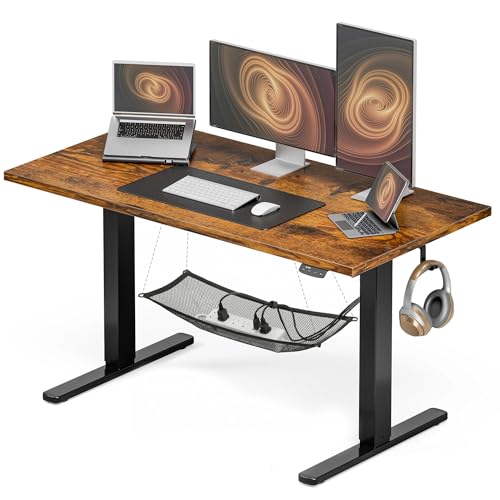
- Hidden wire tray and routing system
- Two memory presets for sit/stand positions
- Supports up to 176 lbs on a steel frame
Best For: Compact home offices that need cable management and height adjustment
No-Drill Tray
Cinati Clamp-On Under Desk Cable Tray

- Clamp-on install with no drilling required
- Includes cable clips and cable ties
- Metal tray helps hide cords and power strips
Best For: Existing desks that need an easy cable tidy-up without drilling
Wide Workspace Choice
Huuger 55 x 28 Electric Standing Desk

- Large 55 x 27.6 inch desktop
- Cable managers plus two side hooks
- 3 presets and quiet electric height control
Best For: People who want a roomy standing desk with tidy cable routing
Clamp-On Organizer
LOVJOYSE 25.3 Inch Cable Management Tray

- No-drill clamp mount protects the desk
- Long 25.3-inch tray with two access holes
- Open mesh design helps reduce dust buildup
Best For: Desk setups that need a long, easy-access cable tray
Ergonomic Pick
Acrolix Electric Standing Desk with Cable Management
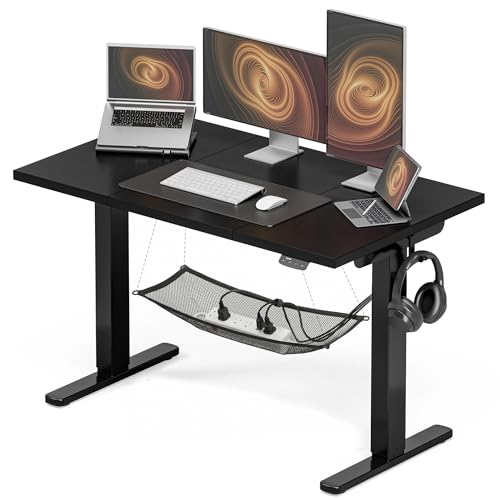
- Hidden wire tray and routing system keep cords out of sight.
- Two memory presets simplify sit-stand adjustments.
- Steel frame supports up to 176 lbs for steady use.
Best For: Home offices needing a compact adjustable desk with cord control.
Best for Everyday Use
25-inch Under Desk Cable Management Tray

- 25-inch size gives cables and sockets plenty of room.
- Clamp-on installation avoids drilling into the desk.
- Mesh metal build supports airflow and easier dust control.
Best For: No-drill cable organization for standing desks and home offices.
Compact Standing Desk
Kingant 35x20 Electric Desk with Cable Management

- Concealed tray keeps power cords and data cables organized.
- Quiet electric lift with three memory presets.
- Compact footprint suits smaller workspaces.
Best For: Small offices that need a compact electric desk with tidy cable storage.
Fabric Cable Organizer

- Flame-retardant Oxford cloth construction
- Large capacity for cords and power strips
- Clamp or screw mount installation
Best For: A soft-sided cable tray for tidy under-desk cable storage
Best Heavy-Duty Pick

- Includes a cable management tray and headphone hook
- Quiet electric height adjustment with 3 presets
- Compact 35" x 20" footprint for small spaces
Best For: Compact workspaces that need height adjustment and basic cable control
Clamp-On Metal Tray

- Quick clamp installation with no drilling
- Carbon steel tray holds about 15 lbs
- Rubber pads help protect desk edges
Best For: A durable no-drill tray for fast cable cleanup
Electric Sit-Stand Pick – Acrolix 48 x 24 Standing Desk
If you want computer desks with cable management that also support healthier work habits, this Acrolix standing desk is built around that idea. The hidden wire tray and routing system help keep cords out of sight, while the electric frame lets you move between sitting and standing with minimal effort.
Best For: Home office users who want a compact standing desk with built-in cable organization and memory presets.
Pros:
- Integrated cable management keeps wires organized and hidden.
- Two memory presets make sit-to-stand changes quick and simple.
- Steel frame supports up to 176 lbs for everyday work, gaming, and multitasking.
- Compact 48 x 24 inch top fits smaller home office setups.
Cons:
- Only two preset height positions are included.
- Smaller surface may feel tight for users with multiple monitors.
- Assembly is straightforward, but still requires setup time.
Overall, this desk is a practical choice if cable control and adjustable height are both important to your workspace. It balances clean routing, stable construction, and easy daily use in one compact package.
No-Drill Tray – Cinati Clamp-On Under Desk Cable Tray
For buyers focused on cable management rather than a full desk upgrade, this clamp-on tray is a simple way to improve computer desks with cable management. It mounts without drilling, helping you organize cords, power strips, and adapters while keeping the area under the desk cleaner and less cluttered.
Best For: People who want a no-drill under-desk cable tray for an existing wood, glass, or other compatible desk.
Pros:
- No-drill clamp installation avoids damage to the desk.
- Metal tray is sturdy, powder coated, and designed not to rust easily.
- Includes cable clips and cable ties for added organization.
- Helps hide cords off the floor and out of the way.
Cons:
- Works only on desks with compatible thickness, up to 2.4 inches.
- Weight limit is 10 lbs per tray.
- It is an accessory, not a complete desk solution.
This is a good add-on if your current desk already works but the cable clutter does not. The clamp design and included accessories make it easy to clean up the underside of a workstation without permanent installation.
Wide Workspace Choice – Huuger 55 x 28 Electric Standing Desk
If you are comparing computer desks with cable management and want more desktop room, this Huuger standing desk stands out for its larger work surface. The included cable managers help reduce tangled wires, and the built-in hooks add extra storage for headphones or bags.
Best For: Users who want a large standing desk with cable management, side hooks, and quiet electric height adjustment.
Pros:
- Large 55 x 27.6 inch desktop offers generous workspace.
- Cable managers help keep wires organized.
- Two side hooks add convenient storage for accessories.
- Quiet motor and 3 presets make daily height changes easy.
Cons:
- It is a freestanding electric desk, so setup is more involved than a simple accessory.
- Only 3 preset heights are available.
- It does not include drawers.
This model is a strong pick when you need space first and cable control second. The wide top, stable frame, and included organizers make it a well-rounded home office or gaming desk.
Clamp-On Organizer – LOVJOYSE 25.3 Inch Cable Management Tray
When you are shopping for computer desks with cable management support, an under-desk tray like this one can do a lot of the cleanup work. This clamp-on metal organizer hides cables beneath the surface, gives you easy access through large openings, and avoids drilling into the desk.
Best For: Home office or gaming desk owners who want a long, no-drill cable tray with easy access to cords and power strips.
Pros:
- No-drill clamp installation protects the desktop.
- 25.3-inch tray provides a long organizing surface.
- Open mesh design helps airflow and reduces dust buildup.
- Two large access holes make cord routing easier.
Cons:
- Supports up to 15 lbs, so it is better for lighter setups.
- Only fits desks up to 2 inches thick.
- It is a tray accessory rather than a full desk.
Overall, this is a straightforward cable-management upgrade for people who want better organization without changing desks. The long tray size and simple clamp system make it especially useful for keeping cords accessible but out of sight.
Ergonomic Pick – Acrolix Electric Standing Desk with Cable Management
If you want computer desks with cable management that also improve how you work, this Acrolix standing desk is a practical fit. The hidden wire tray and routing system help keep cords out of sight, while the electric height adjustment makes it easy to switch between sitting and standing during a long workday.
Best For: Home office users who want a compact standing desk with built-in cord organization and memory presets.
Pros:
- Integrated cable management helps keep wires organized and hidden.
- Two memory presets make it easy to return to favorite sitting and standing heights.
- Strong steel frame supports up to 176 lbs for everyday work, gaming, and multitasking.
- 48 x 24 inch surface offers a useful amount of room without taking over the space.
Cons:
- Tabletop uses three splice boards, so assembly is more involved than a single-piece top.
- Assembly can take 30–60 minutes rather than a quick setup.
Overall, this desk is a solid choice if you want an adjustable workstation that helps reduce cable clutter and supports a cleaner, more ergonomic setup. It balances convenience, stability, and cable management in a size that works well for many home offices.
Best for Everyday Use – 25-inch Under Desk Cable Management Tray
For buyers focused specifically on computer desks with cable management, this clamp-on tray is an easy way to tame loose cords without drilling into the desk. The 25-inch metal basket gives you room for power strips and cables, while the open side design makes routing and repositioning straightforward.
Best For: Standing desks and home office setups that need a no-drill under-desk cable organizer.
Pros:
- 25-inch tray provides generous space for cables and sockets.
- No-drill clamp installation makes setup simple and desk-friendly.
- Metal mesh design helps with ventilation and reduces dust buildup.
- Non-slip rubber pads help protect the desk surface from scratches.
Cons:
- Only fits desks with thickness between 0.4″ and 2″.
- Weight capacity is about 15 lbs, so it is not meant for heavy loads.
This is a smart add-on if your desk already works well but needs cleaner cable routing underneath. It is especially useful for keeping cords and power accessories off the floor while maintaining a tidy workspace.
Compact Standing Desk – Kingant 35×20 Electric Desk with Cable Management
This compact standing desk is a good match if you want computer desks with cable management but do not have much floor space. Its concealed cable management tray keeps power cords and data cables tucked away, and the electric lift lets you shift between positions with minimal effort.
Best For: Small home offices, study areas, and compact workstations that still need electric height adjustment.
Pros:
- Concealed cable tray helps organize cords and keep the workspace tidy.
- Electric motor runs quietly at under 45 dB and adjusts smoothly.
- Three memory presets make it easier to return to preferred heights.
- Heavy-duty frame supports up to 180 lbs for stable daily use.
Cons:
- 35 x 20 inch surface is fairly small compared with full-size desks.
- Assembly recommends two people, which may slow setup.
For tight spaces, this desk offers a strong mix of adjustability and cable control without feeling oversized. It is a practical pick if you want a cleaner workstation and still need enough support for a monitor, keyboard, and essentials.
Fabric Cable Organizer – Fabric Under-Desk Organizer
If you want computer desks with cable management that keep power strips and loose cords out of sight, this under-desk fabric tray is a practical add-on. It uses thickened flame-retardant Oxford cloth to hide wires, while the large interior space helps organize adapters, extension cords, and other desk power needs.
Best For: Users who want a soft-sided under-desk cable tray with flexible mounting options for a neat home office setup.
Pros:
- Thickened flame-retardant Oxford cloth adds dust protection and safety-minded cable storage.
- Large capacity fits power supplies, extension cords, adapters, and multiple wires.
- Clamp or screw mount installation gives you two setup options.
- Includes cable ties and fiber tubes to help route and bundle cords.
Cons:
- Fabric design may be less rigid than metal trays for some users.
- Fits desks only within the specified thickness range of 0.4 to 2.4 inches.
This is a good pick if your priority is keeping cables hidden with a roomy, easy-to-install organizer rather than a more industrial-looking tray.
Best Heavy-Duty Pick – Small Electric Standing Desk
Among computer desks with cable management, this compact electric standing desk stands out if you need a small footprint without giving up adjustable height. It includes a cable management tray and headphone hook, while the quiet motor and memory presets make it easier to move between sitting and standing during the day.
Best For: Small home offices, bedrooms, or dorm spaces where you want an adjustable desk with built-in cable organization.
Pros:
- Compact 35″ x 20″ size is designed for tight spaces.
- Electric height adjustment runs quietly at under 45dB.
- 3 memory presets help you return to preferred working heights quickly.
- Includes a cable management tray and headphone hook.
Cons:
- 154 lb weight limit may not suit heavier multi-monitor setups.
- Small work surface may feel limited if you need lots of desk space.
Overall, this is a strong choice when space is tight and cable control is just one part of a compact standing desk setup.
Clamp-On Metal Tray – No-Drill Mesh Cable Organizer
If you’re comparing computer desks with cable management accessories, this clamp-on metal mesh tray is a straightforward way to tame cords without drilling. The carbon steel basket holds power cords, USB hubs, and transformers, while the mesh design helps keep dust from collecting and keeps wiring out of the way.
Best For: Desk setups that need a durable no-drill cable tray with quick installation and rubber-padded clamps.
Pros:
- No-drill clamp installation can be assembled in about 3 minutes.
- Rubber pads help protect the desk from scratches.
- Carbon steel construction supports about 15 lbs.
- Mesh basket has cable pass-through holes on both sides for easier routing.
Cons:
- Fits flat-edge desks only, with thickness limits from 0.4 to 2 inches.
- Smaller tray size may not suit especially bulky power setups.
This tray makes sense if you want a durable, low-fuss cable organizer that mounts quickly and keeps everyday office cords neatly contained.
How We Picked These Computer Desks with Cable Management
We focused on desks and cable organization solutions that make everyday setups cleaner and easier to use. Priority went to practical cable routing, sturdy construction, adjustable height where relevant, and designs that support common home office and gaming gear.
We also looked at real-world convenience: whether the cable system is built in or add-on, how much room it leaves for a monitor and accessories, and whether the setup is likely to stay tidy after installation.
Quick Comparison
Not every setup needs the same solution. Standing desks are best if you want ergonomic flexibility and integrated wire control, while under-desk trays are ideal if your current desk works fine but needs better cord organization. Compact desks suit smaller rooms, and larger tops are better for multi-monitor or work-from-home stations.
Key Buying Factors for Computer Desks with Cable Management
Cable Routing Design
Look for built-in trays, rear cutouts, cable channels, or under-desk organizers that keep cords off the floor and out of sight. A good system should handle power, display, and accessory cables without crowding.
Desk Size and Surface Depth
Make sure the desktop has enough depth for your monitor distance and enough width for your keyboard, laptop, and peripherals. Smaller desks can work well, but cable management becomes more important when space is tight.
Adjustability and Ergonomics
If you alternate between sitting and standing, height-adjustable models can improve comfort and help keep cable slack under control. Just verify that cable length and routing still work across the full height range.
Mounting Style and Installation
For under-desk cable trays, check whether the system uses clamps, screws, or no-drill mounting. Clamp-on options are convenient for renters and easy upgrades, while screw-mounted trays can feel more permanent and secure.
Weight Capacity and Stability
Heavier monitors and accessories demand a stable frame. A desk may have excellent cable management, but it still needs to resist wobble, especially if you type heavily or use dual screens.
Who Should Buy Which Computer Desks with Cable Management?
If you want an all-in-one ergonomic setup, choose a standing desk with integrated cable management. If your current desk is fine but messy, an under-desk tray may be the simplest and cheapest fix. For smaller rooms, pick a compact desk with a clean rear layout. For gaming or multi-device workstations, prioritize a wider desktop and enough under-desk space for power strips, docks, and adapters.
In short, the best Computer Desks with Cable Management are the ones that match your space, your gear, and how often you move between sitting and standing.