Choosing the right machine for streaming from home is about more than raw specs. You want a computer that can handle broadcasting, chat, browser tabs, and background tasks without lag.
This roundup of live streaming computers for home offices focuses on practical performance, compact designs, and value so you can match the right system to your workflow and budget.
Best 10 Live Streaming Computers for Home Offices Picks for 2026
Compact Triple-Display Pick
GMKtec M6 Ultra Ryzen 7640HS Mini PC

- Ryzen 5 7640HS with up to 5.0GHz boost
- 32GB DDR5 RAM and 1TB SSD included
- Triple-display support with USB4 and 4K outputs
Best For: Compact home office streaming and multitasking
Dedicated GPU Streaming Tower
Ryzen 7 RTX 3050 Desktop Tower

- Ryzen 7 4700LE with 8 cores and 16 threads
- RTX 3050 8GB dedicated graphics
- Six RGB fans for cooling under load
Best For: Streaming, gaming, and editing in a dedicated desk setup
Quad-Display Workhorse
MINISFORUM NAB6 Lite i5 Mini PC

- 12-core Intel Core i5-12600H processor
- Four-display support with HDMI and USB-C
- Dual 2.5G LAN plus WiFi 6
Best For: Work-first streaming and multi-monitor home offices
Premium 24/7 Mini PC
GEEKOM A5 for Home Office Streaming

- Ryzen 5 7430U for efficient office and streaming use
- 16GB RAM, 1TB SSD, and expandable storage
- Supports up to 4x 4K displays; 3-year warranty
Best For: Home office users who want a compact, upgrade-friendly mini PC for streaming and multitasking
Budget Triple-Screen Pick
BOSGAME B95 Mini PC for Simple Streaming

- Intel N95 processor for basic home office tasks
- 16GB RAM, 512GB SSD, and expansion support
- Triple 4K display output with HDMI and Type-C
Best For: Budget-minded home office setups that need compact performance and triple-monitor support
Business-Ready Compact Desktop
Dell OptiPlex 7010 for Home Offices
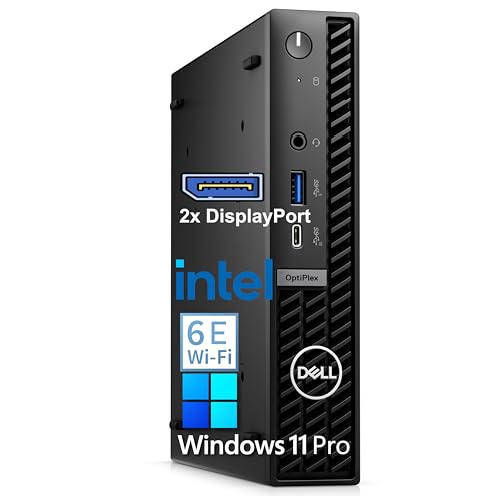
- Intel i3-12100 with 16GB DDR5 for reliable daily work
- 512GB PCIe SSD with WiFi 6E and Bluetooth
- Supports up to three 4K displays in a compact chassis
Best For: Home office professionals who want a compact Windows 11 Pro desktop with strong productivity features
Budget Dual-Display Pick

- Intel N95 for routine home office use
- Dual HDMI supports two 4K@60Hz displays
- 8GB RAM and 256GB SSD keep it basic and compact
Best For: Light streaming and simple office setups with two monitors
Most Connected Workhorse

- Ryzen 5 7430U with 6 cores and 12 threads
- Triple 4K display support and dual 2.5G LAN
- 16GB RAM and 512GB SSD with upgrade room
Best For: Multitasking home offices that need strong networking and multiple displays
Value Streaming Choice

- Ryzen 5 3500U handles daily home office tasks
- 16GB RAM and 512GB NVMe SSD feel responsive
- Dual HDMI and WiFi 6 fit compact setups
Best For: Affordable streaming and everyday work in a small desktop
Compact Triple-Display Pick – GMKtec M6 Ultra Ryzen 7640HS Mini PC
If you want live streaming computers for home offices that stay small but still handle multitasking, the GMKtec M6 Ultra is built around an AMD Ryzen 5 7640HS, 32GB of DDR5 memory, and a 1TB SSD. It’s a practical fit for a desk setup where you need smooth app switching, webcam software, and browser-heavy work without giving up space.
Best For: Home office streamers who want a compact PC with strong multitasking, fast networking, and multi-monitor support.
Pros:
- Ryzen 5 7640HS with 6 Zen 4 cores and up to 5.0GHz boost for responsive everyday performance
- 32GB DDR5 RAM and 1TB PCIe SSD offer a solid out-of-box setup for work and streaming tools
- Supports three displays, including USB4 output, for a flexible home office layout
- 2.5G dual NIC LAN plus WiFi 6 helps with stable network connections
Cons:
- Integrated Radeon 760M graphics are better for moderate gaming and media work than heavy creative rendering
- Base storage is PCIe 3.0, even though expansion is supported
Overall, this is a strong value mini PC if your home office streaming setup depends more on efficiency, connectivity, and multiple screens than on a dedicated graphics card.
Dedicated GPU Streaming Tower – Ryzen 7 RTX 3050 Desktop Tower
For live streaming computers for home offices that need more graphics muscle, this tower pairs a Ryzen 7 4700LE with an RTX 3050 8GB GPU. That combination is a better match for streaming, editing, and running everyday work tasks alongside games or design apps.
Best For: Users who want a desktop tower with a dedicated GPU for streaming, gaming, and general home office use.
Pros:
- Ryzen 7 4700LE offers 8 cores and 16 threads for multitasking and steady workloads
- RTX 3050 8GB adds dedicated graphics power for streaming and visual tasks
- 16GB DDR4 RAM and 512GB NVMe SSD provide a workable base for daily use
- Six RGB cooling fans are designed to help with heat dissipation during long sessions
Cons:
- Uses DOS, so you’ll need to set up the operating system yourself
- At 8.3 kg, it is far less compact than a mini PC
- Single HDMI output may be limiting for some multi-monitor setups
This is the strongest choice here if your streaming setup benefits from a real discrete GPU, but it makes more sense in a dedicated desk space than in a tiny home office.
Quad-Display Workhorse – MINISFORUM NAB6 Lite i5 Mini PC
If your priority is a compact desktop for live streaming computers for home offices, the MINISFORUM NAB6 Lite focuses on useful productivity features rather than flashy specs. Its Intel Core i5-12600H, dual 2.5G LAN, and four-display output support make it a strong fit for a work-first streaming station.
Best For: Home office buyers who want a compact, stable mini PC with strong display and network options.
Pros:
- Intel Core i5-12600H with 12 cores and 16 threads improves multitasking headroom
- Supports four displays with 2 HDMI ports and 2 USB-C video outputs
- Dual 2.5G Ethernet ports plus WiFi 6 help with stable connectivity
- Includes 16GB DDR4 RAM and a 500GB PCIe 4.0 SSD with expansion options
Cons:
- Integrated Intel Iris Xe graphics are not aimed at heavy GPU workloads
- 16GB RAM may be modest for users who keep many apps open at once
This model is a smart pick if you value ports, screen real estate, and dependable networking more than gaming-class graphics.
Cool and Quiet Multitasker – KAMRUI Ryzen 7 7735HS Mini PC
For live streaming computers for home offices that need a fast but space-saving footprint, the KAMRUI Ryzen 7 7735HS mini PC delivers a balanced mix of performance, connectivity, and display support. With 16GB LPDDR5 memory, a 512GB SSD, and triple 4K display support, it suits a desk where streaming, conferencing, and regular work all happen at once.
Best For: Small home office setups that need fast multitasking, quiet cooling, and triple-monitor support.
Pros:
- Ryzen 7 7735HS offers 8 cores and 16 threads with up to 4.75GHz boost
- 16GB LPDDR5 RAM and 512GB SSD provide a responsive base for daily work
- Triple-display support includes HDMI, DP 1.4, and USB-C video output
- 2.5GbE Ethernet, WiFi 6, and Bluetooth 5.2 cover modern connectivity needs
Cons:
- Storage starts at 512GB, so large media libraries may need expansion
- Integrated graphics are suitable for light gaming and office work, not heavy 3D tasks
Its cooling-focused design and compact size make it especially appealing if you need reliable performance without a loud or bulky desktop.
Premium 24/7 Mini PC – GEEKOM A5 for Home Office Streaming
If you want a compact option for live streaming computers for home offices, the GEEKOM A5 is built around efficiency, expandability, and multi-display flexibility. Its Ryzen 5 7430U, 16GB RAM, and 1TB NVMe SSD make it a strong fit for video conferences, 4K streaming, and everyday office workflows without taking much desk space.
Best For: Home office users who want a compact, upgrade-friendly mini PC for streaming, conferencing, and multitasking.
Pros:
- AMD Ryzen 5 7430U is tuned for efficient home office and streaming workloads.
- 16GB RAM and 1TB NVMe SSD give you a strong starting point with room to grow.
- Supports up to four 4K displays, plus 8K output through Type-C.
- 3-year limited warranty adds long-term peace of mind for business use.
Cons:
- Mini PC design means you still need separate monitor, keyboard, and webcam gear.
- Some AI-focused features are cloud-based rather than fully local.
This is a practical choice if you need a small, reliable desktop that can handle conferencing, content viewing, and office multitasking while leaving room for future memory and storage upgrades.
Budget Triple-Screen Pick – BOSGAME B95 Mini PC for Simple Streaming
The BOSGAME B95 is a straightforward option for live streaming computers for home offices when you want basic multitasking, compact size, and triple-screen support. With an Intel N95 processor, 16GB of DDR4 memory, and a 512GB SSD, it is positioned for everyday office work, light streaming tasks, and efficient use of multiple displays.
Best For: Budget-minded home office setups that need compact performance and triple-monitor support.
Pros:
- 12th Gen Intel N95 offers a noticeable step up from older entry-level chips.
- 16GB RAM and 512GB SSD help with file transfers and everyday multitasking.
- Dual HDMI plus Type-C supports three 4K displays at once.
- Includes Gigabit Ethernet, Wi-Fi 5, and Bluetooth 5.0 for flexible connectivity.
Cons:
- Storage expansion is available, but the included drive is only 512GB.
- Best suited to light workloads rather than heavier content creation or demanding streaming.
Overall, the B95 makes sense if your priority is a small, affordable home office computer that can manage simple multitasking and multi-monitor layouts without overcomplicating the setup.
Business-Ready Compact Desktop – Dell OptiPlex 7010 for Home Offices
The Dell OptiPlex 7010 is a compact desktop aimed at home office buyers who want dependable everyday performance and a ready-to-work setup. With an Intel i3-12100, 16GB DDR5 RAM, 512GB PCIe SSD, and support for triple 4K displays, it is a practical fit for video calls, spreadsheets, and light multitasking in a streaming-capable workspace.
Best For: Home office professionals who want a compact Windows 11 Pro desktop with strong productivity features.
Pros:
- Intel i3-12100 and 16GB DDR5 deliver solid performance for everyday office tasks.
- 512GB PCIe SSD helps with fast boot times and quick file access.
- WiFi 6E, Bluetooth, and multiple USB ports support modern peripherals.
- Triple 4K display support helps organize work across multiple screens.
Cons:
- Not designed as a high-end creator or heavy gaming system.
- Compact form factor means you may still need external accessories for a full workstation.
For a home office that values business-ready software, space-saving design, and steady performance, the OptiPlex 7010 is the most polished all-around choice in this group.
Budget Dual-Display Pick – GMKtec G3S Mini PC N95
If you want live streaming computers for home offices without paying for extra power you may not use, the GMKtec G3S is a compact, practical option. Its Intel N95 chip, 8GB RAM, and 256GB SSD are aimed at everyday multitasking, smooth streaming, and general office work in a small footprint.
Best For: Light home office streaming, browsing, and dual-monitor setups on a budget.
Pros:
- 12th Gen Intel N95 processor offers better performance than older low-power N-series chips.
- Dual HDMI 2.0 outputs support two 4K@60Hz displays for multitasking.
- WiFi 5, Bluetooth 5.0, and Gigabit Ethernet cover flexible connectivity.
- AV1 decoding and 4K playback support help with smooth viewing.
Cons:
- 8GB RAM and 256GB storage are modest for heavier workloads.
- Best suited to routine tasks rather than demanding creative or gaming use.
Overall, the G3S is a straightforward mini PC for basic productivity and streaming needs. It stands out most when you want dual-display support and reliable everyday performance in a very small desktop.
Most Connected Workhorse – Getorli Ryzen 5 7430U Mini PC
For live streaming computers for home offices that need more multitasking headroom, this Getorli mini PC brings a stronger Ryzen 5 7430U processor and a flexible display setup. With 16GB RAM, a 512GB SSD, triple 4K display support, and dual 2.5G LAN, it is built for steady daily work and smoother streaming workflows.
Best For: Home office users who want strong multitasking, triple-monitor support, and fast wired networking.
Pros:
- Ryzen 5 7430U with 6 cores and 12 threads handles daily office work smoothly.
- Three display outputs support triple-screen setups at 4K 60Hz.
- Dual 2.5G LAN plus WiFi 6 provide strong network options.
- 16GB RAM, 512GB SSD, and expandability add useful headroom.
Cons:
- Designed for everyday use and light gaming, not high-end performance tasks.
- More features may be unnecessary if you only need a basic single-monitor PC.
This model is the most flexible of the group for productivity-focused home offices. Its combination of stronger CPU performance, wired networking, and triple-display support makes it a solid fit for users who keep many apps and windows open.
Value Streaming Choice – Getorli Ryzen 5 3500U Mini PC
If your goal is live streaming computers for home offices on a tighter budget, this Getorli mini PC keeps the essentials in a compact package. The Ryzen 5 3500U, 16GB RAM, and 512GB NVMe SSD are a sensible match for daily computing, smooth media streaming, and light multitasking.
Best For: Budget-conscious users who want a compact streaming-friendly desktop with dual-monitor support.
Pros:
- Ryzen 5 3500U offers 4 cores and 8 threads for everyday productivity.
- 16GB RAM and 512GB NVMe SSD support responsive multitasking and faster loading.
- Dual HDMI outputs handle one or two 4K screens.
- WiFi 6 and Bluetooth 5.3 provide modern wireless connectivity.
Cons:
- Expansion tops out at 32GB RAM, which is lower than some rivals.
- Performance is aimed at basic home office and streaming tasks, not demanding workloads.
This is a balanced pick when you want a small desktop that can handle work and media without overcomplicating the setup. It offers the core features most home office streamers need, plus a useful selection of ports.
How We Picked These Live Streaming Computers for Home Offices
We prioritized processors with enough headroom for live streaming, responsive multitasking, and modern office work. We also looked at RAM capacity, SSD speed, expansion options, and connectivity such as fast Ethernet, multiple display support, and enough USB ports for webcams, microphones, capture devices, and accessories.
Because home-office setups vary, we included mini PCs, compact desktops, and one more performance-focused desktop option. That mix helps cover users who want a quiet desk setup as well as those who need extra graphics power for streaming or heavier workloads.
Quick Comparison
For most buyers, the best choice depends on the balance between CPU performance, memory, and storage. Mini PCs are usually the best fit for smaller desks and quieter environments, while the RTX-equipped desktop is the stronger pick if streaming and graphics performance matter more than footprint.
If you want a simple office-first system, entry-level Intel N-series models can work well for light streaming or basic productivity. For smoother multitasking and more future-proof performance, Ryzen 5 and Ryzen 7 systems are generally the safer bet.
Key Buying Factors for Live Streaming Computers for Home Offices
Processor and Cores
Live streaming uses the CPU heavily, especially if you are encoding video, running overlays, or keeping multiple apps open. Look for at least a modern 6-core chip for comfortable use, with 8-core options offering more breathing room.
RAM and Storage
16GB of RAM is the practical minimum for most home-office streamers, while 32GB is better for heavier multitasking. SSD storage matters too, because fast load times help when launching streaming software, saving recordings, and switching between projects.
Graphics and Encoder Support
If you stream games or use visual effects, a discrete GPU can make a real difference. For simpler webcam-based streams, integrated graphics are often enough as long as the processor is strong.
Connectivity and Expandability
Dual Ethernet, Wi-Fi quality, and plenty of USB ports can make setup easier and more stable. Support for dual or triple displays is especially helpful for managing chat, scenes, and scripts while streaming.
Who Should Buy Which Live Streaming Computers for Home Offices?
If you want the most balanced option for Live Streaming Computers for Home Offices, choose a Ryzen 7 or strong Intel H-series mini PC with 16GB or more RAM. If your priority is tight space and low noise, a compact mini PC is usually the best fit.
If you need better graphics performance for gaming streams or heavier creative work, go with the RTX desktop. If your setup is mostly office work with occasional streaming, a budget N95 system may be enough, but it is less ideal for demanding broadcasts or multitasking.
In short, match the machine to your stream style: lighter content calls for efficiency, while more demanding production needs extra CPU, memory, and graphics headroom.