Choosing the right streaming PC matters when your broadcast has to stay stable under pressure. The best systems for creators need fast encoding, reliable networking, enough RAM for multitasking, and ports for cameras, monitors, and audio gear.
This roundup focuses on live streaming computers for professionals that can handle production software, game capture, overlays, and background tasks without slowing down.
Best 10 Live Streaming Computers for Professionals Picks for 2026
High-Power Creator Mini PC

- Ryzen 9 8945HX with 16 cores and 32 threads
- Desktop RTX 5060 graphics for demanding workloads
- Quad 4K output plus 5GbE and Wi-Fi 7
Best For: Creators and streamers who want desktop-class power in a compact PC
Compact Professional Pick

- Core i7-1360P with 12 cores and 16 threads
- Quad-display support with Thunderbolt 4 and dual HDMI
- Windows 11 Pro for business-focused features
Best For: Professionals who want a small, reliable multi-monitor desktop
Quiet Performance Choice
ROG GR70 Mini PC with RTX 5070

- Ryzen 9 9955HX paired with RTX 5070 mobile graphics
- Triple-fan QuietFlow cooling for lower noise
- 32GB DDR5, 2TB SSD, Wi-Fi 7, and Bluetooth 5.4
Best For: High-end streamers who want compact power and quiet operation
Portable Creator Workstation
ASUS NUC 13 Pro Tall Mini Desktop

- Core i5-13420H with 32GB RAM and 1TB SSD
- 2x HDMI 2.1 plus 2x Thunderbolt 4 for four displays
- Wi-Fi 6E, Bluetooth 5.3, and Ethernet included
Best For: Compact streaming and multi-monitor productivity
GPU-Powered Streaming Tower
HP OmniDesk M03-0060 Desktop PC
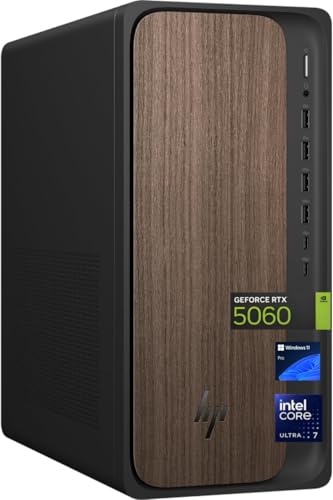
- Core Ultra 7 265 with RTX 5060 graphics
- 32GB DDR5 RAM and 2TB SSD
- Windows 11 Pro plus keyboard and mouse
Best For: Dedicated-graphics streaming and heavy multitasking
High-Output Mini Streaming Rig
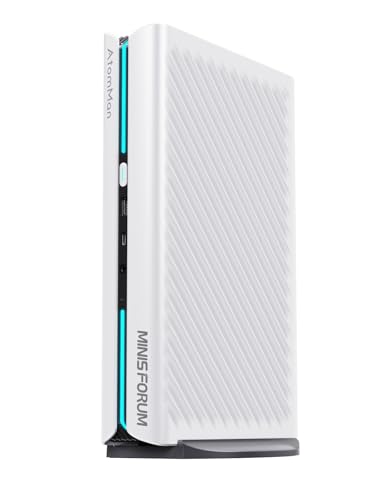
- Ryzen 9 8945HX with RTX 5060 graphics
- 2x HDMI plus 3x DisplayPort for four monitors
- Wi-Fi 7 and 5G LAN for fast networking
Best For: Compact professional streaming with multi-display output
Precision Creator Tower
Dell Precision 3680 for pro streaming

- Core i7-14700 with 20 cores and 5.4GHz boost
- RTX 2000 Ada 16GB dedicated graphics
- 32GB DDR5 RAM and 1TB SSD
Best For: Business-class streaming, editing, and multitasking
Next-Gen XPS Workstation

- Intel Ultra 7-265 with up to 5.3GHz boost
- RTX 5060 8GB GDDR7 graphics
- Thunderbolt 4 plus HDMI and DisplayPort
Best For: Creators who need modern ports and strong graphics
All-in-One Creator Desktop
HP OmniStudio 27 for streaming

- All-in-one 27-inch design with wireless peripherals
- 32GB DDR5 RAM and 1TB NVMe SSD
- WiFi 7 and Windows Hello webcam
Best For: Clean, space-saving streaming and office setups
Business Upgrade Pick – Dell Tower Desktop with Intel Core Ultra 7
For live streaming computers for professionals, this Dell Tower Desktop is a straightforward business-focused choice with modern Intel Core Ultra performance, support for multiple monitors, and room to grow over time. It’s built for users who want a stable desktop that can handle everyday production work, streaming tools, and multitasking without complicating the setup.
Best For: Professional streamers and office users who want a secure, expandable tower with multi-monitor support.
Pros:
- Intel Core Ultra processor with built-in AI for productivity and creative workflows
- Supports up to four FHD monitors or two 4K displays
- Tool-less entry and removable side panel make upgrades easier
- Hardware TPM, lock slot, and padlock loop add business-friendly security
Cons:
- 16GB RAM may be modest for heavier streaming and editing workloads
- Not as compact as a mini PC for tight desks or travel
This is a practical tower for professionals who value expandability, display flexibility, and security more than flashy gaming features. If your streaming setup doubles as a work machine, it offers a balanced, office-ready foundation.
High-Power Creator Mini PC – MINISFORUM G1 Pro RTX 5060
Among live streaming computers for professionals, the MINISFORUM G1 Pro stands out for pairing a Ryzen 9 8945HX with desktop-class RTX 5060 graphics in a compact 3.8L chassis. That combination is aimed at users who need strong CPU and GPU performance for streaming, content creation, and other demanding workloads in a small footprint.
Best For: Professional streamers and creators who need high performance, strong graphics, and compact size.
Pros:
- Ryzen 9 8945HX with 16 cores and 32 threads for heavy multitasking
- Desktop RTX 5060 graphics for GPU-intensive workloads
- Supports up to quad 4K output with multiple display connections
- 5GbE, Wi-Fi 7, and expandable memory/storage for professional setups
Cons:
- Performance-focused design may be more than needed for basic streaming
- Compact high-power systems can be harder to upgrade than full towers
If you want a small system that still behaves like a serious workstation, this mini PC has the specs to support demanding live production. It’s especially appealing when performance, display flexibility, and desk space all matter.
Compact Professional Pick – ASUS NUC 13 Pro Mini Desktop
If you’re comparing live streaming computers for professionals, this ASUS NUC 13 Pro is a compact option built around efficient Intel performance and broad display support. It’s a practical fit for users who want a tidy desk setup with enough connectivity for multiple screens, business apps, and streaming control tools.
Best For: Professionals who need a compact Windows 11 Pro mini desktop with strong display flexibility.
Pros:
- Intel Core i7-1360P with 12 cores and 16 threads for multitasking
- Supports up to four displays, including 4K extended setups
- Thunderbolt 4, dual HDMI 2.1, and Wi-Fi 6E for flexible connectivity
- Windows 11 Pro adds business features like BitLocker and Remote Desktop
Cons:
- 16GB RAM and 512GB SSD are fine for moderate use, but not maximal workloads
- More of a compact productivity machine than a graphics-heavy streaming rig
This is a sensible choice if your streaming setup depends on clean organization, multiple monitors, and business-grade features. It won’t chase top-tier gaming specs, but it covers the practical needs of many professional workflows.
Quiet Performance Choice – ROG GR70 Mini PC with RTX 5070
For live streaming computers for professionals who want high-end performance in a compact system, the ROG GR70 brings a Ryzen 9 9955HX and RTX 5070 mobile GPU together with quiet cooling. It’s geared toward users who need strong speed, low latency, and a small chassis that still looks polished on a desk.
Best For: Streamers and creators who want a compact, high-performance PC with quiet cooling and modern wireless connectivity.
Pros:
- Ryzen 9 9955HX and RTX 5070 mobile GPU for strong performance
- Triple-fan QuietFlow cooling helps manage temperatures and noise
- Wi-Fi 7 and Bluetooth 5.4 support modern wireless gear
- 2TB NVMe SSD and 32GB DDR5 offer generous out-of-box capacity
Cons:
- Gaming-first positioning may be more than some professional streamers need
- Compact design offers less physical expandability than a full tower
This model makes sense if you want a powerful small form factor PC that can handle demanding workloads without taking over your desk. The cooling, storage, and wireless features make it well suited to polished, performance-heavy streaming setups.
Portable Creator Workstation – ASUS NUC 13 Pro Tall Mini Desktop
If you want live streaming computers for professionals that stay compact without giving up multi-monitor support, this ASUS NUC 13 Pro is a practical pick. Its Intel Core i5-13420H, 32GB of RAM, and 1TB SSD give it a solid everyday foundation for streaming workflows, office tasks, and light content production.
Best For: Streamers and creators who need a small Windows 11 Pro desktop with four display outputs.
Pros:
- 2x HDMI 2.1 and 2x Thunderbolt 4 ports support up to four monitors.
- 32GB RAM and 1TB SSD provide a ready-to-use configuration for multitasking.
- Wi-Fi 6E, Bluetooth 5.3, and Ethernet cover flexible connectivity.
- Windows 11 Pro adds a business-friendly software base.
Cons:
- No keyboard or mouse is included.
- Integrated graphics are not listed, so it is not positioned as a GPU-focused workstation.
Overall, this is a strong compact option when desk space matters and you want reliable expansion for multiple displays. It fits professional streaming setups best when the priority is connectivity, storage, and convenience rather than graphics-heavy workloads.
GPU-Powered Streaming Tower – HP OmniDesk M03-0060 Desktop PC
The HP OmniDesk is built for live streaming computers for professionals who want more graphics headroom. With an Intel Core Ultra 7 265, NVIDIA GeForce RTX 5060, 32GB of DDR5 RAM, and a 2TB SSD, it is aimed at heavier business and creator workloads while keeping Windows 11 Pro at the center.
Best For: Streamers who want a tower with dedicated graphics and strong multitasking capacity.
Pros:
- Intel Core Ultra 7 265 pairs with an RTX 5060 for dedicated graphics performance.
- 32GB DDR5 RAM and 2TB SSD offer ample speed and storage.
- Windows 11 Pro supports a professional software environment.
- Includes wired keyboard and mouse for a complete starter setup.
Cons:
- At 49.8 pounds, it is far less portable than a mini PC.
- The product details emphasize tower usage, so it is not a space-saving option.
If your streaming setup benefits from a stronger GPU and more traditional desktop expansion, this HP tower is the most graphics-oriented of the group. It makes the most sense for users who care more about performance and ports than a small footprint.
High-Output Mini Streaming Rig – MINISFORUM G1 Pro Mini PC
For live streaming computers for professionals that need serious performance in a compact machine, the MINISFORUM G1 Pro stands out. Its AMD Ryzen 9 8945HX, RTX 5060 graphics, 32GB of DDR5 memory, and 1TB PCIe 4.0 SSD are built for demanding multitasking, while the five video outputs help support a productive multi-display setup.
Best For: Professional streamers and creators who want compact size, dedicated graphics, and broad display support.
Pros:
- Ryzen 9 8945HX with 16 cores and 32 threads handles heavy workloads well.
- RTX 5060 8GB graphics support advanced visual tasks.
- 2x HDMI and 3x DisplayPort outputs support four ultra-high-definition monitors.
- Wi-Fi 7, Bluetooth 5.4, and 5G LAN offer fast connectivity.
Cons:
- The notes focus on power and connectivity, but do not mention a bundled keyboard or mouse.
- Storage expands to 2TB, which may still be limiting for users with very large media libraries.
This is the most performance-forward mini PC in the list, especially if you want a small chassis with a dedicated GPU and serious display flexibility. It is a strong fit when you need compact hardware that still looks ready for demanding professional streaming or creation work.
Precision Creator Tower – Dell Precision 3680 for pro streaming
If you’re comparing live streaming computers for professionals, the Dell Precision 3680 Tower is built like a dependable workhorse for demanding production setups. Its Intel Core i7-14700, 32GB of DDR5 RAM, and NVIDIA RTX 2000 Ada 16GB give you the kind of core hardware that can handle streaming, editing, and day-to-day business tasks with room to spare.
Best For: Professionals who want a business-class tower for streaming, editing, and multitasking with dedicated graphics.
Pros:
- Intel Core i7-14700 with 20 cores and up to 5.4GHz boost
- NVIDIA RTX 2000 Ada 16GB dedicated graphics for graphics-heavy workloads
- 32GB DDR5 RAM and 1TB SSD for responsive multitasking and storage
- Windows 11 Pro plus wired keyboard and mouse included
Cons:
- Bulky tower design takes more desk or floor space than compact systems
- Only 1 HDMI port listed, so display expansion may rely more on DisplayPort
- DVD+/-RW drive may be unnecessary for buyers focused only on streaming
Overall, this is a strong pick if you want a professional desktop with workstation-style specs and a dedicated NVIDIA GPU. It looks especially practical for streamers who also need a reliable Windows 11 Pro machine for content creation and business use.
Next-Gen XPS Workstation – Dell Tower Plus with RTX 5060
For buyers looking at live streaming computers for professionals, the Dell Tower Plus EBT2250 stands out as a newer workstation-style desktop with modern connectivity and strong headroom. It pairs an Intel Ultra 7-265 processor, 32GB of DDR5 memory, and GeForce RTX 5060 8GB graphics, making it a flexible fit for streaming workflows that also involve graphics-heavy tasks.
Best For: Creators and professionals who want a modern tower with strong connectivity, fast storage, and dedicated graphics.
Pros:
- Intel Ultra 7-265 with up to 5.3GHz boost and 20 cores
- GeForce RTX 5060 8GB GDDR7 graphics for demanding visual workloads
- Plenty of ports, including Thunderbolt 4, USB-C, HDMI, and DisplayPort
- 32GB DDR5 memory and 1TB PCIe NVMe SSD for multitasking and fast access
Cons:
- Only a 1-year manufacturer warranty is listed
- Desktop tower format is less portable than all-in-one alternatives
- Memory speed is listed at 4800 MT/s, which is solid but not class-leading
This is the most forward-looking tower in the group, especially if you want a workstation that already includes current-generation connectivity and a capable RTX 5060. It makes sense for professionals who stream, edit, and connect multiple peripherals at once.
All-in-One Creator Desktop – HP OmniStudio 27 for streaming
If you want live streaming computers for professionals without a separate tower, the HP OmniStudio 27 keeps the setup simple with an all-in-one design. It includes an Intel Core Ultra 7 355 processor, 32GB of DDR5 RAM, and a 1TB NVMe SSD, plus WiFi 7 and wireless keyboard and mouse for a cleaner desk setup.
Best For: Streamers and business users who want an all-in-one PC with strong multitasking hardware and a tidy setup.
Pros:
- All-in-one 27-inch design reduces cable clutter and saves space
- 32GB DDR5 RAM and 1TB PCIe NVMe SSD support smooth multitasking
- WiFi 7, Bluetooth 6.0, and wireless keyboard/mouse included
- 1080p IR pop-up privacy webcam with Windows Hello support
Cons:
- Integrated Intel Xe graphics are less powerful than dedicated GPU options
- The listed display is described as QHD but also noted as 1920×1080, which may confuse shoppers
- 8-core CPU is capable, but less brute-force oriented than the tower models here
This HP is the easiest fit for buyers who value a compact, ready-to-use setup over expandability. It is especially appealing if your streaming workspace doubles as a home office and you want fewer cables and a built-in camera.
How We Picked These Live Streaming Computers for Professionals
We looked for systems that balance CPU performance, GPU acceleration, memory capacity, storage speed, and connectivity. For professional streaming, the most useful builds are the ones that can run OBS or similar software, support multiple displays, and stay responsive during long sessions.
We also favored machines with modern networking such as Wi-Fi 6E, Wi-Fi 7, or 5GbE, plus configurations that leave room for future upgrades.
Quick Comparison
In general, tower desktops and workstations offer the most headroom for heavy production, while mini PCs are best for compact streaming setups, travel rigs, or clean desk builds. All-in-ones are convenient, but they usually make the most sense for lighter streaming and simpler studio layouts.
Key Buying Factors for Live Streaming Computers for Professionals
CPU and GPU Balance
A strong CPU helps with scene switching, multitasking, and browser-heavy workflows, while a dedicated GPU can improve encoding and graphics performance. If you stream demanding games, edit on the same machine, or run multiple apps at once, prioritize both.
RAM and Storage
For serious live streaming, 32GB of RAM is a safer target than 16GB. Fast SSD storage also matters for quick boot times, smoother caching, and faster access to recorded footage and assets.
Ports and Display Support
Look for enough HDMI, DisplayPort, Thunderbolt, or USB-C connectivity to handle cameras, capture cards, microphones, and multiple monitors. Multi-display support is especially helpful for monitoring chat, software controls, and preview windows.
Network Reliability and Thermals
Stable wired networking is ideal, and strong cooling matters for long sessions. Systems built for sustained workloads are usually a better fit than thin, low-power machines.
Who Should Buy Which Live Streaming Computers for Professionals?
If you want maximum expansion and the best long-term flexibility, choose a tower desktop or workstation. If you need a compact setup without giving up much performance, a higher-end mini PC is a smart choice. If your streams are lighter and your desk space is limited, an all-in-one may be enough, but it is the least flexible option for upgrades.
For most Live Streaming Computers for Professionals, the best choice is the one that matches your production workload, your number of peripherals, and how much room you need for growth.