Choosing tablet computers for content creators means balancing display quality, stylus support, battery life, and enough power to keep your workflow moving.
Whether you sketch, edit photos, annotate scripts, or manage social content on the go, the right tablet can replace a laptop for many everyday creative tasks.
Best 10 Tablet Computers for Content Creators Picks for 2026
AI Creator Pick
Lenovo Yoga Tab AI Tablet, 11" 3K 144Hz

- Snapdragon 8 Gen 3 with 12GB RAM
- 11.1-inch 3.2K 144Hz display
- Includes Pen Pro, keyboard, and hub
Best For: Portable creators who want an AI-ready Android tablet with bundled input tools
Apple Ecosystem Choice

- A16 chip with all-day battery life
- Liquid Retina display with True Tone
- Supports Apple Pencil and Magic Keyboard Folio
Best For: Creators who want a polished iPad with strong app support
Pro Drawing Display

- 14-inch OLED with wide color gamut
- Pro Pen 3 has 8,192 pressure levels
- Android 15 with included creative apps
Best For: Illustrators who want a portable, pen-first drawing tablet
Budget Multitasker
Samsung Galaxy Tab S10 Lite, 10.9"

- S Pen support for notes and sketching
- Up to 16 hours of battery life
- MicroSD expansion up to 2TB
Best For: Budget-conscious creators who want pen support and expandable storage
Creator Study Tablet

- 12.7-inch 3K LCD display with stylus support
- Includes pen and folio case in the box
- Dimensity 8300 with Wi‑Fi 6E for multitasking
Best For: Creators who want a large Android slate for notes, sketching, and planning
Pro-Size Creator Canvas
- 14.6-inch Dynamic AMOLED 2X display with 120Hz
- S Pen included plus Drawing Assist and Note Assist
- 12GB RAM, 256GB storage, and 16-hour battery rating
Best For: Creators who want a premium large-screen Android tablet for drawing and review
Eye-Friendly Creator Tablet

- Paper-like 14.3-inch display with low-glare NXTPAPER 3.0
- 4096-level stylus and adjustable flip case included
- Split-screen, extended display, and 10,000mAh battery
Best For: Creators who read, sketch, and multitask for long sessions
Portable Creator Tablet
Samsung Galaxy Tab S10 FE 10.9" 2K+

- Included magnetic S Pen for drawing and notes
- Up to 20 hours of battery life for long sessions
- IP68-rated design adds travel-friendly durability
Best For: Mobile creators who want a lightweight stylus tablet with strong battery life
Big-Screen Workflow Pick
Lenovo Idea Tab Plus 12.1" Creator Bundle

- 12.1-inch 2.5K display with 90Hz refresh rate
- Tab Pen and folio case included
- Lightweight design with up to 13 hours of streaming
Best For: Creators who want a bigger display and bundled accessories for sketching and sharing
Durable Everyday Creator Tablet
Samsung Galaxy Tab S9 FE 10.9" WiFi

- Included S Pen for notes, drawing, and markup
- IP68-rated design for water and dust resistance
- Up to 18 hours of battery life with fast charging
Best For: Creators who want a reliable, durable Android tablet for sketching and multitasking
AI Creator Pick – Lenovo Yoga Tab AI Tablet, 11" 3K 144Hz
If you want a tablet computer for content creators that feels close to a portable creative workstation, the Lenovo Yoga Tab is built for that job. It pairs a fast Snapdragon 8 Gen 3 chip, 12GB of RAM, a 3K 144Hz display, and included pen/keyboard accessories, so it can handle sketching, editing, note-taking, and multitasking on the move.
Best For: Creators who want an AI-assisted Android tablet with pen, keyboard, and strong all-around performance.
Pros:
- Snapdragon 8 Gen 3 and 12GB RAM for demanding creative and multitasking use
- 11.1-inch 3.2K display with 144Hz refresh rate and 98% DCI-P3 color
- Includes Lenovo Tab Pen Pro and keyboard for writing, sketching, and productivity
- Wi-Fi 7, USB-C with DisplayPort output, and included 7-in-1 USB-C hub
Cons:
- 11-inch class screen may feel small for users who prefer larger canvases
- Android app workflows may not match desktop-level creative software
Overall, this is the most creator-focused option in the group if you value speed, portability, and bundled accessories. It stands out for AI tools, premium display specs, and a hardware package that supports both drawing and general content work.
Apple Ecosystem Choice – iPad 11-inch A16, 128GB
The 11-inch iPad is a strong pick for tablet computers for content creators who want a familiar, highly polished creative platform. With the A16 chip, Liquid Retina display, Apple Pencil support, and a large App Store library, it’s a practical choice for drawing, photo work, note-taking, and video calls.
Best For: Creators who want an easy-to-use iPad with excellent app support and accessory options.
Pros:
- A16 chip delivers responsive performance for everyday creative tasks
- Liquid Retina display with True Tone for comfortable viewing and drawing
- Apple Pencil and Magic Keyboard Folio support for versatile workflows
- 12MP Center Stage front camera and 12MP back camera for calls and scanning
Cons:
- 128GB base storage may be limiting for larger media libraries
- Wi-Fi 6 is solid, but not as advanced as newer wireless standards
This iPad makes sense if you want a creator tablet that fits smoothly into the Apple ecosystem. It’s especially appealing for users who rely on iPadOS apps and want a balanced device for creation, communication, and light productivity.
Pro Drawing Display – Wacom MovinkPad Pro 14 OLED
If your creative work centers on drawing and illustration, this Wacom tablet is purpose-built to feel like a mobile art studio. The MovinkPad Pro 14 combines Android 15, a 14-inch OLED panel, and Wacom’s Pro Pen 3, making it a focused option for artists who want a premium pen experience without extra gear.
Best For: Digital artists who want a premium pen display with a portable all-in-one design.
Pros:
- 14-inch 3K OLED display with 100% sRGB and DCI-P3 coverage
- Premium Texture etched glass helps create a pen-on-paper feel
- Pro Pen 3 offers 8,192 pressure levels and never needs charging
- Snapdragon 8s Gen 3, 12GB RAM, and 256GB storage for creative apps
Cons:
- Most compelling for drawing workflows rather than general-purpose tablet use
- Compatibility notes may matter if you plan to use it with certain computers
For illustrators and designers, this is the most specialized of the tablet computers for content creators in this roundup. The display and pen experience are the main reasons to buy it, especially if you care more about drawing feel than multipurpose tablet features.
Budget Multitasker – Samsung Galaxy Tab S10 Lite, 10.9"
The Galaxy Tab S10 Lite is a sensible pick if you want a lower-cost tablet for content creators that still handles notes, sketching, and everyday multitasking. Its 10.9-inch display, S Pen support, expandable storage, and AI tools make it useful for planning, drafting, and light creative work.
Best For: Creators who want an affordable Samsung tablet with pen support and long battery life.
Pros:
- S Pen support for writing, drawing, and note-taking
- Up to 16 hours of battery life with Super Fast Charging
- Expandable storage up to 2TB via microSD
- AI features like Circle to Search and note cleanup tools
Cons:
- 6GB RAM is modest for heavier creative multitasking
- LCD display is less premium than OLED alternatives
This model is best viewed as a practical everyday creator tablet rather than a high-end workstation. If you want S Pen convenience, decent performance, and lots of storage flexibility without overspending, it fits the brief well.
Creator Study Tablet – Lenovo Idea Tab Pro
If you want tablet computers for content creators that also double as a capable productivity device, the Lenovo Idea Tab Pro is a practical middle ground. Its 12.7-inch 3K LCD display, included pen, and folio case make it easy to sketch ideas, mark up notes, and review visuals without carrying extra accessories.
Best For: Creators who want a large-screen Android tablet for note-taking, sketching, and everyday content workflow on the go.
Pros:
- 12.7-inch 3K LCD display gives you plenty of room for viewing and editing content.
- Includes the Lenovo Tab Plus Pen and folio case, so you can start using it right away.
- MediaTek Dimensity 8300 and Wi-Fi 6E support smooth multitasking and quick downloads.
- 11-hour battery life and 45W quick charge help it last through long sessions.
Cons:
- 128GB storage may feel limited if you keep large media files locally.
- LCD panel is less premium than AMOLED alternatives.
- Built-in camera and creator-specific details are not the main focus of the spec sheet.
Overall, this Lenovo fits creators who care more about a roomy display, stylus support, and solid everyday performance than about top-tier pro-level hardware. It looks especially appealing for planning, rough edits, and content organization.
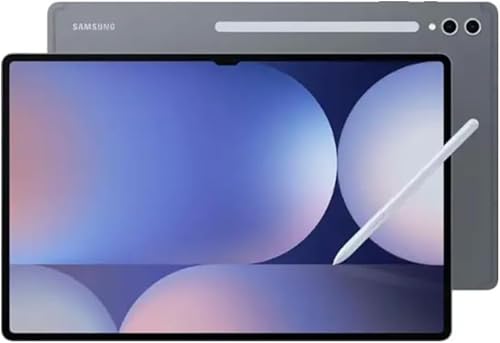
Pro-Size Creator Canvas – Samsung Galaxy Tab S11 Ultra
Among tablet computers for content creators, the Samsung Galaxy Tab S11 Ultra stands out for its huge 14.6-inch Dynamic AMOLED 2X display and included S Pen. That combination makes it a strong choice for layout review, drawing, note-taking, and any workflow that benefits from lots of screen space.
Best For: Creators who want a premium large-screen Android tablet for drawing, notes, and media review.
Pros:
- 14.6-inch AMOLED display with 120Hz refresh rate for a smooth, spacious workspace.
- Includes S Pen and features like Drawing Assist and Note Assist.
- 12GB RAM and 256GB storage support heavier multitasking and file storage.
- 11600mAh battery is rated for up to 16 hours of use.
Cons:
- Wi-Fi only model, so there’s no cellular data option.
- Notes indicate no warranty in the USA for this listing.
- Its size may be less convenient for travel or one-handed use.
For creators who want the biggest and most premium-feeling Android canvas here, this Samsung is the most workstation-like option in the group. It is best suited to people who value display quality and stylus tools over compact portability.
Eye-Friendly Creator Tablet – TCL NXTPAPER 14
If your workflow includes reading, sketching, writing, and long sessions on screen, the TCL NXTPAPER 14 is a smart pick among tablet computers for content creators. Its 14.3-inch paper-like display, 4096-level stylus, and multi-window features make it well suited to note-heavy and creative work.
Best For: Creators who spend long hours reading, writing, drawing, or managing multiple apps at once.
Pros:
- NXTPAPER 3.0 display reduces glare and filters blue light for easier extended viewing.
- Comes with a 4096-level T-PEN stylus and adjustable flip case.
- Supports split-screen, floating windows, and extended display for productivity.
- 10,000mAh battery with 33W fast charging and reverse charging support.
Cons:
- Helio G99 is more modest than the faster chips found in premium creator tablets.
- Built-in storage only; microSD is not supported.
- At 1.67 lbs, it is not the lightest large tablet for travel.
This TCL model makes the most sense if comfort and versatility matter as much as performance. It is especially appealing for creators who read or write for long stretches and want a display designed to be easier on the eyes.
Portable Creator Tablet – Samsung Galaxy Tab S10 FE 10.9" 2K+
If you want tablet computers for content creators that are easy to carry but still capable enough for sketching, note-taking, and everyday editing tasks, the Samsung Galaxy Tab S10 FE is built around that balance. Its 10.9-inch 2K+ display, included S Pen, and 8GB RAM make it a practical pick for creators who work on the move.
Best For: Mobile creators who want a lightweight, stylus-ready tablet with strong battery life and dependable performance.
Pros:
- Included magnetic S Pen supports drawing, handwritten notes, and quick markup.
- Up to 20 hours of battery life helps it last through long work sessions.
- 8GB RAM and Exynos 1580 aim for smooth everyday productivity.
- IP68 water and dust resistance adds extra durability for travel or commuting.
Cons:
- Storage is split between built-in memory and the included SD card capacity.
- Wi-Fi connectivity only, so there is no cellular option in the supplied notes.
For creators who need a portable canvas more than a laptop replacement, this Tab S10 FE checks the right boxes. It leans into stylus use, battery endurance, and a sharp display without adding much weight to your bag.
Big-Screen Workflow Pick – Lenovo Idea Tab Plus 12.1" Creator Bundle
Among tablet computers for content creators, the Lenovo Idea Tab Plus stands out if you value a larger workspace and bundled pen support. Its 12.1-inch 2.5K display, 90Hz refresh rate, quad speakers, and included Tab Pen and folio case make it a versatile option for writing, sketching, and light creative workflows.
Best For: Creators who want a bigger display and bundled accessories for sketching, organizing, and sharing files.
Pros:
- 12.1-inch 2.5K IPS display offers sharp detail and rich color.
- Tab Pen and folio case are included in the bundle.
- Thin, lightweight build makes it easy to carry all day.
- Up to 13 hours of YouTube streaming and quick charge support extend usability.
Cons:
- 128GB storage may feel modest for heavier media libraries.
- Notes emphasize learning and sharing features more than pro-grade creative tools.
This is a practical choice for creators who want screen space without a bulky device. The bundled pen, bright display, and easy file sharing make it especially useful for planning, sketching, and everyday content work.
Durable Everyday Creator Tablet – Samsung Galaxy Tab S9 FE 10.9" WiFi
The Samsung Galaxy Tab S9 FE is a solid fit if you’re shopping for tablet computers for content creators who want a durable, stylus-friendly device with a familiar Samsung workflow. It combines a 10.9-inch display, S Pen support, long battery life, and expandable storage for everyday creative and productivity use.
Best For: Creators who want a reliable, durable Android tablet for note-taking, sketching, and multitasking.
Pros:
- Included S Pen supports handwriting, drawing, and document markup.
- IP68 water and dust resistance adds extra protection.
- Up to 18 hours of battery life and fast charging support long workdays.
- Expandable storage up to 1TB helps if you need more room later.
Cons:
- 10.9-inch screen may feel small next to larger creator-focused tablets.
- Wi-Fi-only design limits use away from wireless networks.
For creators who want a dependable tablet that handles sketches, notes, and multitasking without being fragile, the Tab S9 FE is easy to recommend. It focuses on practical features that matter in daily use rather than flashy extras.
How We Picked the Best Tablet Computers for Content Creators
We prioritized the features that matter most in real creative workflows: responsive pen input, color-accurate and comfortable displays, strong multitasking performance, storage options, battery life, and accessory support such as keyboards and dedicated styluses. We also looked for models that make sense for both casual creators and heavier users who need a portable studio.
Quick Comparison: What Matters Most
For Tablet Computers for Content Creators, the best choice depends on your main task. Large, high-resolution screens are ideal for drawing and editing. Faster chipsets and more RAM help with app switching, layer-heavy artwork, and smoother timelines. If you travel often, weight, brightness, and endurance may matter more than raw specs. For note-taking and script work, a strong pen experience can be more important than top-end performance.
Key Buying Factors for Tablet Computers for Content Creators
Display Quality
Look for a sharp panel with accurate color, good brightness, and a size that fits your workflow. Artists and video editors usually benefit from larger canvases, while mobile creators may prefer a smaller, lighter tablet they can hold comfortably.
Pen and Touch Experience
Pressure sensitivity, palm rejection, tilt support, and low latency all affect how natural the tablet feels. If drawing is a priority, confirm whether a stylus is included and whether it supports the features you need.
Performance and Storage
More RAM and a newer processor help with multitasking, large files, and creative apps. Storage also matters because photo libraries, source files, and offline project assets add up quickly.
Accessories and Workflow
Keyboard support, kickstands, desktop-style multitasking, and file management can turn a tablet into a practical content machine. If you publish often, choose a model that fits your editing, writing, and review process.
Battery and Portability
Long battery life is valuable for shoots, travel, and full-day editing sessions. If you work away from a desk, balance screen size with weight and comfort.
Who Should Buy Which Tablet Computers for Content Creators?
Digital artists should focus on the best pen response and display quality. Photo and video creators should lean toward faster processors, more memory, and larger screens. Writers, social media managers, and students often do well with lighter tablets that support a keyboard and stylus without pushing the budget. If you want one device for sketching, planning, and light editing, choose a well-rounded tablet rather than chasing only the highest specs.
In short, the best Tablet Computers for Content Creators are the ones that match your main creative task, your mobility needs, and the accessories that make your workflow feel effortless.