Choosing the right digital signage displays comes down to where they will be used, how they will be managed, and how visible they need to be.
From compact shelf screens to large 4K commercial panels and interactive kiosks, this roundup focuses on practical options for retail, hospitality, events, and business messaging.
Best 10 Digital Signage Displays Picks for 2026
Commercial 4K Signage
Samsung QE50T 50-Inch Business Display

- 50-inch 4K UHD display with non-glare panel
- HDMI, USB playback, and built-in speakers
- Rated for 16/7 commercial operation
Best For: Businesses needing a dependable indoor commercial display
Signage Player Stick
Amazon Signage Stick 4K Media Player

- Auto-launches CMS in kiosk mode
- Wi-Fi 6E with 4K output and quad-core processor
- Free app for setup and mobile management
Best For: Businesses that need a compact CMS-ready signage player
Portable Touch Display
15.6-Inch Android Signage Kiosk

- 10-point touch panel with 2K FHD resolution
- Built-in 10,000mAh battery for portable use
- Android 13 with wireless screen mirroring
Best For: Interactive indoor signage and portable presentations
OptiSigns Player

- Pre-installed OptiSigns player for remote control
- 4K UHD, HDR, and AV1 decoding support
- Wi-Fi and Ethernet connectivity options
Best For: OptiSigns users needing a compact 4K signage player
Countertop Menu Display
18.5-inch 700-Nit Digital Menu Board

- 700 nits brightness for indoor commercial visibility
- Free lifetime cloud CMS with remote scheduling
- Desktop stand supports portrait or landscape use
Best For: Small businesses needing a bright countertop sign
Interactive Kiosk Pick
OptiSigns 32-inch Floor Standing Touch Display

- 32-inch Full HD touchscreen with 10-point touch
- Optional battery supports up to 8 hours of runtime
- OptiSigns software includes 160+ integrations and templates
Best For: Interactive retail, events, and portable kiosks
Large-Format 4K Display
50-inch 1000-Nit Commercial Signage Screen

- 50-inch 4K UHD display with 1000 nits brightness
- Ultra-thin bezel design suits wall mounting and tiled setups
- CMS supports remote scheduling and brightness control
Best For: Large venues needing a bright 4K commercial screen
Portable Indoor Digital Signage

- 32-inch FHD IPS panel with 178° viewing angle
- USB/HDMI input and automatic loop playback
- CMS remote updates plus foldable, wheeled design
Best For: Indoor businesses that need a movable signage screen
Ultra-Wide Retail Shelf Display

- Ultra-wide layout for shelf and counter messaging
- Multi-zone playback for combined promo content
- Cloud CMS, 700-nit brightness, and metal enclosure
Best For: Retailers needing a slim display for shelves and counters
Interactive Floor-Standing Digital Signage
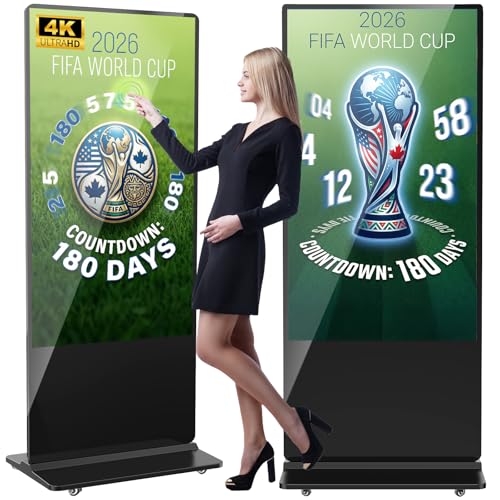
- 65-inch 4K IPS display with 178° viewing angle
- Split-screen playback, loop mode, and timed scheduling
- Android floor-standing kiosk with Wi-Fi, HDMI, and USB
Best For: Large venues that want an interactive digital kiosk
Commercial 4K Signage – Samsung QE50T 50-Inch Business Display
If you need digital signage displays for a retail, lobby, or office setting, the Samsung QE50T focuses on reliability and clean presentation. It delivers 4K UHD clarity, a non-glare panel, and 300 nits of brightness, making it a practical fit for indoor business environments where content needs to stay readable.
Best For: Businesses that want a dependable 50-inch commercial display for scheduled, 16/7 operation.
Pros:
- 50-inch 4K UHD panel with Crystal 4K Processor for upscaling content.
- Non-glare screen and 300-nit brightness for business environments.
- Supports HDMI, USB playback, and built-in speakers.
- VESA 200 x 200 mounting for portrait or landscape installs.
Cons:
- Designed for 16/7 operation, not full 24/7 use.
- Brightness is suited to indoor use rather than very bright spaces.
This is a solid commercial display when you want straightforward signage hardware with reliable uptime and flexible mounting. It is best suited to content that needs to look sharp without requiring advanced playback hardware.
Signage Player Stick – Amazon Signage Stick 4K Media Player
When building digital signage displays across multiple locations, the Amazon Signage Stick is meant to simplify playback and remote control. It auto-launches your CMS in kiosk mode, supports 4K output over Wi-Fi 6E, and is designed for businesses that want a small player with quick setup.
Best For: Teams that need a compact 4K signage player with easy setup and CMS integration.
Pros:
- Auto-launches CMS content in kiosk mode for unattended operation.
- Works with leading CMS providers and supports automatic CMS updates.
- Easy setup with the free Amazon Signage app and mobile management.
- Includes secure boot, encrypted storage, and regular updates.
Cons:
- Requires a CMS subscription for full use.
- Advanced support for issues is limited to weekday business hours.
This stick is a strong choice if your priority is simpler fleet management rather than standalone screen hardware. It gives businesses a small, capable player that can keep signage running and updated with minimal effort.
Portable Touch Display – 15.6-Inch Android Signage Kiosk
This portable option for digital signage displays combines a 15.6-inch touch screen with a built-in battery and adjustable stand. It is aimed at indoor commercial spaces that want interactive signage, but it also adds features like wireless screen mirroring and app support for flexible day-to-day use.
Best For: Interactive indoor signage and portable presentations in retail, hospitality, or event spaces.
Pros:
- 10-point capacitive touch screen with 2K FHD resolution.
- Built-in 10,000mAh battery for 4 to 6 hours of use.
- Android 13 with 4GB RAM and 64GB storage for app installs.
- Supports wireless screen sharing and reverse control via Eshare.
Cons:
- Battery life is limited compared with plugged-in signage.
- 15.6-inch size is better for close-range viewing than large spaces.
Overall, this is a versatile signage kiosk for environments that benefit from touch interaction and mobility. The battery and stand make it easier to move between use cases, but it is best treated as a compact indoor solution rather than a large-format display.
OptiSigns Player – OptiStick 4K UHD HDMI Stick
If you already use OptiSigns for digital signage displays, this OptiStick is a purpose-built player that keeps setup and management simple. It supports 4K UHD output, remote screen management, and a wide app library, making it a practical add-on for subscription-based signage networks.
Best For: OptiSigns users who want a compact, easy-to-manage 4K player for one screen.
Pros:
- Pre-installed OptiSigns Player for remote management from anywhere.
- Supports 4K UHD output, HDR, and AV1 decoding.
- Built-in Wi-Fi and Ethernet for flexible connectivity.
- Access to 160+ apps and 5,000+ ready-to-use templates.
Cons:
- Requires an OptiSigns subscription for full use.
- Free plan is limited to 3 screens and includes branding.
This is a focused solution for businesses already committed to the OptiSigns ecosystem. It is less about hardware flexibility and more about making content deployment and screen management fast and consistent.
Countertop Menu Display – 18.5-inch 700-Nit Digital Menu Board
If you need a compact digital signage display for counters, checkout areas, or reception desks, this 18.5-inch model is built around simple day-to-day menu and promotion updates. It combines 700 nits of brightness with Android 12, cloud CMS control, and USB plug-and-play support, making it practical for businesses that want both remote management and quick local changes.
Best For: Cafés, restaurants, salons, hotel receptions, and retail counters that need a bright desktop sign.
Pros:
- 700 nits brightness helps content stay visible in commercial indoor spaces.
- Free lifetime cloud CMS supports remote scheduling, playlists, and multi-screen management.
- Landscape or portrait desktop stand makes it flexible for countertop layouts.
- Multiple inputs, including HDMI, LAN, USB, and TF card, support local or cloud workflows.
Cons:
- 1366 x 768 resolution is lower than Full HD or 4K options.
- Best suited to smaller display needs rather than large-format signage.
- Designed for desktop use, so it is not a wall-sized commercial screen.
Overall, this is a practical choice if you want a bright, compact digital signage display that is easy to manage remotely and well matched to countertop marketing. It focuses on reliability, simple operation, and flexible placement rather than premium resolution.
Interactive Kiosk Pick – OptiSigns 32-inch Floor Standing Touch Display
This digital signage display is aimed at interactive retail and event use, with a 32-inch Full HD touchscreen, 10-point touch, and built-in support for OptiSigns tools and templates. It is ready to set up out of the box, and the optional rechargeable battery adds portable flexibility for pop-ups, trade shows, and mobile displays.
Best For: Interactive kiosks, pop-up events, retail engagement, and portable digital experiences.
Pros:
- 32-inch 1080p touchscreen with 10-point touch supports interactive experiences.
- Pre-installed OptiSigns Player and remote management simplify setup and control.
- Optional battery can provide up to 8 hours of runtime for mobile use.
- Built-in integrations with 160+ tools plus 5,000+ templates speed up content creation.
Cons:
- Requires an OptiSigns subscription for full use.
- Free plan is limited to 3 screens and includes OptiSigns branding.
- It is purpose-built for OptiSigns, so it is not a general Android kiosk.
If your priority is an interactive, managed signage experience rather than a generic display, this kiosk offers a strong mix of touchscreen capability, software integration, and portable design. It is especially appealing when you want quick deployment with minimal technical setup.
Large-Format 4K Display – 50-inch 1000-Nit Commercial Signage Screen
For businesses that want a larger digital signage display with strong visibility and high-resolution content, this 50-inch commercial screen brings 4K support, 1000 nits of brightness, and an ultra-thin bezel design. It is built for 24/7 playback, remote CMS management, and flexible content layouts, which makes it a solid fit for demanding retail and restaurant installations.
Best For: Restaurants, retail stores, and commercial spaces needing a large bright display with 4K visuals.
Pros:
- 1000 nits brightness supports visibility in busy commercial environments.
- 4K UHD support and a 178° viewing angle help content look sharp from more positions.
- Ultra-narrow bezels and slim profile suit clean wall-mounted installations and multi-screen setups.
- Free CMS supports remote scheduling, brightness control, and menu switching.
Cons:
- Large 50-inch size may be more display than smaller counters or desks need.
- Installation is best suited to wall-mount or larger commercial spaces.
- Advanced features may be unnecessary for simple static signage.
This model stands out when you want a premium-looking commercial screen that can handle bright environments and detailed visuals. It is a better fit for larger venues than compact signage, especially when remote management and 24/7 operation matter.
Portable Indoor Digital Signage – 32 Inch Loop-Ready Display
This 32-inch digital signage display is built for straightforward indoor advertising where you need a bright, easy-to-update screen without a complicated setup. Its FHD IPS panel, wide viewing angle, and auto loop playback make it a practical fit for menus, promotions, and announcements in busy customer-facing spaces.
Best For: Restaurants, retail stores, hotels, and event setups that need a portable plug-and-play signage screen.
Pros:
- FHD IPS display with a 178° viewing angle for clear visibility from different positions
- USB and HDMI input with auto loop playback for simple plug-and-play operation
- CMS support for remote publishing and real-time content updates
- Foldable, movable design with built-in wheels for easier relocation
Cons:
- Best suited to indoor use rather than outdoor signage
- Portability is helpful, but it still requires floor space
Overall, this model works well when you want a flexible digital signage display that can be moved between locations and kept running continuously. The remote content tools and scheduling features add convenience for businesses that update messaging often.
Ultra-Wide Retail Shelf Display – 29 Inch 700-Nit Bar Screen
This ultra-wide digital signage display is designed to turn shelf space and service counters into active messaging areas. With a bright 700-nit commercial panel and multi-zone playback, it is a strong choice when you want pricing, product details, and promotions to sit together on one clean screen.
Best For: Retail shelves, checkout areas, and service counters that need a slim display-only signage screen.
Pros:
- Ultra-wide format fits above shelves and along aisles without using floor space
- Multi-zone playback lets you show video, pricing, and brand content at the same time
- Cloud-based CMS supports remote updates for one screen or multiple locations
- 700-nit FHD panel and full-metal enclosure are built for continuous commercial use
Cons:
- This is a display-only screen, not a touchscreen or self-service kiosk
- Best suited for horizontal mounting locations rather than stand-alone floor placement
For stores that need an efficient way to communicate at the shelf level, this model offers a polished and space-saving approach. The wide layout and remote scheduling tools make it easier to keep promotional content consistent across locations.
Interactive Floor-Standing Digital Signage – 65 Inch 4K Touchscreen Kiosk
This 65-inch digital signage display is aimed at businesses that want a large, attention-grabbing screen with interactive and automated playback options. The 4K IPS panel, split-screen content support, and Android-based controls make it suitable for high-traffic environments that need flexible advertising or information delivery.
Best For: Airports, malls, hospitals, restaurants, and stores that want a large floor-standing interactive signage solution.
Pros:
- Large 65-inch 4K IPS display with a 178° viewing angle for strong visibility
- Supports split-screen playback, automatic loop playback, and timed on/off scheduling
- Offers touch and non-touch versions plus HDMI, USB, Wi-Fi, and Ethernet connectivity
- Floor-standing design with Android OS and built-in speakers for commercial use
Cons:
- At 60 kg, it is a substantial unit that will need dedicated placement
- Its size is better suited to larger venues than compact spaces
As a premium-format digital signage display, this model focuses on flexibility, visibility, and branded presentation. It makes the most sense where a large screen can serve as both an advertising piece and an information hub.
How We Picked These Digital Signage Displays
We looked for business-ready hardware that balances screen size, brightness, resolution, mounting style, and management features. We also favored models with practical inputs, commercial operation ratings, and options that fit different deployment needs, from static promotions to touch-enabled experiences.
Quick Comparison
If you want a simple content screen, a 4K display or signage player may be the easiest path. If visibility in bright indoor spaces matters most, prioritize higher brightness. For customer interaction, choose a touchscreen kiosk with software support and stable connectivity. For shelf-edge or menu use, smaller ultra-wide and mid-size panels are often a better fit than larger displays.
Key Buying Factors for Digital Signage Displays
Size and Viewing Distance
Match the screen size to how far viewers will stand from it. Smaller displays work well for counters, shelves, and close-range messaging, while 50-inch and 65-inch models are better for lobbies, storefronts, and larger rooms.
Brightness and Environment
Brightness is critical in retail windows, bright entrances, and sunlit areas. Higher-nit screens are easier to see in challenging lighting, while lower-brightness units can still perform well in controlled indoor environments.
Resolution and Content Type
4K is best for sharp graphics, detailed promotions, and premium branding. Full HD can still be perfectly suitable for menus, wayfinding, and simpler announcements, especially on smaller panels.
Management and Playback
Some Digital Signage Displays are standalone screens, while others include media players, Android systems, or CMS compatibility. If you need frequent updates across multiple locations, remote management can save time and reduce manual work.
Touch, Mounting, and Power
Touchscreen and kiosk formats are ideal for interactive use, but they usually cost more and require more planning. Battery-powered or floor-standing units offer flexibility for events, while wall-mounted screens are often best for permanent installations.
Who Should Buy Which Digital Signage Displays?
Retail and hospitality buyers should lean toward bright commercial panels and menu-board-friendly formats. Offices and lobbies may prefer polished 4K displays or easy-to-manage media players. Event teams and experiential marketers should look closely at portable or battery-powered kiosks. If interactivity matters, choose touchscreen Digital Signage Displays with reliable software and the right connectivity for your workflow.