A reliable desk fan can make long remote-work sessions more comfortable without taking up the space or power of a full-size floor fan. The best USB desk fans for remote work combine quiet operation, adjustable airflow, flexible positioning, and convenient USB or battery power.
We compared 10 compact models across speed control, rotation, noise, portability, runtime, and everyday desk usability to help you choose the right personal fan for your workspace.
Best 10 USB Desk Fans for Remote Work Picks for 2026
Best Customizable Breeze
KIMMOO 100-Speed Rechargeable Desk Fan

- 100 adjustable speed levels with digital display
- Up to 8.5 hours of rechargeable runtime
- Compact, quiet, and easy to reposition
Best For: Remote workers wanting precise airflow control and cordless use
Best Simple Plug-In Pick

- USB-powered with a 4.9-foot cable
- Three speeds and 360-degree vertical rotation
- Lightweight design with a stable non-slip base
Best For: Fixed desks with an available USB port
Best Whole-Room Circulation
Rechargeable Remote-Controlled Desk Fan

- 90° vertical and 120° horizontal auto-oscillation
- 10,000mAh battery rated for 10–18 hours
- Remote control, digital display, and 100 speeds
Best For: Larger home offices needing broad, cordless air circulation
Best Compact Quiet Fan

- Space-saving 4.5-inch personal fan
- Three speeds with 360-degree tilt adjustment
- Detachable cover for easier cleaning
Best For: Small desks and close-range personal cooling
Best Adjustable Airflow
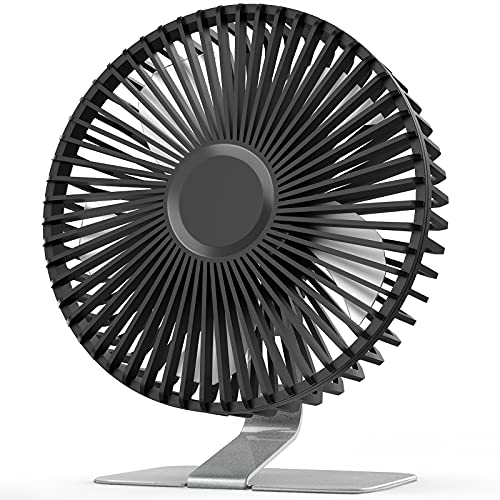
- Four speed settings with a powerful top mode
- Stable metal base and 0–90-degree tilt
- Removable front cover for easier cleaning
Best For: Home offices needing strong, directed airflow
Best Cordless Flexibility
DIGIX Portable Rechargeable Desk Fan
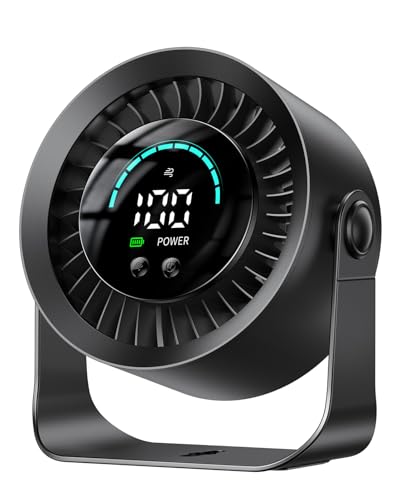
- 3000mAh battery supports up to 17 hours on low
- 100 speeds and 360-degree rotation
- Tabletop or wall-mountable design with LED display
Best For: Cordless home-office cooling and flexible placement
Best Simple Quiet Design

- Three-speed control with a 360-degree adjustable angle
- 30 dB listed noise level and anti-slip base
- USB powered with removable front cover
Best For: Lightweight, uncomplicated cooling at a work desk
Best Compact Pick
Gaiatop 5.5-Inch Quiet USB Desk Fan

- Three speeds with 90-degree tilt
- 6.5-ounce portable design
- USB-powered with a 4.9-foot cable
Best For: Small desks, travel, and laptop-powered cooling
Best Feature-Rich Pick
Coolhill 100-Speed Rechargeable Desk Fan

- 100 speeds with digital display
- 120-degree oscillation and 28 dB listing
- 3000 mAh rechargeable battery
Best For: Precise, cordless cooling in a home office
Best Customizable Breeze – KIMMOO 100-Speed Rechargeable Desk Fan
For remote workers who want precise control, the KIMMOO is a versatile choice among USB desk fans for remote work. Its 100 speed levels, digital display, rechargeable battery, and adjustable positioning make it easy to tailor airflow throughout the workday.
Best For: Home-office users who want highly adjustable airflow and cordless flexibility.
Pros:
- Offers 100 speed settings, from a gentle breeze to turbo airflow.
- Runs at a stated 35dB on its lowest setting for quieter use.
- Rechargeable battery provides up to 8.5 hours of operation and charges in about 2.5 hours.
- Digital display shows battery status and selected wind speed.
Cons:
- Its battery-powered design requires periodic recharging.
- The extensive speed range may be more adjustment than some users need.
The KIMMOO stands out when fine airflow control matters. Its compact, lightweight build and rechargeable operation suit desks, travel, and flexible work locations, while the digital display keeps settings easy to monitor.
Best Simple Plug-In Pick – TriPole 5.1-Inch USB Desk Fan
The TriPole TF01 is a straightforward option for shoppers comparing USB desk fans for remote work. It plugs into a computer, laptop, power bank, or USB wall adapter and uses a compact design that takes up little workspace.
Best For: Office users who prefer a lightweight, budget-minded fan powered directly from USB.
Pros:
- Works with common USB power sources and includes a 4.9-foot cable.
- Compact 5.1-inch fan head and lightweight 6.3-ounce design save desk space.
- Three speed settings provide simple airflow adjustment.
- 360-degree vertical rotation helps direct air where needed.
Cons:
- It must remain plugged in during use and has no built-in battery.
- A wall charger is not included.
This TriPole is best for a dedicated workstation with an available USB port. Its simple controls, non-slip base, and adjustable angle make it practical when you want uncomplicated personal cooling.
Best Whole-Room Circulation – Rechargeable Remote-Controlled Desk Fan
For a larger home office or shared room, this circulating fan brings more coverage than typical mini USB desk fans for remote work. It combines 100 speed levels, remote control, wide auto-oscillation, and a large rechargeable battery for extended cordless cooling.
Best For: Remote workers who need broad air circulation, long runtime, and control from across the room.
Pros:
- Provides 90-degree vertical and 120-degree horizontal auto-oscillation.
- Offers 100 speed levels with a digital display for speed and battery information.
- Its 10,000mAh battery is rated for 10 to 18 hours of runtime.
- Includes a remote control and supports USB charging or operation from USB power sources.
Cons:
- At 2.7 pounds, it is less portable than smaller personal fans.
- Its larger footprint may be excessive for a crowded desk.
- Full charging takes approximately four hours.
This model is a strong fit when you want to circulate air beyond a single seated position. Its oscillation range and remote make it convenient for a home office, though its larger size favors stationary use.
Best Compact Quiet Fan – TriPole Mini USB Desk Fan
The TriPole KW37 keeps personal cooling simple for remote workers with limited desk space. This small USB fan offers three speeds, a 360-degree adjustable head, and a detachable cover for easier cleaning.
Best For: Compact workstations, dorm desks, and users who want a quiet plug-in personal fan.
Pros:
- Small 4.5-inch fan design weighs about 6.3 ounces.
- Three wind modes provide basic airflow customization.
- 360-degree vertical adjustment directs airflow toward your face or workspace.
- Detachable cover supports routine cleaning of the grille and blades.
Cons:
- It requires continuous USB power and has no rechargeable battery.
- The manufacturer notes that the highest speed may require a 5V/1A USB charger.
The KW37 is a space-saving choice for close-range cooling. Its silicone-padded base helps reduce vibration, while the detachable cover is useful for keeping a frequently used office fan clean.
Best Adjustable Airflow – SLENPET 6-inch USB Desk Fan
For shoppers comparing USB desk fans for remote work, the SLENPET stands out with four speed settings, a sturdy metal base, and a 0–90-degree tilt. Its 4.9-foot USB cable connects to a laptop, power bank, wall charger, or other USB power source.
Best For: Home-office users who want strong, adjustable airflow from a stable, corded desk fan.
Pros:
- Four speed levels, including a highest setting activated by a long press.
- Heavy-duty vintage metal base helps keep the fan steady.
- Tilting head directs airflow, and the removable front cover simplifies cleaning.
- Noise is listed at less than 50 dB even at high speed.
Cons:
- It is USB-powered rather than battery-powered, so it needs a connected power source.
- The highest speed requires an output current of up to 2A.
This is a practical pick if you prioritize airflow control and a durable, steady base over cordless portability. Its compact metal design also suits desks where space is limited.
Best Cordless Flexibility – DIGIX Portable Rechargeable Desk Fan
The DIGIX is a flexible option among USB desk fans for remote work, combining USB charging with a 3000mAh rechargeable battery. It can run as a tabletop fan or mount to a wall, while 100 speed levels and 360-degree rotation make fine airflow adjustments easy.
Best For: Remote workers who want cordless operation, precise speed control, and flexible placement.
Pros:
- 3000mAh battery provides up to 17 hours of runtime on low speed.
- Offers 100 stepless speed settings for more precise comfort adjustments.
- 360-degree rotation directs airflow in multiple directions.
- Built-in LED display shows speed and remaining battery power.
Cons:
- The advertised 17-hour runtime applies to low-speed use.
- Its 100 speed settings may be more control than some users need.
Choose this model when moving your fan between rooms, working away from an outlet, or saving desk space matters. Wall mounting and the battery indicator add useful flexibility for a home office.
Best Simple Quiet Design – SWEETFULL Small USB Desk Fan
For straightforward USB desk fans for remote work, the SWEETFULL offers three speeds, a compact footprint, and a 4.7-foot USB cable. Its broad 5.8-inch airflow area, adjustable angle, and quiet operation make it suited to focused desk work.
Best For: Users seeking a lightweight, quiet, easy-to-use fan for a laptop or office desk.
Pros:
- Three simple speed settings provide easy one-button control.
- 360-degree adjustment helps aim airflow where needed.
- Listed noise level is 30 dB, with an anti-slip base to reduce vibration.
- Removable front cover makes blade and grille cleaning easier.
Cons:
- No battery is included, so it must remain connected to USB power.
- It has three speeds rather than the finer adjustment offered by some models.
This fan makes sense for a minimalist workstation where quiet, uncomplicated cooling is the priority. The lightweight build and broad airflow area are useful when you want a personal breeze without taking up much space.
Best Compact Pick – Gaiatop 5.5-Inch Quiet USB Desk Fan
For shoppers comparing USB desk fans for remote work, the Gaiatop is a compact, lightweight option with three speeds, a 90-degree tilt, and a 4.9-foot cable. Its USB connection works with a laptop, power bank, wall adapter, or other USB power source, making it easy to position around a home-office setup.
Best For: Small desks, travel, dorms, libraries, and laptop-powered cooling.
Pros:
- Three airflow speeds, from soft to strong.
- Lightweight 6.5-ounce design is easy to carry.
- 90-degree tilt and a stable rubber-padded base help direct airflow securely.
- Detachable cover supports easier cleaning.
Cons:
- It requires a USB power source and does not list a built-in battery.
- The compact size may provide less room coverage than a larger desk fan.
The Gaiatop makes sense when portability and simple USB operation matter most. It offers useful adjustability without taking much workspace, though users seeking cordless operation will need a different model.
Best Quiet Airflow – Koonie 5-Inch USB Desk Fan
The Koonie is a practical choice among USB desk fans for remote work when quiet operation and directed airflow are priorities. Its seven-blade design, three speed settings, 180-degree adjustability, and stable triangular base fit neatly into a crowded home-office workspace.
Best For: Quiet home-office use and desktops where airflow needs frequent repositioning.
Pros:
- Seven-blade design provides airflow rated up to 15.4 feet per second.
- Three speeds switch easily with a button.
- 180-degree adjustment helps aim air where needed.
- Listed noise level is 35 dB, while the compact design saves desk space.
Cons:
- It is not rechargeable and must remain connected to USB power.
- The supplied notes identify USB-C connectivity, so an appropriate cable or power source is required.
Choose the Koonie if you want a compact fan with broad positioning flexibility and a low listed noise level. Its main limitation is the lack of battery power, which makes it better suited to a fixed desk than mobile use.
Best Feature-Rich Pick – Coolhill 100-Speed Rechargeable Desk Fan
For remote workers who want more precise control, this Coolhill model stands out among USB desk fans for remote work with 100 speed levels, a digital display, 120-degree oscillation, and a built-in rechargeable battery. It can run from a USB connection or operate wirelessly for several hours after charging.
Best For: Home offices needing fine airflow control, oscillation, and cordless flexibility.
Pros:
- Offers 100 adjustable speed levels with a visible digital readout.
- Turbo airflow reaches up to 6 m/s, according to the supplied notes.
- 120-degree oscillation helps distribute air across a wider area.
- Built-in 3000 mAh battery provides approximately 3–10 hours of operation after about 2.5 hours of charging.
Cons:
- Its feature set and 14.4-ounce weight make it less minimal than basic USB fans.
- The battery runtime varies from approximately 3 to 10 hours depending on use.
- The supplied details do not specify the included USB cable.
The Coolhill is the most versatile option here for users who value granular speed adjustments and cordless use. Its digital display and oscillation add convenience, while the rechargeable battery helps keep cooling available away from an outlet.
How We Picked the Best USB Desk Fans for Remote Work
We focused on features that matter during video calls, focused work, and extended desk sessions. Each model was evaluated for airflow adjustment, operating noise, power options, positioning flexibility, controls, and portability. We also considered practical details such as digital displays, timers, oscillation, rechargeable batteries, and compact footprints.
Because “quiet” is not measured consistently across every product listing, treat stated noise levels as useful comparisons rather than guarantees. Your desk position, room acoustics, and selected speed can all affect perceived sound.
Quick Comparison
| Best For | Features to Look For | Models That Fit |
|---|---|---|
| Video calls and quiet offices | Low-noise operation, smooth speed control | Fan with remote, Koonie, SWEETFULL |
| Precise airflow adjustment | Many speed settings and a digital display | KIMMOO, DIGIX, 100-speed rechargeable model |
| Flexible positioning | 360-degree rotation or oscillation | TriPole, DIGIX, Fan with remote |
| Portable use | Rechargeable battery and compact design | KIMMOO, DIGIX, rechargeable 100-speed model |
| Stronger room circulation | Larger blades or higher airflow output | SLENPET, Fan with remote |
Key Buying Factors for USB Desk Fans for Remote Work
Noise and Airflow Control
A fan with several speed levels lets you use a gentle setting during calls and stronger airflow when the room heats up. Ultra-quiet operation is especially valuable if your microphone picks up background noise.
Power and Battery Life
USB-powered fans are convenient for laptops, adapters, power banks, and docking stations. Rechargeable models offer more freedom to reposition the fan, but check charging time and expected runtime if you plan to use one away from an outlet.
Positioning and Coverage
Adjustable tilt is useful for directing airflow at your face or upper body. A rotating or oscillating fan can cool a broader area, while a fixed personal fan may be better when you want airflow aimed precisely at one chair.
Size, Controls, and Extras
Measure the available desk space before buying. Digital displays, remotes, timers, and memory settings can improve convenience, but they may add cost or complexity. A simple fan with dependable speed controls can be the better choice for a small workstation.
Who Should Buy Which USB Desk Fans for Remote Work?
Choose KIMMOO, DIGIX, or the rechargeable 100-speed model if you want fine airflow control and cordless flexibility. The TriPole models suit users who prioritize compact size and multi-angle positioning. Choose the fan with remote if you want oscillation, a timer, and control from across the room. SLENPET is a sensible pick for users who want a somewhat larger desktop fan and stronger circulation, while SWEETFULL, Gaiatop, and Koonie are better suited to simple personal cooling in a compact office setup.
For most remote workers, prioritize low-speed noise, stable placement, and adjustable airflow before maximum speed. Those factors are more likely to improve daily comfort than a long list of extra modes.