Running out of motherboard USB headers or convenient ports can make an otherwise capable workstation frustrating to use. The right hub can connect internal controllers, bring ports within reach, or add storage to a compact desktop.
These nine options cover different jobs, from powered USB 2.0 header expansion to front-panel access and Mac desktop docks. Start with the connections your system actually has, then choose the accessory that solves your bottleneck.
Best 9 Workstation Internal Hub Accessories Picks for 2026
Flexible PC Expansion

- Four internal USB 2.0 ports
- SATA-powered connection
- Magnet or 3M Dual Lock mounting
Best For: Desktop builders needing flexible internal USB expansion
Mac Mini Desk Dock
UGREEN Dock & Stand with NVMe Enclosure

- Seven USB ports and SD/TF readers
- M.2 NVMe enclosure; SSD sold separately
- Power-button lever for Mac mini
Best For: Mac mini users seeking ports and expandable desk storage
Compact Case Hub
Corsair Internal 4-Port USB 2.0 Hub

- Four 9-pin USB 2.0 ports
- Magnetic case mounting
- Fits tight spaces, including Mini-ITX
Best For: Compact PC builds with multiple internal USB devices
Mac Studio Upgrade
Satechi Hub & Stand with SSD Enclosure

- Mac Studio-specific hub and stand
- Optional M.2 SSD enclosure, up to 10Gbps
- Front USB, card readers, and audio
Best For: Mac Studio users seeking accessible ports and added SSD storage
Front-Bay Expansion
Kingwin 5.25-Inch USB and Card Reader Hub
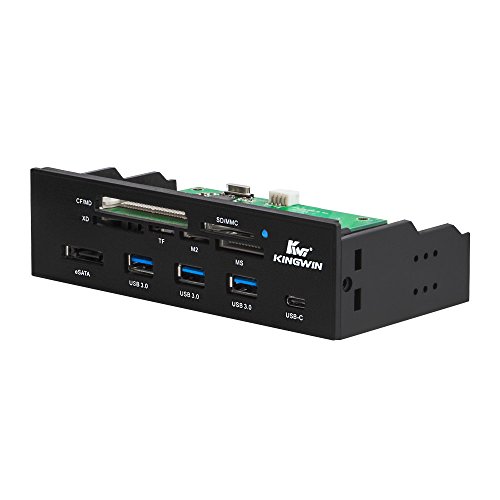
- Fits a 5.25-inch case bay
- Front USB-A, USB-C, and eSATA
- Six card-reader slots
Best For: Desktops with a free front bay and frequent card-reader use
Header Expansion
EZDIY-FAB MH01 Internal USB 2.0 Hub

- Turns one 9-pin header into four
- Hybrid signal and SATA-power cable
- Compact magnetic mounting
Best For: PC builds short on internal USB 2.0 headers
Most Versatile Front Panel
Jinlorion 5.25-Inch Media Dashboard

- USB 3.0 plus USB 2.0, eSATA, and SATA
- Audio ports and multi-format card reader
- Includes cables, screws, and status LEDs
Best For: Desktop users who need varied front-access connections
Best Internal Header Expansion

- Expands one 9-pin header into four
- Uses dedicated SATA power
- Magnetic backplate aids placement
Best For: Builds with multiple internal USB accessories
Best Simple USB Front Panel
Sanpyl 5.25-Inch Four-Port Hub

- Four front-access USB ports
- Designed for a 5.25-inch bay
- Specified as USB 2.0
Best For: Desktops needing straightforward front USB expansion
Flexible PC Expansion – NZXT Internal USB Hub 3
Among workstation internal hub accessories, the NZXT Internal USB Hub 3 is a practical way to add four internal USB 2.0 connections when your desktop motherboard headers are already occupied. It connects to the motherboard and uses SATA power.
Best For: Desktop builders who need more internal USB 2.0 connections and flexible mounting options.
Pros:
- Adds four internal USB 2.0 ports.
- SATA power provides a dedicated power connection.
- Built-in magnet and included 3M Dual Lock tape offer mounting options.
Cons:
- Limited to USB 2.0 speeds of up to 480 Mbps.
- Requires an available motherboard USB connection and SATA power.
Choose this hub for internal USB expansion rather than faster data transfers. Its mounting choices make it easier to place out of sight inside a desktop case.
For shoppers comparing workstation internal hub accessories, this UGREEN dock takes a different approach: it sits with a compatible Mac mini and combines external ports with an enclosure for an M.2 NVMe SSD. The enclosure supports 2230, 2242, 2260, and 2280 drives up to 8TB; the SSD is sold separately.
Best For: Mac mini users who want accessible desk connections and expandable SSD storage in one stand.
Pros:
- Includes seven USB ports plus SD and TF card readers.
- Supports up to 10Gbps transfers through its specified USB ports and SSD connection.
- Power-button lever and anti-slip pads add everyday convenience.
Cons:
- SSD is not included.
- An external power adapter is recommended for setups with multiple connected devices.
Check your Mac mini model against the stated compatibility before buying. This is a desktop dock and storage expansion option, not an internal motherboard USB hub.
The Corsair Internal 4-Port USB 2.0 Hub is a focused choice among workstation internal hub accessories when an AIO cooler, RGB controller, or other in-case device needs a USB header. Its four 9-pin USB 2.0 ports help consolidate those connections inside the case.
Best For: PC builders adding several internal USB 2.0 devices, including in compact cases.
Pros:
- Provides four internal 9-pin USB 2.0 ports.
- Magnetic mounting simplifies placement on a suitable case surface.
- Designed to fit tight spaces, including Mini-ITX cases.
Cons:
- USB 2.0 bandwidth is limited to up to 480 Mbps.
- Installation needs USB 2.0 and SATA connections.
This is a straightforward pick for internal device connectivity, not high-speed peripherals. Confirm you have the required connections and a suitable mounting spot before installation.
Mac Studio Upgrade – Satechi Hub & Stand with SSD Enclosure
For Mac Studio owners comparing workstation internal hub accessories, this Satechi stand combines front-facing ports with an enclosure for an optional M.2 NVMe or SATA SSD. It is a Mac Studio-specific expansion option, not a motherboard header hub.
Best For: Mac Studio users who want easier access to USB ports, card readers, audio, and added SSD storage.
Pros:
- Supports compatible 2242, 2260, and 2280 M.2 NVMe or SATA SSDs at up to 10Gbps.
- Adds USB-C, three USB-A ports, SD and microSD readers, and a 3.5mm audio jack.
- Vented aluminum design is intended to promote airflow.
Cons:
- SSD is not included, and drives with pre-installed heatsinks are not compatible.
- Not compatible with Mac mini M4; USB-A ports have stated device and bus-power limitations.
Choose this if you have a supported Mac Studio and value convenient desktop connectivity as much as extra storage. Check your SSD and peripheral needs against the compatibility limits before buying.
If your desktop case has a free 5.25-inch front bay, this Kingwin unit puts frequently used connections within reach. Among workstation internal hub accessories, it is geared toward front-panel USB access and reading several memory-card formats rather than expanding internal motherboard headers.
Best For: Desktop builders with an available 5.25-inch bay who regularly connect USB devices or use different memory cards.
Pros:
- Provides three front USB 3.0 Type-A ports, one USB-C port, and an eSATA port.
- Includes six card-reader slots supporting formats such as SD, CF, MS, xD, TF, and M2.
- USB 3.0 Type-A ports offer stated bandwidth up to 5Gbps.
Cons:
- Requires a free 5.25-inch case bay.
- The supplied specifications do not establish charging wattage or per-port power limits.
This is the practical pick when front access and broad card-format support matter most. Confirm your case has the required bay and that its connections match your build.
For workstation internal hub accessories that solve a shortage of motherboard USB 2.0 headers, the EZDIY-FAB MH01 turns one 9-pin header connection into four. Its compact body and magnetic mounting are aimed at keeping internal device connections organized.
Best For: PC builders connecting multiple internal USB 2.0 devices, such as AIOs, fan or RGB hubs, front I/O, and Bluetooth modules.
Pros:
- Expands one USB 2.0 header into four connections.
- Combines the motherboard signal and SATA power through a hybrid Type-C cable.
- Magnetic mounting and a 3.8 × 2.3 × 0.6-inch body support flexible placement.
Cons:
- Intended for internal USB 2.0 header devices, not front-access USB 3.0 peripherals.
- The notes conflict on appearance: the listing specifies white, while one feature description calls the finish black.
Pick this to address an internal header bottleneck, not to add external ports. Verify the finish if matching your build’s color scheme matters.
Most Versatile Front Panel – Jinlorion 5.25-Inch Media Dashboard
For workstation internal hub accessories that put frequently used connections within reach, this 5.25-inch media dashboard combines USB, audio, storage connections, and card slots on your PC’s front panel.
Best For: Desktop builders who regularly connect memory cards, external drives, headphones, and USB devices.
Pros:
- Includes USB 3.0, USB 2.0, eSATA, SATA, audio, and a multi-format card reader.
- USB 3.0 supports speeds up to 5Gbps.
- Includes mounting screws and connection cables, plus power and drive-activity LEDs.
Cons:
- Requires an available 5.25-inch bay and compatible motherboard connections.
- Card-reader support is specified for cards up to 64GB.
Choose this when connection variety matters more than a simple USB-only panel; check your case bay and internal headers before ordering.
Best Internal Header Expansion – upHere 1-to-4 USB 2.0 Hub
Among workstation internal hub accessories, this upHere hub addresses a specific build problem: one internal 9-pin USB 2.0 header is not enough for your compatible accessories. It expands that header into four internal connections.
Best For: Desktop builders connecting multiple USB-controlled cooling, lighting, or monitoring devices inside a case.
Pros:
- Turns one internal 9-pin USB 2.0 header into four connections.
- Dedicated SATA power supplies the hub.
- Magnetic backplate allows tool-free placement inside a compatible case.
Cons:
- USB 2.0 is limited to a stated 480Mbps.
- Requires an available internal USB header and SATA power connection.
This is an internal connectivity hub, not a set of front-facing USB ports; choose it when internal header availability is the constraint.
Best Simple USB Front Panel – Sanpyl 5.25-Inch Four-Port Hub
If your workstation internal hub accessories only need to add reachable USB connections, this Sanpyl panel offers four USB 2.0 ports in a standard 5.25-inch optical-drive bay format.
Best For: Desktop owners who want four front-access USB 2.0 ports without a multi-format media dashboard.
Pros:
- Adds four front-facing USB ports.
- Fits a standard 5.25-inch optical-drive bay.
- USB 2.0 ports accommodate multiple connected peripherals.
Cons:
- USB 2.0 is slower than USB 3.0 for large transfers.
- Requires an available 5.25-inch bay.
This is the straightforward choice for extra front USB access. Despite “USB C” in the title, the supplied notes do not establish a USB-C port, so verify the port layout before buying.
How We Picked These Workstation Internal Hub Accessories
We focused on the jobs these accessories are designed to do: expand motherboard USB headers, add accessible front-panel connections, or extend a Mac desktop with ports and SSD storage. We also considered stated connector types, power requirements, mounting methods, and compatibility. A Mac dock is not a substitute for a PC motherboard header hub, so the best choice depends on your system—not the longest port list.
Quick Comparison: Match the Hub to the Job
For a PC build with too few internal USB 2.0 headers, start with the NZXT, Corsair, EZDIY-FAB, or generic 9-pin expansion hubs. The NZXT, Corsair, and generic options list four-port expansion; check each listing to confirm whether that means four header connections or four individual USB ports. If you need connections at the front of a tower, compare the 5.25-inch media dashboard and Sanpyl front-panel hub. The Kingwin powered hub offers a different mix of USB and card-reader access. For a Mac mini or Mac Studio, choose a dock built for your specific computer rather than a motherboard accessory.
Key Buying Factors for Workstation Internal Hub Accessories
Connector and System Compatibility
Check the motherboard manual before ordering a 9-pin USB 2.0 hub: you need an available internal header, and the hub’s outputs must match the plugs on your cooler, controller, or other devices. A USB 2.0 header hub does not turn those connections into USB 3.x ports. For a Mac dock, confirm the exact Mac model and available host connection; do not rely on a similar-looking enclosure or broad model wording.
Power and Device Load
Some internal hubs use SATA power in addition to a motherboard header. Check that your power supply has a reachable SATA power connector, especially in a crowded case. Powered expansion can be useful for several attached devices, but verify the hub’s specifications rather than assuming every port can supply the same current or bandwidth simultaneously.
Mounting, Access, and Storage
Magnetic mounting can simplify placement in a steel case, but check clearance and cable reach before you buy. A 5.25-inch front panel needs a compatible, unobstructed drive bay; many newer cases lack one. For docks with an NVMe enclosure, confirm the supported SSD format, interface, and whether the drive is included. Front-panel USB-C connector shape alone does not establish its data speed—check the stated interface.
Who Should Buy Which Workstation Internal Hub Accessories?
Choose a compact internal header hub if your main problem is connecting an AIO, lighting controller, or other USB 2.0 device inside a PC. Choose a front-panel unit if you regularly plug in removable drives, cards, or peripherals and have the required bay and headers. Consider the Kingwin option when its particular USB and card-reader mix fits your workflow. Mac mini and Mac Studio users should prioritize the corresponding model-specific dock, particularly if desk access and NVMe storage matter. Before checkout, confirm connector availability, power, physical fit, and the exact revision of the product listing.