As you think about upgrading your PC setup in 2026, consider how essential front panel USB hubs can be for enhancing connectivity. These hubs not only streamline your workflow but also add functionality with multiple ports and card readers. You’ll want to explore the best options available, ensuring you choose one that fits your specific needs. Let’s take a closer look at the top contenders that can elevate your experience.
GRAUGEAR 3.5 Inch Front Panel USB C Hub with SD/microSD Card Reader
If you’re looking to maximize your PC’s connectivity options, the GRAUGEAR 3.5 Inch Front Panel USB C Hub is a standout choice. This sleek hub transforms your 3.5-inch floppy drive space into a modern connectivity powerhouse. It features two USB 3.2 Gen 2 Type-C ports and two USB 3.0 ports, delivering fast data transfer rates of up to 20Gbps. You’ll also appreciate the SD and microSD card slots for easy access to your files. Compatible with various Windows operating systems, it’s built to last with safety features like over-current protection. Upgrade your setup effortlessly with this efficient hub.
Best For: The GRAUGEAR 3.5 Inch Front Panel USB C Hub is best for PC users looking to expand their connectivity options with modern ports and card readers.
Pros:
- High-speed data transfer: Supports USB 3.2 Gen 2 with up to 20Gbps transmission rates.
- Multiple connectivity options: Offers two USB Type-C ports, two USB 3.0 ports, and card slots for SD and microSD.
- Durable and safe: Built with protective features like over-current and short circuit protection for reliable usage.
Cons:
- Installation requirements: May require additional adapters for older motherboards, complicating setup.
- Limited compatibility: Only compatible with Windows operating systems, excluding Mac or Linux users.
- Size constraints: Fits only in a 3.5-inch floppy drive bay, which may not be available in all cases.
GRAUGEAR Front Panel USB Hub with SD/microSD Card Reader

For photographers and content creators seeking efficient data management, the GRAUGEAR Front Panel USB Hub with SD/microSD Card Reader stands out with its convenient built-in card slots. This hub fits in a standard 5.25” bay and features a Gen2x2 20Gbps USB-C port alongside dual USB-A ports for rapid data transfer. It also includes dual 2.5″ SSD/HDD slots with tool-free mounting. The UHS-I SD and microSD card slots make it easy to work with various media from cameras and drones. Its compatibility with most desktop PC cases guarantees it integrates smoothly into your setup, enhancing your workflow considerably.
Best For: Photographers and content creators looking for efficient data management and seamless connectivity.
Pros:
- High-speed data transfer with a USB-C port offering up to 20Gbps throughput.
- Convenient built-in UHS-I SD and microSD card slots for easy media access.
- Tool-free mounting for dual 2.5″ SSD/HDD slots simplifies storage upgrades.
Cons:
- Limited to standard 5.25″ bay compatibility, which may not fit all cases.
- May require additional internal headers for full functionality depending on the system.
- Some users may find the installation process challenging if unfamiliar with PC components.
GRAUGEAR 3.5 Inch Front Panel USB C Hub with SD/microSD Card Reader
The GRAUGEAR 3.5 Inch Front Panel USB C Hub is an excellent choice for users looking to maximize their PC’s connectivity options while maintaining a sleek appearance. With two USB 3.2 Gen 2 Type-C ports and two USB 3.0 ports, you’ll enjoy rapid data transfer speeds of up to 20Gbps. The integrated SD and microSD card readers add further versatility for file management. Installation is straightforward—just convert your 3.5’’ floppy drive space. Designed for durability, it features over-current and short circuit protection. Plus, with a solid customer rating of 4.2 stars, you can trust its performance in your setup.
Best For: Users seeking to enhance their PC’s connectivity with modern USB ports and card readers in a compact design.
Pros:
- High-Speed Data Transfer: Offers up to 20Gbps with USB 3.2 Gen 2 Type-C ports and 5 Gbps with USB 3.0 ports.
- Versatile Card Reader: Includes both SD and microSD card slots for easy file management and access.
- Durable Construction: Built with safety features like over-current and short circuit protection for reliable long-term use.
Cons:
- Installation Requirements: May require additional adapters for older motherboards, complicating setup for some users.
- Limited Compatibility: Only compatible with specific Windows operating systems, which may exclude some users.
- Space Limitation: Designed to fit in a 3.5’’ floppy drive slot, which might not be available in all computer cases.
GRAUGEAR 5.25 Inch USB 3.2 PC Front Panel Card Reader

Ideal for tech enthusiasts and gamers, the GRAUGEAR 5.25 Inch USB 3.2 Front Panel Card Reader transforms your PC’s floppy disk drive space into a multifunctional hub. With two USB 3.2 Gen 2 USB-C ports, two USB 3.0 ports, and slots for SD and microSD cards, it enhances your connectivity options. You’ll enjoy lightning-fast data transfer speeds of up to 10Gbps, while remaining compatible with older USB standards. Installation is straightforward, requiring a USB 3.2 Type-E Key-A 20-Pin header. Plus, with built-in safety features, you can trust that your devices will be protected. Elevate your setup effortlessly!
Best For: Tech enthusiasts and gamers looking to enhance their PC’s connectivity and functionality.
Pros:
- High data transfer speeds of up to 10Gbps with USB 3.2 Gen 2 support.
- Multiple connectivity options with two USB-C ports, two USB 3.0 ports, and slots for SD/microSD cards.
- Built-in safety features including over-current, over-voltage, and short circuit protection.
Cons:
- Requires specific motherboard compatibility with USB 3.2 Type-E Key-A 20-Pin header.
- Installation may be challenging for users with older hardware needing adapters.
- SATA power connector is necessary for operation, which may limit setup options.
GRAUGEAR 5.25 Inch Internal USB Hub Front Panel

Looking to enhance your PC setup with efficient connectivity? The GRAUGEAR 5.25 Inch Internal USB Hub Front Panel is a perfect choice. It features a USB-C port offering 20Gbps data transfer speeds and two USB-A ports at 5Gbps, ensuring rapid access for your devices. Designed to fit a standard 5.25-inch internal bay, it includes dual 2.5-inch SSD/HDD bays for added storage. Its tool-free installation makes upgrades a breeze, and it’s compatible with both modern and legacy motherboards. Constructed for durability, this hub is built to last, providing you reliable performance for all your connectivity needs.
Best For: Users seeking efficient and high-speed USB connectivity for their PC setup.
Pros:
- High-speed data transfer: USB-C port offers up to 20Gbps and USB-A ports provide 5Gbps speeds.
- Additional storage: Dual 2.5-inch SSD/HDD bays allow for extra storage options.
- Easy installation: Tool-free design enables quick upgrades or replacements without needing extra tools.
Cons:
- Limited to internal use: Designed for installation in a 5.25-inch internal bay, making it unsuitable for external applications.
- Motherboard compatibility required: Optimal performance requires a motherboard with USB 3.2 Gen2x2 A-Key (20-pin).
- Potential space constraints: May take up space in smaller cases that have limited internal bays.
GRAUGEAR 3.5 Inch Front Panel USB Hub (4 Ports)
![GRAUGEAR 3.5 Inch Front Panel Hub, 4 Ports Internal Metal USB Hub, 2X USB-C 10Gbps and 2X USB 3.2 Gen 2 Ports, USB3.2 Type-E Key-A 20-Pin Header & 15-Pin SATA Power Connector Required [G-MP02]](https://m.media-amazon.com/images/I/41l-JYtgh-L._SL500_.jpg)
For those needing a reliable and efficient way to expand their PC’s connectivity, the GRAUGEAR 3.5 Inch Front Panel USB Hub is an excellent choice. With four ports—two USB-C 10Gbps and two USB 3.2 Gen 2—you’ll enjoy fast data transfer speeds. It easily converts your 3.5’’ floppy disk drive space, making installation straightforward with the required headers. Constructed for durability, it includes safety protections against over-current and short circuits. Plus, it’s backward compatible with older USB standards, ensuring versatility. The package comes complete with cables, screws, and clear instructions, making setup a breeze. Upgrade your connectivity today!
Best For: PC users looking to enhance connectivity with fast and versatile USB options.
Pros:
- Supports high-speed data transmission up to 10Gbps with USB-C and USB 3.2 Gen 2 ports.
- Easy installation using standard headers and includes necessary cables and screws.
- Durable construction with safety features for over-current and short circuit protection.
Cons:
- Requires specific motherboard headers, which may not be available on older systems.
- Limited to 3.5’’ floppy disk drive space, which may not be compatible with all cases.
- May need additional adapters for full functionality on older motherboards.
iDsonix 7 Ports USB Hub 3.0 Multiport Adapter

The iDsonix 7 Ports USB Hub 3.0 Multiport Adapter is the perfect choice for professionals and creatives who need to connect multiple devices simultaneously. With seven ports, you can easily plug in flash drives, mice, keyboards, and printers. The hub boasts USB 3.0 support, delivering data transfer speeds up to 5Gbps, making it ideal for quickly moving large files. Plus, its built-in smart chip safeguards against over-current and short circuits. You won’t need to fuss with drivers—just plug it in and you’re set. For high-power devices, consider a backup power port. Enjoy 18-month service and support for added peace of mind.
Best For: Professionals and creatives who require multiple device connections and fast data transfer speeds.
Pros:
- Supports USB 3.0 with data transfer speeds up to 5Gbps, ensuring quick file transfers.
- Built-in smart chip protects against over-current, over-voltage, and short circuits for added safety.
- Plug-and-play design eliminates the need for additional software or drivers, making it user-friendly.
Cons:
- Backup power port is recommended for high-power devices, but the adapter is not included.
- Limited to USB 3.0 speeds; older USB 2.0 devices will not benefit from the faster transfer rates.
- Cable length of 3.3Ft may not be suitable for all setups, depending on workspace configuration.
GRAUGEAR 3.5 Inch Front Panel USB Hub
![GRAUGEAR 3.5 Inch Front Panel USB Hub, Internal USB Hub with 20Gbps USB3.2 Gen2 USB-C and USB 3.0 Ports, USB3.2 Type-E Key-A 20-Pin Header & USB3.0 Header Required, Fits 3.5" PC Computer Case [G-MP01]](https://m.media-amazon.com/images/I/418fPyaO0BL._SL500_.jpg)
If you’re seeking a reliable solution to expand your PC’s USB connectivity, the GRAUGEAR 3.5 Inch Front Panel USB Hub is an excellent choice. This hub features a USB-C port that supports lightning-fast 20 Gbps data transmission, along with two USB 3.0 ports for up to 5 Gbps. It fits perfectly into a 3.5″ drive bay and is compatible with Windows 11 through 7. Installation is easy with included cables and screws. Built for durability, it includes safety protections against over-current and short circuits. With a stellar 4.7-star rating from customers, it’s a top contender in USB hubs.
Best For: Users looking to enhance their PC’s connectivity with fast and reliable USB ports, especially those needing a front-panel hub for easy access.
Pros:
- High-speed data transfer: Supports up to 20 Gbps via USB-C and 5 Gbps with USB 3.0 ports.
- Easy installation: Comes with necessary cables and screws for a straightforward setup.
- Sturdy and safe: Built with durable materials and includes protections against over-current and short circuits.
Cons:
- Limited compatibility: Requires specific motherboard headers (USB3.0 and USB3.2) which may not be available on all systems.
- Size constraint: Only fits in 3.5″ drive bays, limiting installation options for some users.
- Potential driver issues: May require updated drivers for optimal performance on older operating systems.
Cablecc USB 3.0 HUB 4 Ports Front Panel Connector Cable
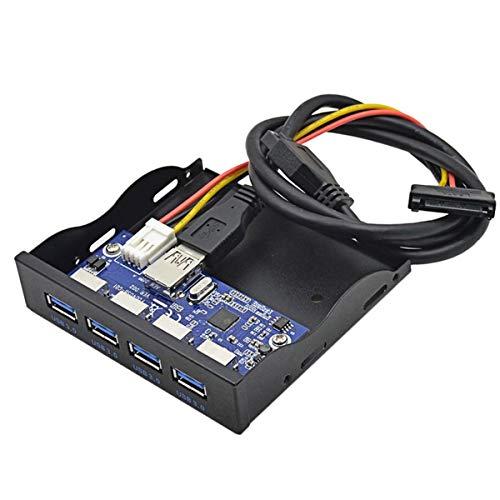
Looking for a convenient way to expand your PC’s connectivity? The Cablecc USB 3.0 HUB offers four ports via a 20-pin connector, perfect for your 3.5″ floppy bay. With its GL3520 chipset, you’ll enjoy super-speed transfers up to 5Gbps, alongside support for USB 2.0 and 1.1. Each port delivers a maximum of 900mA, ensuring your devices stay powered. Weighing just 6.3 ounces and measuring 3.94 x 3.94 x 0.39 inches, it fits seamlessly into your setup. Compatible with Windows, macOS, and Linux, this hub has a solid average rating of 4.4 stars from 354 reviews.
Best For: Users looking to expand their PC’s USB connectivity with a reliable and efficient front panel hub.
Pros:
- High-speed data transfer: Supports USB 3.0 with speeds up to 5Gbps, ensuring quick file transfers.
- Multiple device support: Offers four USB ports, allowing multiple devices to connect simultaneously.
- Wide compatibility: Works across various operating systems including Windows, macOS, and Linux.
Cons:
- Requires a 3.5″ floppy bay: Limited to specific PC setups that have the appropriate bay available.
- Power limitation: Each port provides a maximum of 900mA, which may not be sufficient for high-power devices.
- Weight and size: Weighing 6.3 ounces and with specific dimensions, it may not fit all PC cases aesthetically or physically.
2 Ports USB 3.0 Front Panel Floppy Disk Bay 20 Pin Hub Bracket

For anyone seeking a reliable and efficient way to expand their PC’s connectivity, the 2 Ports USB 3.0 Front Panel Floppy Disk Bay 20 Pin Hub Bracket stands out. This compact hub, measuring just 4.1 x 4.1 x 2.1 inches, fits perfectly into your PC’s 3.5 bay, offering two USB 3.0 type-A female ports. With a data transfer rate of up to 5 Gb/s, it’s ten times faster than USB 2.0. Plus, it’s hot-swappable and plug-and-play, making installation a breeze. Compatible with various operating systems, it’s a solid choice for enhancing your setup without needing external power.
Best For: Users looking to expand USB connectivity on their desktop PCs without the need for external power.
Pros:
- Hot-swappable and plug-and-play design allows for easy installation and immediate use.
- Data transfer rate of up to 5 Gb/s provides significantly faster speeds compared to USB 2.0.
- Sturdy metal construction ensures durability and longevity.
Cons:
- Limited to two USB ports, which may not be sufficient for users with multiple devices.
- Requires installation in a 3.5 bay, which may not be available in all PC cases.
- No included external power option, which could limit performance with high-power devices.
Factors to Consider When Choosing a PC Front Panel USB Hub
When you’re choosing a PC front panel USB hub, you should consider the types and number of ports it offers. Pay attention to data transfer speeds and make certain it’s compatible with your motherboard. Don’t overlook installation ease and the hub’s safety and durability features to guarantee a long-lasting connection.
Port Types and Quantity
Choosing the right PC front panel USB hub involves considering both the types and quantity of ports available. You’ll want a mix of USB-A and USB-C ports to guarantee compatibility with various devices. Many modern gadgets use USB-C, while older ones still rely on USB-A connectors. Think about how many peripherals you need to connect simultaneously; hubs can offer anywhere from 2 to 5 or more ports. Additionally, keep an eye out for hubs that include extra features, like SD/microSD card readers, which can boost their functionality for multimedia and storage tasks. By evaluating both port types and quantity, you can find a hub that perfectly fits your needs.
Data Transfer Speed
After considering the types and quantity of ports, it’s important to look at data transfer speed for your PC front panel USB hub. USB 3.0 offers speeds up to 5 Gbps, while USB 3.2 Gen 2 can reach an impressive 20 Gbps. Higher speeds mean quicker file transfers, which is essential if you often move large files or use high-bandwidth devices. However, keep in mind that hubs with multiple ports may have varying speeds, so check if all ports support the same rates. Don’t forget about backward compatibility—newer USB standards should connect with older devices, albeit at reduced speeds. Finally, consider cumulative speed limits, as sharing bandwidth among multiple devices can impact overall performance.
Compatibility With Motherboards
Compatibility with motherboards is essential for guaranteeing your PC front panel USB hub functions properly. When selecting a hub, check the specific headers on your motherboard, like USB 3.0 (19-pin) or USB 3.2 Gen 2 (20-pin). If you have an older motherboard, you might need a USB front panel adapter to connect newer hubs, so review your motherboard’s specifications carefully. Additionally, confirm that the hub supports the necessary USB standards, such as USB 3.2 Gen 2×2, to guarantee ideal data speeds, especially since older motherboards may limit this capability. Also, make sure the hub fits the designated bay in your case—commonly 3.5 inches or 5.25 inches—and verify its compatibility with your operating system.
Installation Process and Ease
When you’re ready to install a PC front panel USB hub, the ease of the process can make a big difference in your overall experience. First, confirm the hub fits your PC case’s available bay—common sizes are 3.5 inches and 5.25 inches. You’ll typically need a 20-pin USB 3.2 Type-E Key header and a 19-pin USB 3.0 header, so check your motherboard compatibility before purchasing. Many hubs come with installation screws and cables, making setup straightforward and tool-free. It’s also wise to verify that your motherboard supports the necessary headers, as older systems might need a USB front panel adapter. Don’t forget to review the included manual for specific instructions to avoid any compatibility issues.
Safety and Durability Features
Choosing a PC front panel USB hub requires careful attention to safety and durability features, as they protect your devices and guarantee long-term reliability. Look for hubs with over-current, over-voltage, and short circuit protection to safeguard against electrical damage. A sturdy construction using high-quality materials enhances the hub’s longevity, ensuring it can withstand daily use. Check for safety certifications that indicate compliance with industry standards, giving you confidence in its durability. Additionally, models with built-in cooling mechanisms or designs that promote airflow help prevent overheating during prolonged usage. Finally, consider hubs that include mounting screws for a stable installation, minimizing the risk of physical damage and ensuring your hub stays securely in place.
Design and Aesthetics
While aesthetics might not be the first thing you consider, the design of a PC front panel USB hub plays an essential role in how well it integrates with your setup. Look for hubs that complement your computer case’s overall style, available in various colors and finishes. A sturdy construction, like metal, boosts durability and offers a professional appearance. Verify the layout is user-friendly, allowing easy access to ports without clutter, and accommodates different device sizes. LED indicators can enhance both visual appeal and functionality, providing real-time updates on power and data transfer. Finally, opt for compact dimensions that fit standard 3.5” or 5.25” bays to maximize space efficiency and keep your setup organized.
Power Requirements and Supply
A well-designed PC front panel USB hub not only enhances your setup’s look but also needs to meet specific power requirements for ideal functionality. First, check if the hub requires a 15-pin SATA power connector to operate properly. Make sure it can handle up to 900mA per port for USB 3.0 to support high-power devices effectively. Some hubs may need extra power adapters, especially when connecting multiple high-draw peripherals. Compatibility with your motherboard’s headers is essential; look for specific types like USB 3.0 and USB 3.2 Type-E. Finally, consider power management features like over-current and short circuit protection to keep your devices safe while in use.