When upgrading your PC setup, front panel card readers can greatly boost your connectivity. With options ranging from USB 3.2 hubs to versatile card readers, choosing the right one can streamline your workflow. As you consider what fits your needs, think about the compatibility and features each model offers. Discover which of the top-rated card readers will best elevate your experience in 2026.
GRAUGEAR 5.25 Inch USB 3.2 Front Panel Card Reader

If you’re looking to upgrade your desktop with a versatile and high-speed solution, the GRAUGEAR 5.25 Inch USB 3.2 Front Panel Card Reader is an excellent choice. This card reader features USB 3.2 Gen 2, delivering data speeds up to 10Gbps while being backwards compatible with older USB versions. You’ll convert your 5.25’’ drive space into multiple ports, including two USB-C, two USB 3.0, an SD slot, and a microSD slot. It’s easy to install, ensuring compatibility with your motherboard. Plus, its sturdy construction and safety features like over-current protection make it a reliable addition to your setup.
Best For: Users looking to expand their desktop’s connectivity options with a high-speed card reader for various devices.
Pros:
- High-speed data transfer with USB 3.2 Gen 2 technology, supporting up to 10Gbps.
- Versatile connectivity options including multiple USB ports, SD, and microSD slots for enhanced functionality.
- Sturdy construction with safety features like over-current and over-voltage protection for long-term reliability.
Cons:
- Requires specific motherboard compatibility for installation with USB 3.2 Type-E and USB 3.0 headers.
- SATA power connector needed, which may not be available on all setups without additional adapters.
- Limited to 5.25’’ drive bay space, which may not be available in some desktop cases.
GRAUGEAR 3.5 Inch Front Panel USB C Hub with SD/microSD Card Reader
The GRAUGEAR 3.5 Inch Front Panel USB C Hub with SD/microSD Card Reader is an ideal choice for users looking to enhance their PC’s functionality without sacrificing space. With two USB 3.2 Gen 2 Type-C ports and two USB 3.0 ports, you’ll enjoy rapid data transmission up to 20Gbps. The included SD and microSD slots make file transfers a breeze. This hub easily fits in a 3.5-inch floppy drive bay and is compatible with various Windows operating systems. Plus, its sturdy design guarantees durability, while safety features protect your devices. Installation is straightforward with included screws and cables.
Best For: Users who want to maximize their PC’s connectivity with a compact and efficient USB hub featuring SD/microSD card reading capabilities.
Pros:
- High-speed data transmission with USB 3.2 Gen 2 ports offering up to 20Gbps.
- Versatile connectivity options with multiple USB ports and card reader slots.
- Easy installation in a standard 3.5-inch floppy drive bay with included hardware.
Cons:
- Limited compatibility with some older motherboards which may require additional adapters.
- Requires a SATA power connector, which may not be available in all setups.
- Customer support response times may vary based on feedback from users.
Kingwin Powered USB Hub 3.0 with USB-C Port and SD Card Reader
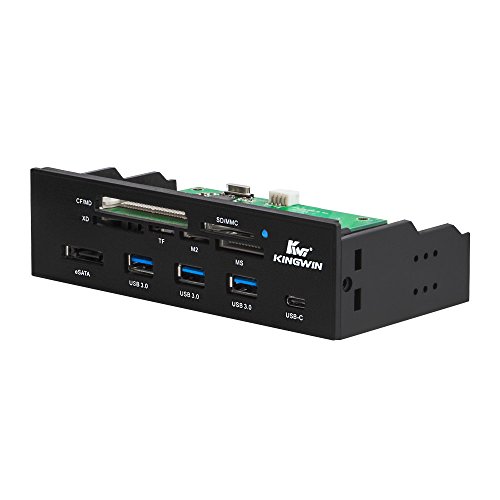
For tech enthusiasts needing a versatile connectivity solution, the Kingwin Powered USB Hub 3.0 stands out with its combination of multiple USB ports and card reader capabilities. Measuring 6 x 2 x 3 inches and weighing just 9.8 ounces, it fits seamlessly into any 5.25″ computer case front bay. With a USB-C port, three USB 3.0 Type-A ports, and an eSATA port, you’ll enjoy data transfer speeds up to 5Gbps. The hub also supports various card formats, making it perfect for photographers and videographers. Plus, backed by a solid warranty, Kingwin guarantees a reliable user experience.
Best For: Tech enthusiasts and professionals who need a versatile and high-speed connectivity solution for their devices.
Pros:
- High-speed data transfer with USB 3.0 capabilities, offering speeds up to 5Gbps.
- Multiple connectivity options including three USB Type-A ports, a USB-C port, and an eSATA port.
- Versatile card reader support accommodating various formats for photographers and videographers.
Cons:
- Limited to installation in a 5.25″ bay, which may not suit all computer cases.
- Potential compatibility issues with older devices that do not support USB 3.0.
- Weight may be heavier than some users prefer for a USB hub, at 9.8 ounces.
GRAUGEAR Front Panel USB Hub with SD/microSD Card Reader

Looking for a versatile solution to enhance your desktop’s connectivity? The GRAUGEAR Front Panel USB Hub with SD/microSD Card Reader is an excellent choice. It fits in a standard 5.25” bay and offers a high-speed USB-C port with 20Gbps throughput, plus dual USB-A ports for quick file transfers. You’ll love the built-in UHS-I SD and microSD slots, perfect for connecting your cameras and drones. With dual 2.5″ SSD/HDD slots featuring tool-free mounting, upgrading your storage has never been easier. Compatible with most desktop cases and Windows systems, this hub elevates your setup seamlessly.
Best For: Anyone looking to enhance their desktop’s connectivity with high-speed data transfer and versatile storage options.
Pros:
- High-speed connectivity with a 20Gbps USB-C port for rapid data transfer.
- Built-in SD/microSD card slots make it easy to connect cameras and drones.
- Tool-free mounting for dual 2.5″ SSD/HDD slots simplifies storage upgrades.
Cons:
- Limited to standard 5.25” bay, which may not fit all PC cases.
- Compatibility primarily with Windows systems, potentially limiting usage for other operating systems.
- Additional internal headers may require extra setup, which could be challenging for novice users.
StarTech.com 22-in-1 USB 2.0 Internal Multi Media Memory Card Reader
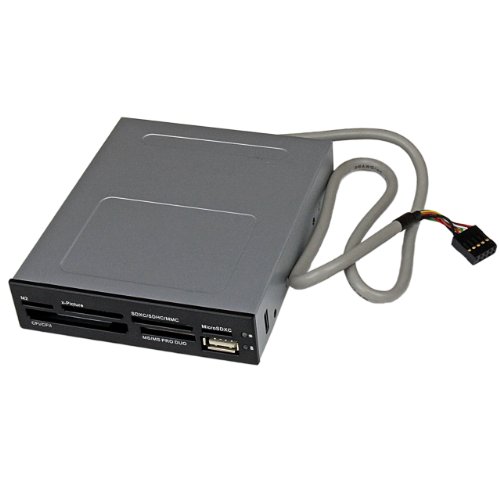
With its ability to support 22 different memory card formats, the StarTech.com 22-in-1 USB 2.0 Internal Multi Media Memory Card Reader is perfect for videographers, photographers, and content creators who need quick and simultaneous access to various media types. It handles everything from CompactFlash to xD Picture cards, making it versatile for all your storage needs. Plus, its front-facing USB 2.0 port simplifies connectivity. You’ll appreciate its OS independence, as it works seamlessly with Windows, macOS, and Linux. With a built-in Power and Activity LED, you’ll always know the status of your connections. Enjoy hassle-free file transfers!
Best For: Content creators, videographers, and photographers who require quick and simultaneous access to a variety of memory card formats.
Pros:
- Supports 22 different memory card formats for versatile compatibility.
- OS independent, working seamlessly with Windows, macOS, and Linux.
- Built-in Power and Activity LED for easy monitoring of connection status.
Cons:
- Limited to USB 2.0 speed, which may be slower compared to newer USB standards.
- May not support the latest high-capacity memory cards fully due to technology limitations.
- Installation in a front bay may require technical expertise for some users.
ineo 5.25″ USB 3.2 Front Panel Card Reader with Audio Ports
![ineo 5.25" 10Gbps USB 3.2 Front Panel Card Reader with Audio Ports - SD/microSD Internal Reader, USB3.2 Type-E Key-A 20-Pin & USB3.0 Header, 15-Pin SATA Power[3570I]](https://m.media-amazon.com/images/I/41ViglehjEL._SL500_.jpg)
The ineo 5.25″ USB 3.2 Front Panel Card Reader is an excellent choice for tech enthusiasts who demand high-speed data transfer and versatile connectivity options. With a remarkable data transfer rate of up to 10Gbps, you’ll enjoy lightning-fast performance for all your devices. It features multiple ports, including two USB 3.2 Gen 2 USB-C, two USB 3.0, and slots for SD and microSD cards. The sturdy metal construction guarantees durability, while built-in safety features protect your devices. Installation is straightforward, making it compatible with various Windows operating systems. Enhance your setup with this reliable and efficient card reader.
Best For: Tech enthusiasts seeking high-speed data transfer and versatile connectivity options for their devices.
Pros:
- Fast data transfer rates of up to 10Gbps, ensuring quick file transfers and efficient workflow.
- Multiple connectivity options, including USB-C, USB 3.0, and card slots, catering to various devices and formats.
- Durable metal construction with built-in safety features for over-current, over-voltage, and short circuit protection.
Cons:
- Requires SATA power for operation, which may limit compatibility with some setups.
- Installation may require technical knowledge to ensure proper connection to the motherboard.
- Limited customer reviews, with only 19 ratings, which may not provide a comprehensive overview of product reliability.
EZDIY-FAB PC Front Panel Internal Card Reader USB HUB
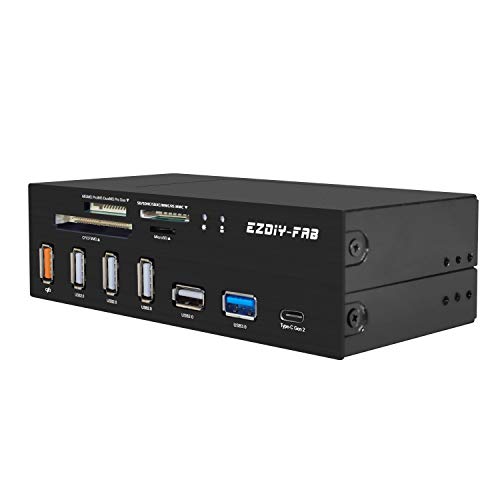
For tech enthusiasts and professionals who require versatile connectivity options, the EZDIY-FAB PC Front Panel Internal Card Reader USB HUB stands out with its impressive six-slot design. You can effortlessly access various card formats like SD, CF, and microSD. With a USB 3.1 Gen2 Type-C port offering speeds up to 10Gbps, transferring data is a breeze. Plus, the USB Fast Charging port guarantees your devices stay powered, even if it doesn’t support data transmission. This hub also includes a 4-port USB 2.0 HUB, making it perfect for connecting all your essential peripherals. Upgrade your setup with this reliable card reader!
Best For: Tech enthusiasts and professionals seeking versatile and high-speed connectivity for various memory card formats.
Pros:
- Supports a wide range of card formats including CF, SD, microSD, and more, making it versatile for different devices.
- USB 3.1 Gen2 Type-C port provides data transfer speeds up to 10Gbps for fast file access and transfers.
- Includes a USB Fast Charging port (5V/2.4A) for charging devices while also featuring a 4-port USB 2.0 HUB for connecting multiple peripherals.
Cons:
- USB Fast Charging port does not support data transmission, limiting its functionality for certain devices.
- Only compatible with Windows operating systems, which may exclude Mac or Linux users.
- Size and form factor may not fit all setups, particularly in compact cases where space is limited.
SABRENT 74 in 1 Internal Flash Media Card Reader/Writer
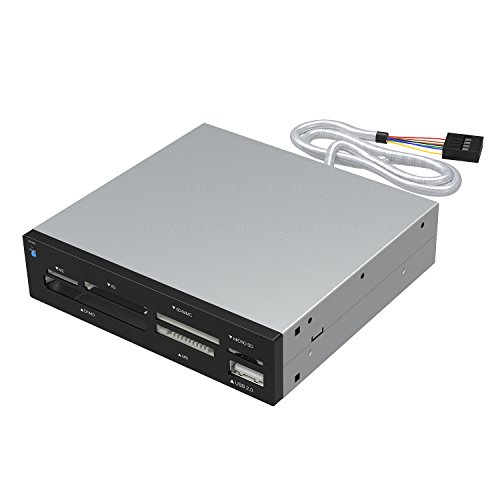
If you’re looking for versatility in your data transfer needs, the SABRENT 74 in 1 Internal Flash Media Card Reader/Writer is an excellent choice. With support for 74 different types of memory cards, including M2, XD, and SD formats, it’s perfect for various devices. The built-in USB 2.0 port allows for easy connection to external devices, while the internal power connector guarantees reliable performance. Weighing just 5.6 ounces, it fits seamlessly into your setup. Compatible with multiple operating systems, it boasts a solid customer rating of 3.9 stars, making it a dependable addition to your PC front panel.
Best For: Those who require a versatile card reader compatible with a wide range of memory card formats for data transfer.
Pros:
- Supports 74 different types of memory cards, making it highly versatile for various devices.
- Includes a USB 2.0 port for easy connection to external USB devices.
- Compatible with multiple operating systems, ensuring broad usability across different platforms.
Cons:
- Some memory cards may require adapters, which could add to the overall cost.
- Customer ratings are only moderate (3.9 out of 5 stars), indicating room for improvement in user satisfaction.
- Limited to USB 2.0 speed, which may not meet the needs of users requiring faster data transfer rates.
TCC-QL5E 5.25 Inch PC Multifunction Dashboard Media Front Panel

Designed for tech enthusiasts and gamers who need efficient access to multiple connectivity options, the TCC-QL5E 5.25 Inch PC Multifunction Dashboard Media Front Panel offers a robust solution. It features dual USB 3.0 ports with 5.0 Gbps speeds, six USB 2.0 ports, and e-SATA for quick data transfer. The durable ABS construction guarantees stability and a sleek look for your setup. With a five-in-one card reader supporting various formats, you’ll enjoy versatile functionality. Weighing just 10.9 ounces and fitting perfectly in a 5.25-inch bay, this front panel is a practical addition to any PC build.
Best For: Tech enthusiasts and gamers seeking efficient connectivity solutions for their PC builds.
Pros:
- High-speed connectivity with dual USB 3.0 ports and e-SATA for quick data transfer.
- Durable and aesthetically pleasing design made from ABS material with an etched surface.
- Versatile functionality with a five-in-one card reader supporting multiple formats.
Cons:
- Mixed customer ratings with an average of 3.6 out of 5 stars from 86 reviews.
- Limited to one memory card read at a time with the five-in-one card reader.
- Warranty information only available upon request, which may limit buyer confidence.
3.5 Inch Front Panel USB C Hub with TF Internal Card Reader

Transform your PC setup with the 3.5 Inch Front Panel USB C Hub featuring a TF Internal Card Reader, perfect for users looking to maximize their connectivity options. This hub converts your floppy drive space into two USB 3.0 ports and one Type C port, ensuring you can connect multiple devices effortlessly. With a blazing fast transfer speed of up to 5Gbps, file transfers are quick and efficient. Plus, its plug-and-play functionality means you won’t need any drivers. Built from durable iron, it’s designed to withstand wear and tear, making it a reliable addition to your setup for years to come.
Best For: Users looking to enhance their desktop connectivity options by utilizing unused floppy drive space for modern devices.
Pros:
- Fast Transfer Speeds: Achieves data transfer rates of up to 5Gbps for quick file access and transfers.
- Easy Installation: Plug-and-play functionality allows for hassle-free setup without the need for drivers.
- Durable Construction: Made from iron, ensuring resistance to wear and tear for long-lasting use.
Cons:
- Limited Compatibility: Primarily designed for systems with floppy drive space, which may not be available in newer models.
- No Power Supply: May require powered USB devices to function optimally, as it draws power from the motherboard.
- Limited Ports: Only provides two USB 3.0 ports and one Type C port, which may not be sufficient for users with many devices.
Factors to Consider When Choosing a PC Front Panel Card Reader
When you’re choosing a PC front panel card reader, it’s crucial to take into account several key factors. You’ll want to check compatibility with your operating system, data transfer speeds, and the number of ports available. Additionally, think about the card formats it supports and any installation requirements to guarantee a smooth setup.
Compatibility With Operating Systems
Choosing the right PC front panel card reader hinges on its compatibility with your operating system, as many models support a range of Windows versions from XP to 11. If you’re using macOS or Linux, look for card readers that cater to those platforms for added versatility. It’s essential to check if the reader requires specific drivers; some offer plug-and-play functionality while others need extra software. Additionally, consider the USB standards the card reader supports—newer versions like USB 3.2 can provide better performance than older ones. Finally, verify any header requirements on your motherboard, such as USB 3.0 or USB 3.2 Key-A Type-E headers, to guarantee smooth installation and peak functionality.
Data Transfer Speeds
While selecting a PC front panel card reader, understanding data transfer speeds is essential for optimizing your workflow. Data transfer speeds can vary widely; USB 3.2 Gen 2 offers up to 20Gbps, while USB 3.0 maxes out at 5Gbps. If your card reader uses older USB standards like USB 2.0, you’ll face reduced speeds of up to 480Mbps. Look for readers that support multiple card formats for simultaneous transfers, enhancing your efficiency during file management. The interface, whether USB-C or traditional USB-A, also affects speed and compatibility. For tasks like video editing or high-resolution photography, high-speed capabilities are vital, as they can dramatically reduce transfer times and improve your overall experience.
Number of Ports
A key factor to evaluate for your PC front panel card reader is the number of ports available, as this directly impacts your ability to connect multiple devices at once. Look for models that feature a variety of ports, including USB 3.0, USB-C, and card slots for SD/microSD, to guarantee compatibility with different devices. Having multiple USB ports, like two or more, enhances your connectivity options for accessories such as keyboards, mice, and external drives. Additionally, make sure the card reader allows simultaneous access to various card types, streamlining file transfers without the hassle of swapping cards. Finally, consider the speed of the ports, as higher data transfer rates can greatly improve performance when moving large files.
Card Format Support
When selecting a PC front panel card reader, the card format support is vital to guarantee compatibility with your devices. Make sure it supports the specific formats you use frequently, like SD, microSD, CF, and MS. Some readers can accommodate up to 74 different types, which is perfect for various digital cameras, smartphones, and gaming devices. It’s also important to look for readers that handle modern high-capacity cards like SDXC, so you can utilize the latest memory technology. Additionally, consider readers that allow simultaneous access to multiple card types for efficient file transfers. Finally, ensuring backward compatibility with older formats keeps your setup flexible and user-friendly.
Installation Requirements
Choosing the right PC front panel card reader involves more than just card format support; installation requirements play a significant role too. First, verify the reader has compatible connection headers, typically a 19-pin USB 3.0 and a 20-pin USB 3.2 Key-A Type-E header. Check if it requires a SATA power connector, as many models do for operation. It’s also essential to confirm motherboard compatibility, especially with older systems that might need an adapter. Ideally, installation should be straightforward, converting existing floppy drive spaces into card reader slots and USB ports. Always refer to the product manual for specific installation instructions to guarantee all necessary connections are made correctly and securely.
Build Quality and Durability
Build quality and durability are essential factors that can greatly impact your experience with a PC front panel card reader. When choosing one, look for sturdy materials like metal or high-grade plastic that offer resistance to wear and tear. A well-constructed card reader should feature secure mounts or screws to guarantee stability during use. Pay attention to customer feedback and ratings; higher-rated products often indicate better long-term performance. Additionally, consider thermal management in the design, as overheating can lead to component failure over time. Investing in a reliable card reader not only enhances your setup but also prolongs its lifespan, making it a smart choice for any PC enthusiast.
Safety Features and Protection
While you might be focused on features and design when selecting a PC front panel card reader, safety features shouldn’t be overlooked. Look for card readers that include over-current protection to prevent damage from excessive electrical flow. Over-voltage protection is essential to guard against voltage spikes that could harm both the reader and your connected devices. Short circuit protection can help prevent potential fire hazards and equipment failure. A sturdy construction not only enhances durability but also minimizes the risk of physical damage, ensuring long-term reliability. Additionally, some card readers come with built-in stability features, like screws for secure installation, which can further enhance safety during operation. Prioritizing these features will keep your setup secure and efficient.