If you’re looking to enhance your PC’s connectivity and performance, choosing the right internal expansion hub is essential. With various options available, it can be challenging to find one that fits your needs perfectly. From USB 2.0 to USB 3.0 configurations, these hubs offer different features and designs. Let’s explore the top contenders that can take your system to the next level and guarantee you have the ports you need at your fingertips.
NZXT Internal USB Hub 3 – 4 USB 2.0 Ports

If you’re looking to expand your PC’s connectivity, the NZXT Internal USB Hub 3 is an excellent choice, especially for gamers and content creators. This hub adds four USB 2.0 ports, giving you ample connections for peripherals and devices. Its sleek, multifunctional design allows it to fit seamlessly into your setup. Plus, the magnetic body and 3M dual lock tapes make installation a breeze. With a SATA power connection, you’ll enjoy a stable power source, ensuring reliable performance. Compatible with any PC, this hub lets you maximize your USB connections effortlessly. Upgrade your system and streamline your workflow today!
Best For: Gamers and content creators who need additional USB ports for their peripherals and devices.
Pros:
- Sleek and compact design allows for easy hiding and integration into any setup.
- User-friendly installation with magnetic body and 3M dual lock tapes simplifies the mounting process.
- Stable power supply via SATA connection ensures reliable performance for all connected devices.
Cons:
- Limited to USB 2.0 ports, which may not support faster data transfer speeds required by some modern devices.
- Requires motherboard connection which may limit placement options in some cases.
- No additional features like LED indicators or power switches for individual ports.
Corsair Internal 4-Port USB 2.0 Hub

The Corsair Internal 4-Port USB 2.0 Hub is ideal for PC builders who need to maximize connectivity in compact spaces. With four 9-pin USB 2.0 ports, you can connect additional internal devices like power supplies, AIO CPU coolers, and RGB lighting controllers. It delivers up to 480Mbps bandwidth across all devices, ensuring efficient data transfer. Installation is a breeze; it attaches easily to any magnetic surface in your case using simple USB 2.0 and SATA connections. Plus, it’s compatible with most Intel and AMD motherboards, making it a versatile choice for Mini-ITX and other tight setups.
Best For: PC builders looking for a compact solution to expand internal USB connectivity.
Pros:
- High speed: Offers up to 480Mbps bandwidth across four USB 2.0 devices for efficient data transfer.
- Easy installation: Attaches effortlessly to any magnetic surface in PC cases using simple USB 2.0 and SATA connections.
- Versatile compatibility: Fits in tight spaces and works with most Intel and AMD motherboards, making it suitable for Mini-ITX builds.
Cons:
- Limited to USB 2.0: Does not support USB 3.0 or higher, which may be a drawback for users needing faster connections.
- Requires magnetic surface: Installation is dependent on having a magnetic surface in the PC case, which may not be available in all setups.
- Limited port availability: Only provides four ports, which may not be sufficient for users with multiple internal devices.
Hyte Powered Internal USB Hub – 4 USB 2.0 Output Headers

For PC enthusiasts seeking to enhance their system’s connectivity, the Hyte Powered Internal USB Hub stands out with its ability to transform a single USB 2.0 header into four powered outputs. This hub is compatible with modern PC components and supports Windows, macOS, and Linux. Its sleek design features recessed unidirectional ports for clean cable management, and installation is a breeze with extra-strength magnets and an adhesive strip. An illuminating indicator helps you troubleshoot easily. With an average rating of 4.6 stars from users, it’s a reliable choice to upgrade your USB capabilities effectively.
Best For: PC enthusiasts looking to expand USB connectivity within their systems efficiently.
Pros:
- Easily expands a single USB 2.0 header into four powered outputs for enhanced connectivity.
- Sleek design with recessed ports promotes clean cable management, keeping your setup tidy.
- User-friendly installation with extra-strength magnets and an adhesive strip for secure attachment.
Cons:
- Limited to USB 2.0 speeds, which may not suffice for users requiring faster data transfer rates.
- May require inspection for returns, potentially leading to restocking fees if misrepresented.
- Limited customer reviews with only 14 ratings, which may not provide a comprehensive view of performance.
ELUTENG PCIe USB 3.0 Expansion Card (7 Ports)

Need to expand your USB connectivity? The ELUTENG PCIe USB 3.0 Expansion Card is your solution with seven USB 3.0 Type A ports, offering speeds up to 5Gbps—ten times faster than USB 2.0. It’s compatible with various Windows versions and doesn’t require external power, thanks to its 2-phase independent power supply. Each port features solid capacitors for stable voltage and long life. Installation is straightforward, especially on WIN8 and later. With a customer rating of 4.3 stars from over 2,000 reviews, it’s a top choice for enhancing your system’s capabilities. Upgrade your setup effortlessly with this reliable expansion card.
Best For: Users looking to expand their USB connectivity with high-speed options and stable power supply for various devices.
Pros:
- Fast Data Transfer: Offers speeds up to 5Gbps, significantly faster than USB 2.0.
- Multiple Ports: Features seven USB 3.0 Type A ports for connecting multiple devices simultaneously.
- Easy Installation: Compatible with various Windows versions, with simple installation on WIN8 and later without needing drivers.
Cons:
- Not Mac Compatible: Does not support Mac systems, limiting its use for Mac users.
- Limited Compatibility for Older Systems: Requires drivers for Windows 7 and XP, which may be inconvenient for some users.
- No PS3/PS4 Support: Not compatible with gaming consoles like PS3 and PS4.
USB PCIE Card 5-Port PCI Express Expansion Card

Offering a seamless solution for users with limited USB ports, the USB PCIE Card 5-Port PCI Express Expansion Card is ideal for those who frequently connect multiple devices to their desktop PC. With three USB-C and two Type A ports, it easily fits into a PCIe x1 slot, requiring no additional power supply. You’ll enjoy SuperSpeed USB 3.0 speeds up to 5Gbps, making data transfer ten times faster than USB 2.0. Compatible with Windows 10/8/7 and Mac OS 10.8.2 and above, installation is a breeze with plug and play for newer systems. Plus, it includes a 1-year warranty for peace of mind.
Best For: Users with desktop PCs who need to expand their USB connectivity by connecting multiple devices simultaneously.
Pros:
- Supports multiple device connections with three USB-C and two Type A ports, addressing limited USB ports.
- Fast data transfer speeds of up to 5Gbps with SuperSpeed USB 3.0, significantly improving efficiency over USB 2.0.
- Easy installation with plug and play functionality for newer operating systems and a one-year warranty for added security.
Cons:
- Driver installation required for older systems like Windows 7/XP, which may complicate setup for some users.
- USB-C ports are not compatible with Thunderbolt protocol, limiting some high-speed device connections.
- Limited to PCIe x1 slot, which may restrict compatibility with certain motherboards or configurations.
Delta EU04 BK Internal USB 2.0 Hub (4-Port Expansion)

The Delta EU04 BK Internal USB 2.0 Hub is the ideal choice for PC builders looking to maximize connectivity without sacrificing space. With one motherboard input and four USB 2.0 9-pin output ports, it effortlessly expands your system’s connectivity. The hub connects directly to your case’s SATA power source, ensuring stable power for all devices. Its ultra-compact design (3.8*2.3*0.6 inches) fits seamlessly into various cases, and installation is a breeze thanks to its magnetic body and 3M dual lock tapes. Plus, protective caps on port pins keep them safe, making this hub a smart addition to your setup.
Best For: PC builders seeking to enhance their system’s connectivity while maintaining a compact and organized setup.
Pros:
- Easy installation with a magnetic body and 3M dual lock tapes.
- Stable power supply through direct connection to the case’s SATA power source.
- Compact design that fits seamlessly into various PC cases, maximizing space.
Cons:
- Limited to USB 2.0 speeds, which may not be sufficient for high-speed devices.
- Designed for internal use only, which may limit versatility in certain setups.
- Requires a SATA power connection, which may not be available in all PC cases.
5 Ports Internal USB Hub Header Splitter

For those looking to maximize their PC’s connectivity options, the 5 Ports Internal USB Hub Header Splitter stands out as an ideal solution. This hub offers five expansion ports, supporting USB 2.0 read/write rates, and features three 9-pin USB 2.0 headers, making it compatible with all PC motherboards. It includes a standard USB 2.0 (Type A) port for added versatility. Installation is a breeze with double-sided tape and an included 11.8-inch cable. Plus, the SATA power connector guarantees stable auxiliary power. Use it to extend connections for your CPU, WiFi receiver, cooling fan, and RGB lights effortlessly.
Best For: Users who need to expand their PC’s USB connectivity with multiple internal ports.
Pros:
- Supports multiple devices: Offers five expansion ports for various peripherals.
- Easy installation: Comes with double-sided tape and a convenient 11.8-inch USB cable for quick setup.
- Stable power supply: Features a SATA power connector for reliable auxiliary power.
Cons:
- Limited to USB 2.0 speeds: Does not support higher data transfer rates found in USB 3.0 and above.
- Internal use only: Cannot be used externally, limiting some installation options.
- Requires motherboard compatibility: Needs a PC motherboard with appropriate 9-pin USB headers for proper function.
Thermalright Internal USB 2.0 Hub X5, SATA Powered, Magnetic Mount
Need to expand your PC’s internal USB connectivity without the hassle of messy cables? The Thermalright Internal USB 2.0 Hub X5 is your solution! This compact hub features five USB 2.0 ports powered by a reliable SATA connection. Its magnetic mount makes installation a breeze—no tools or adhesives needed. With a sleek black finish, it fits seamlessly into any setup while enhancing cable management. Perfect for connecting RGB controllers and fan hubs, it guarantees consistent performance for all your devices. Rated 4.4 out of 5 stars, the X5 is a must-have for a cleaner, more efficient PC build.
Best For: PC builders looking to expand internal USB connectivity while maintaining a clean and organized setup.
Pros:
- Easy Installation: Magnetic mount allows for quick and tool-free setup.
- Compact Design: Space-saving dimensions fit neatly inside various PC cases.
- Reliable Performance: SATA-powered connection ensures stable power delivery for multiple devices.
Cons:
- Limited to USB 2.0: May not be suitable for users needing faster USB 3.0 or higher speeds.
- Specific Compatibility: Only works with standard motherboard USB headers, limiting use with some older systems.
- Weight: At 3.2 ounces, it may not be as lightweight as some users prefer for internal components.
Airgoo Internal USB Hub, 9-Pin USB 2.0 Header Splitter
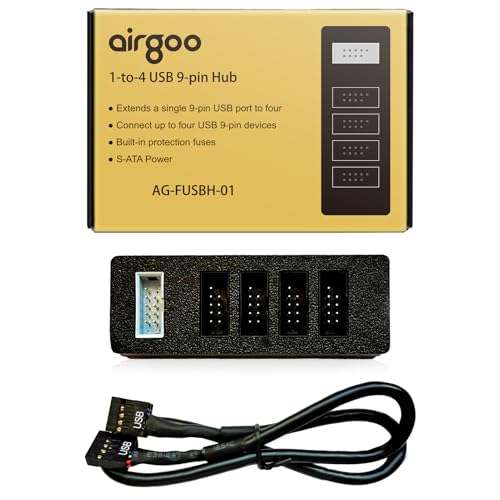
Maximize your PC’s connectivity with the Airgoo Internal USB Hub, a perfect solution for gamers and tech enthusiasts who require multiple USB connections. This 9-pin USB 2.0 header splitter converts one internal port into four, allowing you to connect various devices without sacrificing performance. Powered by S-ATA, it guarantees stable operation even when all ports are in use. Thanks to its magnetic mount, installation is a breeze, keeping your setup tidy. Plus, its compact design won’t block airflow or interfere with components. With plug-and-play functionality, you’ll be up and running in no time. Upgrade your system effortlessly!
Best For: Gamers and tech enthusiasts seeking to expand their PC’s USB connectivity efficiently.
Pros:
- 9-Pin USB Expansion: Easily converts one internal USB header into four, allowing multiple device connections without performance loss.
- Stable S-ATA Power: Ensures consistent power supply even with all four ports in use, enhancing reliability.
- Magnetic Mounting: Simplifies installation by allowing easy attachment to metal surfaces inside the case, promoting a clutter-free setup.
Cons:
- Limited to USB 2.0: Does not support faster USB 3.0 connections, which may be a drawback for users needing higher data transfer speeds.
- Size Constraints: Its compact design may not fit well in all cases, especially those with limited internal space.
- No USB-C Support: Lacks compatibility for newer USB-C devices, which could limit its usability for some users.
PCIE USB 3.0 Expansion Card with 7 Ports (5 Type-A and 2 USB C)
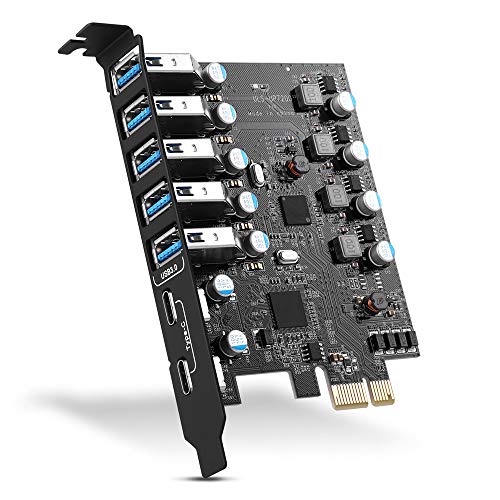
If you’re looking to enhance your PC’s connectivity, the YEELIYA PCIE USB 3.0 Expansion Card is an excellent choice. This card features seven ports—five Type-A and two USB-C—allowing you to connect multiple devices like external hard drives, webcams, and game controllers simultaneously. With transfer speeds of up to 5Gbps, you won’t have to wait long for data transfers. It’s compatible with various operating systems, including Windows and Mac OS, and fits into most PCIe slots. Installation is straightforward, and you’ll enjoy a two-year warranty along with 24/7 customer support for peace of mind.
Best For: Users who need to expand their PC’s USB connectivity with multiple devices, such as gamers, content creators, and professionals using various peripherals.
Pros:
- High-speed transfer rates of up to 5Gbps for efficient data transfer.
- Versatile compatibility with multiple operating systems, including Windows 11/10/8/7/XP and Mac OS/Linux.
- Ample connectivity options with seven ports (5 Type-A and 2 USB-C) for simultaneous device connections.
Cons:
- Installation requires shutting down the PC and manual insertion, which may be inconvenient for some users.
- Drivers needed for older Windows versions (XP/Vista/7), which can complicate setup for users with legacy systems.
- Limited to PCIe slots, potentially excluding users with motherboards lacking available slots.
Factors to Consider When Choosing a PC Internal Expansion Hub
When choosing a PC internal expansion hub, you need to take into account several key factors. Think about the port expansion capacity, power supply stability, and ease of installation. You’ll also want to guarantee compatibility with your devices and check the data transfer speed to maximize performance.
Port Expansion Capacity
Choosing the right PC internal expansion hub involves several key factors, with port expansion capacity being one of the most critical. First, think about the number of ports you need; options range from hubs with 4 to 7 or more ports, which can greatly enhance your device connectivity. Also, pay attention to the types of ports available—some hubs mix USB 2.0 and USB 3.0, offering different speeds and compatibility. Look for hubs with powered ports, especially if you plan to connect high-draw devices like external hard drives. Confirm the hub is compatible with your motherboard’s USB headers, and consider its installation method—magnetic mounts or adhesive strips can simplify setup and improve cable management.
Power Supply Stability
After considering port expansion capacity, it’s important to evaluate power supply stability in a PC internal expansion hub. A stable power supply guarantees that all connected devices receive consistent power, which helps prevent data loss and device failure. Look for hubs with solid capacitors designed to minimize voltage fluctuations, enhancing longevity for both the hub and your devices. Many internal USB hubs use SATA power connections, providing a more robust power source than standard USB connections. A well-designed hub features independent power modules for each port, reducing over-current risks. Make certain the power delivery system can handle the combined requirements of all connected devices without overheating or degrading performance, ensuring your setup runs smoothly.
Installation Ease
Considering how essential installation ease is, you’ll want to prioritize user-friendly features in a PC internal expansion hub. Look for magnetic mounting systems or double-sided tape that allow for easy attachment without tools. Clear instructions or plug-and-play functionality can help you set up the hub quickly, especially if you’re not very tech-savvy. Pay attention to the hub’s physical dimensions to guarantee it fits comfortably within your PC case, particularly in compact builds like Mini-ITX systems. Additionally, check for SATA power connections to provide a stable power supply, simplifying the installation by reducing the need for extra power sources. Finally, evaluate compatibility with existing motherboard headers or PCIe slots for a seamless integration.
Compatibility With Devices
Once you’ve guaranteed easy installation, the next step is to focus on compatibility with devices when selecting a PC internal expansion hub. Start by ensuring the hub matches your motherboard’s USB header type, like the common 9-pin USB 2.0. Check its support for various operating systems; some hubs only work with specific versions of Windows, macOS, or Linux. Look at the number and types of ports available, as compatibility with both USB 2.0 and USB 3.0 enhances versatility. Don’t forget to verify that the hub can handle the power needs of your connected devices, especially if they’re power-hungry. Finally, assess the hub’s dimensions to make sure it fits comfortably in your PC case without blocking airflow or components.
Data Transfer Speed
How essential is data transfer speed when selecting a PC internal expansion hub? It’s critical. USB 2.0 ports offer speeds up to 480 Mbps, but if you want a significant boost, look for USB 3.0 ports that can reach up to 5 Gbps—making them ten times faster. Consider your needs; higher speeds are imperative for tasks like transferring large files, streaming high-definition video, or connecting multiple peripherals at once. Remember, the actual transfer rate can vary depending on the devices you connect and their compatibility with the hub’s specifications. Always check the maximum supported speeds of the USB standards to guarantee you’re getting the performance you need for your system. Maximize efficiency by making speed a priority!
Design and Aesthetics
Data transfer speed plays an essential role in your choice of a PC internal expansion hub, but it’s equally important to reflect on the design and aesthetics of the hub. Look for a compact and sleek profile that fits seamlessly within your case, ensuring it doesn’t obstruct airflow or other components. A magnetic mounting system can simplify installation and enhance aesthetics by promoting clean cable management. Consider modern finishes, like crystal or matte, that complement your PC build’s overall look. Indicator lights are a functional addition, helping with troubleshooting while adding a tech-savvy vibe. Additionally, recessed ports can improve cable organization, keeping your setup tidy and polished for a professional appearance inside your PC.
Mounting Options
When choosing a PC internal expansion hub, it is vital to take into account the mounting options available to guarantee a secure and efficient installation. You might prefer magnetic mounts, which easily attach to metal surfaces inside your case without needing extra tools. Alternatively, some hubs use adhesive strips or double-sided tape, giving you flexibility in placement. It’s important to verify the hub fits compactly in tight spaces, so it doesn’t obstruct airflow or other components. Also, look for user-friendly installation features, like plug-and-play capabilities, to simplify setup. Finally, consider hubs with LED indicators for power status; these can help with troubleshooting and verify everything’s functioning correctly after installation.