Upgrading to faster networking can improve file transfers, workstation performance, storage access, and high-bandwidth connectivity—but the right switch depends on more than port speed alone.
We compared 10 professional multi-gigabit network switches across managed features, port types, expansion capacity, PoE support, installation flexibility, and overall fit for demanding networks.
Best 10 Professional Multi-Gigabit Network Switches Picks for 2026
Best Managed 2.5G Switch

- 8× 2.5G RJ45 ports
- 2× 10G SFP+ uplinks
- Cloud management and ZTP
Best For: Managed small-business and advanced home networks
Best SFP+ Aggregation Switch
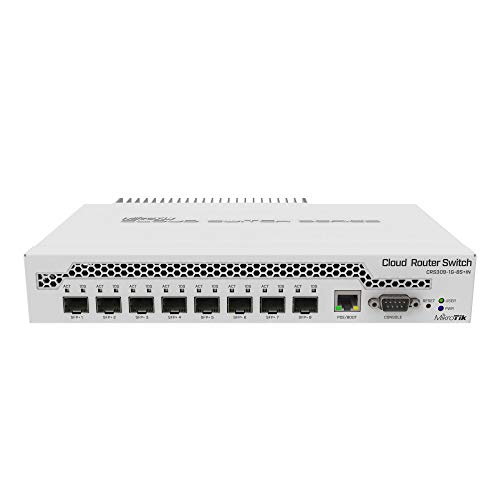
- 8× SFP+ ports
- Dedicated 1G management port
- Compact metal chassis
Best For: Fiber- and DAC-based 10G aggregation
Best High-Port-Count 2.5G Switch

- 16× 2.5G RJ45 ports
- 4× 10G SFP+ ports
- Fanless 1U rack-mount design
Best For: Dense office and lab multi-gigabit networks
Best Compact 10G Pick

- Managed 10G switching
- Compact metal housing
- Five total ports
Best For: Small desktop networks needing high-speed managed connectivity
Best Gaming-Focused Option

- Eight Gigabit ports
- Two multi-gig/10G ports
- Gaming network dashboard
Best For: Gaming, streaming, and small office networks
Best Rack-Mount PoE+ Pick

- 24-port 2.5G Ethernet
- Two SFP+ uplink slots
- Layer 3 and PoE++ support
Best For: Professional rack installations with many powered multi-gigabit devices
Best Compact 10G Switch
TP-Link TL-SX105 5-Port 10G Switch

- Five 10G/multi-gig RJ45 ports
- Up to 100 Gbps switching capacity
- Fanless plug-and-play design
Best For: Small high-speed networks needing simple 10G connectivity
Best Managed Multi-Gig Switch
NETGEAR XS512EM 12-Port 10G Switch
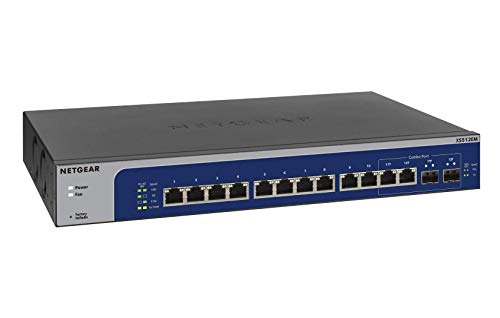
- Twelve 1G to 10G Ethernet ports
- Two shared 1G/10G SFP+ ports
- Easy Smart software for basic management
Best For: Growing networks needing port density and basic controls
Best 8-Port 10G Expansion
TP-Link TL-SX1008 8-Port Switch

- Eight 10G/multi-gig RJ45 ports
- Up to 160 Gbps switching capacity
- Desktop or rackmount installation
Best For: Multi-device networks needing eight high-speed ports
Best Managed 2.5G Switch – TP-Link Omada SG3210X-M2
The TP-Link Omada SG3210X-M2 is a practical choice for professional multi-gigabit network switches when you need eight 2.5Gbps copper connections plus 10Gbps uplinks. Its managed features, centralized Omada control, and rack-mount hardware suit growing offices, labs, and advanced home networks.
Best For: Small professional networks needing managed 2.5G access ports and 10G uplinks.
Pros:
- Eight 2.5G RJ45 ports support high-speed device connections.
- Two 10G SFP+ slots provide high-bandwidth uplink options.
- Omada cloud management, app access, ZTP, monitoring, QoS, and IGMP snooping support centralized administration.
- Includes a rack-mount kit and a five-year manufacturer warranty.
Cons:
- Only eight RJ45 ports are available.
- SFP+ uplinks require compatible modules or cables.
- The listed upper temperature rating is 40°C.
Choose this model when centralized management and flexible 10G uplinking matter more than having a large port count. Its 2.5G access layer is well matched to modern desktops, wireless hardware, storage, and other multi-gigabit devices.
Best SFP+ Aggregation Switch – MikroTik CRS309-1G-8S+IN
The MikroTik CRS309-1G-8S+IN is aimed at networks built around fiber or direct-attach 10G links. Among professional multi-gigabit network switches, its eight SFP+ ports make it especially useful for connecting servers, storage, and other high-throughput network equipment in a compact managed chassis.
Best For: Compact 10G SFP+ aggregation where most connections use fiber or compatible DAC cables.
Pros:
- Provides eight SFP+ ports for high-speed network connections.
- Includes a 10/100/1000 management port.
- Compact metal housing measures 5.55 by 4.53 by 1.1 inches.
- Includes a power adapter, rack ears, and screw kit.
Cons:
- It does not provide a bank of multi-gigabit RJ45 access ports.
- Optical modules or compatible DAC cables may be needed.
- The manufacturer warranty is two years.
This is a focused choice for an SFP+-centric setup rather than a general-purpose copper switch. Its compact metal design and included rack hardware make it suitable for a small network cabinet or equipment shelf.
Best 10G RJ45 Value – Real HD 5-Port 10G Switch
The Real HD five-port switch offers a straightforward way to add 10Gbps copper connectivity to a small network. It is a useful option among professional multi-gigabit network switches for 10G workstations, NAS devices, Wi-Fi hardware, and video-focused systems that use RJ45 cabling.
Best For: Small 10G copper networks with a handful of high-speed devices.
Pros:
- Five 10G Base-T RJ45 ports support 10G, 5G, 2.5G, 1G, and 100M devices.
- Web management includes VLAN, QoS, security, multicast, and SNMP configuration.
- 100Gbps switching capacity supports full 10G connectivity across the ports.
- Metal housing, built-in fan, and included 19-inch rack-mount support suit equipment rooms.
Cons:
- Five ports limit expansion compared with larger switches.
- 10G operation requires Cat6A or better pure-copper Ethernet cable, according to the notes.
- It has a one-year warranty.
This model makes sense when you need managed 10GBase-T without committing to a large chassis. Verify cable quality and plan for fan noise and rack space before installing it in a quiet workspace.
Best High-Port-Count 2.5G Switch – TRENDnet TEG-S50204
The TRENDnet TEG-S50204 combines 16 2.5G copper ports with four 10G SFP+ ports, making it a strong fit for professional multi-gigabit network switches in offices, labs, and dense equipment racks. Its fanless design and 1U rack form factor add practical installation advantages.
Best For: Dense 2.5G deployments needing several 10G fiber or DAC uplinks.
Pros:
- Sixteen 2.5G RJ45 ports work over existing Cat5e or better cabling.
- Four 10G SFP+ ports provide multiple high-speed uplink connections.
- 160Gbps switching capacity supports a substantial multi-gigabit access layer.
- Fanless 1U metal housing is rack-mount ready and reduces operating noise.
Cons:
- The four SFP+ ports require compatible transceivers or cables.
- Its 17.36-inch width is intended for standard rack installation rather than compact desktop use.
- The supplied notes specify VLAN tag passthrough, not a broader list of managed VLAN features.
For a growing network with many 2.5G endpoints, this switch offers more access capacity than the smaller alternatives while retaining 10G expansion. Its fanless design is particularly appealing where low noise matters, and the lifetime protection adds long-term purchase reassurance.
Best Compact 10G Pick – UniFi Switch Flex XG
The Ubiquiti UniFi Switch Flex XG is a compact option for professional multi-gigabit network switches, pairing a managed design with 10G data transfer and RJ45 connectivity. Its metal case and small footprint make it well suited to desktop or space-constrained installations.
Best For: Desktop networks that need managed 10G connectivity in a compact switch.
Pros:
- 10G data transfer rate for high-speed wired connections.
- Managed switch design supports more controlled network setups.
- Compact metal housing measures 5.3 by 7.3 by 1.3 inches.
Cons:
- Only five total ports are listed.
- Power is limited to a 25-watt maximum.
- No PoE capability is identified in the supplied specifications.
This is a focused choice rather than an expansive access switch. Choose it when a small managed 10G unit matters more than port count or integrated power delivery.
Best Gaming-Focused Option – Nighthawk Pro SX10
The NETGEAR GS810EMX Nighthawk Pro Gaming SX10 combines eight Gigabit ports with two multi-gigabit/10G ports, making it a practical contender among professional multi-gigabit network switches for gaming, streaming, and small office setups. Its management interface adds basic configuration, security, and monitoring controls.
Best For: Gaming and streaming networks that need multiple standard Ethernet ports plus fast uplinks.
Pros:
- Provides eight Gigabit ports and two multi-gigabit/10G ports.
- Management software includes configuration, security, and monitoring features.
- Gaming dashboard offers network insights, diagnostics, and latency-focused controls.
- Metal housing and whisper-quiet design suit desktop environments.
Cons:
- Only two ports support multi-gigabit/10G connections.
- It is designed for desktop use rather than rack mounting.
- The listed data transfer rate is 1 Gbps despite the 10G uplinks.
The SX10 is particularly appealing when regular Gigabit device ports are more important than having 10G everywhere. Its gaming-oriented management tools also make it less generic than a standard unmanaged switch.
Best Rack-Mount PoE+ Pick – UniFi Pro Max 24 PoE
The Ubiquiti USW-Pro-Max-24-PoE is built for larger professional multi-gigabit network switches deployments, with 24 2.5G RJ45 ports, two SFP+ slots, Layer 3 management, and PoE++ support. Its rack-mount design and 112 Gbps switching capacity suit offices and other structured network installations.
Best For: Professional offices and rack installations needing many 2.5G ports, fiber uplinks, and PoE++.
Pros:
- Offers 24 RJ45 ports supporting 100, 1000, and 2500 Mbps.
- Includes two SFP+ slots for high-speed fiber uplinks.
- Layer 3 managed functionality provides advanced network control.
- PoE++ can deliver power to compatible connected devices.
Cons:
- Its 5.1 kg weight is substantial for a compact installation.
- Rack-mount hardware may be excessive for small desktop networks.
- The supplied specifications list 48 Gbps data transfer despite a 112 Gbps switching capacity, so buyers should verify the metric they need.
This is the strongest fit here for a growing wired network that needs port density and integrated device power. It offers more expansion and management headroom than the smaller desktop-oriented options.
Best Compact 10G Switch – TP-Link TL-SX105 5-Port 10G Switch
The TP-Link TL-SX105 is a practical choice for professional multi-gigabit network switches when you need high-speed connectivity in a compact desktop or wall-mounted setup. Its five RJ45 ports support 100Mb, 1G, 2.5G, 5G, and 10G connections through automatic speed negotiation.
Best For: Small high-speed networks connecting devices such as 10G NAS systems, servers, Wi-Fi access points, gaming computers, and other multi-gig equipment.
Pros:
- Five 10G/multi-gig ports with up to 100 Gbps of switching capacity
- Automatically negotiates among five link speeds for broad device compatibility
- Fanless design, sturdy metal casing, and desktop/wall-mounting flexibility
- Plug-and-play setup with IEEE 802.3X flow control
Cons:
- Unmanaged design does not provide software-based configuration or monitoring
- Only five ports are available for expansion
Choose the TL-SX105 when you want straightforward 10G performance without management overhead. Its compact, quiet design suits small offices, media workstations, and home labs where simple installation is more important than advanced network controls.
Best Managed Multi-Gig Switch – NETGEAR XS512EM 12-Port 10G Switch
The NETGEAR XS512EM is designed for professional multi-gigabit network switches buyers who need more ports and basic management features. It combines twelve 1G/2.5G/5G/10G Ethernet ports with two 1G/10G SFP+ ports, while its Easy Smart Managed software supports network configuration, security, and monitoring.
Best For: Growing offices, workspaces, and network installations that need multiple multi-gig connections plus basic managed controls and rackmount flexibility.
Pros:
- Twelve 1G/2.5G/5G/10G multi-gig Ethernet ports
- Two 1G/10G SFP+ ports for compatible uplinks or connections
- Easy Smart Managed software supports configuration, security, and monitoring
- Includes desktop or rackmount hardware and supports energy-efficient operation
Cons:
- The two SFP+ ports are shared
- Managed features are described as basic rather than advanced enterprise controls
- Specified for use in the U.S. and Canada only
The XS512EM is the strongest fit here for users who need port density and more oversight than an unmanaged switch provides. Its combination of copper multi-gig ports, SFP+ connectivity, and included mounting hardware makes it suitable for structured desktop or rack installations.
Best 8-Port 10G Expansion – TP-Link TL-SX1008 8-Port Switch
The TP-Link TL-SX1008 offers eight 10G/multi-gig RJ45 ports for professional multi-gigabit network switches installations that need more capacity than a compact five-port model. Automatic negotiation supports 100Mb, 1G, 2.5G, 5G, and 10G devices, while the desktop/rackmount design accommodates different deployment locations.
Best For: Homes, offices, labs, and media setups connecting several 10G-capable devices such as NAS systems, servers, Wi-Fi access points, and workstations.
Pros:
- Eight 10G/multi-gig ports with up to 160 Gbps of switching capacity
- Five-speed auto-negotiation supports a range of legacy and high-speed devices
- Desktop or rackmount installation with a durable metal casing
- Smart fan adjusts speed to help minimize operating noise
Cons:
- Unmanaged operation does not offer software configuration or monitoring
- Uses a smart fan rather than a fully fanless design
The TL-SX1008 is a sensible middle ground for users who want eight high-speed ports without moving to a managed platform. It provides ample switching capacity and flexible placement for multi-device networks, with automatic compatibility across several Ethernet speeds.
How We Picked the Best Professional Multi-Gigabit Network Switches
We evaluated these switches by looking at the features that matter most in real deployments: supported Ethernet speeds, number and type of ports, 10G SFP+ connectivity, management capabilities, VLAN and QoS support, PoE availability, switching capacity, form factor, and setup requirements.
The list includes unmanaged models for straightforward upgrades, web-managed and smart switches for more control, and fully managed options suited to offices, studios, labs, and growing business networks. We also considered whether each switch is better suited to copper cabling, fiber uplinks, desktop use, or rack installation.
Quick Comparison
- Best for simple 10G expansion: TP-Link TL-SX105 or TL-SX1008
- Best for compact managed networking: TP-Link Omada SG3210X-M2
- Best for SFP+ fiber and DAC connections: MikroTik CRS309-1G-8S+in
- Best for larger 2.5G deployments: TRENDnet TEG-S50204
- Best for PoE-powered devices: Ubiquiti USW-Pro-Max-24-PoE
- Best for a rack-ready 10G network: NETGEAR XS512EM
Key Buying Factors for Professional Multi-Gigabit Network Switches
Port Speed and Port Mix
Match the switch to your devices and cabling. 2.5G is useful for modern Wi-Fi access points, workstations, and NAS devices, while 10G is better for high-speed storage, video production, virtualization, and backbone links. A mix of 1G, 2.5G, 5G, and 10G ports can provide a practical upgrade path.
RJ45 Versus SFP+
RJ45 10G ports are convenient when existing copper cabling is suitable. SFP+ ports support fiber or direct-attach copper connections and are often preferable for longer uplinks, lower heat, or data-center-style installations. Check transceiver and cable compatibility before buying.
Managed Features and Network Control
Unmanaged switches are simple plug-and-play choices. Managed models add VLANs, link aggregation, monitoring, QoS, security controls, and sometimes centralized cloud administration. These features are valuable when separating guests, cameras, voice systems, storage, and business traffic.
PoE, Capacity, and Installation
If the switch will power access points, cameras, phones, or other devices, verify PoE standard, total power budget, and per-port limits. Also check switching capacity, cooling, rack-mount hardware, noise level, and power requirements for the intended location.
Who Should Buy Which Professional Multi-Gigabit Network Switches?
Choose an unmanaged 5- or 8-port 10G model if you need the simplest way to connect a few high-speed devices. Choose a managed compact switch if you need VLANs, QoS, monitoring, or centralized administration without a large rack installation. Fiber-heavy networks should prioritize SFP+ ports, while offices with many modern endpoints may benefit from a larger 2.5G switch.
For businesses deploying access points, cameras, phones, or other powered hardware, a PoE managed switch is usually the most flexible choice. Before ordering, confirm port counts, uplink types, cable standards, management requirements, and whether your router or firewall can also handle the desired multi-gigabit throughput.