The best budget USB power meters make it easier to verify what a charger, cable, power bank, or device is actually delivering. They can reveal voltage, current, wattage, capacity, and charging problems that are otherwise difficult to diagnose.
Our 2026 roundup includes compact USB-A and USB-C testers, color-display models, and higher-current options for modern USB Power Delivery setups. Use the guide below to match the meter’s connector, measurement range, and features to your testing needs.
Best 10 Budget USB Power Meters Picks for 2026
Versatile USB Monitoring

- Seven display modes for voltage, current, power, and capacity
- 3.2–30V and up to 5A measurement range
- Dual USB-A outputs with PD and QC 3.0 support
Best For: USB-A testing across chargers, power banks, cables, and solar panels
Simple Voltage Checks
diymore USB-A Voltage Current Tester
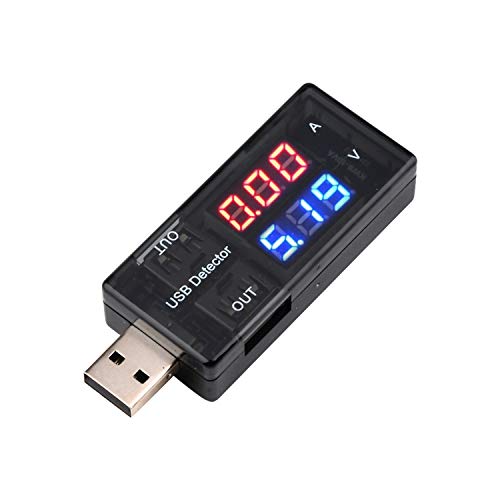
- Measures 3.0–7.5V and up to 2.5A
- Color display separates voltage and current readings
- Compact plug-in design needs no separate power source
Best For: Basic USB-A charger and cable output checks
High-Range USB-A Testing

- 3.6–30V and up to 5.1A measurement range
- Tracks voltage, current, power, capacity, and time
- Retains up to nine data sets for power-bank testing
Best For: Detailed USB-A charger, cable, and power-bank analysis
USB-C Fast-Charge Testing

- Measures 4–30V and up to 6.5A
- Supports multiple PD, QC, VOOC, and other protocols
- Displays power, capacity, temperature, timing, and USB data
Best For: USB-C fast-charge testing and modern electronics troubleshooting
Most Versatile
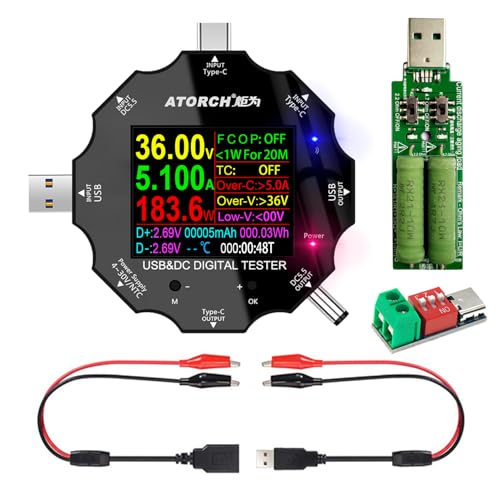
- Tests USB, USB-C, DC5.5, and micro USB connections
- Measures voltage, current, power, capacity, and resistance
- Supports PD2.0/3.0 and QC2.0/3.0 protocols
Best For: Multi-connector testing and fast-charge monitoring
Best for USB 3.0 Testing

- Measures 3.7–30V and up to 4A
- USB 3.0 interface supports USB 2.0 devices
- Stores capacity and power data after power loss
Best For: USB charger, cable, and power-bank testing
Highest Current Range

- Measures 3.6–32V and up to 8A
- Supports PD, QC, and BC1.2 charging protocols
- Tracks power-bank capacity and charging data
Best For: Higher-current USB-C and power-bank testing
Versatile USB-C Monitor
Eversame 2-in-1 USB-C Power Meter

- Measures 3.6–30V and up to 5.1A
- Supports QC, BC1.2, and USB-C PD testing
- Color display with safety protections
Best For: USB-C charging checks and detailed multi-reading monitoring
High-Current Tester

- Handles 4–30V and up to 12A
- Supports a wide range of fast-charge protocols
- Includes selectable voltage and current curves
Best For: High-current USB-C testing and charging diagnostics
Data-Logging Power Meter

- Measures 4–30V and up to 12A
- Records maximum power, voltage, and current
- Stores capacity and energy data after shutdown
Best For: Power-bank capacity checks and retained charging measurements
Versatile USB Monitoring – DROK 7-Mode USB Tester
For shoppers comparing budget USB power meters, the DROK USB Tester stands out for its seven display modes and broad 3.2–30V, 0–5A testing range. It can show voltage, current, power, and capacity while also supporting two USB-A output ports.
Best For: Users who want a versatile USB-A tester for chargers, power banks, cables, and solar-panel setups.
Pros:
- Seven selectable display modes show combinations of voltage, current, power, and capacity.
- Supports testing from 3.2–30V and up to 5A.
- Includes dual USB-A output ports, with support for PD and QC 3.0 fast-charge protocols.
- Provides over-voltage, under-voltage, over-current, and short-circuit alarms.
Cons:
- Designed around USB-A connections rather than USB-C.
- One output is intended for charging only and does not support data transfer.
This is a strong all-purpose option if you need more than basic voltage and current readings. Its wider measurement range and capacity monitoring make it particularly useful for troubleshooting charging equipment and checking power banks.
Simple Voltage Checks – diymore USB-A Voltage Current Tester
If you are looking for budget USB power meters for quick charger checks, this compact diymore model keeps the job straightforward. Plug it into a USB-A port to view voltage and current without needing a separate power source.
Best For: Basic testing of USB-A chargers, phone charging equipment, cables, and other USB-powered devices.
Pros:
- Measures voltage from 3.0–7.5V and current from 0–2.5A.
- Color display uses separate red and blue readings for current and voltage.
- Compact, portable design operates by simply plugging into the USB connection.
- Useful for checking charger output and USB device operating current.
Cons:
- Its measurement range is narrower than higher-range USB meters.
- USB-A focused design may not suit direct USB-C testing.
- It reports voltage and current but does not list capacity or power display modes.
The diymore is best viewed as a no-frills diagnostic tool. It is a practical pick when you mainly need to verify whether a USB-A charger or cable is delivering the expected voltage and current.
High-Range USB-A Testing – Eversame IPS Color USB Tester
Among budget USB power meters, the Eversame USB 3.0 Tester is suited to users who want a larger color display and a broad measurement range. It monitors voltage, current, power, capacity, and time, with memory features for longer power-bank tests.
Best For: Detailed USB-A charging analysis, fast-charge protocol checks, and power-bank capacity testing.
Pros:
- IPS color display offers high-resolution readings and can rotate for different viewing directions.
- Measures DC 3.6–30V and up to 5.1A, with a listed 150W power range.
- Tracks voltage, current, power, capacity, and time in real time.
- Power-off memory can retain up to nine sets of data during capacity testing.
Cons:
- Designed for USB-A port devices and may not be the right fit for direct USB-C testing.
- Its broader feature set may be more than needed for occasional voltage checks.
This model makes sense when you want more detailed diagnostics than a basic inline meter provides. The rotating IPS screen, protocol detection, and retained capacity data are useful for people who regularly compare chargers, cables, and power banks.
USB-C Fast-Charge Testing – USB C 4–30V Power Meter
For shoppers seeking budget USB power meters that work with modern USB-C equipment, this tester covers 4–30V and up to 6.5A. Its color display adds readings for power, capacity, temperature, timing, current direction, and D+/D− voltage.
Best For: USB-C chargers, power banks, phones, tablets, and electronics enthusiasts testing fast-charge behavior.
Pros:
- Measures 4–30V and 0–6.5A, with stated accuracy of ±(1%+5).
- Supports a wide selection of fast-charge protocols, including PD, QC, FCP, SCP, AFC, DASH, VOOC, and Super VOOC.
- Color display shows voltage, current, power, capacity, energy, time, temperature, and additional USB data.
- Single-, double-, and long-press controls handle screen switching, rotation, and data clearing.
Cons:
- USB-C focused design is less suitable for older USB-A-only setups.
- Its many readings and protocol features may be unnecessary for simple charger checks.
This is the most forward-looking choice in the group for USB-C users. Its higher current ceiling and extensive fast-charge protocol coverage make it useful for examining modern charging systems, while the included storage case helps with portability.
Most Versatile – UD18 USB-C Power Meter
For shoppers comparing budget USB power meters, the UD18 stands out for its broad connector support and feature set. It measures voltage, current, power, resistance, capacity, temperature, and charging data across USB, USB-C, DC5.5, and micro USB connections, with support for PD2.0/3.0 and QC2.0/3.0.
Best For: Users who need one compact tester for multiple connector types, fast-charging checks, and general DC-device monitoring.
Pros:
- Supports USB, Type-C, DC5.5, and micro USB testing.
- Color IPS display offers eight interfaces and switchable views.
- Measures voltage, current, power, resistance, capacity, and temperature.
- Includes over-voltage, over-current, and low-voltage protection features.
Cons:
- The temperature probe is not included.
- Its broad feature set may be more than needed for simple voltage checks.
The UD18 is a strong all-around option when connector flexibility matters. Its compact 34-gram design and safety features make it practical for checking chargers, power banks, routers, and other DC equipment.
Best for USB 3.0 Testing – MakerHawk AT34 Power Meter
The MakerHawk AT34 is a practical budget USB power meter for measuring 3.7–30V and up to 4A. Its USB 3.0 interface supports USB 2.0 devices as well as higher-current tests, while the display tracks charging, capacity, power, impedance, and temperature.
Best For: USB-focused users testing chargers, cables, power banks, USB 3.0 drives, and other digital accessories.
Pros:
- Measures 3.7–30V and 0–4A.
- USB 3.0 interface supports USB 2.0 and high-current testing.
- Power-off storage preserves capacity and power data for later viewing.
- Identifies several charging standards, including QC2.0, QC3.0, and common device charging modes.
Cons:
- Its 4A current range is narrower than some competing meters.
- The supplied notes focus on USB testing rather than a broad range of connector types.
Choose the AT34 if stored readings and USB 3.0 compatibility are priorities. The 0.96-inch IPS color display and charge-protocol identification add useful visibility for charger and power-bank comparisons.
Highest Current Range – YOJOCK USB-C Tester
Among budget USB power meters, the YOJOCK USB-C Tester offers a wide 3.6–32V range and current measurement up to 8A. It monitors charging voltage, current, capacity, power, resistance, temperature, and time, making it useful for evaluating USB-C chargers, cables, and power banks.
Best For: USB-C users who want higher-current testing, protocol compatibility, and detailed power-bank capacity measurements.
Pros:
- Measures up to 8A across a 3.6–32V range.
- Provides eight IPS display interfaces with larger-font viewing options.
- Supports PD2.0/3.0, QC2.0/3.0, and BC1.2.
- Includes over-voltage, over-current, under-voltage, and low-energy protection.
Cons:
- Accurate power-bank capacity testing requires the stated charging and discharge procedure.
- Its USB-C-focused design may be less convenient for users testing many legacy connector types.
The YOJOCK is the better fit when current capacity and USB-C compatibility matter most. Automatic output cutoff and data saving add reassurance during longer charging or discharge tests.
Versatile USB-C Monitor – Eversame 2-in-1 USB-C Power Meter
For shoppers comparing budget USB power meters, the Eversame combines broad USB-C testing with a color display and built-in safety protections. It measures 3.6–30V and up to 5.1A, making it useful for checking chargers, cables, power banks, and other USB-powered equipment.
Best For: USB-C users who want protocol support, multiple display views, and safety monitoring in one compact tester.
Pros:
- Measures voltage, current, capacity, energy, power, impedance, and D+/D− voltage.
- Supports QC2.0, QC3.0, BC1.2, and USB-C PD charging measurements.
- Includes over-voltage, over-current, under-voltage, and low-energy protection with an alarm.
- Offers eight color-screen display interfaces and saves data if power is interrupted.
Cons:
- Its 5.1A current range is lower than the 12A range of the other meters in this roundup.
- The listed operating range begins at 3.6V, so it is not intended for every low-voltage application.
The Eversame is a flexible choice when display customization and protective features matter more than maximum current capacity. Its broad data readout makes it especially practical for troubleshooting USB-C charging performance.
High-Current Tester – KWS-2303C USB-C Power Meter
Among budget USB power meters, this KWS-2303C stands out for its 0–12A current range and wide fast-charging protocol coverage. Its color display shows live charging data and its curve function helps track voltage and current over selectable time periods.
Best For: Electronics enthusiasts who need high-current USB-C testing and longer-term charging trend monitoring.
Pros:
- Measures 4–30V and up to 12A through a high-current terminal.
- Supports PD2.0/3.0, QC2.0/3.0, FCP, SCP, AFC, PE, DASH, VOOC, and Super VOOC protocols.
- Displays voltage, current, power, capacity, energy, time, maximum readings, current direction, and CPU temperature.
- Records voltage and current curves for 5 minutes, 15 minutes, 60 minutes, or 2 hours.
Cons:
- The operating range starts at 4V, which may not suit lower-voltage testing.
- Its feature-rich interface may be more than casual charger checks require.
Choose this meter if current capacity and protocol compatibility are priorities. The 12A range and curve display make it a stronger fit for evaluating demanding USB-C charging setups than a basic voltage-and-current reader.
Data-Logging Power Meter – YOJOCK 360W USB-C Tester
This YOJOCK meter is a practical option among budget USB power meters for testing USB-C power supplies, chargers, and power banks. It combines a 4–30V, 0–12A measurement range with maximum-value recording, curve monitoring, protocol detection, and power-off data storage.
Best For: Power-bank capacity testing and users who want charging results retained for later review.
Pros:
- Measures up to 12A and covers a 4–30V voltage range.
- Records maximum wattage, current, and voltage during charging.
- Supports PD, QC, FCP, SCP, AFC, PE, DASH, VOOC, and Super VOOC protocols.
- Stores capacity and energy data after power-off for convenient follow-up checks.
Cons:
- Its listed minimum operating voltage is 4V, limiting some low-voltage uses.
- The supplied notes do not mention a protective alarm or automatic output cutoff.
The YOJOCK is particularly appealing when measurement history matters. Its retained capacity and energy readings make it a useful tool for comparing power banks and documenting charging performance over time.
How We Picked the Best Budget USB Power Meters
We compared these meters by looking at the measurements they support, connector compatibility, stated voltage and current ranges, display readability, and practical features such as capacity tracking, temperature readings, resistance checks, PD support, and data retention. We also separated basic USB-A testers from USB-C models designed for higher-power charging systems.
Specifications vary considerably in this category. A meter rated for high current is not automatically the best choice for every user, and a simple USB-A monitor may be more useful than an advanced USB-C tester if you mainly troubleshoot older cables, chargers, or power banks.
Quick Comparison
- Basic USB-A testing: Choose a straightforward voltage-and-current meter for everyday charger and cable checks.
- Color displays: IPS or LED screens are easier to read when monitoring several values at once.
- USB-C testing: Look for Type-C compatibility and sufficient voltage and current headroom for your charger.
- High-power USB-C: Models rated around 0–12A and up to 360W offer more room for demanding PD equipment, provided the connected setup supports those levels.
- Capacity monitoring: A capacity function can help estimate power-bank or battery output over a test session, but it should not be treated as laboratory-grade battery analysis.
Key Buying Factors for Budget USB Power Meters
Connector and Protocol Compatibility
Start with the ports you actually use. USB-A meters suit legacy chargers, cables, and accessories, while USB-C testers are better for current phones, laptops, power banks, and USB PD chargers. Check whether the design supports the direction and cable arrangement required by your equipment.
Measurement Range and Accuracy
Compare the meter’s voltage and current limits with your highest-powered devices. A wider range provides more flexibility, but accuracy, screen stability, and clear unit labeling matter just as much. Never exceed the manufacturer’s stated limits.
Display and Extra Functions
A color screen can make voltage, current, power, and accumulated capacity easier to distinguish. Temperature, resistance, elapsed time, and multiple display modes are useful for troubleshooting, though they add complexity and may consume more power.
Build and Pass-Through Design
Choose a sturdy connector and a readable screen that will not be hidden behind a charger or power bank. For frequent testing, prioritize a meter that remains firmly connected and does not require awkward adapters.
Who Should Buy Which Budget USB Power Meters?
Occasional home users should choose a simple, affordable USB-A meter for confirming whether a charger or cable is delivering power. Phone and power-bank testers will benefit from capacity tracking and a color display. USB-C and PD users should select a Type-C model with a suitable voltage and current range, especially when testing fast chargers or laptops. Repairers, hobbyists, and electronics enthusiasts may prefer a higher-range meter with resistance, temperature, timing, and expanded display modes. Whichever model you choose, treat these devices as diagnostic tools rather than substitutes for certified electrical test equipment.