Professional USB power meters make it easier to verify charger output, troubleshoot cables, compare charging standards, and monitor battery performance. The right tester can reveal voltage drops, current limits, negotiated USB-C profiles, and real-world power delivery.
We selected 10 options covering advanced USB-C protocol analysis, high-power PD testing, USB-A compatibility, portability, and everyday diagnostic work. Use the guide below to match features and measurement limits to your testing needs.
Best 10 Professional USB Power Meters Picks for 2026
Best Advanced USB-C Analyzer

- Measures up to 50V and 6A
- Supports PD3.2 and protocol analysis
- Includes rotating display and PC software
Best For: Advanced USB-C diagnostics and high-power testing
Best Protocol Testing Value

- Supports USB-A, Micro-USB, and USB-C
- Tests many PD and fast-charge protocols
- Includes graphs, ripple testing, and app support
Best For: Multi-standard charger, cable, and protocol testing
Best Rugged General-Purpose Meter
Klein Tools ET920 USB Power Meter

- Works with USB-A and USB-C
- Stores up to 10 readings
- Has overload detection and drop protection
Best For: Routine field testing and jobsite use
Best High-Power Inline Monitor

- Monitors USB-C connections up to 240W
- Supports data pass-through and Alt Mode video
- Bidirectional design with OLED display
Best For: High-power USB-C chargers, docks, and laptops
Versatile USB-C Analyzer
2-in-1 Color Screen USB Tester

- Measures voltage, current, power, capacity, temperature, and more
- Supports PD, QC, and BC 1.2 fast-charging checks
- Tests chargers, cables, phones, and power banks
Best For: Broad USB charging and capacity diagnostics
High-Power USB-C Diagnostic Tool

- Tests bidirectional voltage, current, and wattage
- Supports USB PD 3.1 EPR up to 240W
- Passes USB 10Gbps data and DP Alt Mode video
Best For: IT and USB-C Power Delivery troubleshooting
Advanced Programmable Power Meter

- Measures up to 26V and 6A with 0.1% maximum gain error
- Adds fast-charge triggers, ripple viewing, and PD listening
- Supports PC logging and Lua scripts with onboard memory
Best For: Engineering and advanced USB protocol analysis
Versatile USB-A Monitor

- Seven display modes for voltage, current, power, and capacity
- 3.2–30V and up to 5A measurement range
- PD/QC 3.0 support with safety alarms
Best For: USB-A chargers, power banks, cables, and solar-panel checks
Advanced Interface Tester
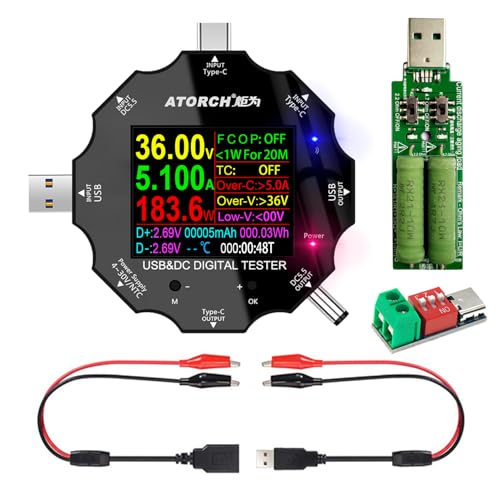
- Supports USB, USB-C, DC5.5, and micro USB
- Eight display interfaces with color screen
- PD/QC recognition plus protection features
Best For: Mixed USB/DC equipment and detailed charging diagnostics
High-Current USB-C Meter

- Measures up to 32V and 8A
- Tracks eight categories of charging data
- Supports USB-C, USB-A, PD, QC, and BC1.2
Best For: Higher-current charging tests and power-bank capacity checks
Best Advanced USB-C Analyzer – ChargerLAB Power-Z KM003C
For professionals who need more than basic readings, the ChargerLAB Power-Z KM003C is a feature-rich choice among professional USB power meters. It supports USB-C testing up to 50V and 6A, with PD3.2 support, protocol analysis, and PC software for detailed data review.
Best For: USB-C engineers, repair technicians, and advanced users analyzing charging protocols, cables, and high-power connections.
Pros:
- Supports voltage and current testing up to 50V and 6A, including up to 240W in PD applications.
- Offers PD, PDO, E-marker, capacity, energy, and protocol tests.
- Features a 1.54-inch rotating display and PC connectivity for extensive data analysis.
- Includes a metal case and supports English and Chinese interfaces.
Cons:
- Designed for USB-C rather than USB-A connections.
- Its advanced functions may be more than casual users need.
The KM003C stands out when protocol visibility and high-power USB-C measurements matter. Its broader testing capabilities make it particularly suitable for development benches and troubleshooting workflows.
Best Protocol Testing Value – FNIRSI FNB58 USB Tester
The FNIRSI FNB58 is one of the more versatile professional USB power meters for users who test multiple charging standards. Its 2-inch TFT display, broad port selection, protocol triggers, waveform tools, and app support provide detailed visibility into USB power behavior.
Best For: Technicians and hobbyists testing fast-charge protocols, cables, chargers, ripple, capacity, and USB-A or USB-C devices.
Pros:
- Supports USB-A, Micro-USB, and USB-C interfaces.
- Monitors voltage, current, power, resistance, capacity, D+/D-, and temperature.
- Supports numerous fast-charge standards, including PD, QC, AFC, FCP/SCP, and VOOC variants.
- Provides real-time graphs, ripple testing, E-marker reading, and app or PC software support.
Cons:
- Printed documentation is not included; manuals and updates are accessed through the package QR code.
- Incorrect protocol settings or port selection may cause the device to default to 5V output.
With its wide protocol coverage and graphing functions, the FNB58 is a strong all-purpose testing platform. It offers especially good flexibility for users working across different charger and cable ecosystems.
Best Rugged General-Purpose Meter – Klein Tools ET920 USB Power Meter
The Klein Tools ET920 is a practical option among professional USB power meters for straightforward USB-A and USB-C measurements. It tracks voltage, current, capacity, energy, and calculated resistance while adding overload detection and a durable, jobsite-ready design.
Best For: Electricians, field technicians, and users who want dependable USB power measurements without advanced protocol-analysis features.
Pros:
- Measures 3–20V DC, with current ranges up to 3A on USB-A and 5A on USB-C.
- Monitors voltage, current, capacity, energy, and calculated resistance for up to 1,000 hours.
- Stores and recalls up to 10 readings for comparison.
- Offers overload detection, a high-resolution LCD, and 6.6-foot drop protection.
Cons:
- Does not list advanced USB PD protocol analysis or triggering functions.
- Its maximum voltage and current ranges are below the high-power USB-C models in this roundup.
The ET920 favors durability and easy-to-read core measurements. It is a sensible pick for service calls and routine USB power checks where rugged construction is more important than protocol detail.
Best High-Power Inline Monitor – Plugable USB-C Power Meter
The Plugable USB-C Power Meter is a compact choice among professional USB power meters for monitoring modern USB-C charging connections. It supports measurements up to 240W, bidirectional connection, USB data pass-through, and Alt Mode video while displaying voltage, amperage, and current direction.
Best For: USB-C laptop, dock, charger, and accessory testing where high-power monitoring and pass-through functionality are important.
Pros:
- Monitors USB-C power up to 240W across a 4.5–50V and 50mA–6.5A operating range.
- Works in either orientation and shows the directional flow of current.
- Supports USB data pass-through, USB-C Alt Mode video, and charging connections.
- Uses an updated OLED display, orientation button, and reinforced USB-C connections.
Cons:
- Not compatible with Thunderbolt 3 devices.
- Limited to USB-C connections and focuses on power monitoring rather than protocol-analysis features.
The Plugable meter is a strong fit for checking high-wattage USB-C setups without interrupting normal data or video functionality. Its compact, bidirectional design also makes it convenient for repeated bench or travel use.
Versatile USB-C Analyzer – 2-in-1 Color Screen USB Tester
For shoppers comparing professional USB power meters, the KJ-KayJI tester offers broad everyday diagnostics in a compact USB testing tool. Its IPS color display reports voltage, current, power, resistance, temperature, capacity, timing, and fast-charge information across USB-A and USB-C setups.
Best For: Users who need detailed charger, cable, power-bank, and phone-capacity checks with support for common fast-charging standards.
Pros:
- Displays multiple measurements across nine selectable IPS screen interfaces.
- Supports PD 2.0/3.0, QC 2.0/3.0, and BC 1.2 detection.
- Can help test cables, chargers, wireless-charger output, and power-bank capacity.
- Includes a USB clip cable and Micro-USB OTG adapter for broader connectivity.
Cons:
- Capacity testing requires a load and specific clearing, charging, and discharge procedures.
- Some functions depend on the included OTG adapter and compatible test setup.
- The listed fast-charge support does not guarantee compatibility with every proprietary standard.
This is a flexible choice for hobbyists, repair work, and general USB troubleshooting. Choose it when a color interface and a wide set of measurements matter more than specialized PC-based logging.
High-Power USB-C Diagnostic Tool – StarTech 240W PD Tester
Among professional USB power meters, the StarTech USB-C Power Tester stands out for high-wattage USB-C Power Delivery work. Its bi-directional design measures voltage, current, and wattage while allowing USB data pass-through, including USB 10Gbps and DP Alt Mode video.
Best For: IT professionals troubleshooting USB-C chargers, docks, hubs, ports, cables, and high-power devices.
Pros:
- Supports USB PD 3.1 EPR applications up to 240W.
- Measures 4.5V–50V and 50mA–6.5A in either direction.
- Passes through USB data up to 10Gbps and DP Alt Mode video.
- Compact 12-gram design includes a 180-degree rotating display and two-year warranty.
Cons:
- Not compatible with Thunderbolt 3 devices.
- Focused on USB-C voltage, current, and wattage rather than broader measurements such as temperature or capacity.
- Requires USB-C equipment and cables for operation.
This is a strong professional option when preserving normal USB-C data and video functionality is important during power testing. Its wide voltage and current range also makes it suitable for diagnosing modern high-power USB-C systems.
Advanced Programmable Power Meter – CT-3 USB 3.1 Tester
For demanding professional USB power meters work, the CT-3 combines precise electrical readings with computer-assisted analysis. It measures up to 26V and 6A, records capacity and energy, and adds fast-charge triggering, ripple viewing, PD listening, data logging, and Lua programmability.
Best For: Engineers, developers, and advanced testers who need protocol triggers, high-speed logging, ripple analysis, or custom measurement scripts.
Pros:
- Offers 0–26V and 0–6A measurement with stated 0.1% maximum gain error.
- Supports PD with PPS, QC 2.0/3.0/4.0, and several manufacturer-specific charging protocols.
- PC software provides data logging up to 1000 samples per second and a 3.2Msps VBUS ripple viewer.
- Integrated Lua interpreter and 12MB memory enable custom scripts and stored output.
Cons:
- Its advanced software and Lua features may be excessive for simple voltage checks.
- The maximum operating voltage is 26V, below the StarTech tester’s listed 50V range.
- Advanced functions require a PC, scripts, or additional test hardware such as an external load module.
The CT-3 is the most technically ambitious option in this group. It is best suited to repeatable development and diagnostic workflows where logging, ripple inspection, protocol triggering, and automation justify a steeper learning curve.
Versatile USB-A Monitor – 7-Mode USB Power Tester
For shoppers comparing professional USB power meters, the DROK USB Tester is a practical USB-A option for checking voltage, current, power, and charging capacity. Its color display offers seven viewing modes, while the dual output ports support PD and QC 3.0 charging applications.
Best For: Monitoring USB-A chargers, power banks, cables, batteries, and small solar-panel setups.
Pros:
- Displays voltage, current, power, and capacity in seven selectable modes.
- Measures 3.2–30V and up to 5A.
- Supports PD and QC 3.0 protocols and includes dual USB-A output ports.
- Provides over-voltage, under-voltage, over-current, and short-circuit alarms.
Cons:
- Uses USB-A connections rather than offering a native USB-C-focused design.
- One output is intended for charging only; data transfer is limited to the other output.
This is a straightforward choice when you want broad measurement coverage and a simple one-button interface for USB-A testing. Its 30V range also makes it useful beyond basic phone charging, including compatible solar and battery projects.
Advanced Interface Tester – USB-C and DC Multimeter
This USB tester suits buyers seeking professional USB power meters with broader connection options. It supports USB, USB-C, DC5.5, and micro USB interfaces, and its color screen presents measurement data across eight interfaces.
Best For: Testing mixed USB and DC equipment such as notebooks, routers, desk lamps, set-top boxes, and charging setups.
Pros:
- Supports USB, Type-C, DC5.5, and micro USB connections.
- Offers eight display interfaces and switchable screen orientation.
- Supports PD 2.0/3.0 and QC 2.0/3.0 fast-charging protocols.
- Includes temperature, capacity, two-way current, and fast-charge recognition functions.
Cons:
- The temperature probe is not included.
- Its feature set may be more than needed for simple USB voltage checks.
With multiple connector types and safety functions including over-voltage, over-current, low-voltage protection, charging-time settings, and auto-off, this model is a flexible option for more varied bench testing and troubleshooting.
High-Current USB-C Meter – 32V, 8A Digital Tester
Among professional USB power meters, the YOJOCK USB C Tester stands out for its 32V maximum and 8A current range. It tracks voltage, current, capacity, power, resistance, temperature, and charging time through eight IPS color-screen interfaces.
Best For: USB-C and USB-A charging diagnostics, power-bank capacity testing, and higher-current charger or cable checks.
Pros:
- Measures 3.6–32V and up to 8A.
- Monitors voltage, current, power, capacity, resistance, temperature, and charging time.
- Supports PD 2.0/3.0, QC 2.0/3.0, and BC1.2 protocols.
- Includes an A OTG adapter and protection against over-voltage, over-current, under-voltage, and low energy.
Cons:
- Power-bank capacity testing requires a fully charged bank, a connected load, and the stated testing procedure.
- Warranty information must be obtained directly from the seller.
The higher current ceiling and USB-C compatibility make this a strong fit for more demanding charging tests. Automatic output cutoff and data saving during sudden power loss add useful safeguards when monitoring connected devices.
How We Picked These Professional USB Power Meters
We focused on meters that provide useful electrical measurements rather than simple charging indicators. Key considerations included voltage and current ranges, power and capacity tracking, USB-A and USB-C support, USB Power Delivery and Quick Charge compatibility, display readability, connector design, portability, and practical safety limits.
Advanced models may also identify USB-C E-Marker data, negotiated PD profiles, resistance, temperature, or charging protocols. Because capabilities vary widely, confirm the listed voltage, current, and power limits before connecting high-output chargers, power banks, laptops, or electronic loads.
Quick Comparison
| Best For | Look For | Useful Features |
|---|---|---|
| USB-C fast-charging analysis | PD and QC protocol support | Profile detection, E-Marker reading, data logging |
| High-power laptop charging | At least 240W USB-C PD support | Clear voltage, current, and wattage readings |
| General USB troubleshooting | USB-A and USB-C compatibility | Capacity, energy, resistance, and elapsed-time readings |
| Battery and power-bank testing | Capacity and energy tracking | Stable display, broad voltage range, and current monitoring |
Key Buying Factors for Professional USB Power Meters
Measurement Range and Accuracy
Check the maximum voltage and current before testing fast chargers or USB-C laptop adapters. A wider range provides more flexibility, but stated accuracy, resolution, and refresh behavior matter just as much. For repeatable work, prioritize a meter with clear specifications and stable readings.
USB-C PD and Protocol Support
USB-C power delivery testing is more useful when the meter can identify negotiated profiles, voltage requests, or E-Marker information. Protocol support helps explain why a device charges slowly, falls back to a lower voltage, or fails to reach its advertised power.
Connectors, Display, and Usability
Choose a direct plug-in design for quick checks, or a model with multiple ports and adapters for broader bench work. A color screen can improve readability, while a compact body is better for travel and power-bank testing. Avoid relying on a meter whose connector orientation or clearance does not suit your equipment.
Safety and Test Conditions
A USB meter is a diagnostic instrument, not a substitute for an electronic load or calibrated laboratory analyzer. Stay within its ratings, inspect connectors, and avoid bending or stressing the meter between a heavy charger and cable. For precise engineering measurements, verify results with a trusted reference instrument.
Who Should Buy Which Professional USB Power Meters?
Choose an advanced USB-C protocol tester if you repair, develop, or frequently troubleshoot modern chargers, cables, and power banks. A high-power 240W-capable meter is the better choice for USB-C PD laptop and desktop charging. For household diagnostics, a USB-A/USB-C model with voltage, current, capacity, and energy readings offers the most useful balance. Battery hobbyists should prioritize capacity tracking, resistance measurement, broad voltage support, and a readable display.