An iPad Pro desk mount arm can lift your screen to a more comfortable viewing position while freeing up workspace. The right choice depends on your iPad’s size, your desk edge, and whether you need steady positioning or easy movement.
These eight options cover rigid arms, flexible goosenecks, clamp-mounted holders, and magnetic designs. Use the guide below to narrow down which mounting style fits your setup.
Best 8 Ipad Pro Desk Mount Arm Picks for 2026
Best Phone-and-Tablet Swap

- Tablet clamp plus detachable magnetic phone head
- Four rotating shafts and tension-adjustable base
- Padded C-clamp fits edges up to 2.55 inches
Best For: Switching between an iPad Pro and a phone
Best Separate-Clamp Option

- Includes separate plastic phone and tablet clamps
- Four rotating shafts for positioning
- Padded C-clamp fits edges up to 2.55 inches
Best For: Users who prefer clip-style holders for both devices
Best for Thicker Desk Edges

- Desk clamp opens to 2.83 inches
- Separate tablet and phone clamps
- Four joints with 360-degree adjustment
Best For: Thicker desk edges and mixed phone/tablet use
Best Long-Reach Arm

- Extends up to 30.3 inches
- Adjustable-tension joints; 2.2-pound load limit
- Cable channels and fold-away design
Best For: Reaching from a desk or bedside table to a viewing position
Flexible Bed-to-Desk Pick
Lamicall Tapered Gooseneck Holder
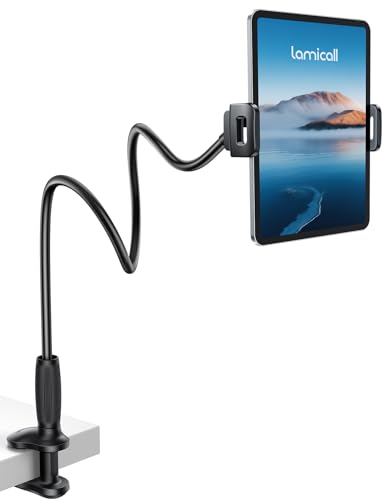
- Supports devices up to 800 g
- Clamps to flat edges up to 3.15 inches
- May wobble during frequent tapping
Best For: Hands-free viewing at a desk or bedside
Magnetic Quick-Release Pick
Three-Section Magnetic iPad Mount

- Magnetic head supports up to 2.2 lb
- Adjustable arm extends to 30.3 inches
- iPads need an adhesive metal plate
Best For: Quick tablet attachment at a flat-edged desk
Large-Screen Workstation Pick

- Holds devices up to 3.3 lb
- Two 11.8-inch arm segments
- Desk clamp fits edges up to 3.5 inches
Best For: An iPad or portable monitor used as a desk display
Compact Gooseneck Pick
13.7-Inch Clamp-On Tablet Stand

- 13.7-inch metal gooseneck
- Clamp fits edges up to 2.32 inches
- Verify fit for larger iPad Pro models
Best For: Close-range viewing from a desk or counter
Best Phone-and-Tablet Swap – OMOTON GH04 Magnetic Desk Arm
The OMOTON GH04 is an iPad Pro desk mount arm for people who also want to position a phone. It pairs a plastic tablet clamp with a detachable magnetic phone head, so you can switch device holders without replacing the arm.
Best For: Desk setups that alternate between an iPad Pro and a phone.
Pros:
- Four rotating shafts offer height and angle adjustments.
- Rotating base has a tension knob to help control side-to-side movement.
- Rubber-padded C-clamp fits surfaces up to 2.55 inches thick.
Cons:
- The tablet holder is plastic rather than metal.
- The magnetic head is for phones; tablets use the separate clamp.
Choose the GH04 if swapping between tablet viewing and phone positioning matters more than having a single-purpose iPad holder. Check your desk-edge thickness before buying.
Best Separate-Clamp Option – OMOTON GH03 Tablet Arm
The OMOTON GH03 is an iPad Pro desk mount arm with separate plastic clamps for tablets and phones. Its adjustable aluminum arm suits a shared desk where both device types need hands-free positioning.
Best For: Users who prefer dedicated clip-style holders for their tablet and phone.
Pros:
- Includes separate phone and tablet clamps for devices in its stated 4–13-inch range.
- Four rotating shafts allow multiple height and viewing-angle adjustments.
- The 360-degree rotating base has a tension knob, and the C-clamp fits edges up to 2.55 inches thick.
Cons:
- Both device holders use plastic clamps, not a magnetic phone head.
- The base requires a suitable edge for C-clamping.
The GH03 is the straightforward pick if you want to swap between two mechanical holders rather than use the GH04’s magnetic phone attachment.
Best for Thicker Desk Edges – LISEN Adjustable Tablet Arm
The LISEN iPad Pro desk mount arm offers separate phone and tablet clamps and a C-clamp rated for surfaces up to 2.83 inches thick. Its four-joint design gives you several ways to position a screen for calls, reading, or cooking.
Best For: Buyers with a thicker desk or countertop edge who also use a phone.
Pros:
- Includes dedicated clamps for tablets and phones.
- Four joints and 360-degree adjustment offer flexible positioning.
- Base accommodates edges up to 2.83 inches thick.
Cons:
- The notes advise against mounting it on a metallic surface.
- You may need to tighten the knob to reinforce stability.
The wider stated clamp opening distinguishes this LISEN arm from the two OMOTON models above. Confirm your device fits the included holder: the supplied notes give conflicting device-size ranges.
Best Long-Reach Arm – Adjustable Tablet Desk Mount
This iPad Pro desk mount arm is built around reach: its three-stage arm extends up to 30.3 inches and rises to 31.1 inches. It also includes adjustable-tension joints, making it worth considering when a nearby clamp point is farther from your preferred screen position.
Best For: Positioning an iPad beside a desk or from a bedside table.
Pros:
- Long articulating arm provides up to 30.3 inches of stated reach.
- Adjustable-tension joints come with an Allen key; the stated load limit is 2.2 pounds.
- Built-in cable channels help route cords, and the arm folds away when unused.
Cons:
- The C-clamp fits surfaces only up to 2.16 inches thick.
- The supplied notes conflict on maximum device size, listing both 12.9 and 15.6 inches; verify fit before buying.
This is the reach-focused choice rather than the widest-clamping option. Check both your iPad’s weight and your desk-edge thickness against its stated limits.
Flexible Bed-to-Desk Pick – Lamicall Tapered Gooseneck Holder
If you want an iPad Pro desk mount arm that can also move to a bedside table, this Lamicall holder offers a bendable tapered arm and a wide clamp. It supports devices up to 800 g, so check the weight of your iPad and case before buying.
Best For: Hands-free viewing at a desk, bed, or couch.
Pros:
- Clamp fits flat surfaces 0.2–3.15 inches thick and has protective pads.
- Flexible arm and 360° rotating holder accommodate different viewing positions.
- Fits 4.7–13-inch devices within its 800 g limit.
Cons:
- Repositioning the reinforced arm takes moderate effort.
- Some wobble during frequent screen taps is expected.
This is better suited to watching, reading, and calls than sustained on-screen typing. Bending the arm into an S, Z, or loop shape can improve stability.
Magnetic Quick-Release Pick – Three-Section Magnetic iPad Mount
This iPad Pro desk mount arm trades spring-loaded tablet jaws for a magnetic head and a three-section aluminum arm. An iPad needs the included adhesive metal plate; the magnetic connection supports devices up to 2.2 lb.
Best For: A desk setup where you want to attach and remove your tablet quickly.
Pros:
- Arm extends up to 30.3 inches, with adjustable joints and a rotating head.
- Joint tension can be tightened individually with the included Allen key.
- Padded C-clamp fits solid, flat desk edges up to 2.16 inches thick.
Cons:
- Tablets require an adhesive metal plate and a 24-hour curing period before mounting.
- Clamp is not intended for padded, curved, or rounded headboards.
Choose this if easy magnetic attachment matters more than avoiding an adhesive plate. Confirm your tablet’s weight and available clamp edge before installation.
Large-Screen Workstation Pick – COOPER FlexArm Tablet Holder
For an iPad Pro desk mount arm that can also hold a portable monitor, the COOPER FlexArm pairs two 11.8-inch arm segments with a tablet holder rated for 3.3 lb. Its padded jaws accommodate devices from iPads to compatible portable monitors up to 17 inches.
Best For: Desk users positioning an iPad Pro or portable monitor as a second screen.
Pros:
- Rated to hold devices up to 3.3 lb, including compatible portable monitors.
- Three re-tightenable joints and a 360° swivel base allow positioning adjustments.
- Steel desk clamp fits edges up to 3.5 inches thick; cable clips help route a cord.
Cons:
- Clamp is not intended for bed frames or round posts.
- Check that your device fits the holder’s jaws and 3.3 lb weight limit.
The long segmented arm makes sense when screen placement and desk space matter. It is a desk-edge mount, not a general-purpose clamp for every nearby surface.
Compact Gooseneck Pick – 13.7-Inch Clamp-On Tablet Stand
If you need a compact iPad Pro desk mount arm rather than a long articulated reach, this stand uses a 13.7-inch metal gooseneck and a clamp-on base. Its rotating ball joint lets you switch between portrait and landscape viewing.
Best For: Hands-free viewing where a nearby desk or counter edge is available.
Pros:
- Gooseneck lets you adjust the screen position without articulated arm segments.
- Padded C-clamp attaches to surfaces up to 2.32 inches thick.
- 360° rotating holder supports portrait and landscape orientation.
Cons:
- The 13.7-inch arm offers less reach than longer segmented mounts.
- Supplied compatibility details conflict on the maximum supported device size, so verify fit for a 13-inch iPad Pro.
This is a straightforward choice for close-range mounting. The product notes state different upper size limits, making a fit check especially important for larger tablets.
How We Picked These Ipad Pro Desk Mount Arms
We focused on practical differences that matter at a desk: mounting style, stated device-size range, adjustment method, and how securely each holder is likely to support a tablet. The selection includes rigid articulated arms, flexible goosenecks, clamp-based holders, and magnetic options so you can compare approaches rather than eight near-identical stands. Always verify the current listing’s dimensions and compatibility before ordering, particularly for larger iPad Pro models.
Quick Comparison: Which Mount Style Fits Your Desk?
For a work desk where you tap or draw on the screen, start with a rigid arm and a secure tablet clamp. If you primarily watch video or read, a gooseneck can make repositioning easier, though its flexibility may allow more movement when touched. A magnetic holder can offer quick attachment and removal, but only if its attachment system works with your specific iPad, case, or required accessory. If you switch between tablets or want to hold a portable monitor, prioritize a clearly stated size range and check weight limits.
Key Buying Factors for an Ipad Pro Desk Mount Arm
Fit and Holding Method
Check your iPad Pro’s exact model, screen size, and dimensions with its case attached. A holder advertised for tablets generally may still have clamp-width, thickness, or weight restrictions. Mechanical clamps should grip without covering buttons or charging ports. Do not assume a MagSafe-compatible mount will attach directly to an iPad Pro; confirm whether it needs a compatible case, plate, or other adapter.
Desk Attachment and Reach
Measure your desktop thickness and inspect the underside before choosing a C-clamp. Reinforcing bars, drawers, and beveled edges can prevent a clamp from seating properly. Consider where you want the screen to sit—not just the arm’s maximum length, but whether it can clear your monitor, keyboard, and desk accessories without tipping or bouncing.
Stability and Adjustment
Longer reach increases leverage on the clamp and joints. For frequent touch input, a shorter, rigid setup is usually preferable to a fully extended flexible arm. Look for joints you can tighten, a viewing angle you can set comfortably, and enough rotation for your preferred portrait or landscape orientation. If you plan to use an Apple Pencil, keep the tablet well supported and expect some movement from any raised mount.
Who Should Buy Which Ipad Pro Desk Mount Arm?
Choose a rigid, clamp-mounted arm if your iPad Pro doubles as a desk display or you interact with it often. Pick a gooseneck if convenient viewing angles matter more than a firm surface for tapping. Consider a magnetic design if quick removal is your priority and you have confirmed its attachment requirements. For shared desks or multiple devices, a broadly compatible mechanical holder is the safer starting point. Before checkout, match the mount’s stated device size, weight capacity, and desk-clamp range to your actual setup.