A docking station can turn a compatible Android tablet into a more useful desk setup, adding connections for a monitor, keyboard, storage, and power. But a USB-C connector alone does not guarantee video output, fast charging, or Samsung DeX support.
These five options range from compact multiport hubs to stands that hold a tablet upright. Before choosing one, match its ports and form factor to what your tablet can actually do.
Best 5 Android Tablet Docking Station Picks for 2026
Best Rotating Stand
BENFEI 9-in-1 USB-C Tablet Dock
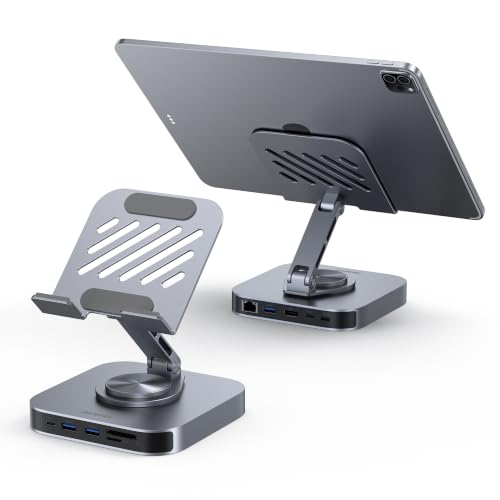
- 360° foldable aluminum stand
- 4K@60Hz HDMI and Gigabit Ethernet
- 100W PD input; up to 85W output
Best For: An adjustable stand with multiple wired connections
Best for Wired Audio
NXPGKEA 9-in-1 iPad USB-C Hub Stand
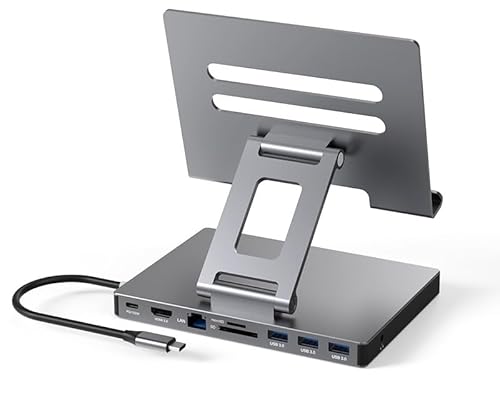
- 3.5mm headphone and speaker jack
- 4K@60Hz HDMI and Gigabit Ethernet
- Three USB 3.0 ports and SD/TF readers
Best For: A tablet desk setup with wired audio and peripherals
Best for Samsung DeX
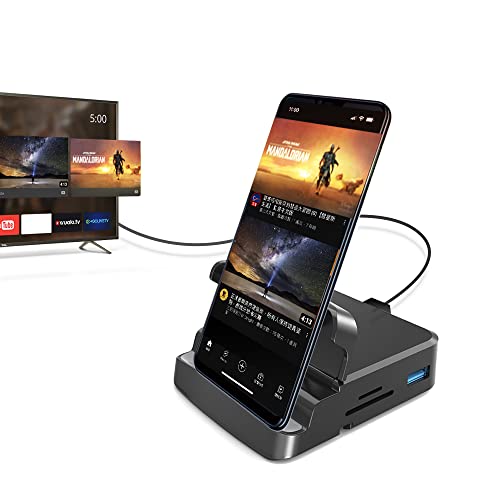
- Supports Samsung DeX
- HDMI, three USB ports, and SD/TF readers
- 105 g; up to 15W device charging
Best For: DeX or DP Alt Mode tablet setups
Best With Ethernet
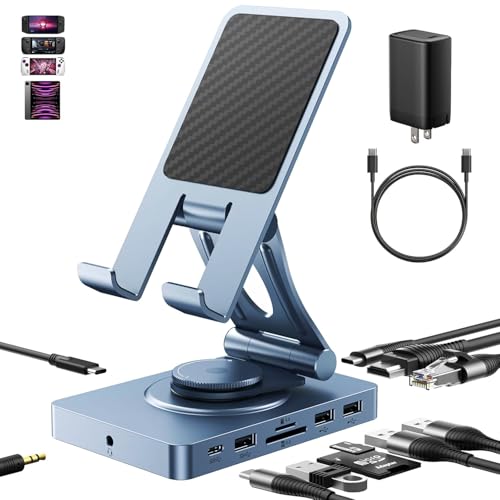
- Adjustable tablet stand
- Gigabit Ethernet and 4K@60Hz HDMI
- 65W adapter included
Best For: USB-C tablets needing wired networking and multiple peripherals
Best Compact Stand

- Folds for carrying
- 4K@60Hz HDMI output
- Three 5Gbps USB 3.0 ports
Best For: USB-C Galaxy tablets needing a portable stand and wired accessories
Best Rotating Stand – BENFEI 9-in-1 USB-C Tablet Dock
The BENFEI is an android tablet docking station option for buyers who want a foldable stand and connection hub in one. Its 360° adjustable aluminum stand supports a tablet while the hub adds HDMI, Ethernet, USB ports, card readers, and charging.
Best For: USB-C tablet users who want an adjustable desktop stand with wired connectivity.
Pros:
- Foldable, 360° rotating stand with silicone-grip pads.
- 4K@60Hz HDMI, Gigabit Ethernet, three USB 3.0 ports, and SD/TF readers.
- 100W PD input with up to 85W output; open-back stand leaves cooling vents exposed.
Cons:
- The supplied compatibility list specifically names USB-C iPads; confirm the features you need work with your Android tablet.
- No 3.5mm audio port is listed.
Choose this model if stand adjustability matters as much as port selection. Check your tablet’s USB-C video-output capability before relying on the HDMI connection.
Best for Wired Audio – NXPGKEA 9-in-1 iPad USB-C Hub Stand
The NXPGKEA combines a folding, clip-shaped stand with a 9-in-1 hub. For an android tablet docking station setup, its 3.5mm audio jack is a useful distinction alongside HDMI, Ethernet, USB accessories, and SD/TF card access.
Best For: Tablet users who need wired headphones or speakers alongside a monitor and peripherals.
Pros:
- Includes a 3.5mm audio jack, 4K@60Hz HDMI, and Gigabit Ethernet.
- Three 5Gbps USB 3.0 ports plus SD/TF card readers.
- Foldable design; the listing says charging, HDMI, USB, and card reading can work simultaneously.
Cons:
- The product listing emphasizes iPad Pro; verify fit and functionality with your Android tablet.
- At a listed 0.53 kg, it is heavier than the other docks in this roundup with stated weights.
This is the practical pick when a headphone jack is essential. Confirm your tablet supports the desired USB-C display and charging features before buying.
Best for Samsung DeX – GKI 7-in-1 USB-C Dock
The GKI is an android tablet docking station option aimed at USB-C devices with DisplayPort Alt Mode, with explicit support for Samsung DeX. It connects a display, keyboard, mouse, and memory cards through a compact hub.
Best For: Samsung DeX users or owners of Android tablets with confirmed USB-C DisplayPort Alt Mode support.
Pros:
- Explicit Samsung DeX support and HDMI output for an external display.
- USB 3.0, two USB 2.0 ports, and SD/TF card readers.
- Listed 105 g weight and up to 15W pass-through charging for phones and tablets.
Cons:
- Video output requires a device with USB-C DisplayPort Alt Mode.
- Charging is limited to phones and tablets, not laptops; the fast-charge adapter and cable are sold separately.
- Thick cases may obstruct the connector or affect stability.
Its DeX focus makes it the clearest match here for a compatible Android device. Verify DP Alt Mode and check case clearance before ordering.
Best With Ethernet – 11-in-1 Adjustable USB-C Dock
This android tablet docking station combines an adjustable stand with connections for a monitor, wired internet, storage, and peripherals. Its included 65W adapter is useful if you plan to run several ports while charging your tablet.
Best For: USB-C Android tablet users who want a desk stand with Ethernet and a broad selection of ports.
Pros:
- Adjustable stand folds down for travel or use as a conventional dock.
- Includes 4K@60Hz HDMI, Gigabit Ethernet, 3.5mm audio, and USB-A and USB-C connections.
- SD and TF 4.0 readers support faster transfers when paired with compatible cards.
- Includes a 65W adapter; the dock supports up to 100W PD input.
Cons:
- Not compatible with Lightning iPads or Amazon Fire devices.
- Ports can consume about 8W, so available host charging power is lower than adapter input.
Choose this one if wired networking and stand adjustability matter more than a minimal setup. Check that your tablet has USB-C and supports the external-display features you intend to use.
Best Compact Stand – Foldable USB-C Hub Stand
For a smaller android tablet docking station setup, this foldable hub stand brings common desk connections together without the Ethernet port found on the other pick. It offers HDMI, three USB 3.0 ports, card readers, audio, and a USB-C PD charging port.
Best For: USB-C Galaxy tablet users who want a portable stand with display output and room for wired accessories.
Pros:
- Foldable design is convenient to carry.
- 4K@60Hz HDMI output and three USB 3.0 ports rated at 5Gbps.
- SD/TF readers and a 3.5mm audio jack cover common media and headphone needs.
Cons:
- No Ethernet connection is listed.
- The supplied specifications do not state a PD wattage or include a power adapter.
This is the simpler choice when portability and USB-A access take priority. Confirm your particular USB-C tablet supports video output before counting on the HDMI connection.
How We Picked the Best Android Tablet Docking Station
We focused on the listed connections and the jobs buyers commonly expect a dock to handle: external displays, USB accessories, wired networking, card transfers, and pass-through charging. We also considered whether each design is a portable hub or a stand suited to a desk.
These listings include several products marketed primarily for iPads. Their presence here is not proof of Android compatibility. Check the maker’s supported-device list and your tablet’s specifications before buying, especially if an external monitor or DeX is essential.
Quick Comparison
For a Samsung DeX setup: Start with the GKI 7-in-1, which explicitly mentions DeX and Android devices; verify support for your exact tablet. For a stand with Ethernet: The BENFEI 9-in-1 combines an upright stand with listed HDMI, Ethernet, USB ports, and power delivery. For more connection types: The 11-in-1 dock lists card readers, RJ45 Ethernet, and audio. The NXPGKEA and 2026 iPad Pro hub stands are worth considering only after confirming they work with your Android model.
Key Buying Factors for an Android Tablet Docking Station
Video Output and DeX Support
First, confirm that your tablet supports external video over USB-C. A dock’s 4K or 60 Hz HDMI claim describes its potential output, not a guarantee that your tablet can produce that signal. Samsung DeX also depends on a supported Samsung device. If monitor use drives your purchase, look for an explicit compatibility statement rather than relying on a shared USB-C plug.
Charging and Port Priorities
USB-C power delivery can keep a tablet charged while peripherals are connected, but the advertised wattage may describe the dock’s maximum input or pass-through capacity. Check the power adapter requirements and your tablet’s charging limits. Count the ports you will use at the same time: HDMI and Ethernet for a fixed workspace, USB-A for older accessories, or SD and microSD readers for photo transfers. Confirm whether any USB-C port handles data, power, or both.
Stand Versus Portable Hub
A stand can place the screen at a better viewing angle and reduce desk clutter. Check its fit for your tablet size, case, and preferred orientation. A separate hub is easier to pack and can work better when the tablet sits in another holder. For either style, consider cable length and whether connected plugs leave room for your keyboard and other gear.
Who Should Buy Which Android Tablet Docking Station?
DeX-focused buyers should investigate the GKI first, then confirm model-specific support. Desk users who want a built-in stand and wired internet can compare the BENFEI against their tablet’s video and charging specifications. People moving files from cameras should prioritize a dock with the card readers they need, such as the listed 11-in-1 option. Android buyers considering an iPad-branded stand should get explicit compatibility confirmation before ordering; if that information is unavailable, choose a dock documented for their tablet instead.