If you’re looking to enhance your iPad Pro’s functionality, finding the right dock with Ethernet support is crucial. These docks not only expand your connectivity options but also provide stable internet access for smoother streaming and data transfers. From compact designs to versatile multi-port adapters, there’s a wide range of options available. Let’s explore the top 10 docks that can elevate your iPad experience and guarantee you’re always connected.
UGREEN Revodok 6 in 1 USB C Hub with Gigabit Ethernet and 4K HDMI

If you’re looking for a versatile docking solution for your iPad Pro, the UGREEN Revodok 6 in 1 USB C Hub is an excellent choice. This hub effortlessly converts a single USB-C port into six, including a Gigabit Ethernet adapter for stable, high-speed connections up to 1000Mbps. You’ll also enjoy stunning visuals with its 4K HDMI output, perfect for movies or presentations. Plus, the PD 100W charging capability guarantees your devices stay powered. With three USB-A 3.0 ports, you’ll experience fast data transfer speeds up to 5Gbps, making it ideal for all your peripheral devices.
Best For: Users who need a multi-functional hub for their Mac, iPad, or other USB-C devices that require high-speed internet and versatile connectivity options.
Pros:
- Versatile Connectivity: Converts a single USB-C port into six, allowing for multiple devices to be connected simultaneously.
- High-Speed Internet: Offers stable Gigabit Ethernet connections up to 1000Mbps, ideal for gaming and professional work.
- Fast Data Transfer: Features three USB-A 3.0 ports with transfer speeds up to 5Gbps, enhancing productivity with peripheral devices.
Cons:
- Limited HDMI Output: The 4K HDMI port only supports 30Hz and does not accommodate HDR/3D content.
- Charging Restrictions: The USB-C port is dedicated to charging only, with no data or video output capabilities.
- Power Distribution: 15W is reserved for other operations, limiting the maximum charging capability for connected devices to 85W.
Hiearcool USB C Hub Ethernet Multi-Port Adapter

The Hiearcool USB C Hub Ethernet Multi-Port Adapter is the ideal solution for iPad Pro users seeking reliable connectivity and versatile functionality. This 8-in-1 hub features a 4K HDMI port for stunning visuals, an Ethernet port for stable internet, and three USB 3.0 ports for quick data transfer. Plus, the TF/SD card slot makes accessing files a breeze. You’ll appreciate the high-speed charging capability with 100W USB-C power adapters, ensuring your devices stay powered. Hiearcool’s two-year product care and 24/7 customer support offer peace of mind, making this adapter a smart choice for your iPad Pro setup.
Best For: The Hiearcool USB C Hub Ethernet Multi-Port Adapter is best for iPad Pro users looking for enhanced connectivity and multi-functional capabilities.
Pros:
- Provides stunning 4K visuals at 60Hz, perfect for gaming and video conferencing.
- Offers reliable Ethernet connectivity, ensuring stable internet access.
- Includes multiple USB 3.0 ports and TF/SD card slot for versatile data transfer options.
Cons:
- May be less portable compared to single-port adapters due to its size.
- Limited compatibility with devices that do not support USB-C.
- Performance may vary depending on the quality of the connected cables and devices.
Anker 6-in-1 USB C Hub with 65W Power Delivery

For users seeking a versatile and powerful docking solution, the Anker 6-in-1 USB C Hub with 65W Power Delivery stands out as an exceptional choice for the iPad Pro. This hub features a Power Delivery input port, HDMI for 4K displays, an Ethernet port for reliable internet, and two USB data ports, providing massive expansion. You can easily connect a 65W wall charger for fast, pass-through charging, keeping your devices powered up. With over 65 million satisfied users, Anker’s quality and customer support guarantee a worry-free experience, making this hub a top pick for your connectivity needs.
Best For: Users looking for a versatile and efficient docking solution for their devices like the iPad Pro, MacBook Air, or XPS.
Pros:
- Massive Expansion: Offers multiple ports including HDMI, Ethernet, and USB for enhanced connectivity.
- Powerful Pass-Through Charging: Allows for fast charging of devices with a 65W wall charger.
- High-Quality Media Display: Supports 4K external displays for an enhanced visual experience.
Cons:
- Limited HDMI Output: Only supports 4K at 30Hz, which may not satisfy all users seeking higher refresh rates.
- Price Point: May be considered expensive compared to simpler USB hubs.
- Dependence on Wall Charger: Requires a wall charger for optimal charging, which may not be convenient for all users.
Belkin USB-C Hub – 6-in-1 Multi-Port Adapter Dock

Looking for a versatile solution to enhance your iPad Pro experience? The Belkin USB-C Hub is your go-to 6-in-1 multi-port adapter dock. It features two USB-A ports, a 4K HDMI 2.0 output, Gigabit Ethernet, an SD 2.0 card reader, and USB-C PD 3.0 for charging. You’ll enjoy fast data transfers up to 5Gbps and can stream 4K video at 60Hz for presentations or entertainment. Its compact design makes it travel-friendly, weighing just 4.2 ounces. With a solid 4.5-star rating and a 2-year warranty, you can trust Belkin to keep your devices connected and powered up.
Best For: The Belkin USB-C Hub is best for professionals and students looking to expand connectivity options for their USB-C devices like MacBooks and iPads.
Pros:
- Fast Data Transfer: Supports data speeds up to 5Gbps for quick file transfers.
- 4K Video Support: Enables streaming of 4K video at 60Hz, perfect for presentations and entertainment.
- Compact and Travel-Friendly: Lightweight design and flat-lying cable make it ideal for on-the-go use.
Cons:
- Limited Number of Ports: Only two USB-A ports may not be sufficient for users with multiple USB devices.
- Dependence on USB-C Devices: Compatibility is restricted to devices with USB-C ports, excluding older models.
- Potential Overheating: Some users report the hub may heat up during prolonged use, which could impact performance.
iPad Pro USB C Hub Stand, 9-in-1 Adapter

When you need a versatile solution for your iPad Pro, the USB C Hub Stand, 9-in-1 Adapter stands out as an ideal choice. This compact, foldable docking station offers 4K 60Hz HDMI output, Gigabit Ethernet, and multiple USB 3.0 ports, ensuring seamless connectivity. You can easily connect flash drives, keyboards, and more with impressive data transfer speeds of 5Gbps. Plus, it supports various devices, including MacBooks and mobile phones, making it a practical addition to your tech arsenal. With a customer rating of 4.6 stars, it’s clear that many appreciate its functionality and convenience.
Best For: Those seeking a versatile and portable docking station for their iPad Pro or other USB-C compatible devices.
Pros:
- Compact and foldable design makes it easy to carry and store.
- High-resolution 4K@60Hz HDMI output allows for stunning display quality on external monitors.
- Multiple connection options including USB 3.0 ports and Gigabit Ethernet enhance functionality and convenience.
Cons:
- Limited to USB-C devices, which may exclude some older devices.
- Weight of 1.2 pounds might be considered heavy for ultra-portable users.
- Price point may be higher compared to basic adapters with fewer features.
UGREEN Revodok 7 in 1 USB C Hub

The UGREEN Revodok 7 in 1 USB C Hub is an excellent choice for creative professionals and gamers who need a versatile solution for their iPad Pro. This hub transforms a single USB-C port into seven, including a 4K@60Hz HDMI output for stunning visuals and a gigabit Ethernet port for stable internet connections. With PD 100W fast charging, you can power your devices while using two USB-A 3.0 ports for peripherals. Plus, quick data transfers up to 5Gbps make moving files a breeze. It’s compatible with various devices, including Mac M1, M2, and Steam Deck, enhancing your setup remarkably.
Best For: Creative professionals and gamers looking for a versatile USB-C hub to enhance their iPad Pro or other compatible devices.
Pros:
- Supports 4K@60Hz HDMI output for high-definition visuals.
- Offers PD 100W fast charging while allowing for device connectivity through USB-A ports.
- Facilitates quick data transfers with speeds up to 5Gbps.
Cons:
- The USB-C port is dedicated to charging only, with no data transmission or video output.
- Limited to devices with USB-C compatibility.
- May be less portable due to the number of ports and size compared to simpler hubs.
11-in-1 USB C Hub Multiport Adapter for Laptops

For professionals and creatives who need versatility on the go, the 11-in-1 USB C Hub Multiport Adapter is a perfect choice for your iPad Pro. This compact hub expands your USB-C port into 11 connections, including HDMI, VGA, USB, and Ethernet, ensuring seamless connectivity. You can enjoy 4K HDMI output and 1080P VGA for dual displays, perfect for multitasking. With 100W Power Delivery, it keeps your devices charged while you work. The high-speed data transfer capabilities and stable Ethernet connection make it ideal for gaming and video calls. Durable and lightweight, it’s your go-to solution for home or travel.
Best For: Professionals and creatives seeking a versatile, portable hub for seamless connectivity and multitasking on their devices.
Pros:
- Expands a single USB-C port into 11 useful connections, enhancing device functionality.
- Supports dual display output (4K HDMI and 1080P VGA), perfect for multitasking and presentations.
- Features 100W Power Delivery for fast charging while using multiple ports.
Cons:
- May require a higher wattage charger (65W+) for optimal performance.
- Limited to USB-C compatible devices, which may exclude older models.
- The compact design may lead to overheating during prolonged use if not properly ventilated.
iPad USB C Hub Stand, 9-in-1 Multiport Adapter
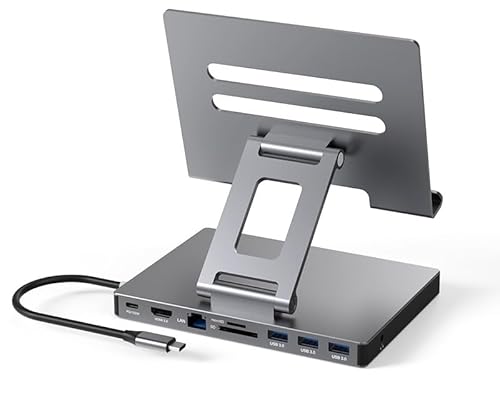
Looking for a versatile solution to enhance your iPad Pro experience? The iPad USB C Hub Stand, a 9-in-1 multiport adapter, is perfect for you. With features like a 4K HDMI port, Gigabit Ethernet, and three USB 3.0 ports, it guarantees seamless connectivity. Need to transfer files rapidly? The SD/TF card reader and fast USB connections have you covered. Plus, you can charge your device while using all these ports simultaneously. Its compact, folding design makes it easy to transport, so you can stay connected wherever you go. Upgrade your setup and enjoy ultimate convenience today!
Best For: Users looking to enhance their iPad Pro’s functionality with multiple connection options and easy portability.
Pros:
- Versatile connectivity with multiple ports including HDMI, USB 3.0, and Ethernet for various devices.
- Simultaneous usage of all ports while charging, enhancing productivity.
- Compact and portable design makes it easy to carry for on-the-go use.
Cons:
- Limited compatibility with devices not using USB3.1 Type-C interface.
- May require additional power for optimal performance when using multiple ports.
- Some users may find the price point higher compared to simpler adapters.
NOVOO USB C Hub Multiport Adapter (7-in-1)

If you’re seeking a reliable and versatile docking solution for your iPad Pro, the NOVOO USB C Hub Multiport Adapter is an excellent choice. This 7-in-1 hub features four USB 3.0 ports, one USB 2.0 port, and HDMI output, allowing you to connect multiple devices simultaneously. Experience high-speed data transfer and enjoy 4K@60Hz video for streaming or gaming. With 100W power delivery, you can keep your devices charged while working. Plus, the Ethernet support guarantees stable internet connectivity at up to 1Gbps. With its compact design and solid warranty, this hub is perfect for enhancing your productivity.
Best For: Users looking for a multifunctional USB C hub to enhance connectivity and productivity with their devices, particularly iPad Pro owners.
Pros:
- Versatile Connectivity: Offers multiple USB ports and HDMI output for connecting various devices simultaneously.
- High-Speed Performance: Supports high-speed data transfer and 4K@60Hz video output, ideal for streaming and multitasking.
- Power Delivery: Provides 100W fast charging, ensuring devices stay powered during use.
Cons:
- Limited Data Transfer During Charging: Data transfer is not supported while charging connected devices.
- Compact Size May Limit Port Accessibility: Smaller dimensions may require careful arrangement of connected devices.
- Warranty Duration May Vary by Region: Customer support and warranty terms may differ based on location.
Anker 555 USB-C Hub (8-in-1)

The Anker 555 USB-C Hub (8-in-1) stands out as an exceptional choice for professionals and creatives who demand high-speed connectivity and versatility. With an 85W power delivery feature, you can charge your devices while working. The 4K 60Hz HDMI port ensures stunning visuals, while the USB-C and USB-A ports deliver data transfer speeds up to 10 Gbps. Weighing just 4.5 ounces and measuring 4.76 x 2.17 x 0.6 inches, it’s portable yet powerful. Compatible with MacBook, Windows, and ChromeOS, you’ll enjoy seamless connectivity. Plus, the 18-month warranty provides peace of mind with your purchase.
Best For: Professionals and creatives seeking high-speed connectivity and versatile charging options in a portable hub.
Pros:
- Supports high-speed data transfer with USB-C and USB-A ports up to 10 Gbps.
- Delivers stunning visuals with 4K 60Hz HDMI output for compatible devices.
- Portable design at only 4.5 ounces, making it easy to carry for on-the-go use.
Cons:
- Limited video output as HDMI is the sole video port; USB-C is for data only.
- Not compatible with Linux, which may limit options for some users.
- Recommends a 100W charger for optimal performance, which may require additional investment.
Factors to Consider When Choosing an iPad Pro Dock With Ethernet
When you’re picking an iPad Pro dock with Ethernet, think about the variety of ports and how well they’ll work with your devices. You’ll also want to take into account charging power options, video output quality, and data transfer speeds to make sure it meets your needs. Don’t forget to check the durability and design, as these factors can greatly impact your overall experience.
Port Variety and Compatibility
Choosing the right iPad Pro dock with Ethernet involves considering both port variety and compatibility to confirm it meets your needs. Look for a dock that includes HDMI, USB-A, and SD/TF card slots, allowing you to connect multiple peripherals seamlessly. Compatibility is vital, so choose a dock that supports USB-C connections and is tailored for your specific iPad Pro model. High-speed data transfer is essential; docks with USB 3.0 ports can offer speeds up to 5Gbps, making file transfers quick and efficient. Verify the dock supports stable Ethernet connections, ideally providing speeds of 1Gbps for reliable internet access. By focusing on these factors, you’ll enhance your iPad Pro experience considerably.
Charging Power Delivery Options
Finding the right iPad Pro dock with Ethernet isn’t just about port variety; charging power delivery options play a significant role too. Make sure the dock supports Power Delivery (PD) charging, ideally between 65W and 100W. A 100W dock usually reserves 15W for its operations, allowing 85W for charging your iPad Pro and other devices simultaneously. Look for USB-C hubs that clearly state their power delivery capabilities; some might only support lower wattages, which can affect charging efficiency. Higher wattage PD ports reduce charging times, especially when you’re transferring data or using video output. Finally, check compatibility with your power adapters, as using a charger rated lower than the dock’s maximum PD input can limit performance.
Video Output Quality
Video output quality is essential for making the most of your iPad Pro dock with Ethernet. When choosing a dock, check its HDMI output capabilities; look for 4K resolution options at either 30Hz or 60Hz to enhance visual clarity in presentations and media. Confirm the dock supports high-definition video standards like HDMI 2.0 to fully utilize 4K video quality for gaming and streaming. Additionally, consider docks that offer dual display functionality, allowing output to both HDMI and VGA ports for better multitasking. Don’t forget to assess compatibility with various resolutions and refresh rates, as some models may only support 1080P at lower refresh rates. Finally, look for HDR support to boost video output quality for your media consumption.
Data Transfer Speeds
When you’re looking to enhance your iPad Pro experience with a dock that includes Ethernet, data transfer speeds play an essential role. Many USB-C hubs offer speeds up to 5Gbps, which is ten times faster than USB 2.0, making quick data access and file transfers effortless. If you want even better performance, consider higher-end models that support speeds up to 10Gbps through USB-C or USB-A ports, perfect for multitasking. Verify the hub is compatible with USB 3.1 Type-C interfaces to achieve ideal data transfer rates. Look for models with multiple USB ports that allow simultaneous connections to various peripherals while maintaining high-speed performance. Always check the specifications to meet your specific needs, especially for video editing or large file transfers.
Durability and Design
Choosing the right iPad Pro dock with Ethernet means considering both durability and design to confirm it meets your needs. Look for docks made with aluminum alloy shells; they not only offer robust durability but also provide effective heat dissipation. A compact and lightweight design is essential, especially if you plan to travel or work remotely. Opt for a foldable design for added convenience, making transport easier and saving space. Additionally, verify the dock maintains a slim profile, ideally less than an inch thick, to complement your iPad Pro’s sleek aesthetic. Finally, choose docks rated for longevity and consistent performance, so you can rely on them to withstand daily use without losing functionality.
Size and Portability
Selecting the right size and portability features for your iPad Pro dock with Ethernet can greatly enhance your experience, especially if you’re always on the go. Consider a compact and lightweight design, as this makes it easier to carry around. Look for docks with a foldable or slim profile to save space in your bag and on your desk. Confirm the dock’s dimensions fit comfortably with your iPad setup without blocking other ports or accessories. An integrated cable design, like a built-in USB-C cable, can further boost portability by reducing clutter. Aim for a dock that balances functionality with a lightweight structure, ideally weighing around 4 to 6 ounces, so you won’t compromise on features while staying mobile.