If you’re looking to boost your iPad Pro’s connectivity and storage capabilities, finding the right docking station with SSD slots is vital. With so many options available, you need to take into account features like speed, multiple ports, and power delivery. Each model has its unique strengths, making it important to identify which one aligns with your needs. Let’s explore the top contenders that can elevate your iPad Pro experience.
PULWTOP USB C Hub for iPad Pro
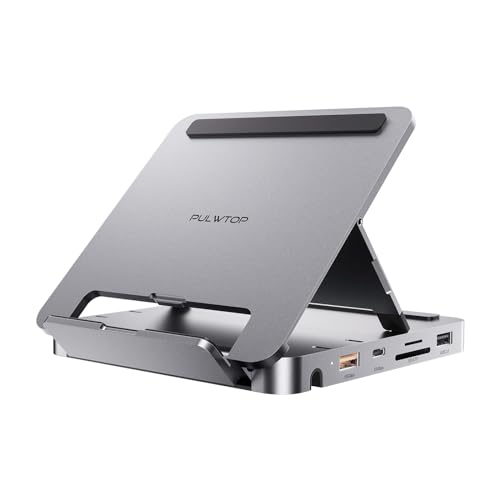
If you’re a creative professional or gamer seeking seamless connectivity and high performance, the PULWTOP USB C Hub for iPad Pro is an excellent choice. This 9-in-1 docking station features 4K@60Hz HDMI, SSD enclosure, and multiple USB ports, ensuring you can connect all your devices effortlessly. You can expand your storage with M.2 PCIe NVMe SSDs up to 2TB, tackling any storage shortages. Plus, with 100W fast charging, you can power up your iPad or laptop quickly. Whether you’re working on graphics or gaming, the PULWTOP hub delivers the speed and flexibility you need for peak performance.
Best For: Creative professionals and gamers seeking high-performance connectivity and storage expansion for their iPad Pro.
Pros:
- 9-in-1 Connectivity: Offers multiple ports including 4K HDMI, USB-A, USB-C, and card slots for versatile device connections.
- Storage Expansion: Supports M.2 PCIe NVMe SSDs up to 2TB, allowing for significant storage increases.
- Fast Charging: Provides 100W power delivery for quick charging of devices, making it convenient for on-the-go use.
Cons:
- Compatibility Limitations: Not compatible with iPads that have a lightning port, which limits usability for some users.
- SSD Not Included: Requires separate purchase of a compatible SSD, which may be an additional cost.
- Power Adapter Not Included: Users need to provide their own power adapter, which could be an inconvenience.
Versatile 11-in-1 USB C Docking Station for iPad and Tablets
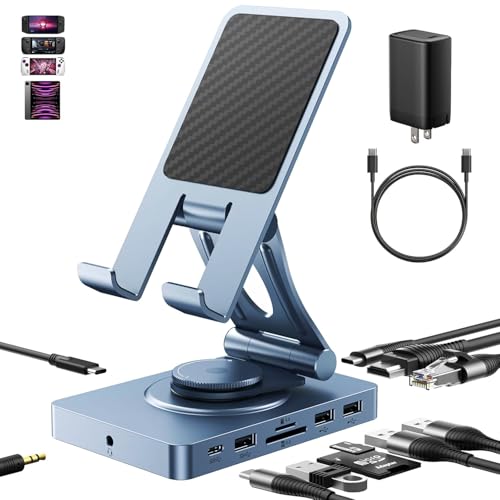
The versatile 11-in-1 USB-C docking station is perfect for anyone looking to enhance their iPad Pro or tablet experience. With 11 ports, including a 4K HDMI output and a high-speed SD/TF card reader, you can connect monitors, audio devices, and storage effortlessly. It also supports multiple operating systems, making it compatible with devices like the Steam Deck and MacBook. The portable design doubles as a stand, ideal for gaming or work on the go. Plus, it guarantees peak power distribution with a 65W adapter, keeping your devices charged while you multitask efficiently.
Best For: Users seeking a multifunctional docking solution to enhance their tablet and laptop capabilities while maintaining portability and compatibility with various devices.
Pros:
- 11-in-1 design allows for extensive connectivity options, accommodating multiple devices simultaneously.
- High-speed data transfer with SD/TF 4.0 reader, providing rapid file transfers and backing up capabilities.
- Portable and multifunctional design serves as both a docking station and a tablet stand, suitable for various environments.
Cons:
- Some users may find the size and weight less convenient for ultra-portable needs compared to smaller adapters.
- Price point may be higher than simpler docking solutions, possibly deterring budget-conscious consumers.
- Not all devices may support full functionality, especially older models or those lacking USB-C compatibility.
iPad Pro USB C Hub, 7-in-1 Adapter

Looking to expand your iPad Pro’s functionality? The iPad Pro USB C Hub, a 7-in-1 adapter, is your perfect solution. It transforms a single USB-C port into seven versatile connections, including a 4K HDMI output, USB 3.0 port, and SD/microSD card reader. You’ll experience lightning-fast data transfers at 5Gbps and enjoy high-resolution audio through its 3.5mm jack. Plus, with a USB-C PD port, you can charge your device at 100W while using it. Weighing just 1.76 ounces, this compact hub is highly rated by users, making it an essential accessory for your iPad Pro, Air, or mini.
Best For: Users looking to enhance their iPad Pro, Air, or mini with additional connectivity options and high-resolution audio capabilities.
Pros:
- Versatile Connectivity: Transforms a single USB-C port into seven different ports, including HDMI and USB 3.0.
- High-Speed Data Transfer: Offers data transfer speeds of up to 5Gbps, making file access quick and efficient.
- Compact and Lightweight: Weighs only 1.76 ounces, making it easy to carry and convenient for travel.
Cons:
- Limited HDMI Refresh Rate: Supports only up to 30Hz for 4K output, which may not suit high-refresh-rate needs.
- Single USB-C Port: Relies on just one USB-C port, which may limit simultaneous use of other USB-C accessories.
- No Ethernet Port: Lacks a wired Ethernet connection, which could be a drawback for users needing stable internet access.
UGREEN 12 in 1 Triple 4K Docking Station

For professionals seeking a versatile docking solution, the UGREEN 12 in 1 Triple 4K Docking Station stands out with its impressive ability to support triple 4K displays. With two HDMI ports and one DisplayPort, you can enjoy stunning visuals, whether you’re working or gaming. The ultra-fast 10G USB-C ports enable quick data transfers, while the USB A ports connect your peripherals effortlessly. Plus, the 100W Power Delivery guarantees your devices stay charged. Weighing only 7.7 ounces, it’s portable yet powerful, making it perfect for MacBook, DELL, and HP users. Elevate your setup with this essential docking station.
Best For: Professionals and gamers looking for a versatile docking station that supports triple 4K displays and high-speed data transfer.
Pros:
- Triple 4K display support allows for an enhanced visual experience for multitasking and gaming.
- Ultra-fast 10G USB-C ports ensure quick data transfer, making it ideal for heavy data users.
- Lightweight and portable design (7.7 ounces) makes it easy to carry for on-the-go use.
Cons:
- Charging port does not support data transfer or video output, limiting its versatility.
- Limited to certain brands like MacBook, DELL, and HP, which may restrict compatibility with other devices.
- Customer ratings of 4.2 out of 5 stars suggest some users may have experienced issues.
iPad Pro USB C Hub Stand, 9-in-1 Adapter

Experience seamless connectivity with the iPad Pro USB C Hub Stand, a 9-in-1 adapter designed specifically for iPad Pro models. This compact device offers a foldable design, making it perfect for on-the-go use. With 4K 60Hz HDMI output, Gigabit Ethernet, and three USB 3.0 ports, you can easily connect your peripherals and enjoy fast data transfer speeds of up to 5Gbps. Plus, the SD/TF card reader streamlines your workflow. Compatible with various devices and operating systems, this hub’s versatility guarantees it’s a valuable addition to your setup, earning a stellar rating of 4.6 out of 5 stars from users.
Best For: Professionals and students seeking a versatile and portable docking solution for their iPad Pro and other USB-C devices.
Pros:
- Compact and foldable design makes it easy to transport and store.
- High-speed data transfer of up to 5Gbps through three USB 3.0 ports.
- Multiple connectivity options including 4K HDMI, Ethernet, and card readers provide extensive functionality.
Cons:
- Limited to USB-C devices, which may not be compatible with all laptops or tablets.
- Weight of 1.2 pounds may be considered heavy for some users seeking ultra-light accessories.
- Customer reviews indicate some setup issues on certain operating systems, which may require additional troubleshooting.
Sonnet Echo 13 Thunderbolt 5 SSD Dock with 1TB Storage

The Sonnet Echo 13 Thunderbolt 5 SSD Dock stands out as the perfect choice for creative professionals seeking lightning-fast storage and extensive connectivity options. With a built-in 1TB Kingston PCIe 4.0 NVMe SSD, you’ll enjoy speeds up to 6000 MB/s. The dock boasts 12 high-speed ports, including four Thunderbolt 5 ports and multiple USB connections, ensuring you can connect various devices seamlessly. You’ll benefit from up to 140W power delivery, charging your laptop while you work. Plus, it supports multiple display resolutions up to 8K, making it ideal for high-performance workflows and enhancing your productivity markedly.
Best For: Creative professionals and high-performance users who require ultra-fast storage and extensive connectivity options.
Pros:
- Delivers ultra-fast storage speeds up to 6000 MB/s with integrated 1TB SSD.
- Offers 12 high-speed ports, including four Thunderbolt 5 ports for maximum connectivity.
- Supports multiple high-resolution displays, enhancing productivity for visual tasks.
Cons:
- Higher price point compared to standard SSD docks.
- Requires compatible Thunderbolt 5 or 4 devices for optimal performance.
- May be overkill for casual users or those with basic storage needs.
INVZI MagHub 8-in-1 Docking Station for iPad Pro and Android Tablets

Transform your iPad Pro or Android tablet into a powerful workstation with the INVZI MagHub 8-in-1 Docking Station. This versatile dock is compatible with M2, M1, and M4 iPad models, as well as Samsung Galaxy and Pixel Tabs. Enjoy 8-in-1 functionality, featuring a magnetic Apple Pencil holder, 100W PD charging, 4K HDMI output, and SD/MicroSD slots. With high-speed USB ports supporting up to 5Gbps, data transfer is a breeze. Its adjustable dual-hinge design allows for ideal viewing angles, while the premium aluminum build guarantees durability and efficient heat dissipation. Elevate your productivity effortlessly!
Best For: Users seeking a versatile and efficient docking solution to enhance their iPad Pro or Android tablet experience.
Pros:
- 8-in-1 functionality including charging, HDMI output, and card slots for comprehensive connectivity.
- Adjustable dual-hinge design provides optimal viewing angles for comfort during use.
- Premium aluminum construction ensures durability and effective heat dissipation.
Cons:
- Limited compatibility with Apple Pencil Pro, as it only supports standard Apple Pencil.
- Potential for overheating if used extensively without breaks, despite heat dissipation features.
- May require additional adapters for certain device connections, depending on user needs.
MacBook Pro Docking Station (14-in-2 Dual USB C)
For MacBook Pro users seeking a robust docking solution, the 14-in-2 Dual USB C Docking Station stands out with its dual 4K HDMI support, allowing you to connect two high-resolution monitors simultaneously. This docking station offers a plethora of ports, including 10Gbps USB-C and USB-A, three USB 3.0 ports, and an RJ45 Gigabit Ethernet connection. You’ll appreciate the fast data transfer rates, moving a 20GB file in just 16.4 seconds. Designed for compatibility with various MacBook models, it also includes SD/TF card slots and an ON-OFF switch for easy management. Plus, you get a solid two-year warranty for peace of mind.
Best For: MacBook Pro users who need a versatile docking solution for enhanced connectivity and dual monitor support.
Pros:
- Dual 4K HDMI support allows for high-resolution dual monitor setups.
- Fast data transfer speeds of 10Gbps enable quick file transfers, such as moving a 20GB file in just 16.4 seconds.
- Wide compatibility with various MacBook models, including M1 series and Intel-based models.
Cons:
- Not compatible with MacBook Pro models released before 2016 or MacBook Air models before 2018.
- M1 Macs limited to connecting only one external display despite dual HDMI ports.
- Possibly excessive for basic users who may not need all the features and ports offered.
Adjustable Tablet Stand with USBC Hub 7-in-1
Looking for a versatile solution to enhance your iPad experience? The Adjustable Tablet Stand with USB-C Hub 7-in-1 is your answer. This aluminum holder is compatible with all USB-C iPad models and requires no drivers—just plug and play. With 7 functional ports, including a 4K HDMI and two USB-A 3.0 ports, you’ll enjoy speedy data transfer and stunning visuals. Plus, it supports PD100W fast charging, ensuring your device stays powered. Its adjustable height and 360-degree rotation make it perfect for sharing content, while the foldable design adds portability. Elevate your setup with this multifunctional stand!
Best For: Users looking for a multifunctional tablet stand that enhances connectivity and viewing experience for USB-C iPad models.
Pros:
- Versatile 7-in-1 hub with multiple ports for charging, data transfer, and media output.
- Adjustable height and 360-degree rotation for optimal viewing and easy screen sharing.
- Portable and foldable design for convenience on the go.
Cons:
- USB-C charger not included, requiring an additional purchase for fast charging.
- Limited compatibility with non-USB-C devices.
- Some users may find the aluminum construction prone to scratches.
Anker USB C Hub for iPad (8-in-1)

The Anker USB C Hub for iPad (8-in-1) is an ideal choice for iPad Pro users seeking to maximize connectivity and functionality. This versatile hub includes a foldable stand, enhancing your workspace. With a USB-C Power Delivery port, 4K HDMI output, two USB-A data ports, and microSD/SD card slots, you’ll enjoy seamless file transfers and crystal-clear displays. Plus, it supports high-speed pass-through charging with compatible chargers (45W–100W). Weighing just 1.43 pounds and measuring 5.63 x 5.55 x 1.1 inches, it’s portable yet powerful. Rated 4.5 stars from 905 reviews, it’s a reliable choice for your iPad setup.
Best For: Users of iPad Pro, Air, and Mini models who need enhanced connectivity and functionality for their devices.
Pros:
- Versatile 8-in-1 design with multiple connectivity options including HDMI, USB-A ports, and card slots.
- Supports high-speed pass-through charging with compatible chargers for added convenience.
- Portable and lightweight, making it easy to carry for on-the-go use.
Cons:
- Charger not included, requiring a separate purchase for power delivery.
- Limited to iPad models, which may not benefit users with other devices.
- May block adjacent ports on some iPad models due to its design.
Factors to Consider When Choosing an iPad Pro Docking Station With SSD Slot
When you’re picking an iPad Pro docking station with an SSD slot, consider the variety of ports it offers to guarantee compatibility with your devices. You’ll want to check the SSD compatibility requirements and how well it handles data transfer speeds. Don’t forget to look at power delivery options and display output capabilities to maximize your setup.
Port Selection Variety
Choosing a docking station with a diverse range of ports can greatly enhance your iPad Pro’s functionality. Look for options that include USB-A, USB-C, HDMI, and card readers to maximize your connectivity. Multiple USB ports allow you to connect keyboards, mice, and external storage simultaneously, boosting your productivity. High-speed data transfer rates of 10Gbps or higher guarantee efficient file transfers when using SSD slots, which is vital for heavy workloads. If you need to connect to external displays, opt for docking stations with HDMI ports supporting 4K resolution, perfect for presentations or creative projects. Finally, consider models that offer power delivery (PD) capabilities, allowing you to charge devices while using multiple ports, streamlining your workspace.
SSD Compatibility Requirements
Selecting a docking station with an SSD slot requires careful attention to compatibility to guarantee peak performance. First, verify it supports the M.2 PCIe NVMe SSD interface and accommodates sizes like 2230, 2242, 2260, and 2280. Confirm that the docking station is compatible with PCIe SSDs since SATA SSDs typically aren’t supported.
New SSDs must be formatted to either exFAT or APFS for proper functionality. It’s also essential to check the maximum supported SSD capacity, as some docking stations may only handle disks up to 2TB. Finally, confirm that the docking station provides adequate power delivery for the SSD, as some models might reserve power for other functions, impacting performance. Make these checks to guarantee peak use.
Power Delivery Options
Power delivery options play a crucial role in enhancing your iPad Pro experience with a docking station that features an SSD slot. When choosing a dock, consider its power delivery capabilities. Some models support up to 100W charging, greatly reducing charging time. Confirm the USB-C PD port is dedicated to charging only, as using it for data transfer can hinder functionality. Look for docks that recommend a power adapter with at least 65W for ideal performance. Additionally, some stations reserve power for peripherals while maintaining high output for your iPad Pro, boosting multitasking efficiency. Finally, verify that the docking station supports fast charging for both your iPad and connected devices, guaranteeing you get quick power boosts when needed.
Data Transfer Speed
When evaluating docking stations for your iPad Pro with an SSD slot, data transfer speed is a key factor that can make or break your productivity. Look for models supporting USB 3.2 or Thunderbolt 3/4, which can deliver speeds up to 10Gbps or higher. If you’re tackling high-performance tasks, choose SSDs connected via M.2 PCIe NVMe interfaces, as they typically provide faster read/write speeds than SATA SSDs. Newer SSDs can reach transfer rates of up to 6000 MB/s, considerably enhancing your workflow. Additionally, verify the docking station allows simultaneous data transfer across multiple ports. This way, you can efficiently transfer files from various devices without bottlenecks, keeping your tasks moving smoothly.
Display Output Capabilities
Considering the display output capabilities of an iPad Pro docking station with an SSD slot is vital for maximizing your setup’s potential. Look for options that support 4K resolution at 60Hz, guaranteeing high-quality video output. Multiple HDMI ports or DisplayPort connections can help you set up dual or triple monitors, boosting productivity and multitasking efficiency. It’s important that the docking station can mirror or extend displays under iOS, with support for Single Stream Transport (SST) for seamless shifts. Check compatibility with various resolutions, including 1080p, 1440p, and 5K, to meet your external display needs. Finally, evaluate the refresh rates to guarantee smooth graphics performance, especially if you’re gaming or working on design tasks.
Build Quality and Design
The effectiveness of your iPad Pro docking station goes beyond just display output; build quality and design play a considerable role in your overall experience. Look for robust materials like aluminum that enhance durability and heat dissipation during operation. A compact and foldable design makes it easy to transport without losing functionality. Adjustable height and angle features are essential for improving ergonomics, helping you find the perfect viewing position. Confirm the SSD slot is easily accessible, allowing for quick swaps or upgrades when needed. Finally, a well-ventilated design helps prevent overheating, assuring both your docking station and SSD perform efficiently during extended use. Prioritizing these factors will enhance your iPad Pro experience greatly.